
Resolving common FRP Bypass Errors quickly is what separates a profitable 5-minute mobile repair ticket from an hour of frustrating failed retries. Whether Windows shows an Unknown USB Device, Samsung Android 14–16 blocks the legacy *#0*# test menu, Qualcomm throws a Sahara Fail error, or MediaTek phones boot straight to the charging logo instead of BROM, almost every failure traces back to ten predictable driver, security-patch, or mode-selection causes. This bench-tested troubleshooting manual lists all ten real-world errors with exact fixes and matching rental tools — including UnlockTool ($0.30), Octoplus FRP Tool ($2.60), MDMFixTool ($1.50), and Android Multi Tool (AMT) ($0.39) — strictly for owner-authorized devices.
Table of Contents
- What are the 10 most common FRP bypass errors and their instant fixes?
- Errors 1–3: USB Detection, *#0*# Blocked & ADB Unauthorized
- Errors 4–6: Qualcomm Sahara Fail, MediaTek BROM Blocked & Xiaomi EDL Auth
- Errors 7–10: Odin SW REV Fail, KG Locked, APK Patched & Wrong Model
- How do technicians prevent FRP errors before starting a rental shift?
- Frequently Asked Questions
What are the 10 most common FRP bypass errors and their instant fixes?
Nearly all failed FRP jobs come down to four root categories: missing Windows USB drivers, patched legacy entry points (such as *#0*# or TalkBack APKs on Android 14–16), single-handshake bootrom timeouts (Sahara Fail / PreLoader timeout), or mismatched chipset/binary selections. Use this quick triage table to jump straight to the matching fix:
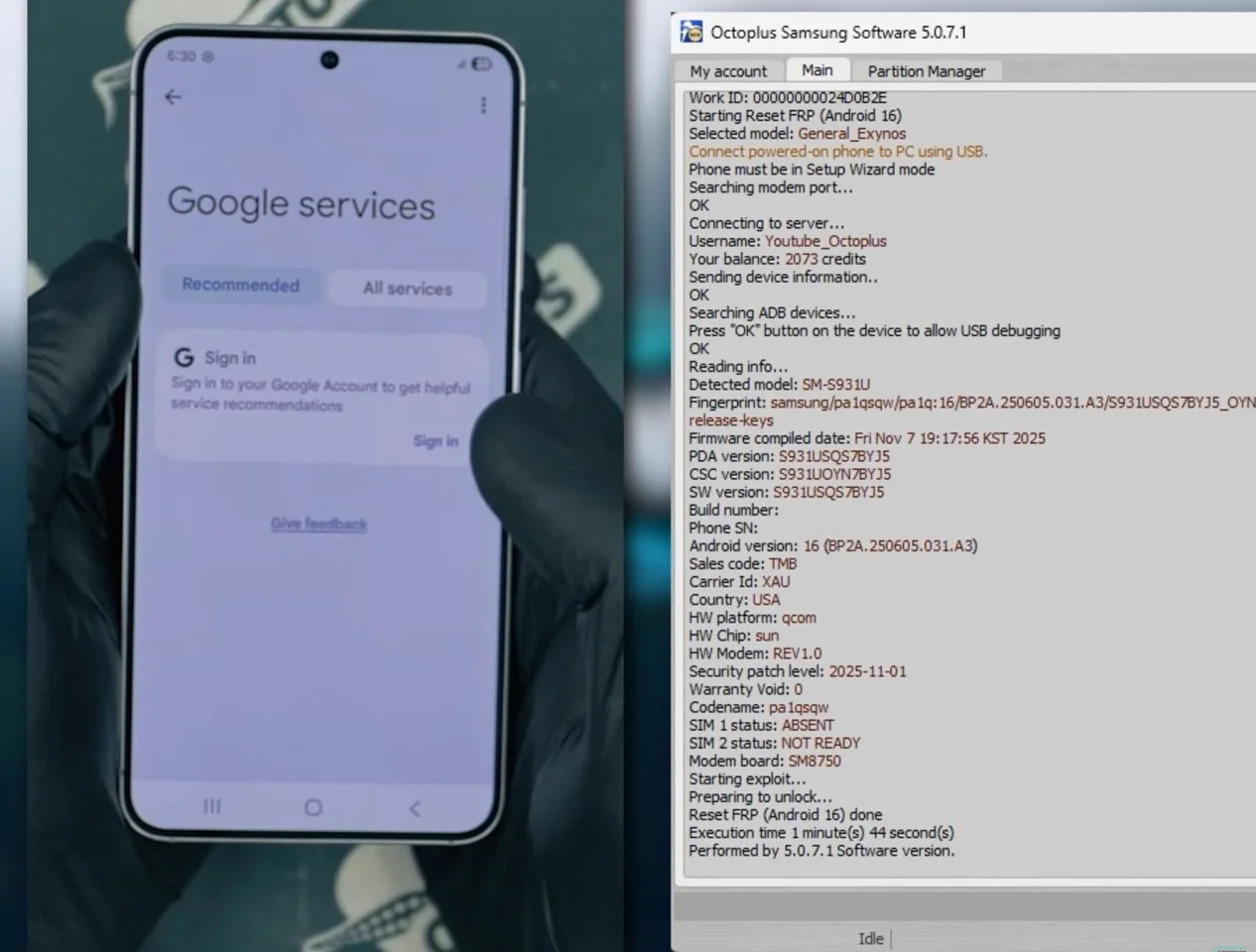
Clean reference run in Octoplus Samsung Software 5.0.7.1: verifying Modem Port, ADB prompt, HW platform (qcom), and security patch before Reset FRP.
| # | Error / Symptom | Root Cause | Verified Fix |
|---|---|---|---|
| 1 | Unknown USB Device / No COM Port | Missing chipset driver or weak front-panel cable | Install official Samsung / QCOM 9008 / MTK VCOM drivers; use rear PC USB port |
| 2 | *#0*# Dialer Code Blocked | Samsung Android 14–16 patched Test Mode MTP exploit | Use QR ADB, Exynos EUB, MTK PreLoader, or QCOM EDL 9008 instead |
| 3 | ADB Unauthorized / No Popup | RSA prompt missed or outdated Platform-Tools | Update Google Platform-Tools; keep screen awake and tap Always Allow |
| 4 | Qualcomm Sahara Fail | Stale EDL session (Sahara accepts 1 handshake only) | Unplug USB 5 seconds, re-short test points fresh, retry immediately |
| 5 | MTK Boots to Charging Icon | Wrong timing or BROM disabled on newer patch | Click Start FIRST, then hold Vol+ & Vol- + USB; use PreLoader Auth |
| 6 | Xiaomi EDL Auth Rejected | Free Mi Flash lacks server Firehose authorization | Use AndroidWinTool, AMT, DFT Pro, or UnlockTool No-Auth/Server |
| 7 | Odin SW REV CHECK FAIL | Binary (BIT) downgrade blocked by bootloader | Match or exceed current RP SWREV binary digit |
| 8 | KG State Locked / Prenormal | Samsung Knox Guard blocks Download Mode writes | Check Download Mode KG status; use CellTool, MDMFixTool, or KG Killer |
| 9 | TalkBack / APK Bypass Dead | Android 13–16 blocks sideloaded FRP APKs & Settings | Stop wasting time on APKs; use PC chipset tool (30 seconds) |
| 10 | FRP Remove Failed / Wrong Model | Regional SoC variant mismatch (e.g. Exynos vs MTK) | Verify exact model code (SM-A145F vs SM-A145P) before clicking Start |
Errors 1–3: USB Detection, *#0*# Blocked & ADB Unauthorized
Connection errors cause more wasted bench minutes than software bugs. Install the official Samsung Android USB Driver, Google Platform-Tools, and Qualcomm/MediaTek/Unisoc drivers from our complete GSM USB drivers guide before checking out any tool.
- Error 1 — Unknown USB Device / Port Disconnects: Swap to a short shielded data cable plugged directly into a rear motherboard USB 2.0/3.0 port (never a USB hub). On Windows 10/11, check Device Manager for yellow exclamation marks indicating unsigned driver blocks.
- Error 2 — Samsung *#0*# Does Not Open or Fails ADB: Samsung patched the classic Emergency Call *#0*# ADB exploit on newer Android 14, 15, and 16 security patches. Switch to Android 14+ QR ADB (via MDMFixTool or CellTool), MTP Android 16 modules (via Octoplus, TFM Pro, or UnlockTool), or hardware bootrom mode.
- Error 3 — ADB Unauthorized: Keep the phone screen unlocked during MTP/QR steps, run a single GSM tool at a time (two tools fighting over adb.exe kills the RSA prompt), and tap "Always allow from this computer".
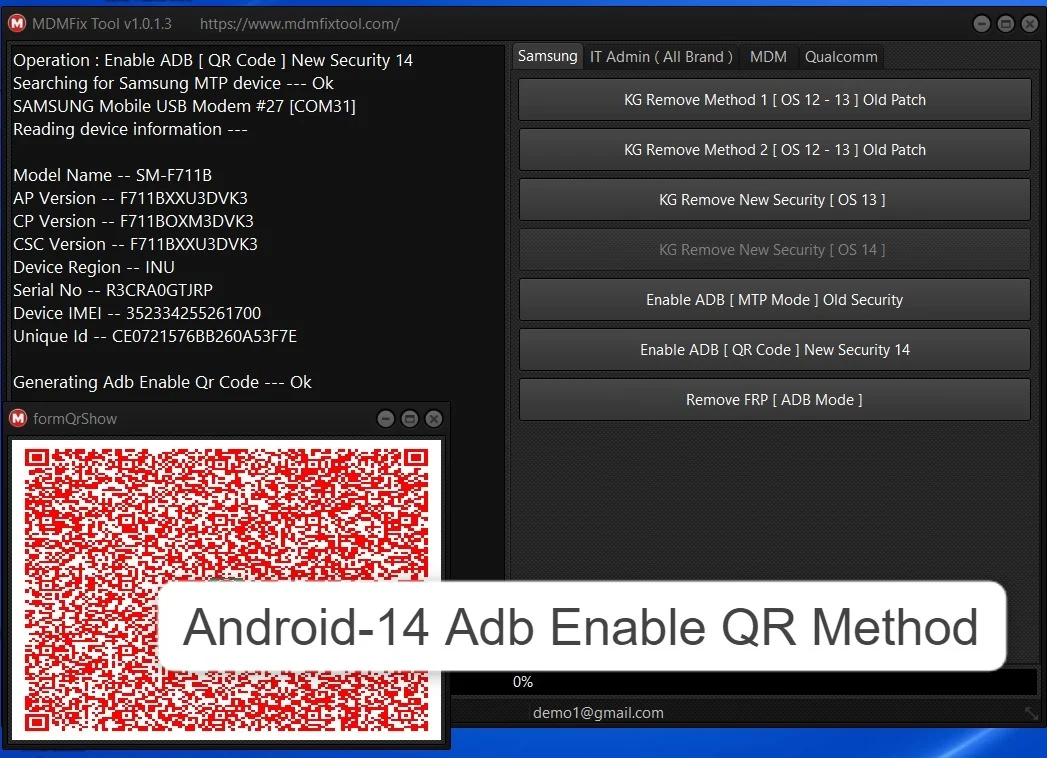
When legacy *#0*# dialer methods fail on Android 14+, QR Code ADB enablement in MDMFix Tool restores clean USB debugging access.
Errors 4–6: Qualcomm Sahara Fail, MediaTek BROM Blocked & Xiaomi EDL Auth
Hardware bootrom errors happen whenever timing, battery voltage, or loader authorization is slightly off — and every one has a deterministic fix:
- Error 4 — Qualcomm Sahara Fail / Cannot Receive Hello Packet: Qualcomm's Primary Boot Loader accepts exactly one Sahara loader handshake per boot. If an attempt times out, do NOT click Start again — unplug USB, wait 5 seconds, re-short the test point fresh (see our Samsung Test Point guide or Xiaomi Test Point guide), and run immediately.
- Error 5 — MediaTek Phone Boots to Charging Icon Instead of BROM: Always click Erase FRP inside UnlockTool, TSM Tool, or Pandora FIRST so the software is actively listening, then plug in the fully powered-off phone while holding Volume Up + Volume Down. If newer security patches disable raw BROM (common on 2024–2026 Samsung, Tecno, Infinix, and Xiaomi), switch to PreLoader Auth or META Mode.
- Error 6 — Xiaomi Authorized Mi Account Required: Free Mi Flash rejects EDL 9008 on locked-bootloader HyperOS Snapdragon devices. Switch to AndroidWinTool, AMT, DFT Pro, or UnlockTool — read our full Xiaomi EDL Auth guide.
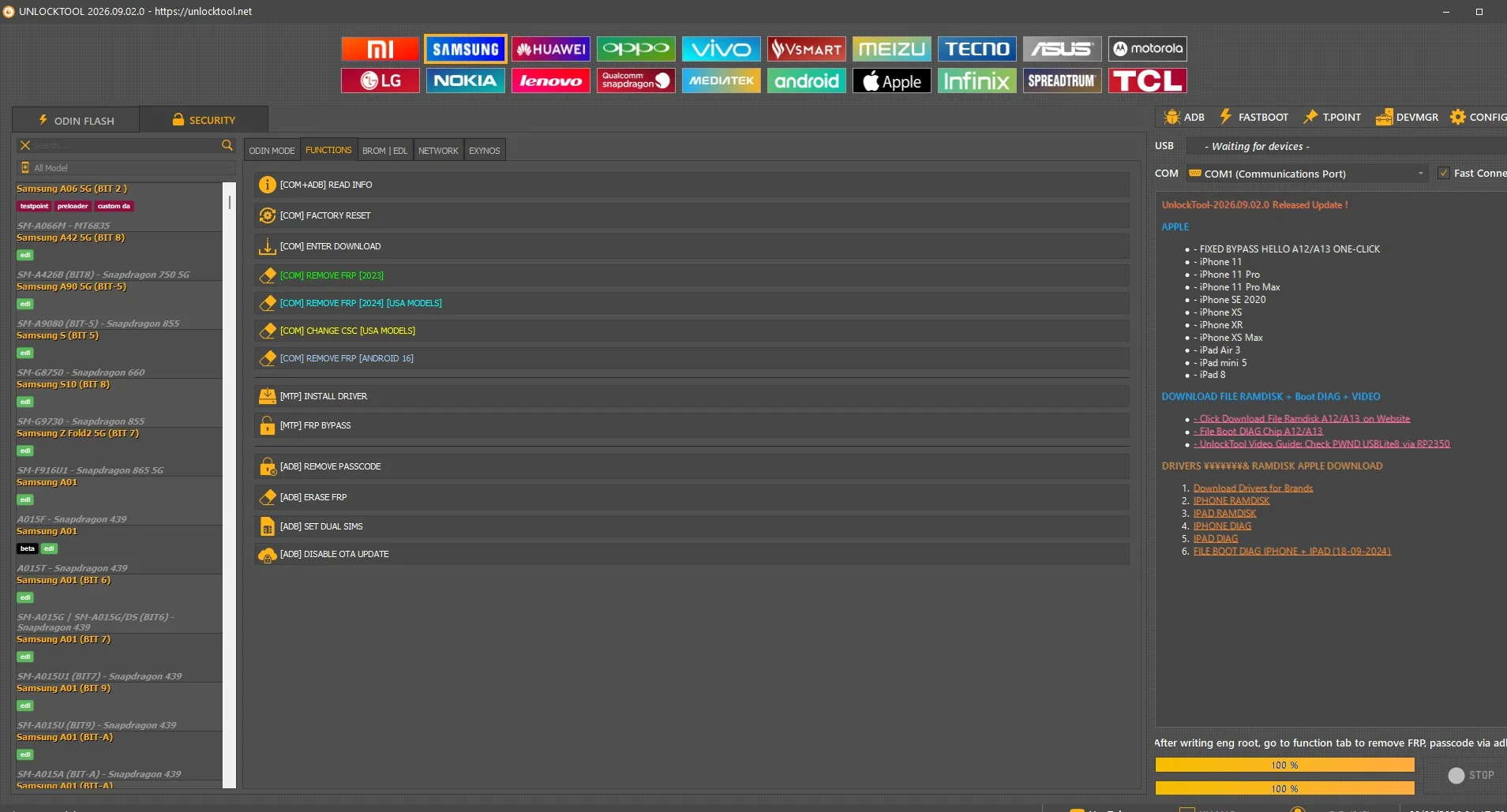
UnlockTool puts FUNCTIONS (MTP), ODIN MODE, BROM, EDL, and EXYNOS side by side so you can pivot immediately when one method is patched.
One-Tool-at-a-Time Rule: Never leave Odin, UnlockTool, AMT, and Samsung Kies/Smart Switch running simultaneously on the same bench PC. Background sync daemons silently hijack COM ports and ADB sockets, causing mysterious "Port Busy" and "Device Offline" failures.
Errors 7–10: Odin SW REV Fail, KG Locked, APK Patched & Wrong Model
The final four errors stem from security lockouts or selecting the wrong model/binary profile:
- Error 7 — Odin FAIL! SW REV CHECK FAIL: Samsung bootloaders strictly block binary downgrades. Read the RP SWREV binary digit on the Download Mode screen (e.g., BIT 6) and select matching BIT firmware or loader — tools like AMT clearly label exact binary support (e.g., GALAXY A15 - BIT - 6).
- Error 8 — Samsung KG State Locked / MDM Blocks Download: If Download Mode displays KG State: Locked, ordinary FRP tools fail. Diagnose first using our MDM & Knox Guard guide.
- Error 9 — TalkBack / YouTube / Browser APK Tricks Fail: Android 13–16 blocks APK installs during Setup Wizard and restricts Settings shortcuts. Switching to a 6-hour PC tool rental (starting from $0.30 or $0.69) finishes the job in under a minute cleanly.
- Error 10 — FRP Remove Failed (Wrong SoC Variant): Many Galaxy and Redmi models share one retail name across two totally different processors (for example, Galaxy A14 4G SM-A145F is MediaTek Helio G80 while SM-A145P is Exynos 850). Always read exact model info first before running any erase command.
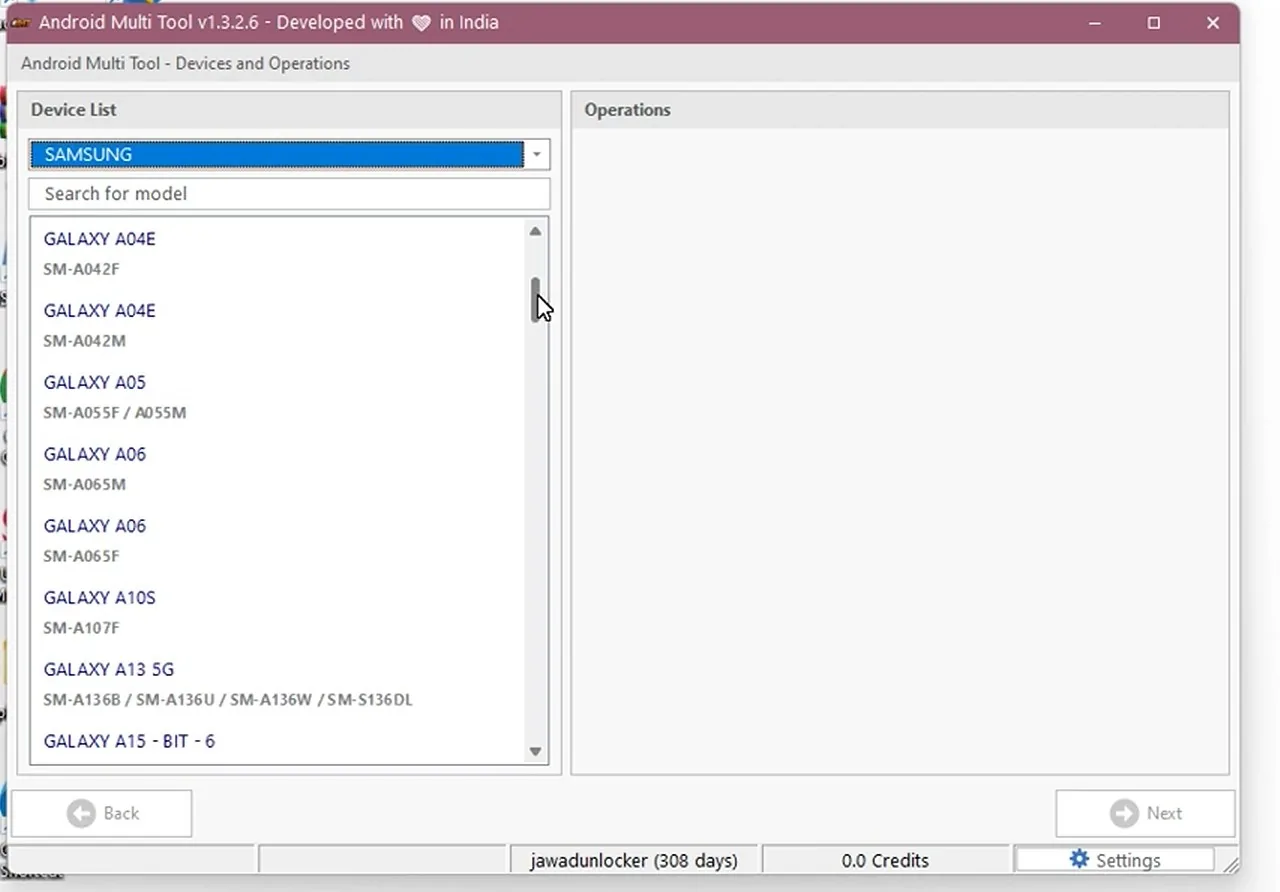
Always verify exact model code and binary revision (such as GALAXY A15 - BIT - 6 in Android Multi Tool) before executing FRP or flash actions.
How do technicians prevent FRP errors before starting a rental shift?
Run a 60-second pre-flight checklist before renting any GSM account on GSM24h: confirm Windows Device Manager detects the phone cleanly with zero warning icons, verify the exact model code and SoC chipset, close competing sync software, and queue 2–3 devices so one short hourly rental handles your entire bench batch smoothly.
| Package | Current price | Original price | Save |
|---|---|---|---|
| 6 hours | $0.30 | $0.35 | 14% |
| 12 hours | $0.42 | $0.49 | 14% |
| 1 day | $0.95 | $1.00 | 5% |
| 2 days | $1.20 | $1.30 | 8% |
| 3 days | $1.60 | $1.70 | 6% |
| 5 days | $2.00 | $2.10 | 5% |
| 7 days | $3.40 | $3.50 | 3% |
| 14 days | $3.90 | $4.00 | 3% |
| 30 days | $7.40 | — | — |
Updated November 2026 — listed price before coupon
Antivirus False-Positive Fix: Windows Defender frequently quarantines signed DA/Firehose helper DLLs inside GSM tools, producing silent "Loader Not Found" errors. Create one dedicated excluded folder (such as C:\GSMTools\) in Windows Security before extracting UnlockTool, DFT Pro, TSM Tool, or AMT.
Frequently Asked Questions
Why does my phone show up as Unknown USB Device during FRP bypass?
Unknown USB Device means Windows is missing the matching Samsung, Qualcomm 9008, MediaTek VCOM, or Unisoc SPRD driver, or the USB cable/front port is dropping data lines. Install the matching driver package and plug directly into a rear motherboard USB port.
Why does *#0*# not work on Samsung Android 14, 15, and 16?
Samsung patched the Emergency Call *#0*# ADB vulnerability on newer Android 14–16 security patches. Use updated MTP Android 16 modules, QR ADB enablement, Exynos EUB, MediaTek PreLoader, or Qualcomm EDL 9008 instead.
How do I fix Qualcomm Sahara Fail on Samsung or Xiaomi?
Unplug the USB cable, wait 5 seconds, re-short the EDL 9008 test points cleanly to start a fresh bootrom session, verify you are on a rear USB port, and run your tool immediately — Sahara only allows one handshake per boot.
Why do MediaTek phones boot into charging mode instead of BROM?
Either you plugged the USB cable in before clicking Start in your tool, or the phone's newer security patch disabled raw BROM. Click Erase FRP first, hold Volume Up + Volume Down while connecting USB, or select PreLoader Auth / META Mode.
Do manual TalkBack and APK bypass tricks still work on Android 15 and 16?
Almost never on updated Android 14–16 builds because Google patched Setup Wizard browser launches and blocked third-party APK installation before device provisioning completes. Rented PC GSM tools solve it cleanly in seconds.
Which GSM tool should I rent first if I encounter repeated FRP failures?
UnlockTool (/rent-unlocktool) starting from $0.30 covers the broadest mix of Samsung, Xiaomi, Tecno/Infinix, MediaTek, and Qualcomm devices; keep Octoplus (/rent-octoplus-frp-tool) or Samsung Tool CellTool (/rent-samsung-tool) in reserve for tough Samsung Android 16 and Knox Guard tickets.

Written by: Trần Kế Khang
5 years of in-depth mobile & laptop hardware repair experience; founder of thuetaikhoan.com.vn, unlocktool.us, dienthoailaptop.vn, and gsm24h.com. Facebook · Profile & articles · About us



No comments yet. Be the first to share your thoughts!