
Executing a reliable Huawei FRP Bypass or authorized Huawei ID removal requires matching the phone's exact processor and software ecosystem before touching a cable. Older Google-certified Huawei handsets and modern independent Honor smartphones enforce Google FRP, whereas newer HMS / HarmonyOS Huawei models (such as P40, Mate 40, and Nova series) enforce Huawei ID lock instead — and across both brands, motherboards span HiSilicon Kirin (USB COM 1.0), Qualcomm Snapdragon (EDL 9008), and MediaTek (BROM). This verified bench manual details every chipset workflow using Sigma Plus ($1.55), Chimera Tool ($25.96), Octoplus FRP Tool ($2.60), and UnlockTool ($0.30).
Notice: Perform Huawei FRP, Honor FRP, and Huawei ID servicing strictly on owner-authorized devices with valid proof of ownership. Hardware test-point support depends on exact Kirin/Qualcomm/MTK model and HarmonyOS/EMUI patch.
Table of Contents
- How is Google FRP different from Huawei ID lock on Huawei and Honor?
- Which Huawei and Honor models use Kirin, Qualcomm, or MediaTek chips?
- How does HiSilicon Kirin USB COM 1.0 Test Point work?
- How do you service Qualcomm EDL 9008 and MediaTek Huawei / Honor models?
- Which rented GSM tool is best for Huawei and Honor FRP or Huawei ID?
- How do you resolve common Huawei COM 1.0 and Fastboot errors?
- Frequently Asked Questions
How is Google FRP different from Huawei ID lock on Huawei and Honor?
Google FRP locks Android Setup Wizard to a previously synced Gmail account on pre-2020 Huawei phones and post-split independent Honor devices (MagicOS with Google Mobile Services). Huawei ID is Huawei's separate cloud activation lock on EMUI 10–14 and HarmonyOS devices (such as P40, Mate 40, Nova 8–12) that requires dedicated Huawei ID / OEMINFO servicing.

SigmaPlus v1.01.16 HiSilicon Kirin module covering Kirin 65x, 710, 810, 820, 960, 970, 980, 985, and Kirin 990 / P40 Pro 5G boot modes.
Which Huawei and Honor models use Kirin, Qualcomm, or MediaTek chips?
Because Huawei and Honor do not share one single bootrom protocol, check the exact model code in Fastboot Mode (power off, hold Volume Down while plugging in USB) before choosing a driver or rental tool:
| Chipset Family | Representative Huawei & Honor Models | Service Port in Windows | Recommended Rental Tools |
|---|---|---|---|
| HiSilicon Kirin | P20/P30/P40 series, Mate 20/30/40, Nova 3i/5T/7, Honor 8X/9X/10/20 (Kirin 659, 710, 810, 970, 980, 990) | HUAWEI USB COM 1.0 (Test Point) | Sigma Plus, Chimera Tool, Octoplus, UnlockTool |
| Qualcomm Snapdragon | Huawei P50/P60/Nova 9–11 (4G), Honor X7/X8/X9/50/70/90/Magic series | Qualcomm HS-USB QDLoader 9008 (EDL) | UnlockTool, TMT Pro, AMT |
| MediaTek Helio / Dimensity | Huawei Y5/Y6/Y6p/Y7a/Y9a, Honor X5/X6/Play series | MediaTek USB Port / PreLoader VCOM | UnlockTool, TSM Tool, Octoplus |
How does HiSilicon Kirin USB COM 1.0 Test Point work?
On Kirin 659, 710, 810, 820, 970, 980, and 990 motherboards, shorting the dedicated test pad to ground (GND) while plugging in a USB cable forces the SoC into HUAWEI USB COM 1.0 factory download mode, allowing Sigma Plus, Chimera Tool, Octoplus, or UnlockTool to upload a temporary fastboot loader and clear FRP or Huawei ID cleanly.
- Pre-install HUAWEI USB COM 1.0 & Platform-Tools drivers: Set up the official Huawei USB COM 1.0 driver alongside Google Platform-Tools and the Android WinUSB reference (see our GSM USB drivers guide).
- Unplug battery and short test point to GND: Open the rear cover cleanly, unclip the battery connector with a plastic spudger, touch fine ESD tweezers from the model's test point pad to the metal shield GND, and plug in the USB cable.
- Confirm HUAWEI USB COM 1.0 in Device Manager: Release tweezers immediately once Device Manager lists HUAWEI USB COM 1.0 (COMx) under Ports.
- Select exact Kirin CPU & execute Remove FRP / Huawei ID: Inside Sigma Plus, Chimera Tool, or UnlockTool, pick the exact Kirin chipset (e.g., Kirin 710, Kirin 980, Kirin 990) and run Remove FRP or Erase Huawei ID.
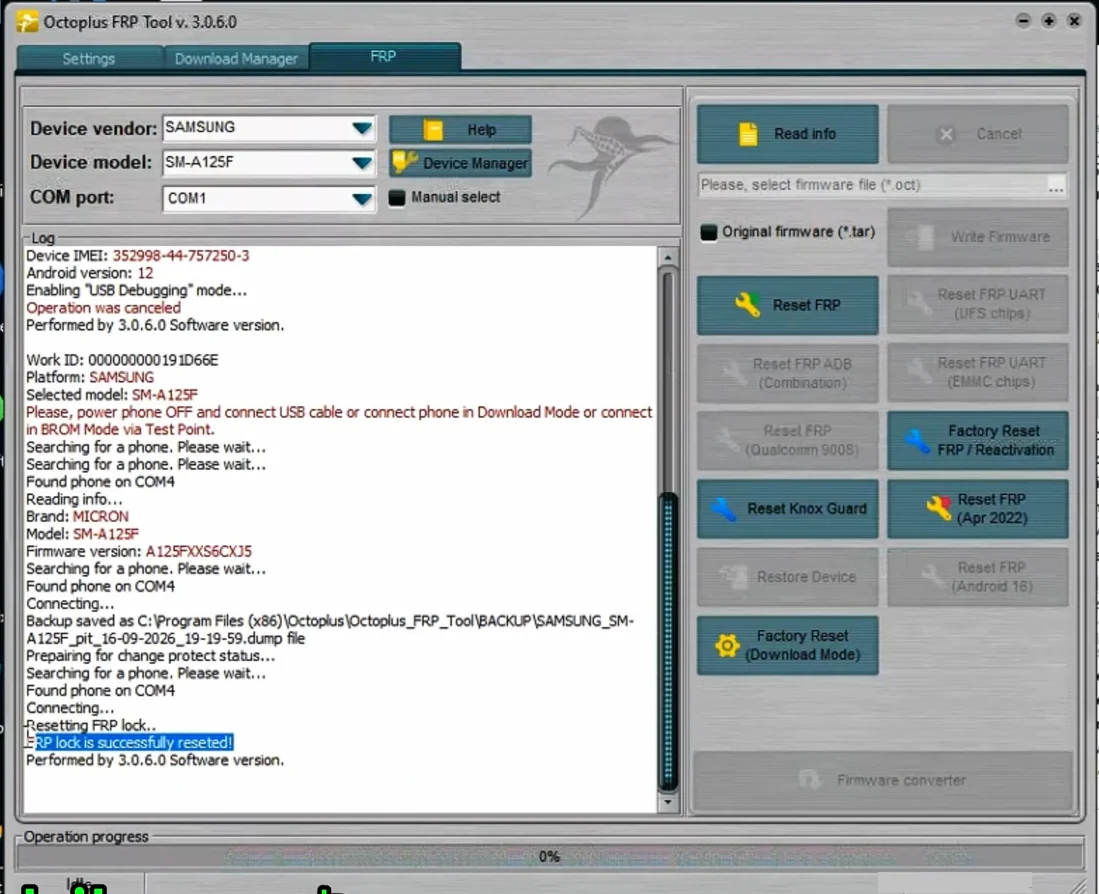
Octoplus FRP Tool provides reliable Kirin, Qualcomm, and MediaTek FRP resets with automatic partition backup logging.
HarmonyOS 2/3/4 Kirin Cable Note: Newer HarmonyOS security patches on Kirin 710/810/980/990 boards sometimes fail to stay in USB COM 1.0 with a standard USB cable alone. Using a modified Huawei Harmony TP cable (with a 10k-ohm resistor between D+ and GND) alongside Sigma Plus or Chimera Tool stabilizes COM 1.0 detection without repeatedly disconnecting the battery.
How do you service Qualcomm EDL 9008 and MediaTek Huawei / Honor models?
Modern Snapdragon Honor phones (Honor X7/X8/X9, Honor 50/70/90) and Qualcomm Huawei Nova/P-series models bypass Kirin completely and enter standard Qualcomm HS-USB QDLoader 9008 via motherboard test points, while budget Huawei Y-series and Honor X5/X6 MediaTek models enter MediaTek BROM / PreLoader over USB volume buttons.
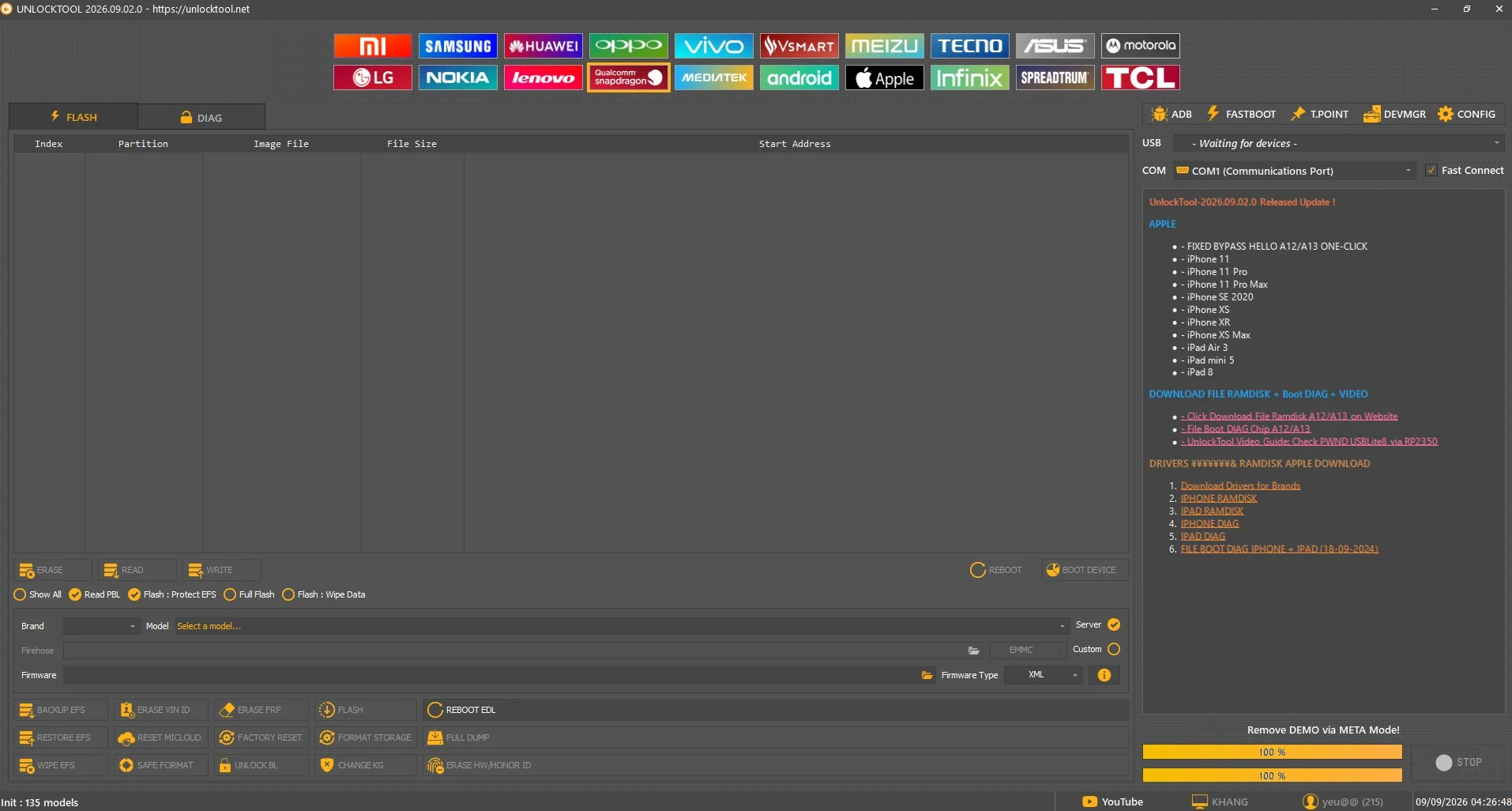
UnlockTool Qualcomm EDL workspace featuring dedicated ERASE HW/HONOR ID, ERASE FRP, and Server Firehose loader options.
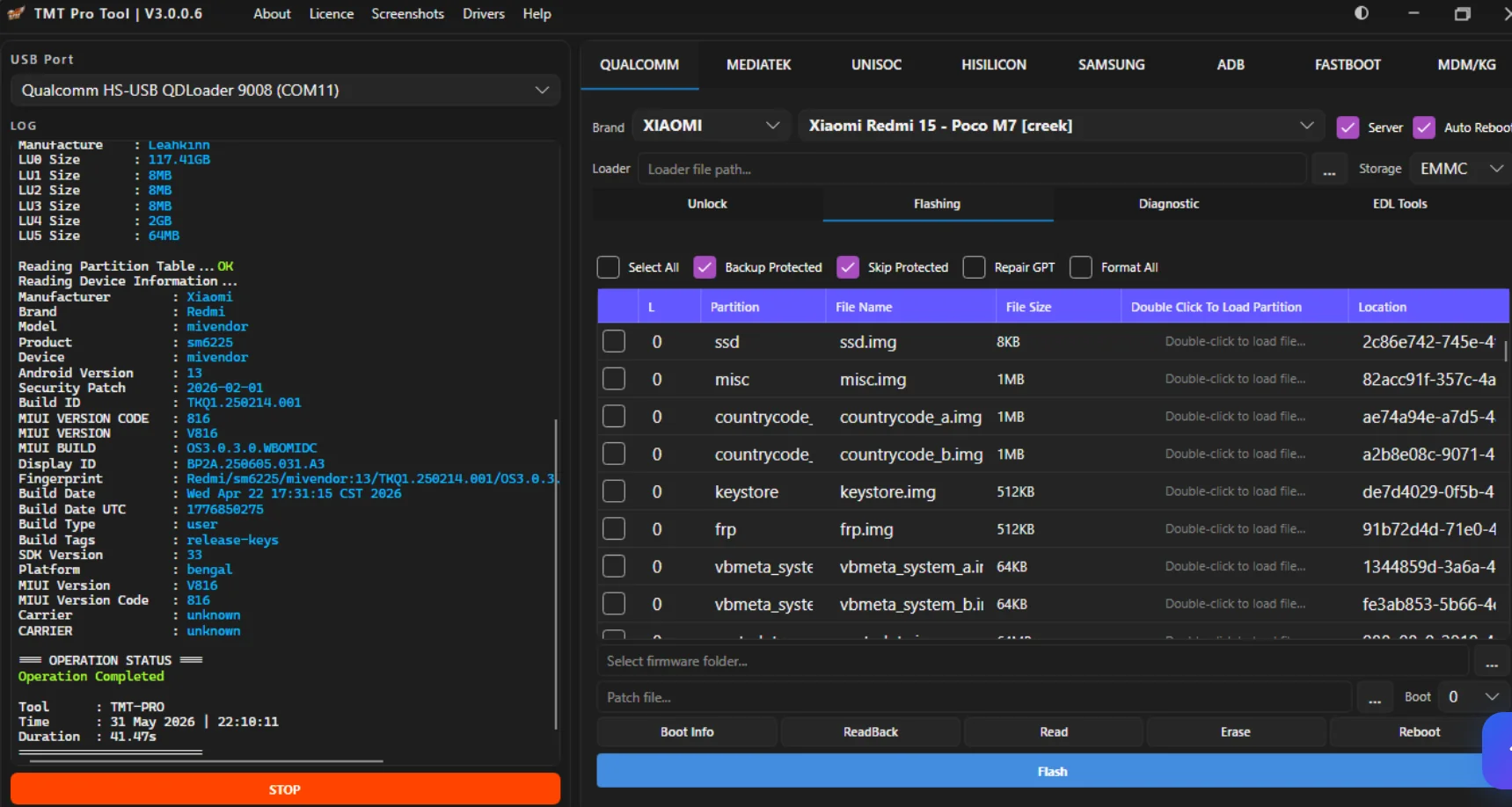
TMT Pro Tool brings HiSilicon, Qualcomm, and MediaTek modules together in one clean Windows interface for mixed Huawei and Honor counters.
Which rented GSM tool is best for Huawei and Honor FRP or Huawei ID?
Match your GSM24h hourly rental directly to the board's silicon so you avoid buying physical smartcard dongles: choose Sigma Plus or Chimera Tool for HiSilicon Kirin 659–990 USB COM 1.0 and OEMINFO servicing, UnlockTool for Qualcomm Honor and MediaTek FRP/Huawei ID, and Octoplus or TMT Pro for fast backup-logged FRP resets.
- HiSilicon Kirin Specialists: Rent Sigma Plus ($1.55) or Rent Chimera Tool ($25.96) — industry leaders for Kirin 659–990 USB COM 1.0, OEMINFO repair, and HarmonyOS servicing (Chimera guide).
- All-Rounder (Qualcomm Honor + MediaTek + Kirin): Rent UnlockTool ($0.30) for Erase HW/Honor ID, Qualcomm EDL Firehose, and MediaTek BROM workflows.
- Dedicated FRP & Backup Alternative: Rent Octoplus FRP Tool ($2.60) or Rent TMT Pro Tool ($2.30) for quick FRP resets (Octoplus guide).
| Package | Current price | Original price | Save |
|---|---|---|---|
| 1 hour | $1.55 | $2.50 | 38% |
| 2 hours | $3.20 | $3.50 | 9% |
| 3 hours | $4.30 | $4.70 | 9% |
| 1 day | $7.50 | $7.90 | 5% |
Updated November 2026 — listed price before coupon
How do you resolve common Huawei COM 1.0 and Fastboot errors?
Three practical checks solve nearly all Huawei and Honor connection blocks: manually assign the HUAWEI USB COM 1.0 driver whenever Device Manager displays "USB SER", switch from read-only Fastboot FRP Lock: ON to a hardware test point, and verify whether HarmonyOS supports permanent OEMINFO removal versus temporary disable.
- Device Manager shows "USB SER" instead of "HUAWEI USB COM 1.0": Manually point Windows Device Manager → Update Driver → Browse to the signed Huawei USB COM 1.0 INF driver (disable Driver Signature Enforcement on Windows 10/11 if blocked).
- Fastboot FRP Lock: ON blocks fastboot commands: Standard Fastboot mode is read-only when FRP Lock is ON — switch to hardware test point (Kirin COM 1.0 or Qualcomm EDL 9008) rather than retrying Fastboot commands.
- Huawei ID returns after Wi-Fi on patched HarmonyOS: Always verify whether your target Kirin/Qualcomm model supports permanent OEMINFO/Huawei ID removal vs temporary disable, and check our EDL vs Fastboot comparison for safe bootrom rules.
Backup OEMINFO Before Modifying Huawei ID: Whenever servicing a Kirin Huawei device in Sigma Plus or Chimera Tool, read and save a backup of the phone's original OEMINFO partition first. Corrupted OEMINFO causes region mismatch, lost Dual-SIM detection, or failed official OTA updates.
Frequently Asked Questions
What is the difference between Google FRP and Huawei ID on Huawei phones?
Google FRP asks for the previous Google account on older GMS Huawei devices and modern Honor phones. Huawei ID asks for the previous Huawei Cloud account on newer HMS and HarmonyOS Huawei models.
Do all Kirin Huawei phones require opening the back cover for USB COM 1.0?
Most Kirin 710, 810, 970, 980, and 990 devices require shorting the motherboard test point to ground to enter HUAWEI USB COM 1.0 cleanly, though certain older EMUI builds also supported Fastboot factory keys.
Can I service modern Honor X7, X8, X9, or Magic phones with HiSilicon Kirin mode?
No. Most post-2021 independent Honor models run Qualcomm Snapdragon or MediaTek processors — use Qualcomm EDL 9008 or MediaTek BROM/PreLoader modules in UnlockTool, AMT, or TMT Pro instead of Kirin mode.
Why does Windows show "USB SER" when I short a Huawei Kirin test point?
"USB SER" means the phone entered Kirin bootrom correctly, but the Huawei USB COM 1.0 driver is not yet assigned. Install the Huawei USB COM 1.0 driver in Device Manager and refresh your tool.
Which rented tool on GSM24h works best for HiSilicon Kirin Huawei models?
Sigma Plus (/rent-sigma-plus) starting from $1.55 and Chimera Tool (/rent-chimera-tool) starting from $25.96 offer the deepest HiSilicon Kirin COM 1.0, FRP, Huawei ID, and OEMINFO support.
Does removing FRP on a Huawei or Honor phone erase the original IMEI?
No. Targeted Erase FRP or Erase Huawei ID leaves factory radio calibration and original IMEI untouched as long as you do not wipe OEMINFO or format full flash.
Servicing a HiSilicon Kirin Huawei or Qualcomm Honor device? Rent Sigma Plus with automated delivery on GSM24h.com.
View Sigma Plus Rental Plans →
Written by: Trần Kế Khang
5 years of in-depth mobile & laptop hardware repair experience; founder of thuetaikhoan.com.vn, unlocktool.us, dienthoailaptop.vn, and gsm24h.com. Facebook · Profile & articles · About us


No comments yet. Be the first to share your thoughts!