
Chimera Tool is one of the longest-running multi-brand mobile servicing platforms for professional repair benches, covering Samsung, LG, Huawei, MediaTek, and Qualcomm smartphones through a single Windows dashboard. Because official annual licenses are structured for high-throughput workshops, technicians who only face occasional flagship jobs can book assisted Chimera Tool remote activation starting from $25.96 on GSM24h.com. Every FRP, carrier unlock, and IMEI restoration procedure must be carried out strictly on owner-authorized devices.
Table of Contents
- What is Chimera Tool and which brands does it support?
- How do official Chimera Tool licenses compare with GSM24h remote rental?
- How does Chimera Tool remote activation work step by step?
- How does Chimera Tool compare with UnlockTool, DFT Pro, and Z3X?
- Common Chimera Tool errors and bench fixes
- Frequently Asked Questions
What is Chimera Tool and which brands does it support?
Chimera Tool is a Windows desktop utility built by ChimeraTool that automatically detects connected handsets over USB, installs required vendor drivers, and displays only the service functions verified for that exact model and firmware. Its core modules cover Samsung, LG, Huawei/Honor, MediaTek, and Qualcomm devices for firmware flashing, FRP removal, network unlocking, and IMEI/certificate repair.
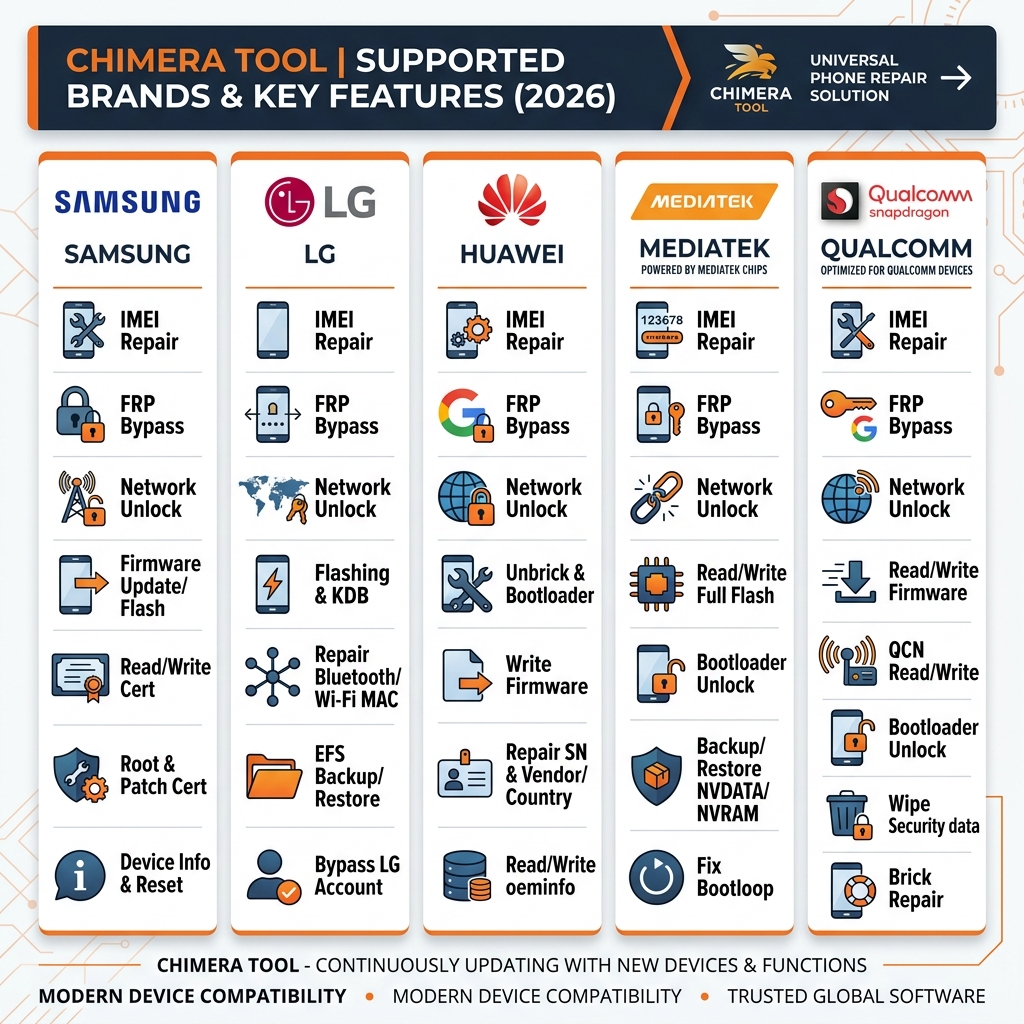
Overview of Chimera Tool brand modules spanning Samsung, LG, Huawei, MediaTek, and Qualcomm chipsets.
Samsung Firmware, FRP & Certificate Servicing
Samsung remains Chimera Tool's flagship platform for hardware-safe software recovery. Inside the Samsung module, technicians can read and write EFS/Cert backups, run network unlock routines, flash multi-part stock firmware, handle supported FRP resets, and execute certificate patching where compatible with the device's binary security bit. Always install the latest official Samsung Android USB Driver before connecting Galaxy handsets in Download, EUB, or ADB modes.
Huawei, LG, MediaTek & Qualcomm Modules
Beyond Samsung, Chimera Tool saves repair shops from maintaining separate legacy boxes for older and niche boards:
- Huawei & Honor: Firmware writing, unbrick/bootloader repair, SN/Vendor/Country edits, and
oeminfobackup/restore. - LG: Firmware flashing, EFS backup/restore, Bluetooth/Wi-Fi MAC repair, and LG Account / FRP servicing.
- MediaTek & Qualcomm: Full flash read/write, NVDATA/NVRAM or QCN backup/restore, bootloader operations, and bootloop recovery.
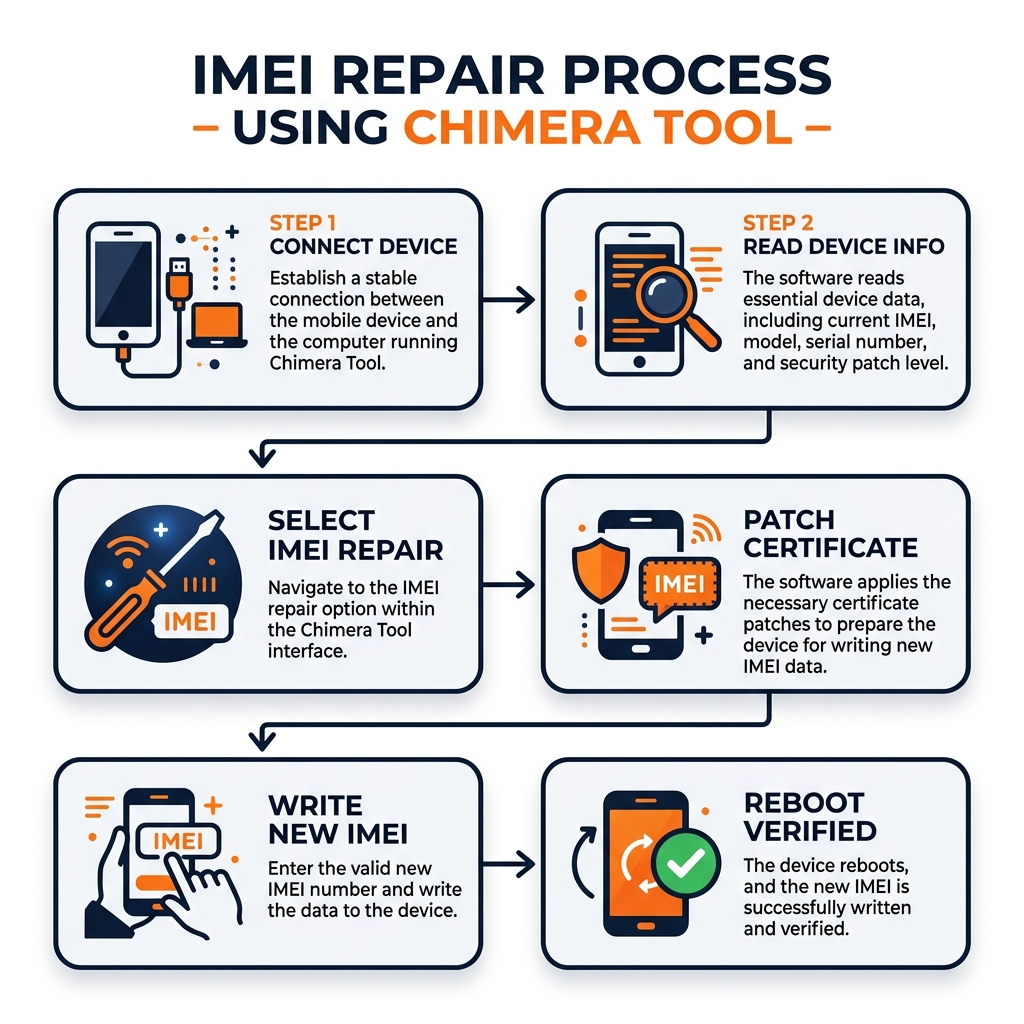
Standard six-stage Chimera Tool workflow: connect device, read info, select service, patch certificate, restore original IMEI, and verify reboot.
Bench EFS/NV Protection Rule: Before running any Patch Certificate, Network Unlock, or IMEI restoration inside Chimera Tool on Exynos or Qualcomm boards, always save a full EFS / NVDATA / QCN backup first. Restoring original factory identifiers printed on the device tray or box is reversible only when you retain the untouched pre-job security partition.
How do official Chimera Tool licenses compare with GSM24h remote rental?
According to the official ChimeraTool webshop, annual licenses are segmented into Basic (up to 100 phones/year), Professional (up to 1,500 phones/year with extra PC slots), and Premium (high-volume repair centers), alongside separate server credit packs. On GSM24h.com, technicians can instead book short-term assisted Chimera Tool remote activation from $25.96 without committing to an annual license.
| Package | Current price | Original price | Save |
|---|---|---|---|
| 2 days | $25.96 | — | — |
Updated November 2026 — listed price before coupon
Notice an important operational difference on GSM24h: unlike instant username/password rentals such as UnlockTool or Android Multi Tool, Chimera Tool is delivered via scheduled remote activation assistance on your Windows PC so Chimera's strict authenticator/hardware security checks stay clean throughout your active session.
How does Chimera Tool remote activation work step by step?
Chimera Tool remote activation follows four simple stages so your workstation passes every hardware check without wasting rental hours. Install the official client and USB drivers from Chimera first, verify exact model support, order your 2-day session on GSM24h, and connect with support to activate your Windows desktop directly.
- Download the Official Installer: Pull the latest Windows client directly from the official Chimera Tool Download & Changelog page and install its bundled USB drivers.
- Confirm Model & Firmware Eligibility: Check Chimera's official supported-models documentation for your exact model code (for example
SM-S918B) and current binary bit/patch level, and verify whether your target operation requires extra Chimera server credits. - Book Your Session on GSM24h: Place your order on the Chimera Tool rental page with USD or crypto checkout, then connect with GSM24h support to complete remote activation on your PC.
- Run Your Authorized Repair & Backups: Connect the target phone via a direct rear motherboard USB port, export EFS/QCN first, complete your procedure, and verify baseband/network stability after reboot.
Remote Session Preparation Note: Because Chimera Tool monitors hardware binding and active sessions strictly, never attempt to log in on a second computer or run virtual machines/USB redirectors that conflict with Chimera's client checks. Installing the official client and verifying the target phone shows cleanly in Windows Device Manager beforehand cuts remote setup down to a couple of minutes.
How does Chimera Tool compare with UnlockTool, DFT Pro, and Z3X?
Chimera Tool excels at Samsung certificate/network repair, Huawei unbricking, and LG servicing, whereas everyday FRP resets or Xiaomi NV repairs often cost far less per session with lighter tools. Compare entry rental pricing and core bench strengths before deciding which service to order:
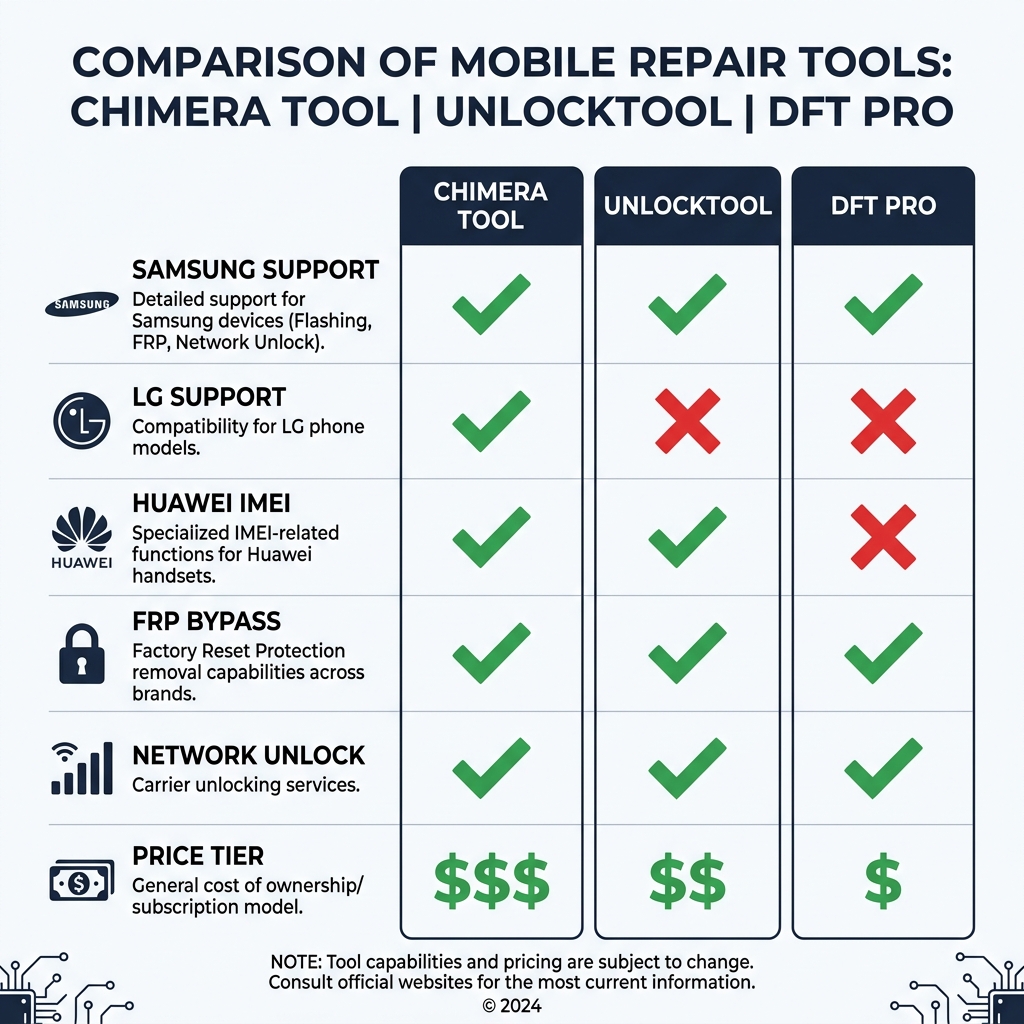
Feature and price-tier overview comparing Chimera Tool against UnlockTool and DFT Pro.
| GSM Tool | Strongest Specialty | GSM24h Rental Starting At | Delivery Model |
|---|---|---|---|
| Chimera Tool | Samsung Cert/Unlock, Huawei unbrick, LG, multi-brand | $25.96 | Assisted remote activation |
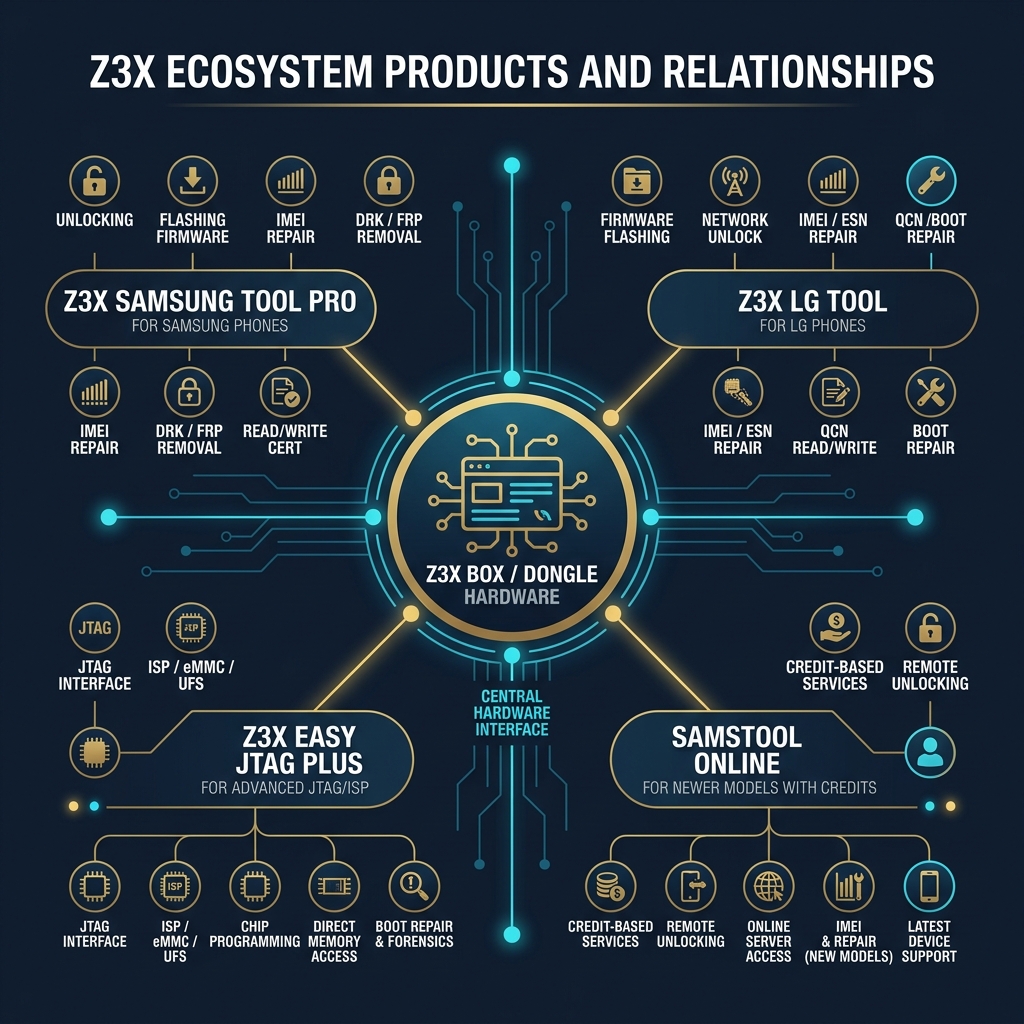
| Z3X Samsung Tool PRO | 2,200+ Samsung Galaxy models, .tar/.md5 flash, EFS/IMEI | $4.50 | Remote activation via UltraViewer |
| UnlockTool | Daily Samsung/Xiaomi/OPPO FRP & Apple checkm8 Ramdisk | $0.30 | Automated instant credentials (guide) |
| DFT Pro Tool | Xiaomi MTK/QC NV, IMEI & bootloader repairs | $1.19 | Automated instant credentials (guide) |
If your repair job is purely a Samsung Exynos EUB FRP bypass or Android 16 MTP Knox job, compare cost-per-ticket against Sigma Plus Exynos EUB, Samsung Tool CellTool, or UnlockTool Samsung FRP before booking a full Chimera session.
Common Chimera Tool errors and bench fixes
Resolve the four most frequent roadblocks seen during Windows Chimera Tool sessions:
- Phone Not Detected in EUB / Download / ADB Mode: Re-run Chimera's built-in driver installer as Administrator, uninstall conflicting third-party libusb/Zadig filters, and plug directly into a rear motherboard USB port.
- Operation Greyed Out or "Not Supported": Verify the phone's exact firmware security patch and bootloader binary (BIT) against Chimera's changelog; newer patches often require downgrading within the same binary bit or waiting for an official update.
- Server Credit Prompt on Advanced Unlock: Standard Chimera access does not automatically cover paid server credits (CRD) needed for specific carrier unlocks or online auth operations; verify credit requirements on
chimeratool.combeforehand. - Antivirus Blocking Chimera Launcher: Add Chimera's installation directory to Windows Defender exclusions before remote activation begins so helper executables are never quarantined mid-job.
Frequently Asked Questions
How is Chimera Tool delivered when rented on GSM24h.com?
Chimera Tool rentals on GSM24h are delivered via assisted remote activation on your Windows workstation after payment confirmation, rather than raw shared credentials, keeping your session stable under Chimera's security rules.
What are the official Chimera Tool license tiers?
On chimeratool.com/en/shop, Chimera offers three official annual license tiers: Basic (up to 100 phones per year), Professional (up to 1,500 phones per year with more computer slots), and Premium for high-volume workshops.
Does Chimera Tool require a physical hardware dongle?
Standard Chimera Tool software runs via authenticated Windows login without requiring a physical smartcard box, though Chimera also sells optional accessories and credit packs for specialized workflows.
Are Chimera server credits included in a rental session?
No. Standard rental sessions cover all license-included functions; specialized server operations that consume Chimera Credits (CRD) require separate credit balance verification before running.
Should I rent Chimera Tool or UnlockTool for a basic Samsung FRP reset?
For routine Samsung FRP removal without certificate/network repair, automated rentals like UnlockTool (from $0.30) or Samsung Tool CellTool (from $2.15) are typically faster and far cheaper. Reserve Chimera Tool for Samsung Patch Cert, Huawei unbricking, LG, or advanced baseband repairs.
Is IMEI repair and network unlocking with Chimera Tool legal?
Yes when performed strictly to restore a damaged device's original factory IMEI or unlock carrier access on devices you own or service with explicit customer authorization.
Book Assisted Chimera Tool Remote Activation
Get verified Chimera Tool access from $25.96 on GSM24h.com with transparent USD & crypto checkout and direct WhatsApp support.
Rent Chimera Tool →
Written by: Trần Kế Khang
5 years of in-depth mobile & laptop hardware repair experience; founder of thuetaikhoan.com.vn, unlocktool.us, dienthoailaptop.vn, and gsm24h.com. Facebook · Profile & articles · About us
No comments yet. Be the first to share your thoughts!