
This guide walks through Samsung Exynos FRP removal using Sigma Plus v1.01.16 over EUB Mode (Exynos USB Boot)—allowing technicians to clear Google verification locks across supported Galaxy A, M, F, S, Note, and Tab models without disassembling the phone across Android 12, 13, 14, and 15 builds.
📑 Table of Contents
- 1. Why Legacy Samsung FRP Tricks Fail on Exynos
- 2. What Is Sigma Plus & Which Exynos Models Are Supported?
- 3. How Do You Install EUB Mode USB Drivers with Zadig?
- 4. Step-by-Step Exynos FRP Removal via EUB Mode
- 5. Fixing "File I/O operation failed" in Sigma Plus
- 6. Should You Use UnlockTool or Sigma Plus for Samsung FRP?
- 7. Buying a Hardware Box vs Renting Sigma Plus Hourly
- 8. Frequently Asked Questions
🔧 Verified Bench Workflow — By Trần Kế Khang:
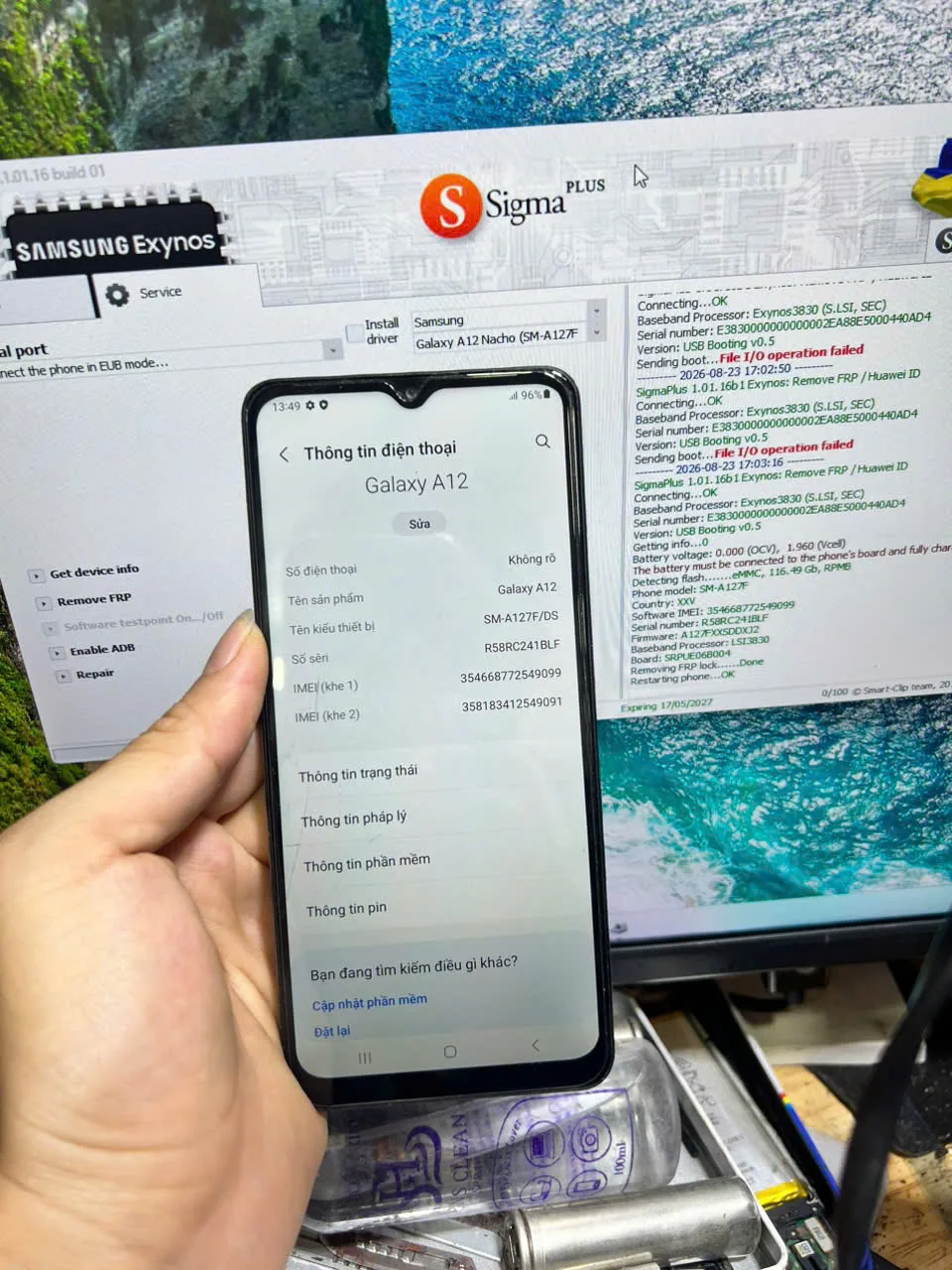
All screenshots, EUB handshake parameters, and error recovery steps in this article were recorded live at our bench on a Samsung Galaxy A12 (SM-A127F, Exynos 850) customer repair ticket.
1. Why Legacy Samsung FRP Tricks Fail on Exynos
In earlier years, technicians routinely triggered ADB by dialing *#0*# in the Emergency Call dialer and running free utilities like SamFw or SamFirm. Samsung closed that loophole in security updates starting late 2023.
Exynos devices also enforce strict Knox partition checks that block unsigned custom recoveries and Odin firmware downgrades while FRP is active. Servicing them reliably today requires interacting at the hardware BootROM layer via EUB (Exynos USB Boot)—where Sigma Plus excels.
2. What Is Sigma Plus & Which Exynos Models Are Supported?
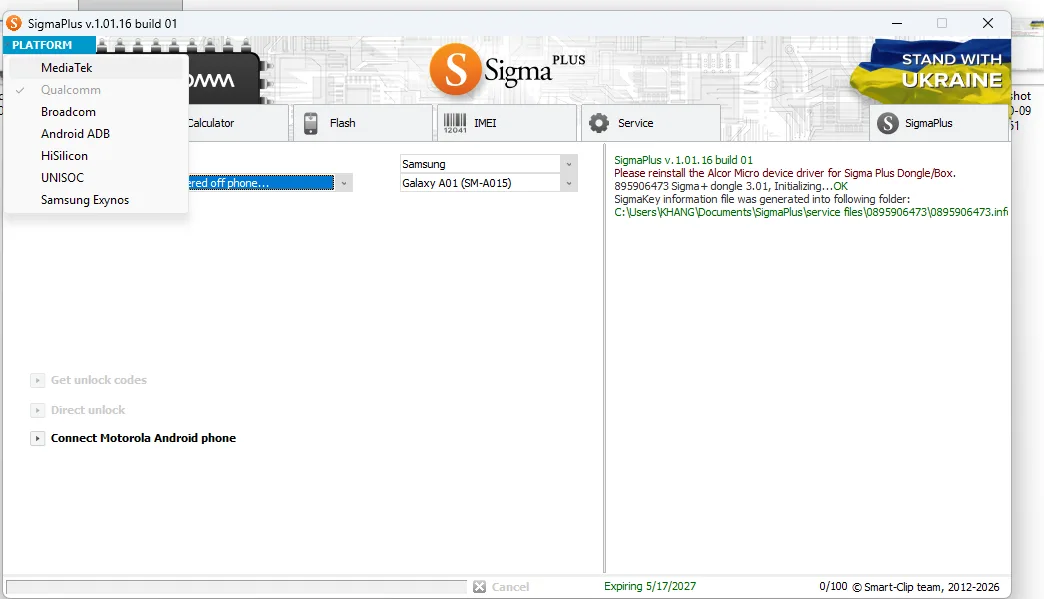
Sigma Plus v1.01.16 is a multi-platform GSM servicing suite supporting seven core architectures: MediaTek, Qualcomm, Broadcom, Android ADB, HiSilicon Kirin, UNISOC, and Samsung Exynos. Inside the Exynos module, technicians simply select the exact model from built-in loaders without manually hunting for scattered boot files.
| Galaxy Line | Representative Supported Models | Exynos SoC | Connection Mode |
|---|---|---|---|
| Galaxy A Series | A04s (SM-A047F), A10, A12 (SM-A127F), A13 (SM-A135F), A14, A16 5G | Exynos 850, Exynos 1330 | EUB Mode (No disassembly) |
| Galaxy M & F Series | M12 (SM-M127F), M13, M14 5G, F12, F13, F14 5G, F54 5G | Exynos 850, Exynos 1380 | EUB Mode |
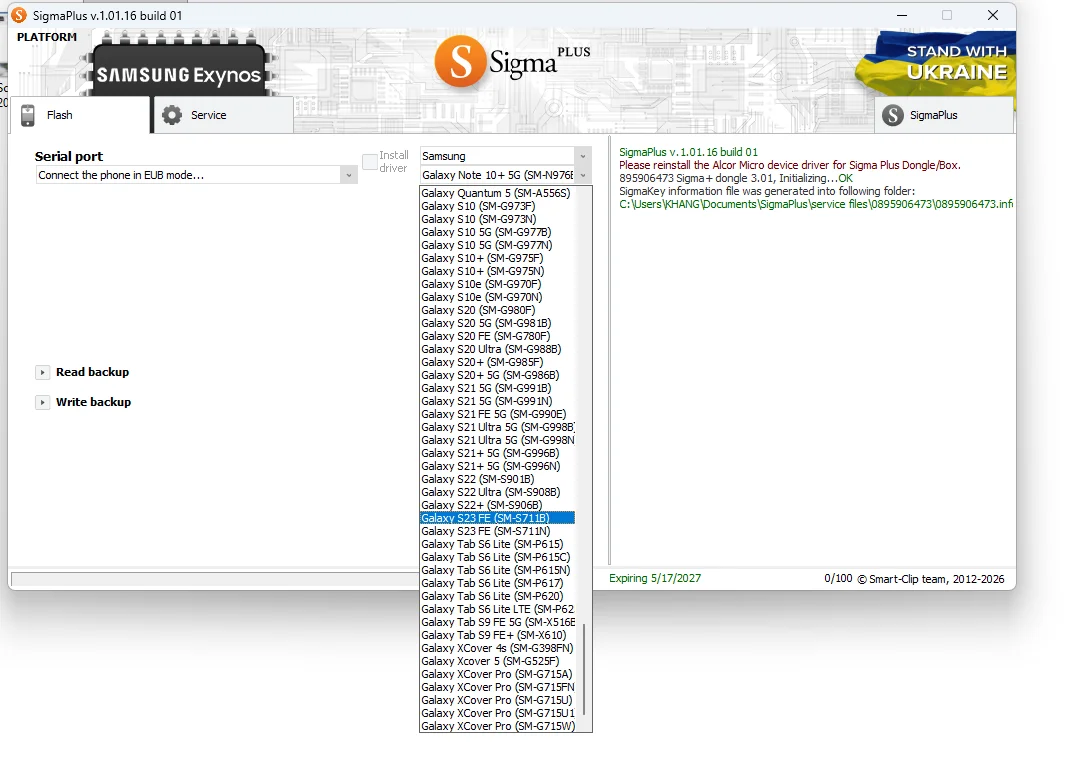
| Galaxy S Series | S10 (SM-G973F), S20 (SM-G980F), S21 FE, S22 (SM-S901B), S23 FE (SM-S711B) | Exynos 9820, 990, 2100, 2200 | EUB Mode / Service Tab |
| Galaxy Note & Tab | Note 10+ (SM-N975F), Tab S6 Lite (SM-P615/P617), Tab S9 FE | Exynos 9825, Exynos 9611 | EUB Mode |
3. How Do You Install EUB Mode USB Drivers with Zadig?
To detect Exynos BootROM cleanly in EUB Mode, install Samsung's official USB driver first and swap any flagged Exynos USB Boot interface in Device Manager using Zadig (libusb-win32 or WinUSB). Using a direct motherboard port ensures stable loader transfer.
Install the latest official Samsung Android USB Driver and use a high-quality direct USB Type-C cable to prevent voltage drops during boot transmission.
If Windows Device Manager shows a yellow warning icon labeled Exynos USB Boot, open Zadig USB Utility and replace/install the interface driver with libusb-win32 or WinUSB so Sigma Plus captures the virtual boot port reliably.
4. Step-by-Step Exynos FRP Removal via EUB Mode
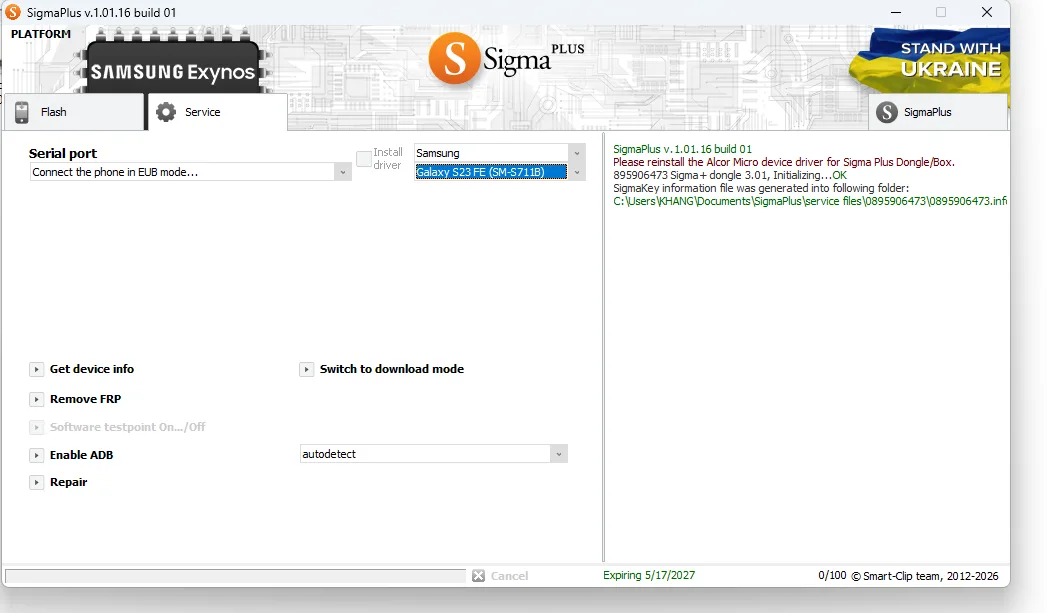
- Select Platform: Launch Sigma Plus, click
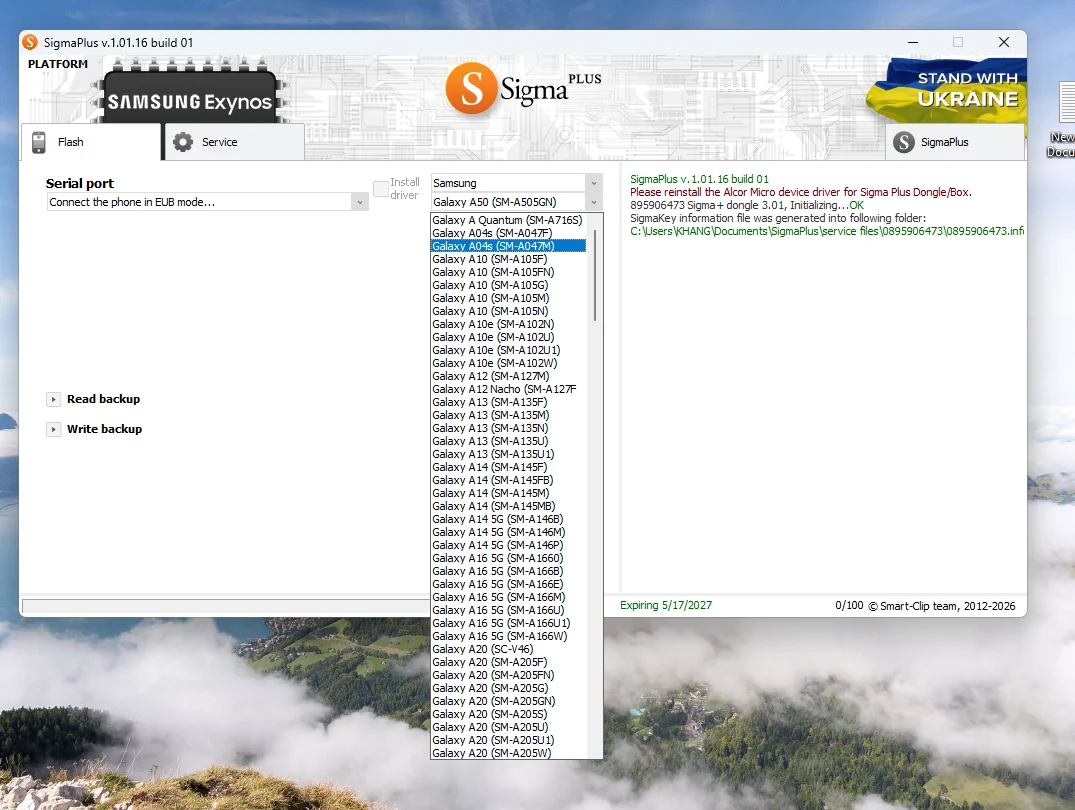
PLATFORMin the top-left corner, and choose Samsung Exynos. - Select Model: Open the Service tab and pick your exact device from the dropdown list (such as
Galaxy A12 (SM-A127F)orGalaxy A14 5G). - Enter EUB Mode: Power the handset completely off. Hold Volume Up + Volume Down simultaneously while plugging in the USB cable.
- Execute Removal: Click Remove FRP. Sigma Plus loads the signed bootloader and clears the lock automatically in roughly 1–2 minutes.
5. Fixing "File I/O operation failed" in Sigma Plus
During BootROM enumeration, technicians commonly see Sending boot… File I/O operation failed once or twice in the log window. That normally happens while the USB controller hands off from initial boot detection to flash loader transfer—it is not fatal.
- Do not yank the cable immediately; hold steady for ~15 seconds to allow automatic re-enumeration.
- If transfer still aborts, move the cable to a direct rear motherboard USB 2.0 port and click Remove FRP again until you see
Removing FRP lock... Done.
6. Should You Use UnlockTool or Sigma Plus for Samsung FRP?
Choose UnlockTool when your shop handles mixed MediaTek, Unisoc, and Apple workflows, and turn to Sigma Plus over EUB Mode whenever an Exynos handset blocks Odin ADB exploits. Keeping both options available solves virtually every Galaxy SoC variant.
| Criteria | UnlockTool | Sigma Plus |
|---|---|---|
| Chipset Specialty | MediaTek Preloader Auth, Unisoc SPD, Apple Ramdisk | Samsung Exynos EUB, Huawei Kirin, Motorola |
| Exynos FRP Coverage | Strong via Odin/ADB or testpoint on supported builds | Very strong across EUB-capable Galaxy A, M, F, S models |
| Extended Tools | Apple Bypass, Xiaomi Mi Cloud & No-Auth EDL | Direct SIM unlock, Huawei/Motorola IMEI & baseband fixes |
| Access Workflow | Direct username & password sign-in | Remote dongle sharing via UltraViewer technician session |
Working on MediaTek or Unisoc Samsung variants? Check our Samsung FRP bypass guide via UnlockTool or our full UnlockTool 2026 walkthrough.
7. Buying a Hardware Box vs Renting Sigma Plus Hourly
Purchasing a physical Sigma Plus box or dongle along with official annual activation packs requires a substantial upfront hardware investment—tying up capital if Exynos EUB tickets only arrive occasionally at your desk. Renting an active session on GSM24h Sigma Plus Rental connects an authentic dongle directly to your workstation remotely via UltraViewer within minutes, so you pay only per job.
⚖️ Legal Servicing Policy: GSM24h provides technical software access strictly to recover legitimately owned or customer-authorized handsets. We do not assist with stolen devices or unlawful modifications.
8. Frequently Asked Questions
Does removing Exynos FRP with Sigma Plus trip Knox?
No. EUB FRP removal targets the Persistent Data account protection partition only without unlocking the bootloader or tripping Knox to 0x1.
Does Sigma Plus support Android 14 and Android 15 Samsung phones?
Yes. Sigma Plus v1.01.16 communicates at the BootROM level, allowing supported models running Android 13, 14, and 15 security patches to be serviced.
Do I need to open the back cover for a hardware testpoint?
Most Galaxy A and M models (such as A04s, A12, A13, A14) enter EUB Mode via Volume button combinations or an EDL/EUB cable without disassembly, though a few specific patches require testpoint access.
How does GSM24h deliver rented Sigma Plus access?
After placing an order on our Sigma Plus page, a technician connects securely via UltraViewer to map the licensed dongle session onto your PC while you handle the handset directly.
Can Sigma Plus clear Knox Guard or PayJoy financing locks?
No—FRP (Google Account) and Knox Guard / PayJoy are separate locks. For KG or MDM workflows, check dedicated tools such as Samsung Tool, KG Killer, or DFT Pro.
Need to clear a Samsung Exynos FRP lock today?
Book an authentic Sigma Plus v1.01.16 dongle session on GSM24h.com with fast remote UltraViewer setup.
Rent Sigma Plus Now →
Written by: Trần Kế Khang
5 years of in-depth mobile & laptop hardware repair experience; founder of thuetaikhoan.com.vn, unlocktool.us, dienthoailaptop.vn, and gsm24h.com. Facebook · Profile & articles · About us



No comments yet. Be the first to share your thoughts!