
KG Killer Tool is a specialized Windows servicing utility built primarily for Samsung Knox Guard (KG Lock), enterprise MDM, IT Admin enrollment removal, and Xiaomi/Qualcomm auth servicing across Android 13, 14, and 15 devices. Instead of purchasing a standalone activation for occasional Galaxy KG tickets, technicians can rent KG Killer Tool online starting from $0.60 with automated 24/7 credential delivery on GSM24h.com. Every Knox Guard, MDM, or IT Admin workflow applies strictly to devices serviced with verifiable owner authorization.
Table of Contents
- What is KG Killer Tool and how do KG, FRP, and MDM locks differ?
- How much does renting KG Killer Tool cost on GSM24h?
- How do you prepare Windows, drivers, and run KG Killer safely?
- How does KG Killer compare with Samsung Tool CellTool, UnlockTool, and Octoplus?
- Common KG Killer errors, re-lock risks, and fixes
- Frequently Asked Questions
What is KG Killer Tool and how do KG, FRP, and MDM locks differ?
Published at kgkiller.com (current release Tool v3.8.0 PRO), KG Killer Tool targets Samsung enterprise and financing security states that standard FRP tools cannot clear. Knowing whether a Galaxy handset is locked by Knox Guard (KG), Google FRP, or corporate MDM/IT Admin determines both the connection mode and whether OTA updates must be blocked afterward.

KG Killer Tool v3.8.0 PRO focuses on Samsung Android 13–15 Knox Guard, MDM, and IT Admin removal.
Comparing Samsung KG Lock, FRP Lock & MDM / IT Admin
Before selecting any operation inside KG Killer Tool, inspect the Download Mode screen (KG STATUS) and setup prompt so you choose the matching routine:
- Google FRP Lock: Standard Android Factory Reset Protection asking for the previous Google account after a wipe; usually fastest to clear with UnlockTool or Octoplus.
- Samsung KG Lock (Knox Guard): Financing or enterprise lock displaying KG STATUS: LOCKED or PRENORMAL in Download Mode and blocking normal flashing or boot activation.
- MDM / IT Admin Enrollment: Corporate device management profile restricting settings, factory reset, USB debugging, or app installation even after reaching the home screen.
Official KG Killer v3.8.0 PRO Capabilities
According to the official KG Killer homepage, Tool v3.8.0 PRO highlights the following core bench modules:
- Android 13, 14 & 15 KG Bypass: Dedicated Knox Guard bypass routines across modern Samsung Galaxy Exynos, Qualcomm, and MediaTek handsets.
- All-Brand MDM Unlock & IT Admin Removal: Clears corporate IT Admin / MDM restrictions across supported Android security patches, plus Axio Lock support.
- Xiaomi Auth FRP Flash & Qualcomm Support: Supplementary Xiaomi auth flashing and wide Qualcomm EDL servicing, with a Zero Credit Loss on Failed server policy for supported credit jobs.
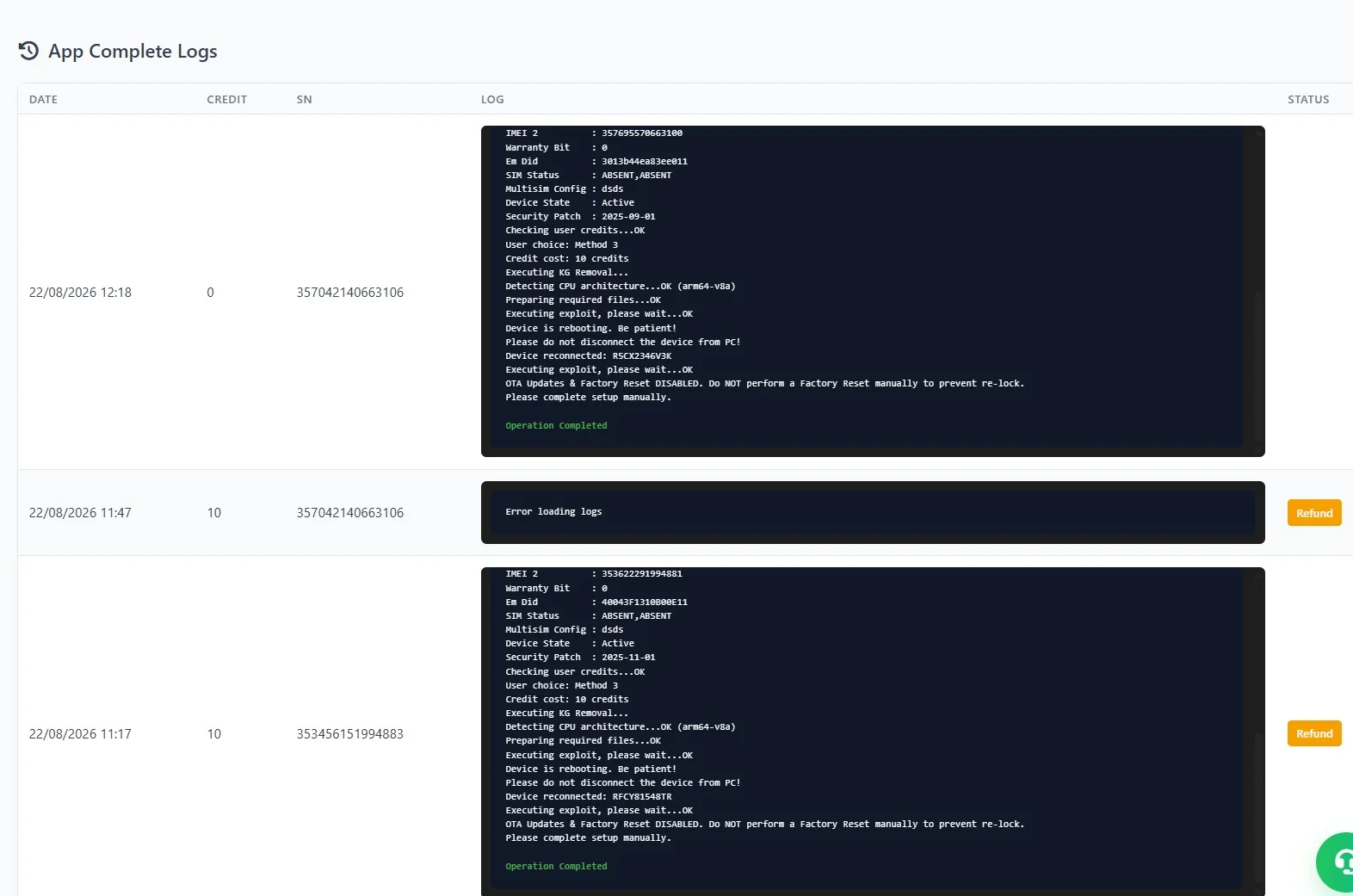
Reference Samsung KG Removal bench log illustrating a universal rule across KG tools: OTA updates and manual Factory Reset are disabled afterward to prevent re-lock.
Critical Post-Bypass Re-Lock Warning: Regardless of whether you clear Samsung Knox Guard with KG Killer Tool or Samsung Tool CellTool, software KG bypasses disable OTA firmware updates and manual Factory Reset to keep the device unlocked. Always explain clearly to the device owner that performing a manual Factory Reset or flashing unmodified firmware via Odin will re-trigger the Knox Guard lock screen.
How much does renting KG Killer Tool cost on GSM24h?
Renting KG Killer Tool on GSM24h.com starts from $0.60, with short 4-hour and 12-hour plans designed for single Galaxy tickets or workshop shifts. Automated checkout settles in ~2 seconds with instant credential output, zero pre-registration, and USD or crypto payment.
| Package | Current price | Original price | Save |
|---|---|---|---|
| 4 hours | $0.60 | $0.65 | 8% |
| 12 hours | $1.00 | $1.10 | 9% |
Updated November 2026 — listed price before coupon
Note that while standard rental access covers local software features, specialized server-auth operations inside KG Killer (or paid HWID resets) may require separate server credits — confirm your exact model and method on kgkiller.com's Supported Models list before ordering.
How do you prepare Windows, drivers, and run KG Killer safely?
Setting up drivers and checking Download Mode status before purchasing your timed window prevents wasted rental hours on USB detection errors. Install official Samsung and Android SDK drivers, disable antivirus interference on the tool folder, rent your KG Killer slot on GSM24h, and verify KG STATUS before starting.
- Install Official Drivers First: Install the official Samsung Android USB Driver and Google Android SDK Platform-Tools (ADB) on Windows 10/11.
- Download Official KG Killer Setup: Grab the current installer from
kgkiller.com→ Downloads and whitelist its extraction folder in Windows Security so Windows Defender does not quarantine packed executables. - Rent on GSM24h & Log In Once: Book a 4-hour or 12-hour window on the KG Killer rental page, copy your credentials, and sign in on your single prepared servicing PC (avoid switching PCs mid-session to prevent HWID lockouts).
- Select Exact Model & Execute: Confirm your Galaxy's model code, binary BIT, and security patch, connect via a rear motherboard USB port in the required mode (ADB, MTP, or EDL/BROM), run the matching KG/MDM/IT Admin routine, and wait for automatic reboot.
HWID & Security Patch Prep Tip: KG Killer enforces strict HWID binding on user accounts (requiring a cooldown or credit-billed reset if switched between computers). Make sure your servicing workstation already has Samsung USB drivers, ADB, and Qualcomm/MTK drivers passing Windows Device Manager checks before logging in with your rented credential.
How does KG Killer compare with Samsung Tool CellTool, UnlockTool, and Octoplus?
Samsung Knox Guard and MDM repairs depend heavily on exact Android security patch dates, so repair benches regularly compare KG Killer against CellTool, Octoplus, and UnlockTool before booking a session:
| Tool | Best Samsung Specialty | GSM24h Rental Starting At | Detailed Guide |
|---|---|---|---|
| KG Killer Tool | Android 13–15 KG Lock, MDM, IT Admin & Axio Lock | $0.60 | This guide |
| Samsung Tool CellTool | Android 16 MTP FRP, Qualcomm EDL & KG Removal Method 3 (10 credits) | $2.15 | CellTool Guide |
| Octoplus FRP / Samsung | Android 16 Galaxy S25/S22 FRP & Reset Knox Guard via UltraViewer | $2.60 | Octoplus Guide |
| UnlockTool | Everyday multi-brand FRP, Mi Account & checkm8 Ramdisk | $0.30 | UnlockTool Guide |
For Exynos EUB test-point FRP without Knox Guard locks, also check Sigma Plus Exynos EUB or TSM Tool Pro.
Common KG Killer errors, re-lock risks, and fixes
Troubleshoot the four most frequent issues seen on KG Killer Tool benches:
- ADB / Modem Port Not Recognized: Reinstall official Samsung USB Drivers, kill conflicting ADB daemons (
adb kill-server), and connect directly to a rear USB 2.0/3.0 motherboard port using an OEM cable. - Security Patch Too New for ADB Enablement: Newer Android 14/15/16 patches block legacy dialer codes (
*#0*#). Checkkgkiller.comSupported Models for whether EDL/BROM or an alternate tool like Samsung Tool CellTool is required for your binary BIT. - "Insufficient Credits" Prompt: Standard time rentals carry 0 server credits for local operations. Confirm beforehand whether your specific KG method requires credits or switch to a credit-bundled tier.
- HWID Mismatch on Login: Never open a rented KG Killer login on two PCs. If an assigned credential fails on first login due to a prior HWID lock on our side, GSM24h replaces or refunds the order promptly.
Frequently Asked Questions
What is the difference between Samsung KG Lock and Google FRP?
Google FRP locks a phone after a factory reset until the previous Google account signs in. Samsung KG Lock (Knox Guard) is an enterprise or financing lock managed via Samsung Knox servers that blocks normal setup and flashing until cleared.
How much does it cost to rent KG Killer Tool on GSM24h.com?
KG Killer Tool rentals start from $0.60 on GSM24h.com with 4-hour and 12-hour options delivered automatically 24/7 after payment confirmation.
Which Android versions does KG Killer Tool v3.8.0 PRO support?
According to kgkiller.com, KG Killer Tool v3.8.0 PRO specializes in Android 13, 14, and 15 Knox Guard bypass, all-brand MDM unlock, IT Admin removal, Axio Lock, and Xiaomi/Qualcomm servicing.
Can I factory reset or install OTA updates after removing KG Lock?
No. Software KG bypass methods intentionally block OTA updates and manual Factory Reset because wiping or reflashing stock firmware restores the Knox Guard lock prompt.
Does standard KG Killer hourly rental include server credits?
Standard time-based rentals cover local software features without extra paid server credits. Verify on kgkiller.com whether your target model/method consumes server credits before ordering.
What happens if a rented KG Killer account shows an HWID lock error?
Under GSM24h support policy, if an assigned credential cannot log in due to a pre-existing HWID or technical fault on our side, we provide a working replacement account or a full refund promptly.
Rent KG Killer Tool Automatically 24/7
Get instant access from $0.60 for Samsung KG Lock, MDM, and IT Admin servicing on GSM24h.com.
Rent KG Killer Now →
Written by: Thanh Tài
6 years of GSM & IT background; specializes in mobile and laptop software, firmware flashing, iCloud, Xiaomi, Samsung, and OPPO unlocking. Facebook · Profile & articles · About us


No comments yet. Be the first to share your thoughts!