
Comparing Samsung Tool vs TSM Tool comes down to choosing between a dedicated Samsung Galaxy powerhouse and an ultra-affordable multi-brand daily workhorse. Samsung Tool (CellTool SamS Modules) focuses exclusively on Samsung — packing Android 16 MTP ADB, Qualcomm EDL Auto-Loaders for Galaxy S21–S24 and Z Fold/Flip, Knox Guard / MDM / ITAdmin servicing, and EFS protection — whereas TSM Tool Pro covers 4,473+ models across Samsung, Tecno, Infinix, Itel, Xiaomi, OPPO, Vivo, Motorola, ZTE, and Unisoc Tiger chips starting from just $0.69. Both tools are available for instant automated USD rental on GSM24h so you can test either tool on owner-authorized devices without locking capital into annual keys.
Table of Contents
- What is the main difference between Samsung Tool (CellTool) and TSM Tool Pro?
- Feature-by-Feature Matrix: Samsung Tool CellTool vs TSM Tool Pro
- Where does Samsung Tool (CellTool) clearly outperform TSM Tool?
- Where does TSM Tool Pro beat Samsung Tool for daily shops?
- How do Samsung Tool and TSM Tool USD rental prices compare on GSM24h?
- Frequently Asked Questions
What is the main difference between Samsung Tool (CellTool) and TSM Tool Pro?
Samsung Tool (CellTool SamS Modules) is a single-brand specialist engineered specifically for deep Samsung Galaxy servicing — including Qualcomm EDL Auto-Loaders, Knox Guard / MDM removal, Please Call / Lost Mode fixes, and Exynos modules. TSM Tool Pro is a lightweight multi-brand all-rounder covering Samsung plus Tecno, Infinix, Itel, Xiaomi, Motorola, and Unisoc devices at a lower hourly cost.
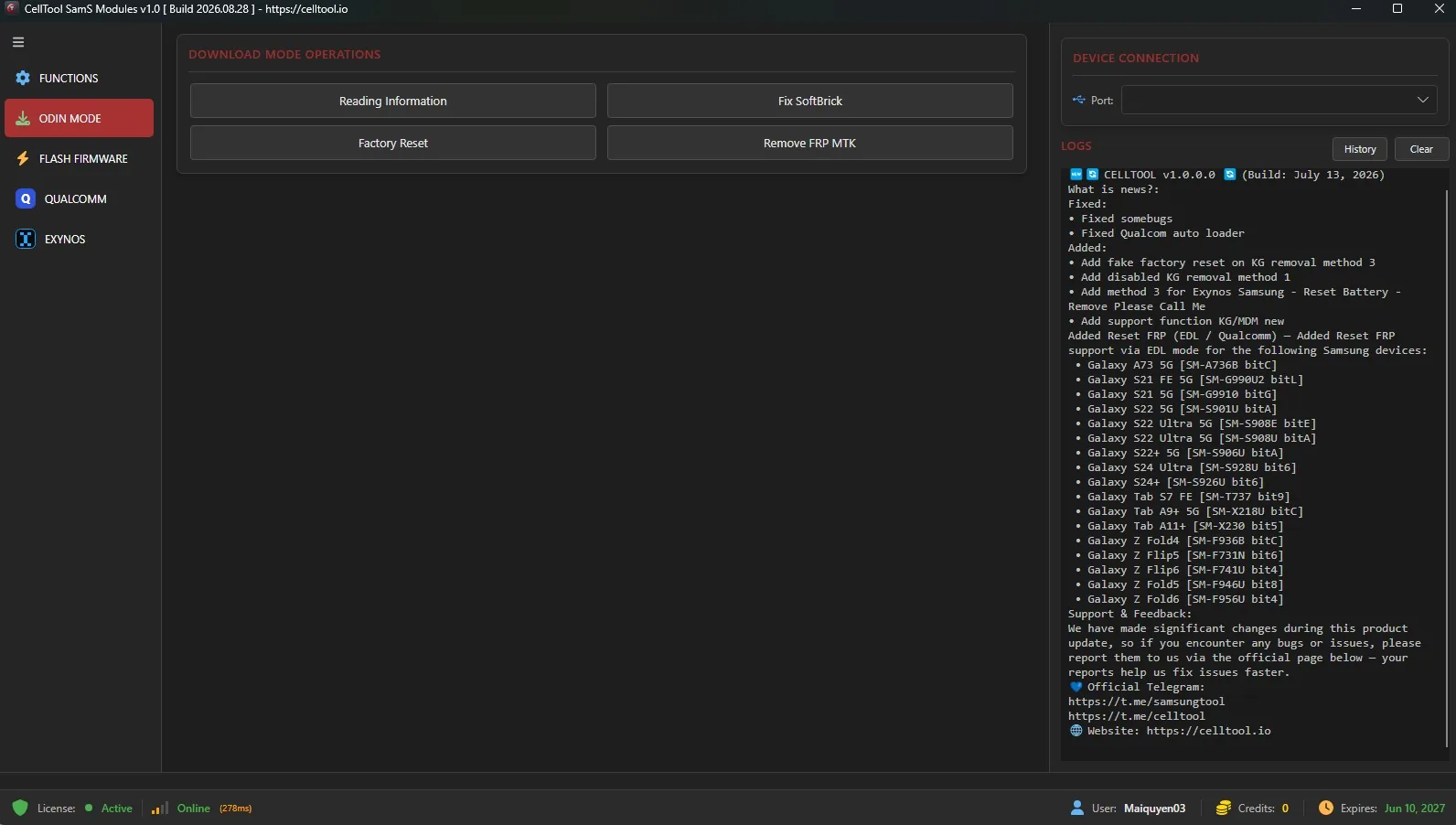
Samsung Tool (CellTool SamS Modules v1.0): dedicated Samsung workspace with ODIN MODE, Flash Firmware, Qualcomm EDL Auto-Loader, and Exynos modules.
Feature-by-Feature Matrix: Samsung Tool CellTool vs TSM Tool Pro
Both suites run natively on Windows with no physical smartcard dongle required (see Samsung Android USB Driver and Google Platform-Tools for setup). Compare their real bench capabilities side by side:
| Criteria | Samsung Tool (CellTool SamS) | TSM Tool Pro |
|---|---|---|
| Brand Coverage | Samsung Galaxy exclusively (deep focus) | Multi-brand (4,473+ models: Samsung, Tecno, Infinix, Itel, Xiaomi, ZTE, Motorola, OPPO, Vivo) |
| Samsung Qualcomm EDL 9008 | Top-tier — Server AUTO loaders for S21–S24, Z Fold4–6, Z Flip5–6, Tab S7/A9+ | Supported on major Samsung Qualcomm models |
| Samsung Knox Guard & MDM | Dedicated suite — KG Removal ADB, Bypass ITAdmin/MDM, MDM Can't Download, Remove Please Call | Basic KG/MDM/IT module included |
| Samsung EFS & Odin Flash | Keep EFS, Backup/Erase EFS, ReadGPT, 5-slot BL/AP/CP/CSC/DATA Flasher | Security/EFS backup + standard Flash tab |
| Tecno / Infinix / Itel & Unisoc | Not supported | Standout strength — Meta Task Remove FRP Tecno/Infinix/Itel + Tiger T7300/T765 |
| Xiaomi / Huawei / Bootloader | Not supported | Remove Mi Account, Huawei ID, Unlock/Lock Bootloader, Fix DM-Verity |
| GSM24h Live Rental Entry | From $2.15 | From $0.69 |
Where does Samsung Tool (CellTool) clearly outperform TSM Tool?
Choose Samsung Tool (CellTool) whenever a tough flagship Samsung Galaxy hits your desk — especially Qualcomm Snapdragon Galaxy S22–S24, Z Fold/Flip, or Tab models locked by Knox Guard, IT Admin MDM, "MDM Can't Download", or Android 16 MTP/EDL FRP where generic multi-brand tools lack updated loaders.
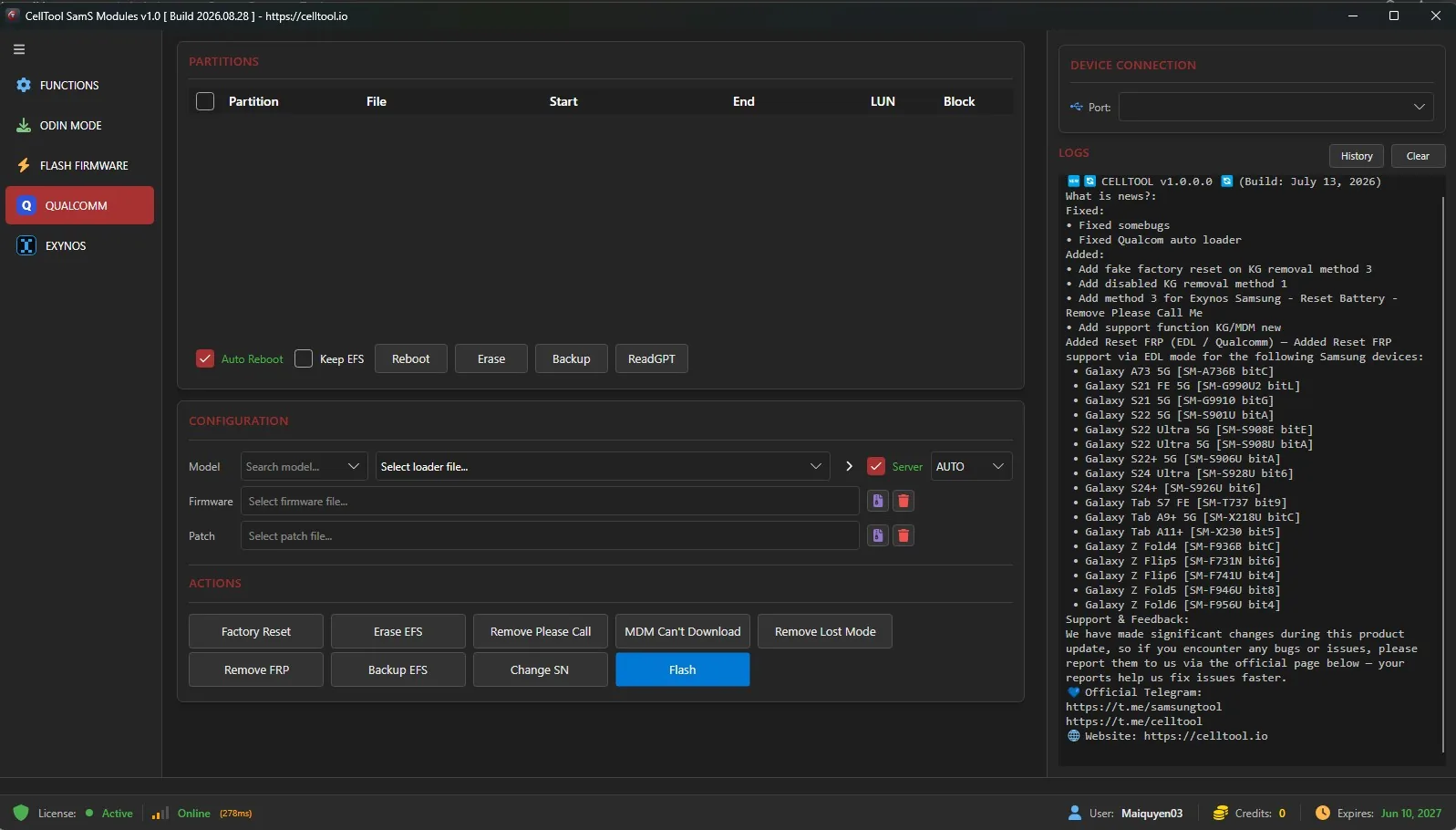
CellTool Qualcomm EDL tab: Server AUTO Firehose selection paired with Keep EFS, Backup EFS, Remove Please Call, and MDM Can't Download.
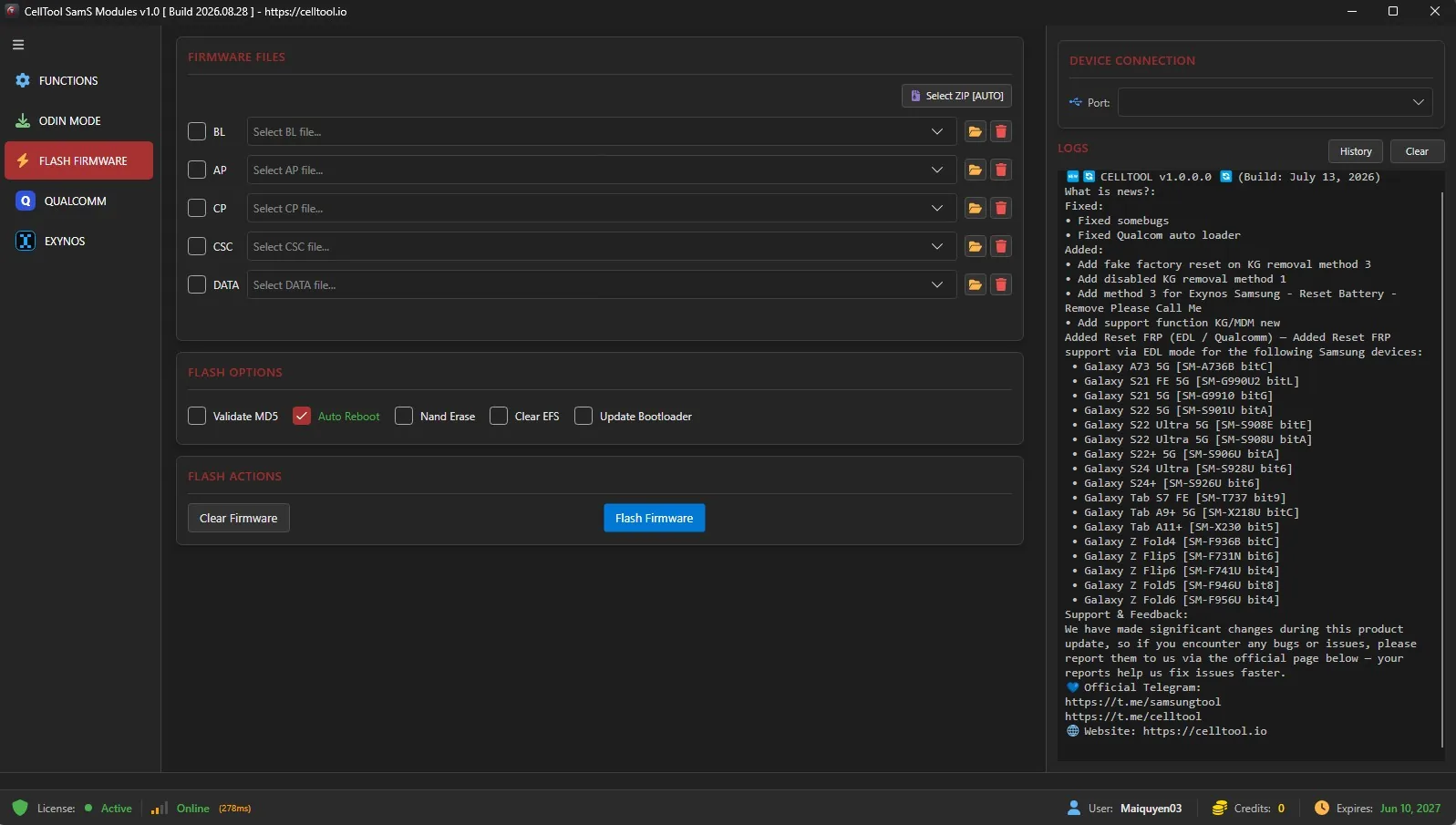
CellTool integrated 5-slot Samsung firmware flasher (BL, AP, CP, CSC, DATA) with optional MD5 validation and safety toggles.
Read our complete workflow walkthrough in the Samsung Tool CellTool guide or compare MDM options in our MDM & Knox Guard removal guide.
CellTool Bench Tip — Keep EFS Always Checked: Inside CellTool's Qualcomm EDL module, always verify Keep EFS or run Backup EFS before flashing or clearing MDM partitions. Protecting original radio calibration prevents Null IMEI headaches — see our Samsung EFS backup & restore guide.
Where does TSM Tool Pro beat Samsung Tool for daily shops?
TSM Tool Pro clearly wins for general repair counters servicing diverse budget and mid-range Android traffic every day — especially Tecno, Infinix, Itel, ZTE Nubia, Unisoc Tiger, Xiaomi, and routine Samsung MediaTek/Exynos/Qualcomm FRP tickets at one of the lowest rental rates on the market.
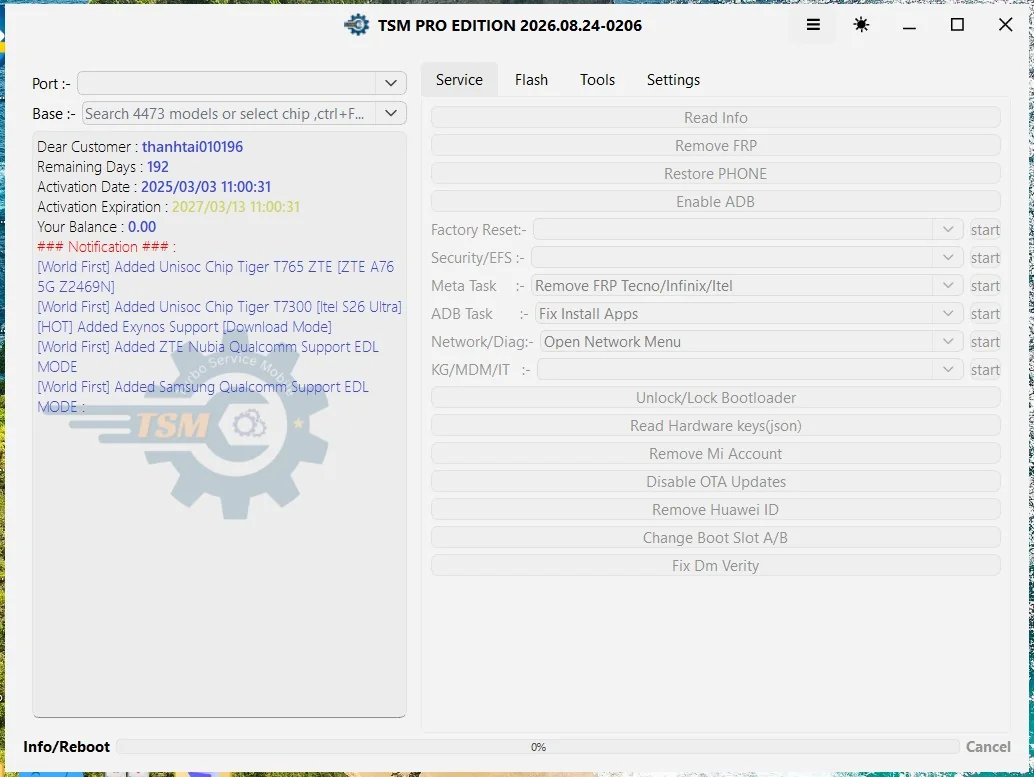
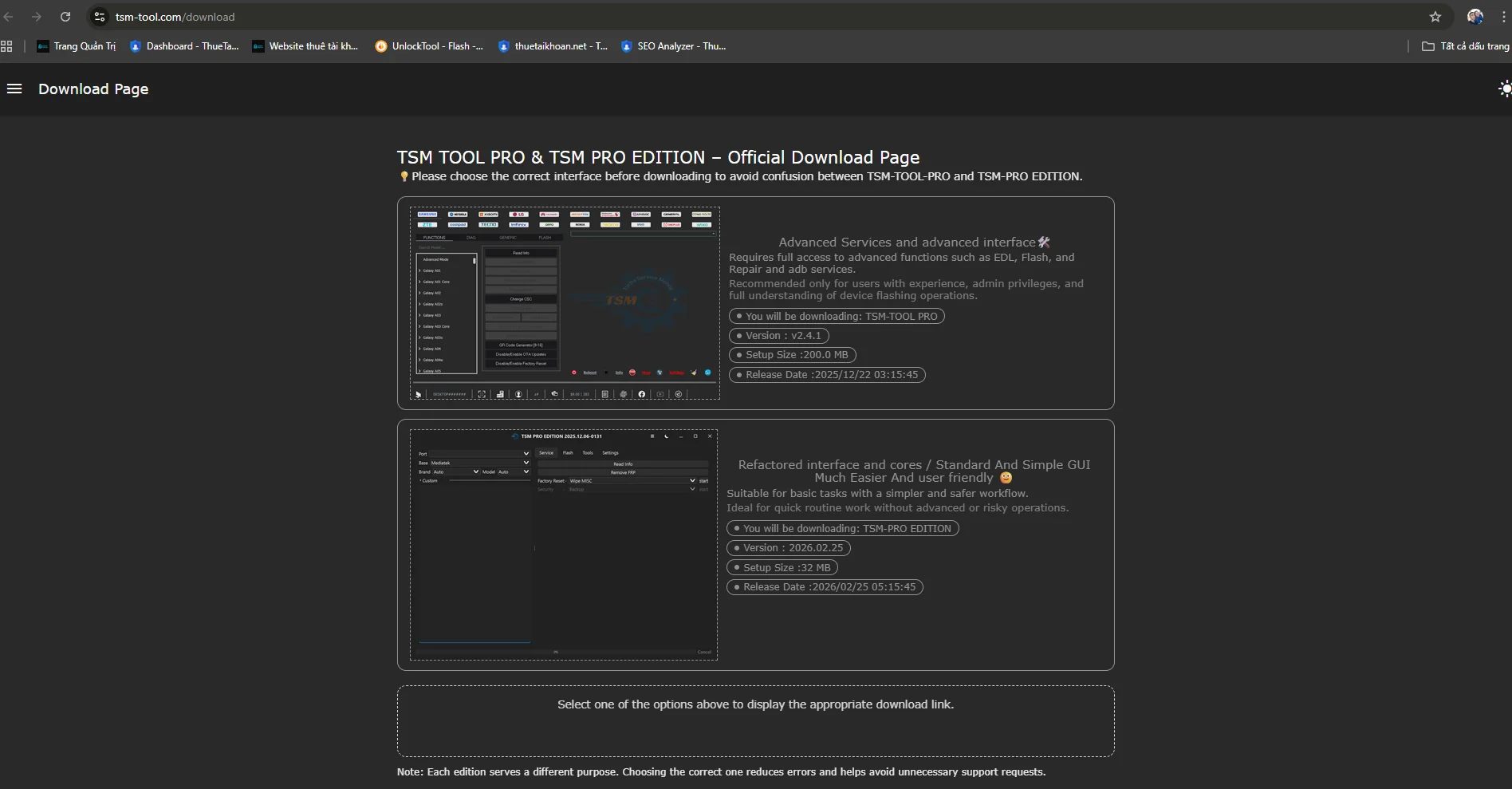
TSM PRO EDITION Service tab: 4,473+ searchable models, one-click Meta Task for Tecno/Infinix/Itel FRP, Exynos Download Mode, and Samsung Qualcomm EDL.
Explore our TSM Tool Pro complete guide, see how it stacks up against UnlockTool in TSM Tool vs UnlockTool, or check our Tecno, Infinix & Itel FRP guide.
How do Samsung Tool and TSM Tool USD rental prices compare on GSM24h?
Because GSM24h pulls live USD rental packages directly from our automated database, you never have to choose only one annual license — rent TSM Tool Pro for everyday multi-brand jobs and rent Samsung Tool CellTool specifically when a high-value Samsung KG/EDL flagship arrives:
| Package | Current price | Original price | Save |
|---|---|---|---|
| 12 hours | $2.15 | — | — |
Updated November 2026 — listed price before coupon
| Package | Current price | Original price | Save |
|---|---|---|---|
| 5 hours | $0.69 | $0.75 | 8% |
| 10 hours | $0.79 | $0.80 | 1% |
| 1 day | $1.10 | $1.12 | 2% |
| 2 days | $2.20 | $2.30 | 4% |
| 3 days | $2.38 | — | — |
Updated November 2026 — listed price before coupon
Smart Shop Combo Strategy: High-efficiency benches rarely pay for redundant overlapping subscriptions. Pair TSM Tool Pro (or UnlockTool from $0.30) for high-volume multi-brand FRP, then spin up a short Samsung Tool CellTool or MDMFixTool rental only when a Samsung Knox Guard, IT Admin, or Snapdragon S24/Fold6 EDL ticket walks in.
Frequently Asked Questions
Can Samsung Tool (CellTool) remove FRP on Xiaomi, Tecno, or Infinix phones?
No. Samsung Tool (CellTool SamS Modules) is engineered exclusively for Samsung Galaxy smartphones and tablets. For Xiaomi, Tecno, Infinix, Itel, or ZTE, use TSM Tool Pro (/rent-tsm-tool) or UnlockTool (/rent-unlocktool).
Which tool is better for Samsung Galaxy S22, S23, S24, and Z Fold EDL FRP or Knox Guard?
Samsung Tool (CellTool) is the stronger specialist for flagship Qualcomm Samsung EDL FRP, Knox Guard, IT Admin MDM, and Remove Please Call workflows thanks to its Server AUTO Firehose loader updates.
Which tool is cheaper to rent on GSM24h for routine daily FRP jobs?
TSM Tool Pro (/rent-tsm-tool) starts from $0.69 and covers 4,473+ multi-brand models, making it more economical for general mixed-brand FRP traffic compared to specialized Samsung Tool CellTool (/rent-samsung-tool) starting from $2.15.
Does TSM Tool Pro support Samsung Exynos and Qualcomm EDL?
Yes. Recent TSM PRO EDITION builds include Samsung Exynos Download Mode and Samsung Qualcomm EDL support alongside its core MediaTek and Unisoc modules, though CellTool remains deeper for specialized Knox Guard and MDM tasks.
Do either Samsung Tool or TSM Tool require a physical USB dongle?
No. Both Samsung Tool (CellTool) and TSM Tool Pro are 100% digital Windows software accounts delivered automatically in ~2 seconds after checkout on GSM24h.
Should I rent Samsung Tool or UnlockTool if I mostly service Samsung Galaxy phones?
For general Samsung FRP across A-series MediaTek/Qualcomm/Unisoc, UnlockTool (/rent-unlocktool) covers broad daily tasks. When you need specialized Samsung Knox Guard, ITAdmin/MDM, or newer Snapdragon flagship EDL loaders, rent Samsung Tool CellTool (/rent-samsung-tool).

Written by: Thanh Tài
6 years of GSM & IT background; specializes in mobile and laptop software, firmware flashing, iCloud, Xiaomi, Samsung, and OPPO unlocking. Facebook · Profile & articles · About us
No comments yet. Be the first to share your thoughts!