
Comparing TSM Tool vs UnlockTool helps repair shops decide whether a streamlined Samsung/Android servicing utility or a broad multi-brand + Apple powerhouse fits their bench better. On GSM24h.com, TSM Tool Pro rentals start from $0.69 and UnlockTool rentals start from $0.30, both with instant automated 24/7 credential delivery. All FRP and unlock procedures must strictly be limited to owner-authorized devices.
Table of Contents
What distinguishes TSM Tool Pro from UnlockTool?
TSM Tool (Turbo Service Mobile) splits cleanly into a full-featured advanced suite and a lightweight 32 MB GUI focused on rapid Samsung, Qualcomm, MediaTek, and Unisoc FRP/Factory Reset work. UnlockTool consolidates 20 Android brands plus Apple checkm8 Ramdisk inside one heavier workspace at a lower entry rental price.
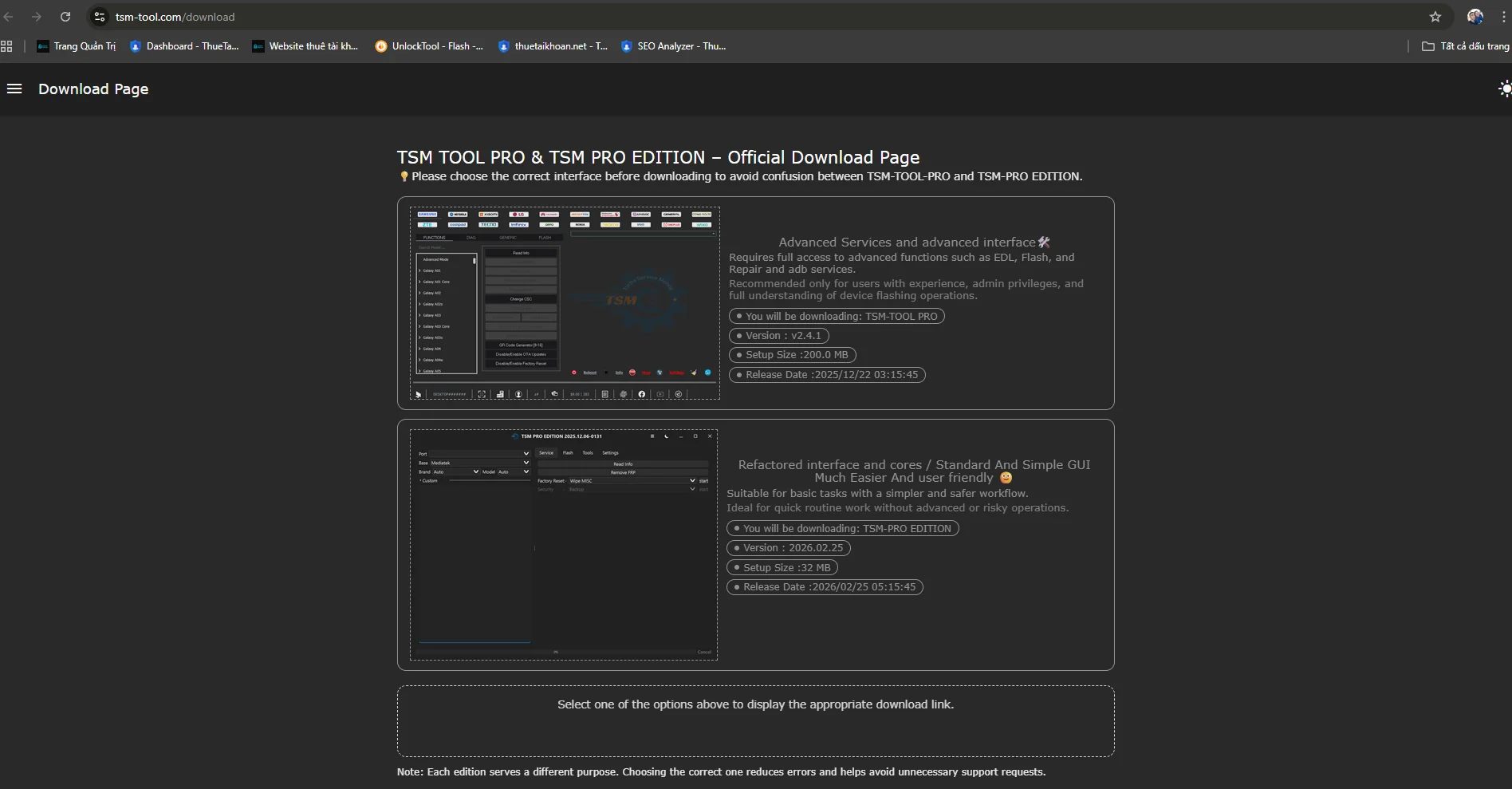
Official TSM Tool download page distinguishing TSM-TOOL PRO v2.4.1 (200 MB advanced suite) from TSM-PRO Edition (32 MB simplified GUI).
TSM-TOOL PRO v2.4.1 vs TSM-PRO Edition (32 MB)
A unique advantage shown directly on TSM Tool's official download page is choosing the right interface for your experience level:
- TSM-TOOL PRO (v2.4.1, 200 MB): Built for experienced technicians needing full EDL, Flash, Repair, CSC edits, QR Code Generator, Disable/Enable OTA Updates, and ADB services across Samsung, Motorola, Xiaomi, LG, Huawei, MTK, Qualcomm, and Unisoc.
- TSM-PRO EDITION (2026.02.25, 32 MB): Refactored, simplified GUI built for quick routine FRP removal, Factory Reset, Wipe MISC, and Security Backup with lower risk of misclicks.
TSM also hosts a centralized driver hub covering ADB, QCOM, SPRD, MTK, Libusb, Samsung All USB, Huawei, LG, OnePlus, Vivo, and ZTE (see our complete TSM Tool Pro setup guide).
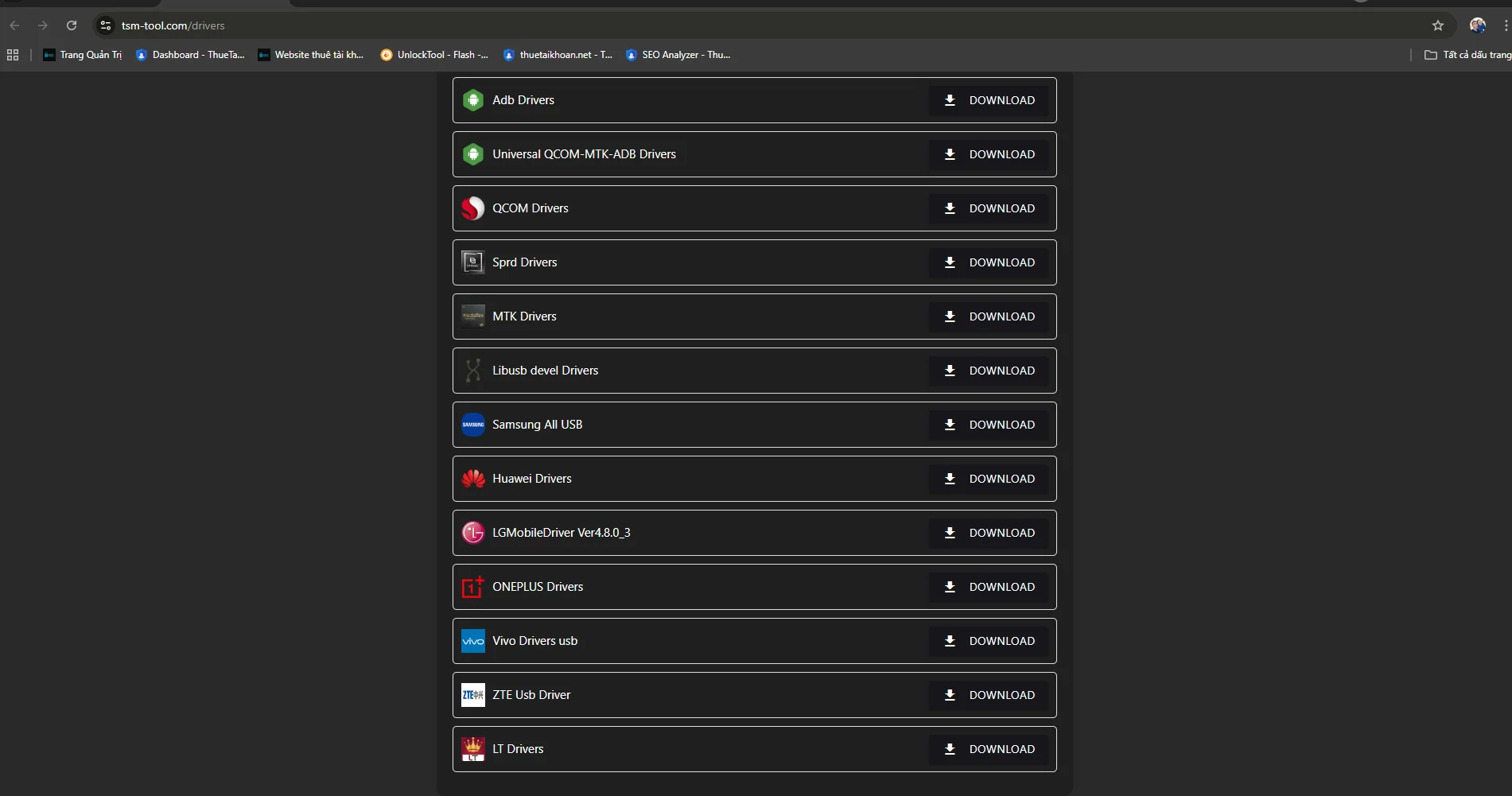
TSM Tool's organized driver library covering ADB, Qualcomm, Spreadtrum/Unisoc, MediaTek, and Samsung USB packages.
UnlockTool's Multi-Brand & Apple Ramdisk Reach
UnlockTool shines whenever a repair counter handles unpredictable mixed walk-ins — switching effortlessly between Samsung Android 16 COM/MTP FRP, Xiaomi HyperOS Mi Account resets, OPPO/Vivo MTK/QC unlocks, and Apple iPhone/iPad Ramdisk modules without switching applications. Pair either tool with the official Samsung Android USB Driver and Google Android SDK Platform-Tools.
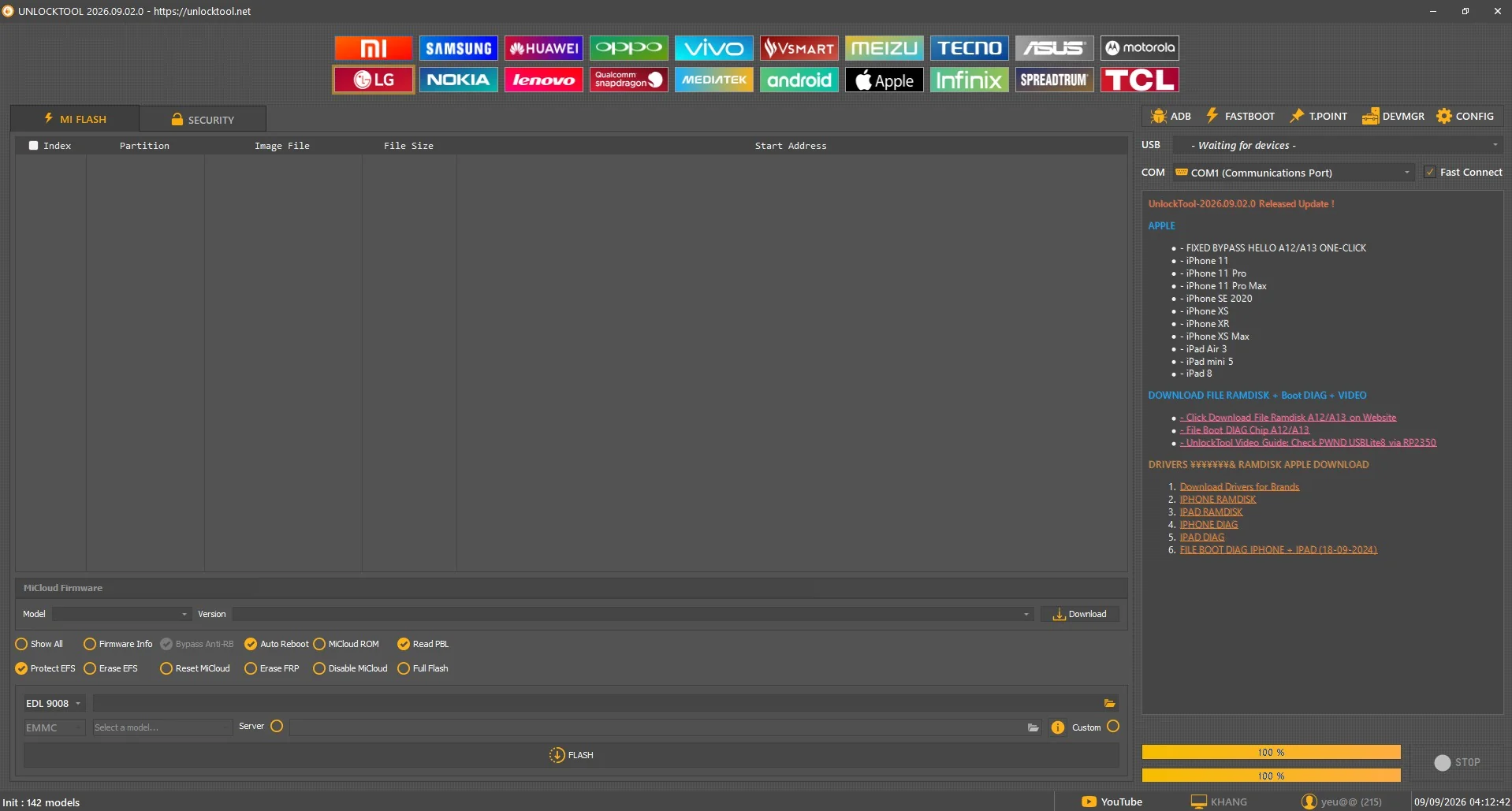
UnlockTool integrates Android multi-brand workflows and Apple checkm8/Ramdisk servicing inside one unified desktop client.
Choosing the Right TSM Edition on First Login: Many first-time TSM renters accidentally download only the 32 MB TSM-PRO Edition and wonder where advanced Samsung EDL, CSC, or OTA-disable buttons went. If you need full Samsung/EDL servicing, install TSM-TOOL PRO (200 MB) first; keep the 32 MB edition strictly for fast basic FRP wipes.
Side-by-side comparison: TSM Tool vs UnlockTool
Compare both utilities across everyday workshop criteria:
| Criteria | TSM Tool Pro / TSM-PRO Edition | UnlockTool |
|---|---|---|
| Core Focus | Samsung FRP/CSC/OTA/EDL + clean MTK/QC/Unisoc Android servicing | 20 Android brands + Apple checkm8 Ramdisk & Hello |
| Client Options | Two official builds: 200 MB Pro & 32 MB simplified GUI | Single unified Windows client |
| Apple iPhone Support | No (Android-only) | Yes (A7–A11 Ramdisk & Hello; see Ramdisk guide) |
| Driver Convenience | Dedicated per-chipset & per-brand driver downloads page | Built-in driver links + manual vendor installs (Driver guide) |
| GSM24h Rental Starting At | $0.69 | $0.30 |
How do TSM Tool and UnlockTool rental costs compare on GSM24h?
Both TSM Tool and UnlockTool deliver instant automated logins on GSM24h.com with ~2-second confirmation and USD or crypto checkout. UnlockTool carries the lower starting entry rate at $0.30, while TSM Tool Pro starts at $0.69 with flexible short and multi-day options.
| Package | Current price | Original price | Save |
|---|---|---|---|
| 5 hours | $0.69 | $0.75 | 8% |
| 10 hours | $0.79 | $0.80 | 1% |
| 1 day | $1.10 | $1.12 | 2% |
| 2 days | $2.20 | $2.30 | 4% |
| 3 days | $2.38 | — | — |
Updated November 2026 — listed price before coupon
| Package | Current price | Original price | Save |
|---|---|---|---|
| 6 hours | $0.30 | $0.35 | 14% |
| 12 hours | $0.42 | $0.49 | 14% |
| 1 day | $0.95 | $1.00 | 5% |
| 2 days | $1.20 | $1.30 | 8% |
| 3 days | $1.60 | $1.70 | 6% |
| 5 days | $2.00 | $2.10 | 5% |
| 7 days | $3.40 | $3.50 | 3% |
| 14 days | $3.90 | $4.00 | 3% |
| 30 days | $7.40 | — | — |
Updated November 2026 — listed price before coupon
If your Samsung ticket specifically involves Knox Guard Method 3 credits or Android 16 Exynos EUB, also check Samsung Tool CellTool ($2.15) and Sigma Plus ($1.55).
Which tool should you rent for your repair ticket?
Choose UnlockTool first for general multi-brand shops, Xiaomi HyperOS resets, Apple checkm8 servicing, and the lowest cost per short rental. Choose TSM Tool Pro when a specific Samsung security patch, CSC/OTA workflow, or Unisoc/MTK routine matches TSM's updated loader list or when you want TSM's lightweight 32 MB interface for fast FRP turns.
- Start with UnlockTool if you have mixed Android + iPhone tickets or want the lowest entry rental price (UnlockTool Guide).
- Switch to TSM Tool Pro when UnlockTool's current loader skips a specific Samsung Galaxy / Unisoc / Motorola patch and TSM's changelog confirms support (TSM Tool Guide).
- Keep Drivers Pre-Installed: Both tools use standard Samsung, Qualcomm 9008, MTK VCOM, and ADB drivers, so switching between them takes seconds on the same PC.
Backup Plan for Stubborn Samsung Patches: No single GSM software unlocks every Samsung security patch on day one. Keeping both UnlockTool and TSM Tool (plus Octoplus for difficult Android 16 models) in your on-demand rental rotation lets you resolve edge-case Galaxy tickets without buying multiple annual licenses.
Frequently Asked Questions
Which is cheaper to rent on GSM24h: TSM Tool or UnlockTool?
UnlockTool starts lower at $0.30, while TSM Tool Pro starts at $0.69. Both deliver credentials automatically 24/7 after payment confirmation.
What is the difference between TSM-TOOL PRO and TSM-PRO Edition?
TSM-TOOL PRO (200 MB) exposes full advanced functions including EDL, Flash, Repair, CSC, and ADB tools, whereas TSM-PRO Edition (32 MB) offers a refactored, simplified GUI for quick routine FRP and Factory Reset jobs.
Does TSM Tool Pro support iPhone bypass like UnlockTool?
No. TSM Tool Pro is focused on Android smartphones (Samsung, Xiaomi, Motorola, Huawei, MTK, Qualcomm, Unisoc). Use UnlockTool for A7–A11 Apple Ramdisk or /bypass-icloud and /hfz-ramdisk for A12+ iPhones.
Can I use both TSM Tool and UnlockTool on the same Windows workstation?
Yes. They share the same underlying Samsung, Qualcomm 9008, and MTK VCOM USB drivers — simply close one software before running the other so COM ports do not collide.
Does either tool require a physical USB dongle?
No. Both TSM Tool Pro and UnlockTool authenticate over the cloud with username/password login on Windows.
What if a rented TSM Tool or UnlockTool account has a login problem?
Under GSM24h support policy, any assigned account with a verified technical fault on our side is promptly replaced or refunded.
Ready to Rent TSM Tool Pro or UnlockTool?
Book TSM Tool Pro from $0.69 or UnlockTool from $0.30 with instant automated 24/7 delivery.
Rent TSM Tool Now →
Written by: Trần Kế Khang
5 years of in-depth mobile & laptop hardware repair experience; founder of thuetaikhoan.com.vn, unlocktool.us, dienthoailaptop.vn, and gsm24h.com. Facebook · Profile & articles · About us
No comments yet. Be the first to share your thoughts!