
How fast you clear a Samsung Google FRP lock in UnlockTool comes down to picking the exact method for the handset's SoC. Modern MediaTek Galaxy models rely on Preloader + Custom DA, Exynos models use ADB enabling (preserving data) or EUB mode, and Unisoc handsets require a hardware testpoint.
Below is our technician playbook backed by verified bench logs from Trần Kế Khang across the Galaxy A07 4G, Galaxy A16 5G, Galaxy A12, Galaxy A26 (Android 16), and Galaxy A03—plus a backup Sigma Plus option for stubborn Exynos devices.
⚖️ Legal Servicing Notice: Perform FRP resets strictly on devices you own or repair under verified customer authorization. If you forgot your own Google password, review Google Factory Reset Protection help and attempt Google Account Recovery first.
📑 Table of Contents
- 1. What Triggers Samsung FRP Lock?
- 2. How Do You Pick the Right UnlockTool Method by Chipset?
- 3. What Drivers & Tools Are Needed Before Removing Samsung FRP?
- 4. MediaTek Galaxy Models: Preloader + Custom DA
- 5. Exynos Galaxy Models: Enable ADB & Remove FRP
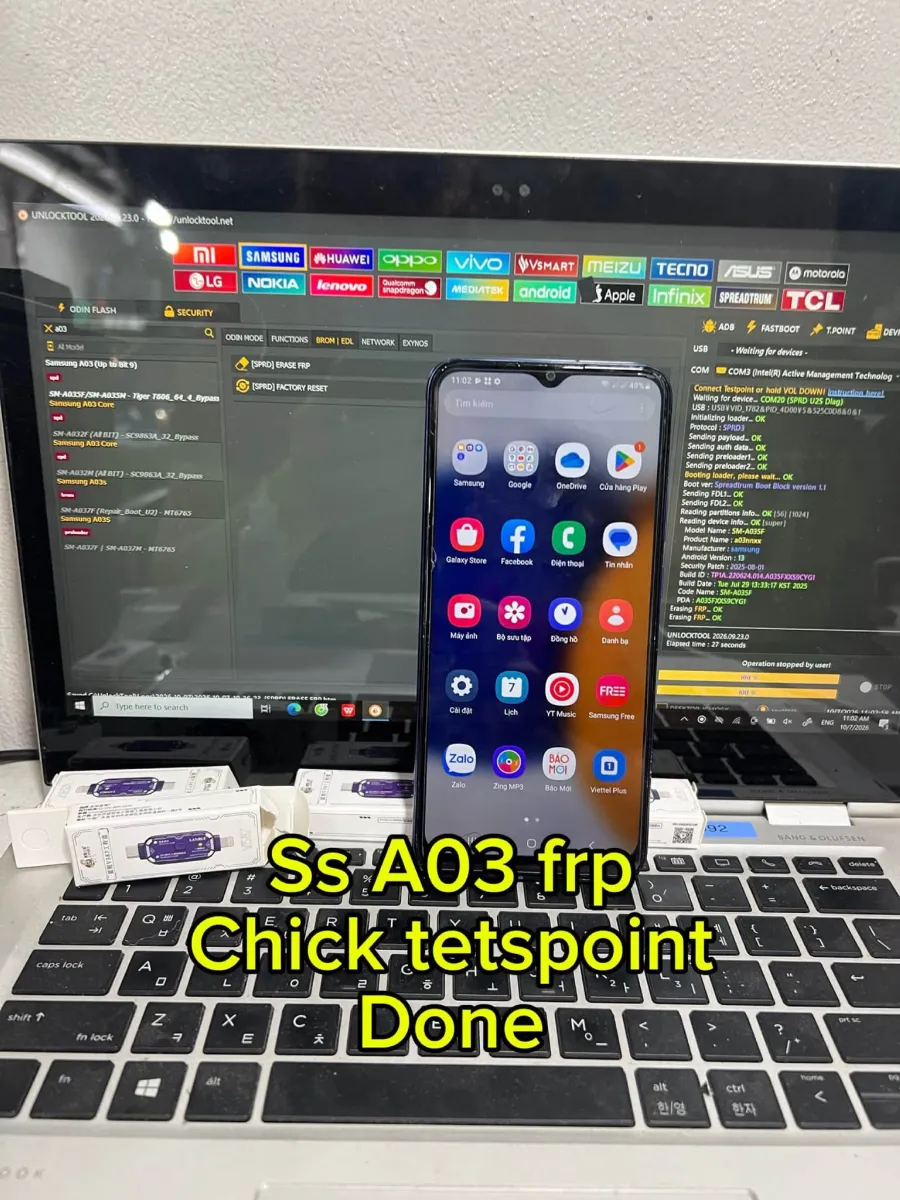
- 6. Unisoc Galaxy Models: Hardware Testpoint (Galaxy A03)
- 7. Exynos Alternative: Sigma Plus EUB Mode
- 8. What Errors Occur Most Often During Samsung FRP Removal?
- 9. How Much Does Renting UnlockTool for Samsung FRP Cost?
- 10. Frequently Asked Questions
1. What Triggers Samsung FRP Lock?
FRP (Factory Reset Protection) is Android's built-in anti-theft safeguard tied to the previously synced Google account. Whenever a phone is wiped through recovery keys without signing out inside Settings, Android blocks setup until the original Google credentials are entered.
Recent Samsung devices can also carry carrier or enterprise financing locks such as Knox Guard (KG) or MDM—which are separate from FRP and require dedicated tools like KG Killer.
2. How Do You Pick the Right UnlockTool Method by Chipset?
Enter the Samsung model code (e.g., SM-A166P) in UnlockTool's left search bar and inspect the tag beneath the model name (preloader, custom da, testpoint, or edl):
| Chipset Family | Tested Workshop Models | UnlockTool Tab | Execution Method |
|---|---|---|---|
| MediaTek | Galaxy A07 4G (MT6789), A16 5G (MT6835) | BROM | EDL | [PRELOADER] Factory Reset + FRP + exact Custom DA file |
| Exynos | Galaxy A12 (Exynos 850), A26 (Exynos 1380) | EXYNOS | [ODIN] Enable ADB → [ADB] Remove FRP |
| Unisoc / Spreadtrum | Galaxy A03 (SM-A035F) | BROM | EDL | [SPRD] Erase FRP via hardware testpoint |
| Snapdragon | EDL-tagged models (A42 5G, A90 5G, S10) | BROM | EDL | Boot EDL 9008 port and execute model FRP reset |
Not sure which SoC powers your unit? Read the chipset tag shown under the model name or check the Hardware / Platform line after reading info.
3. What Drivers & Tools Are Needed Before Removing Samsung FRP?
Preparing a clean Windows 10/11 (64-bit) PC, chipset-specific USB drivers, and a direct motherboard USB data cable prevents handshake dropouts and saves rental time. Install only the driver matching your phone's SoC so COM ports do not conflict during BROM, Odin, or SPD enumeration.
- OS: Windows 10 or Windows 11 (64-bit) with a folder exclusion configured in Windows Defender (see our UnlockTool setup guide).
- Clean Drivers: Install MediaTek VCOM driver for MTK models, official Samsung Android USB Driver for Exynos/Odin, or SPD driver for Unisoc—avoid stacking conflicting USB drivers.
- Direct USB Connection: Connect a short, reliable data cable directly to rear motherboard USB ports rather than unpowered hubs.
⏰ Smart Timer Tip: Rental duration starts the moment your account is delivered. Install USB drivers and confirm the device model before checking out on GSM24h.com.
4. MediaTek Galaxy Models: Preloader + Custom DA
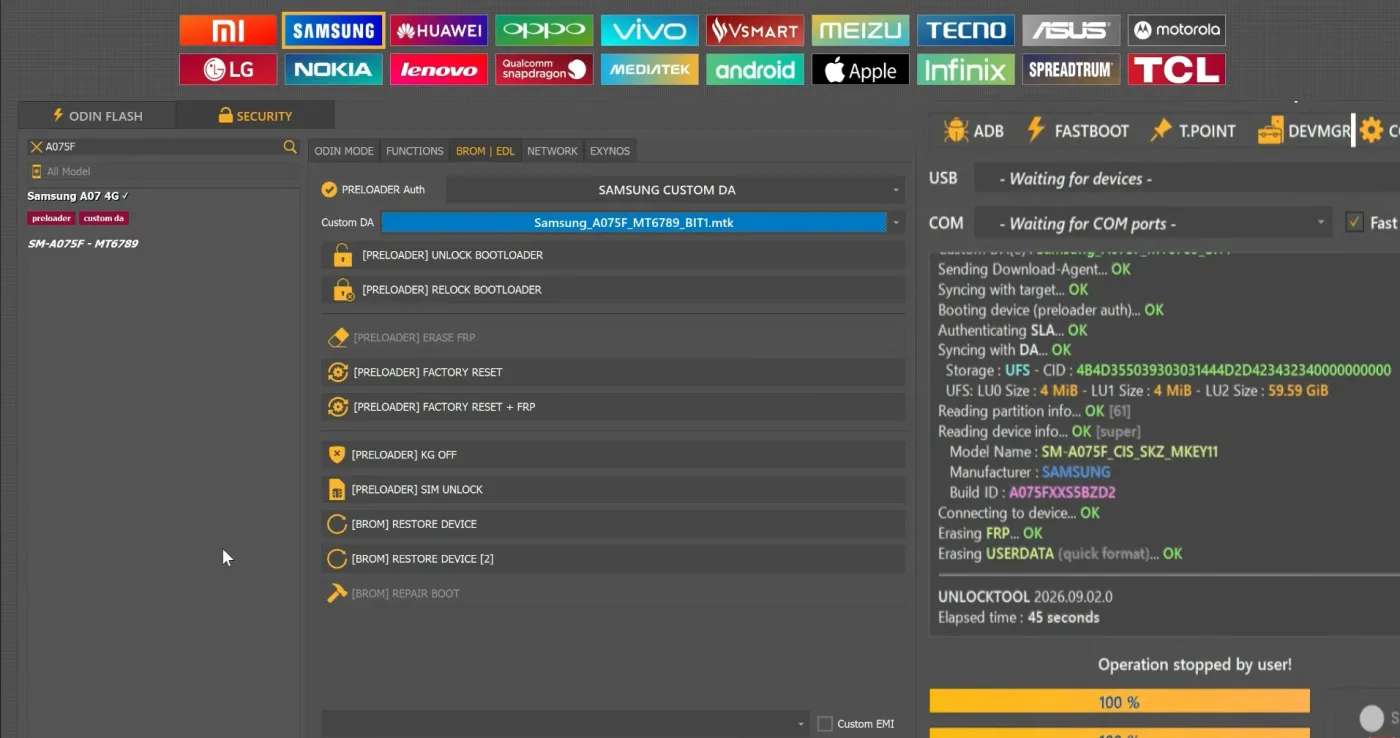
Newer MediaTek Galaxy A devices often block traditional button-combo BROM entry. UnlockTool handles them through Preloader Authentication paired with model-specific Custom DA loaders. Running [PRELOADER] Factory Reset + FRP wipes both FRP and user data cleanly.
- Navigate to Samsung → BROM | EDL and type the exact model code (e.g.,
A075F). - Set PRELOADER Auth to Samsung Custom DA and choose the exact DA matching your model and binary bit.
- Click
[PRELOADER] Factory Reset + FRP, power off the device completely, and plug in USB as prompted. - Confirm
Erasing FRP… OKandErasing USERDATA… OKin the log.
4.1. Galaxy A07 4G (SM-A075F, MT6789)
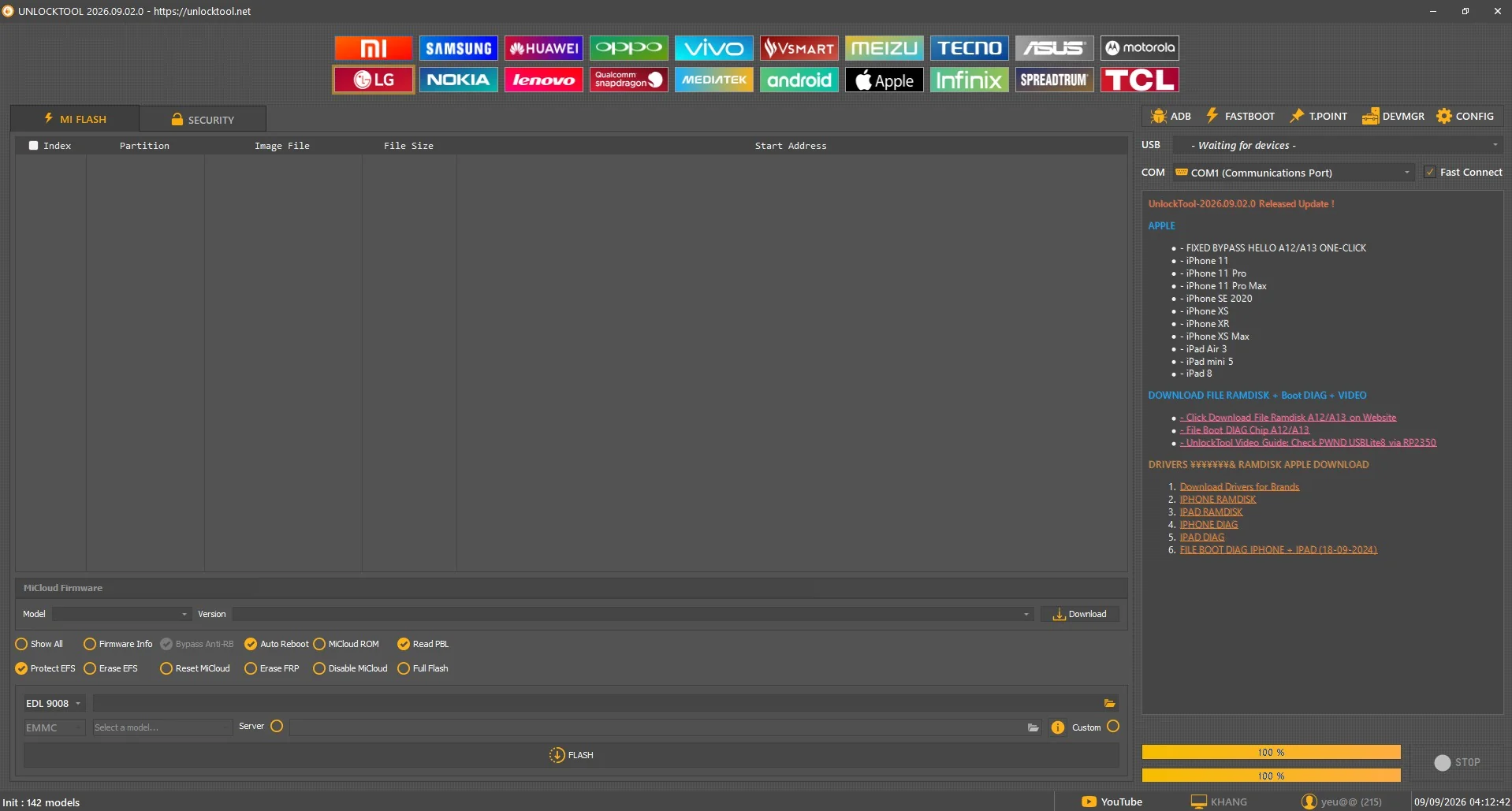
In the lead screenshot above, UnlockTool identified SM-A075F (build A075FXXS5BZD2, UFS storage). Because standalone [PRELOADER] Erase FRP was greyed out on this binary, running Factory Reset + FRP cleared the lock completely in 45 seconds on UnlockTool 2026.09.02.
4.2. Galaxy A16 5G (SM-A166P, Dimensity 6100+ / MT6835)
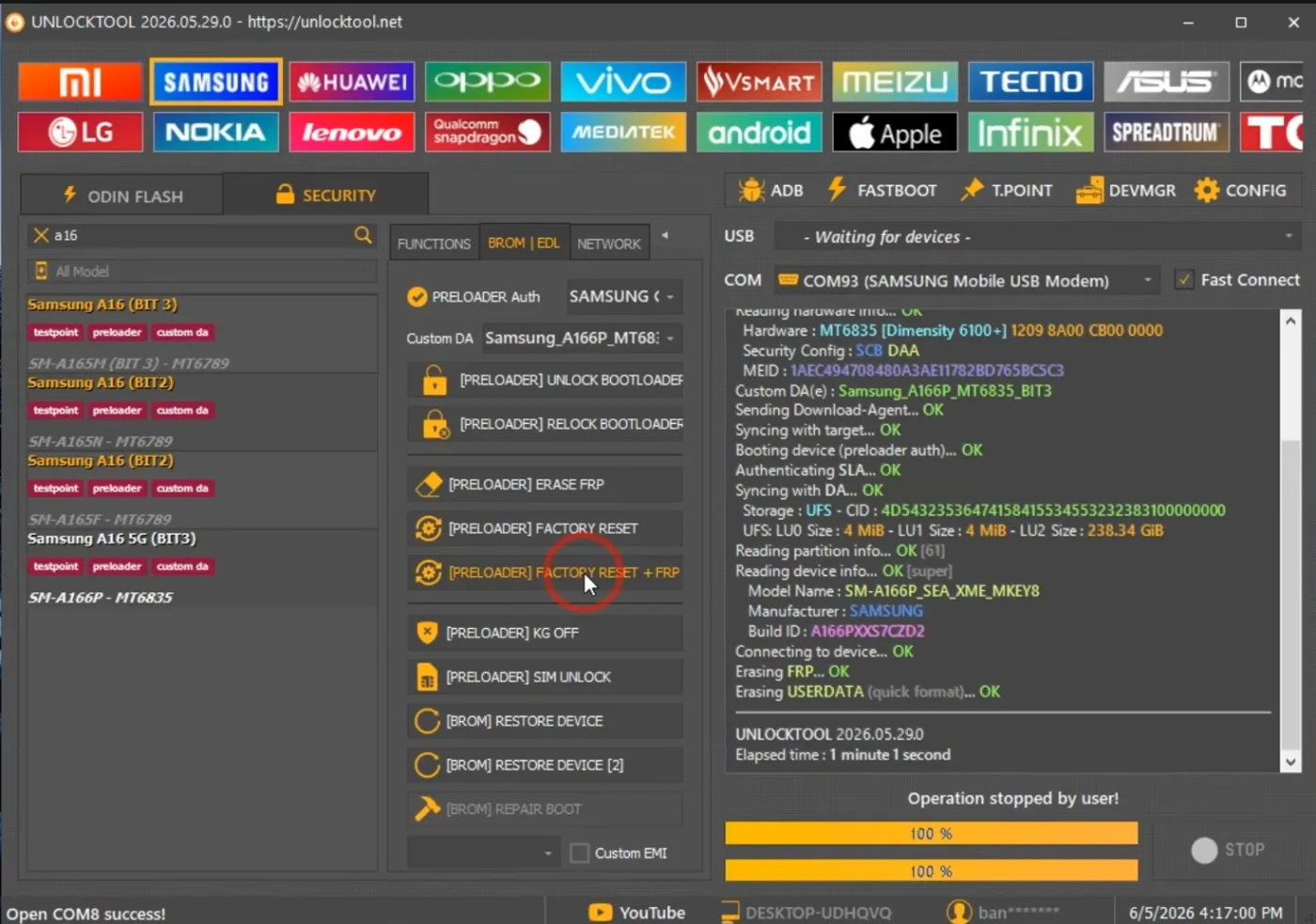
🔧 Bench Note: Galaxy A16 ships in multiple variants (A165F, A165M, A165N, A166P), each requiring its own Custom DA. On this SM-A166P unit (MT6835), selecting Samsung_A166P_MT6835_BIT3 completed the full job in 1 minute 1 second on UnlockTool 2026.05.29. Picking the wrong variant DA stalls handshake at connection.
5. Exynos Galaxy Models: Enable ADB & Remove FRP
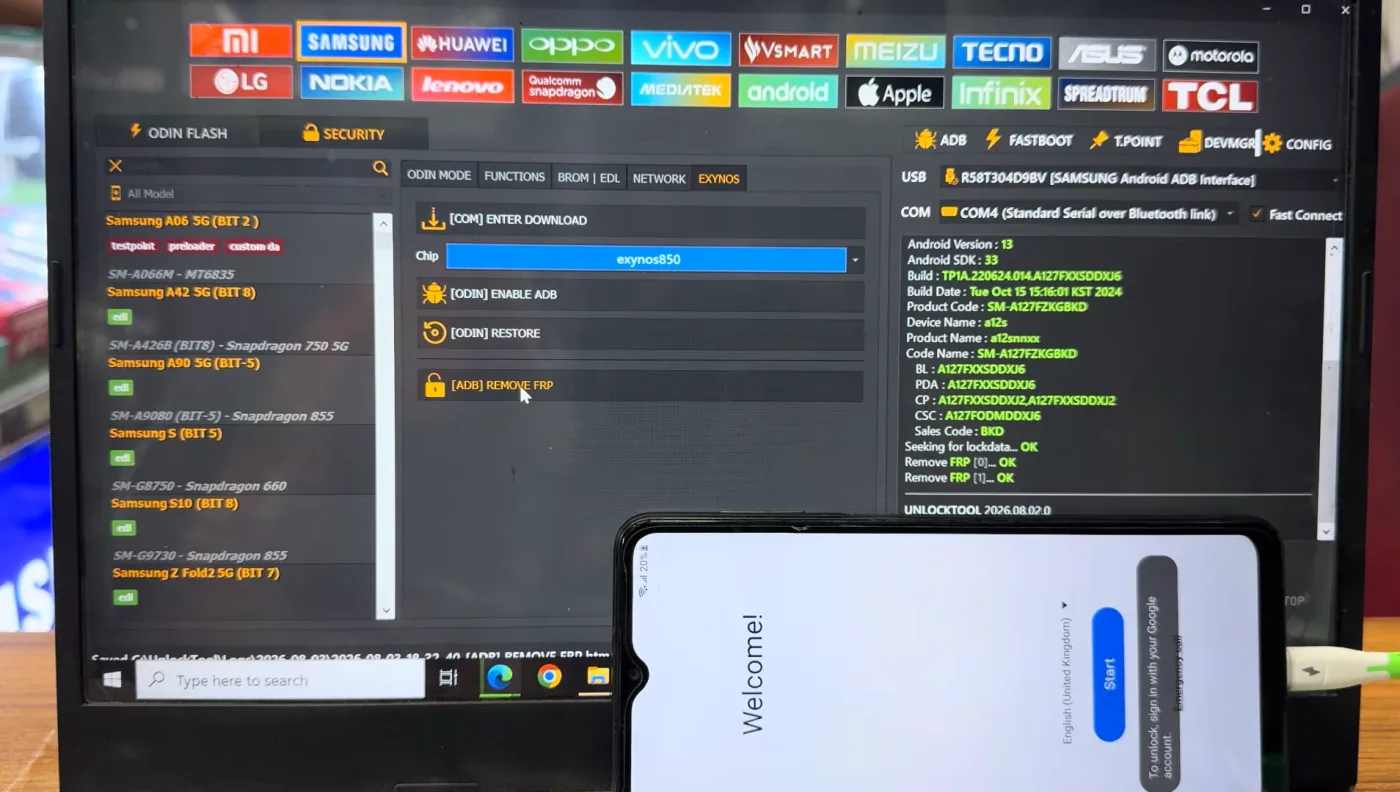
For Exynos handsets, UnlockTool strips FRP via ADB—meaning user data does not need to be wiped where ADB activation succeeds:
- Go to Samsung → EXYNOS and select the matching chipset (e.g.,
exynos850,exynos1380). - Keep the handset on the Welcome screen, connect USB, and click
[ODIN] Enable ADB(accept any RSA prompt on screen if displayed). - Once
SAMSUNG Android ADB Interfaceappears in the USB dropdown, click[ADB] Remove FRP. - Wait for
Remove FRP [0]… OKandRemove FRP [1]… OK, then reboot.
5.1. Galaxy A12 (SM-A127F, Exynos 850) — Android 13
5.2. Galaxy A26 (SM-A266B, Exynos 1380) — Android 16
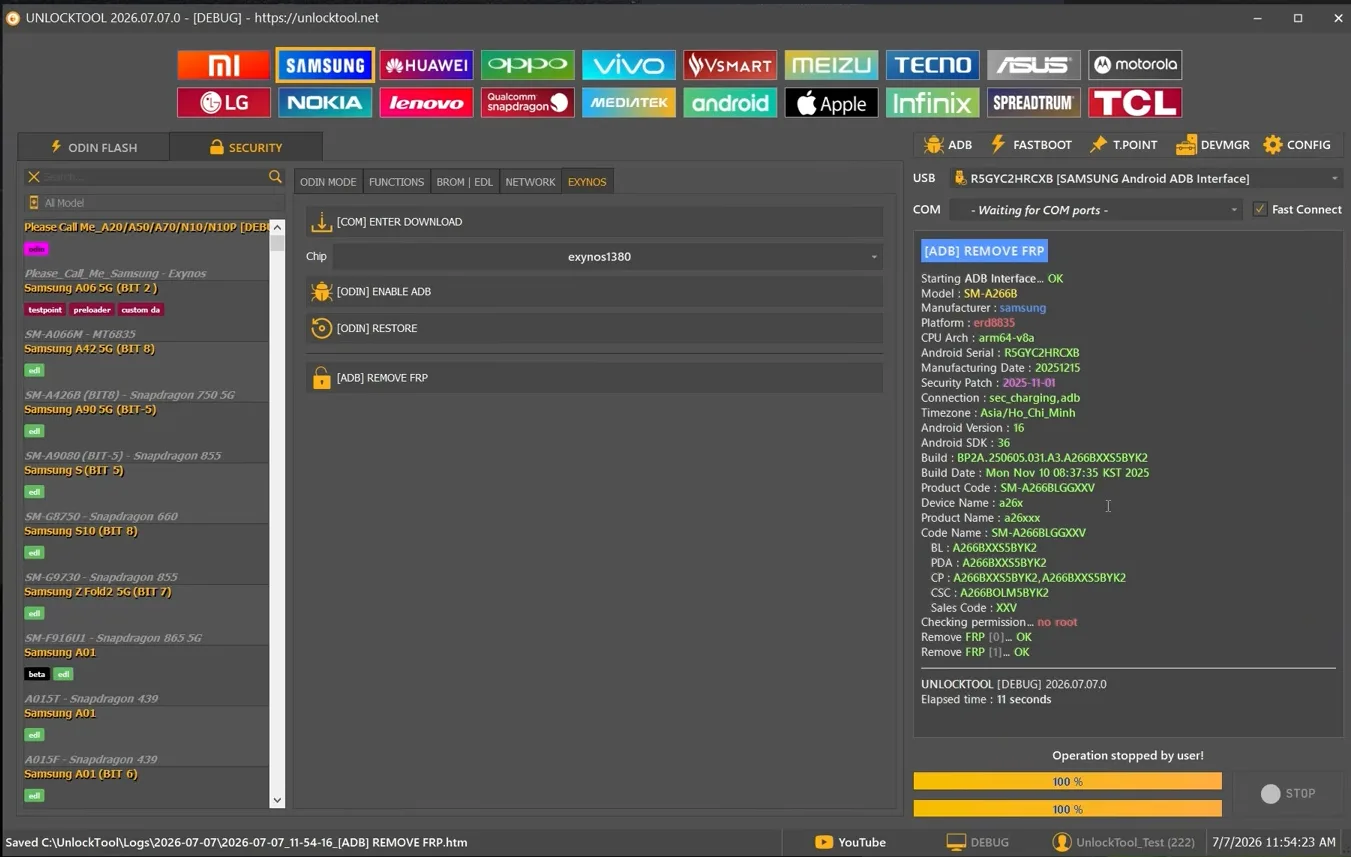
🔧 Real Android 16 Exynos Test (By Trần Kế Khang):
On our Galaxy A26 (SM-A266B, Exynos 1380) unit running Android 16 with the 01/11/2025 security patch (manufactured 12/2025), selecting exynos1380 enabled ADB without root and completed FRP removal in 11 seconds—showing why checking the exact chip dropdown matters before trying factory reset fallbacks.
6. Unisoc Galaxy Models: Hardware Testpoint (Galaxy A03)
Budget Unisoc models like the Galaxy A03 (SM-A035F) use BROM | EDL → [SPRD] Erase FRP. Short the hardware testpoint pins while connecting USB so Windows enumerates SPRD U2S Diag (requires SPD drivers, not Samsung drivers).
7. Exynos Alternative: Sigma Plus EUB Mode
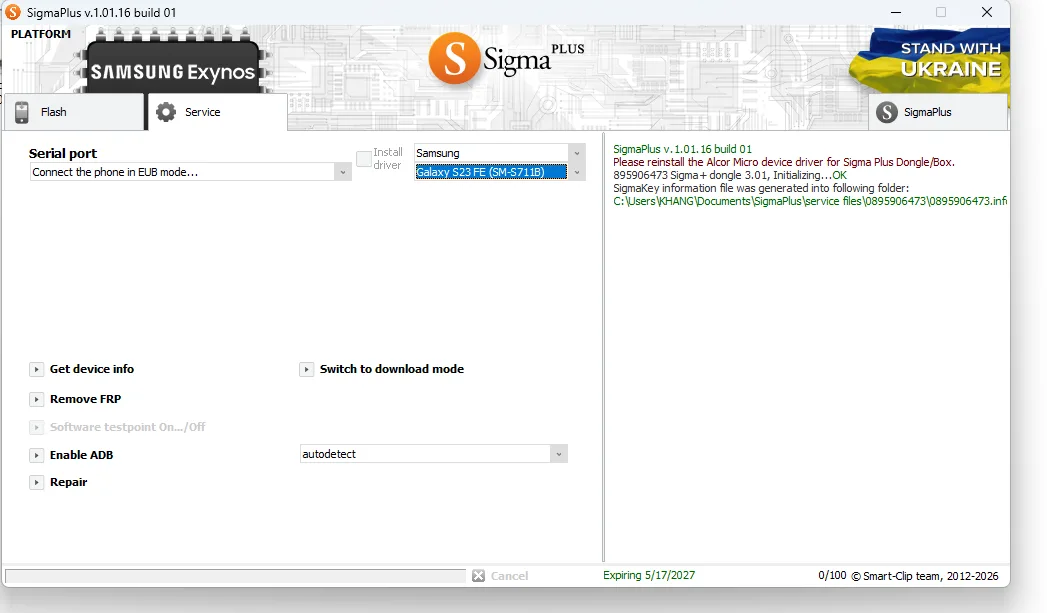
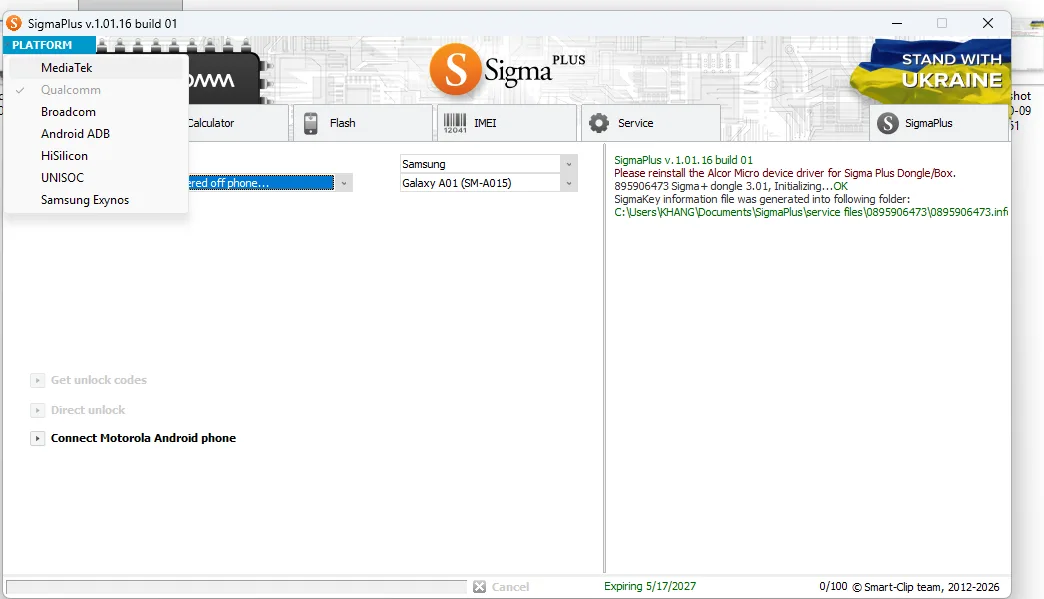
Whenever a patched Exynos handset refuses Odin ADB activation, Sigma Plus connects directly at the hardware EUB (Exynos USB Booting) layer. See our complete Sigma Plus Samsung Exynos guide for driver and Zadig instructions.
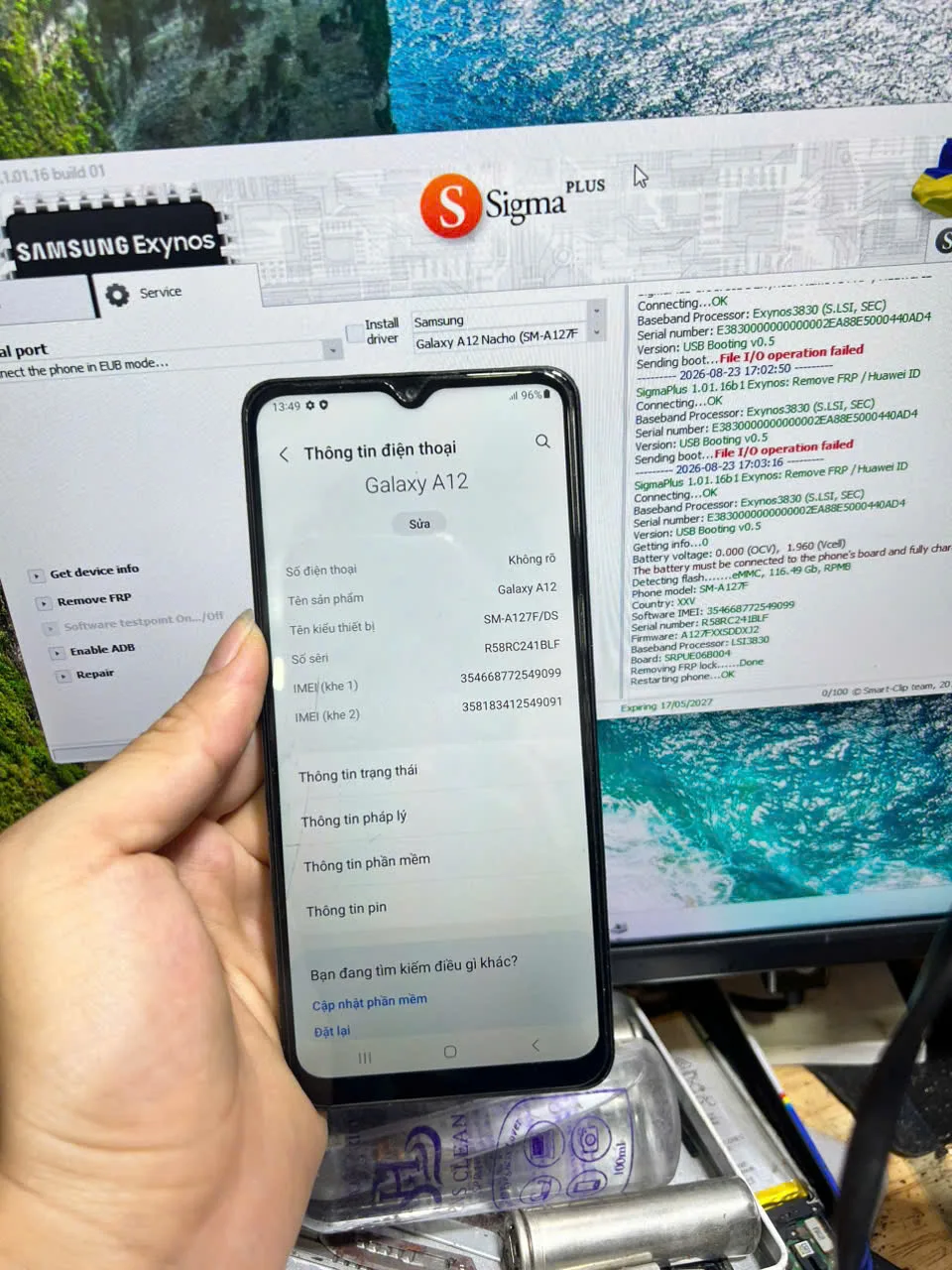
On Sigma Plus v1.01.16, the first two attempts logged Sending boot… File I/O operation failed—reconnecting cleanly on the third attempt finished Removing FRP lock… Done. Always retry a USB reconnect before giving up on EUB handshakes.
8. What Errors Occur Most Often During Samsung FRP Removal?
Most failed UnlockTool runs come from missing chipset drivers, selecting the wrong Custom DA variant binary, or encountering Knox Guard/MDM locks rather than standard Google FRP. Checking the model label and bit version first resolves most connection stalls quickly.
- Tool freezes on "Waiting for devices": Reinstall the chipset-specific USB driver, switch cables, and ensure MediaTek devices are powered completely off before plugging USB.
- "Erase FRP" button greyed out: Use
[PRELOADER] Factory Reset + FRP(as shown on Galaxy A07), understanding it formats userdata. - Wrong Custom DA or chipset selected: Verify the exact
SM-xxxxmodel and binary/bit on the back label or Download Mode screen—variants under the same retail name frequently use different SoCs. - Device still locked after FRP wipe: Check whether the prompt is Knox Guard / MDM rather than Google FRP; use a dedicated tool such as KG Killer.
9. How Much Does Renting UnlockTool for Samsung FRP Cost?
Instead of paying full subscription prices for occasional Samsung repairs, rent an automated UnlockTool pass from $0.30 on GSM24h.com with instant delivery:
| Package | Current price | Original price | Save |
|---|---|---|---|
| 6 hours | $0.30 | $0.35 | 14% |
| 12 hours | $0.42 | $0.49 | 14% |
| 1 day | $0.95 | $1.00 | 5% |
| 2 days | $1.20 | $1.30 | 8% |
| 3 days | $1.60 | $1.70 | 6% |
| 5 days | $2.00 | $2.10 | 5% |
| 7 days | $3.40 | $3.50 | 3% |
| 14 days | $3.90 | $4.00 | 3% |
| 30 days | $7.40 | — | — |
Updated November 2026 — listed price before coupon
10. Frequently Asked Questions
Does UnlockTool Samsung FRP removal wipe phone data?
It depends on the method. Exynos ADB removal preserves user data, whereas MediaTek Preloader Factory Reset + FRP formats userdata along with the FRP partition.
Does UnlockTool work on Samsung Android 16?
Yes on supported chipsets. In our bench test, Galaxy A26 (SM-A266B, Exynos 1380, Android 16, Nov 2025 patch) cleared FRP in 11 seconds without root.
How can I identify my Samsung phone's chipset?
Search the exact SM-xxxx code inside UnlockTool's search box to inspect the chipset tag beneath the model, or run Read Info to view the Platform/Hardware log.
Do I need Samsung USB drivers for a MediaTek Galaxy A model?
For Preloader mode, MediaTek VCOM drivers are mandatory. Samsung USB drivers are required for Odin, Download Mode, and ADB steps.
UnlockTool vs Sigma Plus: which is better for Samsung Exynos?
UnlockTool is more versatile across brands and MediaTek/Unisoc/Apple jobs, while Sigma Plus is a strong Exynos EUB backup when ADB activation is blocked.
What if the phone asks for Knox Guard after FRP is cleared?
Knox Guard is a separate enterprise/financing lock. You will need a dedicated KG tool such as KG Killer.
⚡ Need an UnlockTool account right now?
Start from $0.30 on GSM24h.com with instant automated account delivery after checkout.
🔑 Rent UnlockTool Now →
Written by: Trần Kế Khang
5 years of in-depth mobile & laptop hardware repair experience; founder of thuetaikhoan.com.vn, unlocktool.us, dienthoailaptop.vn, and gsm24h.com. Facebook · Profile & articles · About us

Cảm ơn ae ủng hộ
Thanks sếp