
Deciding between UnlockTool vs Chimera Tool is one of the most common budget choices for mobile repair technicians. Both tools dominate different halves of the GSM bench: UnlockTool leads on rapid, low-cost multi-brand FRP, Xiaomi/OPPO/Vivo, and Apple checkm8 Ramdisk (rentable from $0.30), while Chimera Tool leads on deep Samsung certificate/network servicing, Huawei unbricking, and LG recovery (available via assisted remote activation from $25.96 on GSM24h.com). All servicing workflows apply strictly to owner-authorized devices.
Table of Contents
What is the core difference between UnlockTool and Chimera Tool?
UnlockTool is built for high-speed daily turnarounds across budget and mid-range Android handsets plus legacy A7–A11 Apple devices at an entry-level hourly rental rate. Chimera Tool is an enterprise-grade servicing suite engineered for automated USB model detection, deep Samsung certificate/network repairs, Huawei oeminfo/unbrick routines, and LG legacy boards under stricter hardware-bound licensing.
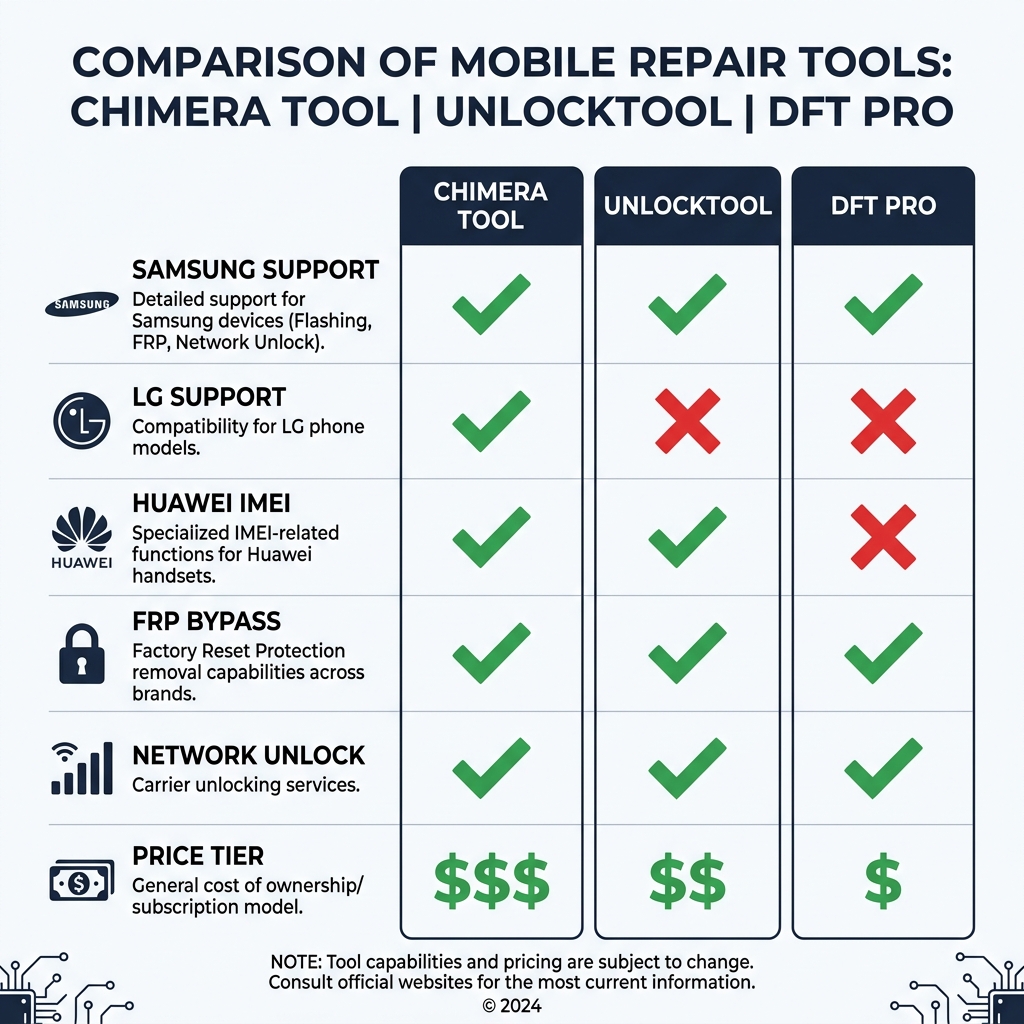
High-level capability and price-tier comparison across Chimera Tool, UnlockTool, and DFT Pro.
Where UnlockTool Wins: Xiaomi, OPPO, Vivo & Apple checkm8
For day-to-day walk-in repair counters, UnlockTool resolves the widest share of everyday customer tickets without needing server credits or remote scheduling:
- Xiaomi, Redmi & Poco: Fast MediaTek BROM/Preloader and Qualcomm EDL FRP & Mi Account resets (see our Xiaomi HyperOS Mi Account UnlockTool guide).
- OPPO, Realme & Vivo: Broad MTK/Qualcomm FRP and factory-reset coverage on popular Asian and global models.
- Apple A7–A11 Ramdisk & Hello: Built-in PWNDFU + Boot Ramdisk workflow for iPhone 5s through iPhone X (detailed in our UnlockTool Apple Ramdisk guide).
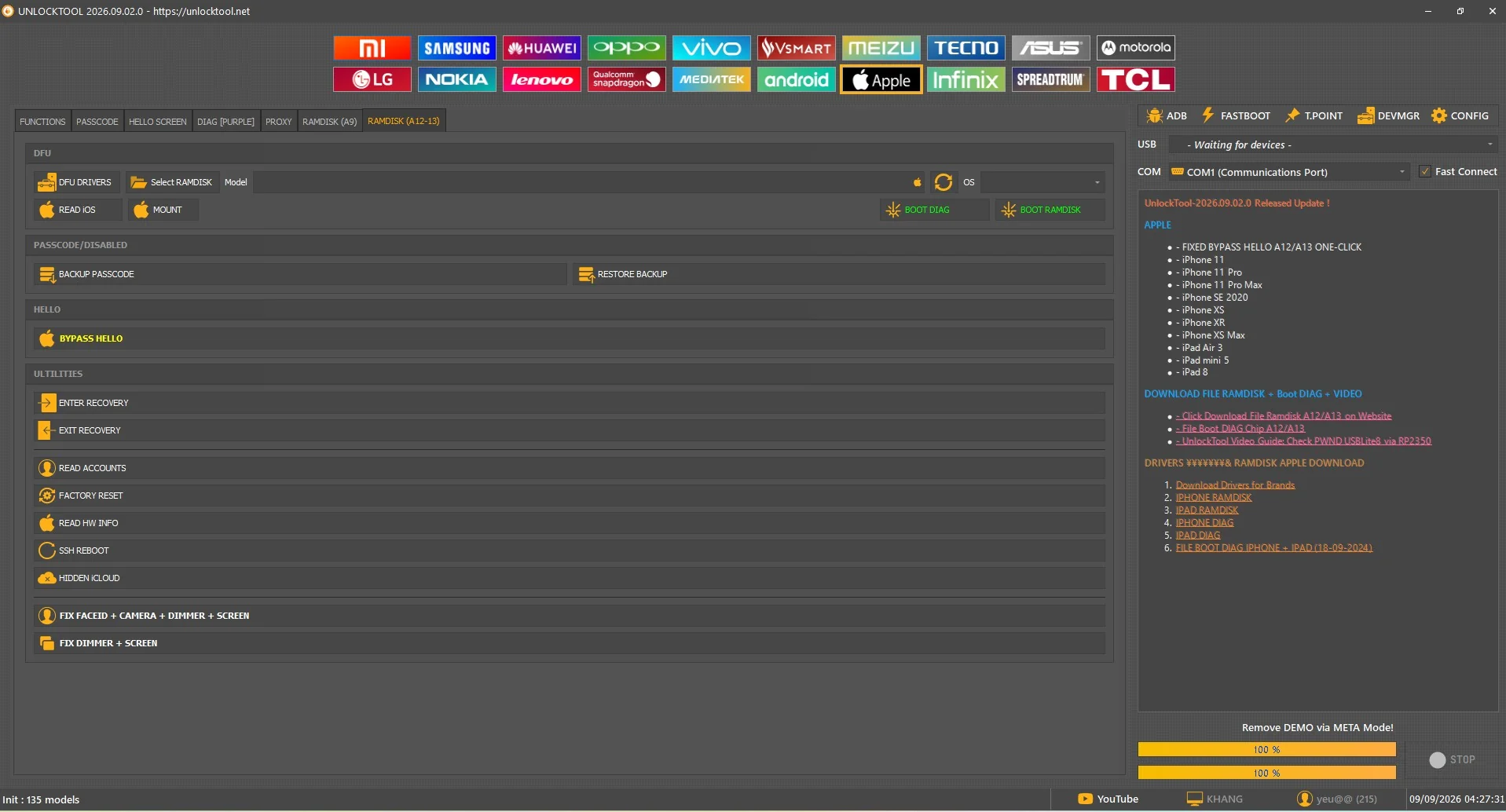
UnlockTool includes a full Apple checkm8 Ramdisk module that Chimera Tool does not target.
Where Chimera Tool Wins: Samsung Cert, Huawei & LG
When a device needs deeper baseband, certificate, or brand-specific recovery rather than a basic FRP wipe, Chimera Tool justifies its higher cost immediately:
- Samsung Network Unlock & Patch Cert: Automated model recognition, EFS/Cert backup and restore, carrier unlocking, and baseband recovery (always pair with the official Samsung Android USB Driver).
- Huawei & Honor Unbricking: Writing board firmware,
oeminfobackup/restore, SN/Vendor/Country edits, and bootloader repair. - LG Servicing: Dedicated LG firmware flashing, EFS backup, and LG Account / FRP servicing where UnlockTool has minimal focus.
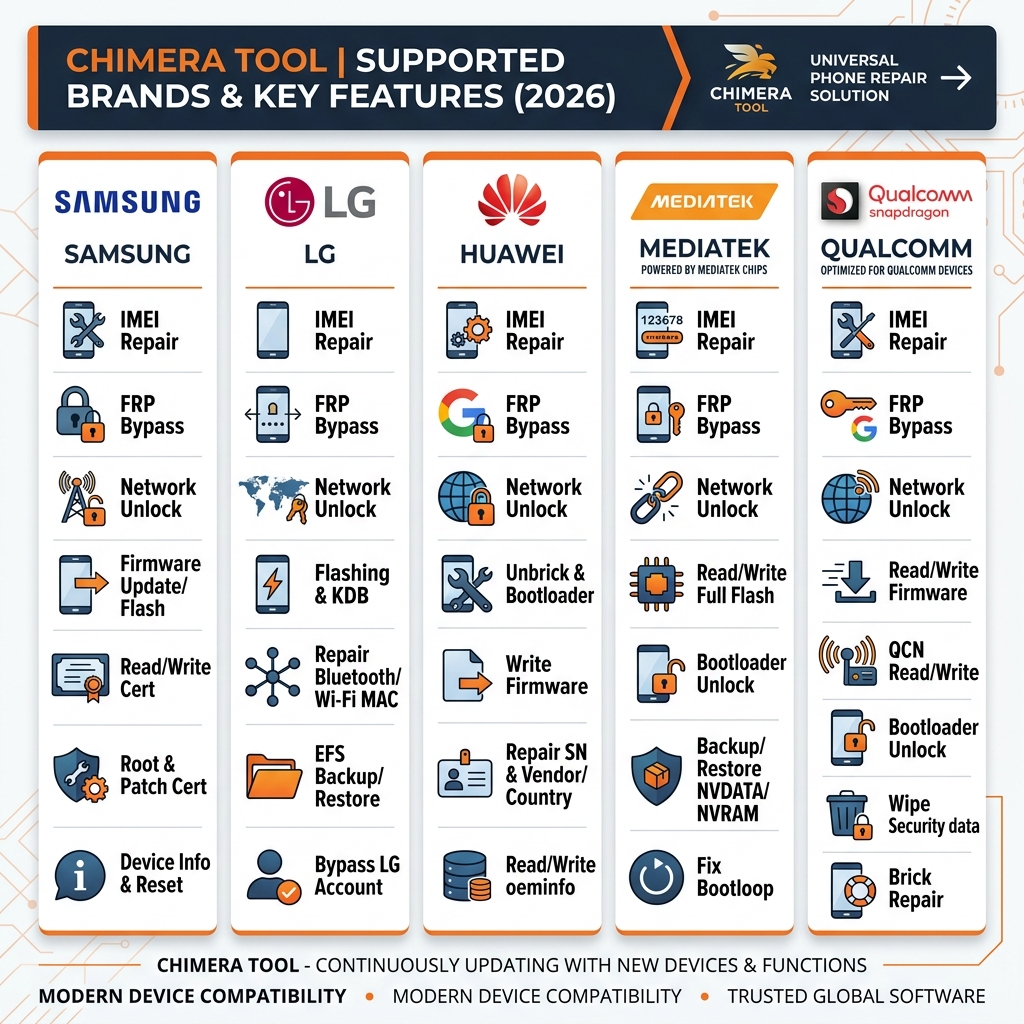
Chimera Tool brand matrix emphasizing deep Samsung, LG, and Huawei service functions alongside MTK/Qualcomm.
Real Bench Cost Discipline: Most repair shops do not need to pay for Chimera Tool just to reset Google FRP on a Galaxy A-series or Redmi Note. Renting UnlockTool from $0.30 clears routine Samsung MTK/Exynos/Qualcomm FRP tickets in minutes, reserving Chimera Tool's 2-day remote activation specifically for Patch Cert, carrier unlocks, Huawei dead-boot recovery, or multi-device Samsung batches.
Side-by-side comparison: UnlockTool vs Chimera Tool
Review every operational difference between UnlockTool and Chimera Tool before selecting your next GSM24h order:
| Criteria | UnlockTool | Chimera Tool |
|---|---|---|
| Strongest Brands | Xiaomi, OPPO, Vivo, Realme, Samsung FRP, Apple A7–A11 | Samsung (Cert/Unlock/Flash), Huawei, LG, MTK, Qualcomm |
| Apple iPhone Support | Yes (A7–A11 checkm8 Ramdisk & Hello) | No (Android-focused) |
| Official Licensing Model | Time-based cloud account (3m / 6m / 12m) | Annual tiers on chimeratool.com/en/shop: Basic (≤100/yr), Pro (≤1,500/yr), Premium |
| GSM24h Delivery Model | Automated instant credentials (~2s confirmation) | Assisted remote activation session |
| GSM24h Rental Starting At | $0.30 | $25.96 |
| Driver Setup Effort | Manual MTK / Qualcomm / Samsung / Apple drivers | Built-in automated driver installer via chimeratool.com/en/download |
How do UnlockTool and Chimera Tool costs compare on GSM24h?
UnlockTool and Chimera Tool occupy completely different pricing tiers on GSM24h.com, reflecting their official licensing structures and delivery models. UnlockTool delivers instant short-hour credentials from $0.30, while Chimera Tool provides assisted 2-day remote activation starting at $25.96 — compare both live USD tables below.
| Package | Current price | Original price | Save |
|---|---|---|---|
| 6 hours | $0.30 | $0.35 | 14% |
| 12 hours | $0.42 | $0.49 | 14% |
| 1 day | $0.95 | $1.00 | 5% |
| 2 days | $1.20 | $1.30 | 8% |
| 3 days | $1.60 | $1.70 | 6% |
| 5 days | $2.00 | $2.10 | 5% |
| 7 days | $3.40 | $3.50 | 3% |
| 14 days | $3.90 | $4.00 | 3% |
| 30 days | $7.40 | — | — |
Updated November 2026 — listed price before coupon
| Package | Current price | Original price | Save |
|---|---|---|---|
| 2 days | $25.96 | — | — |
Updated November 2026 — listed price before coupon
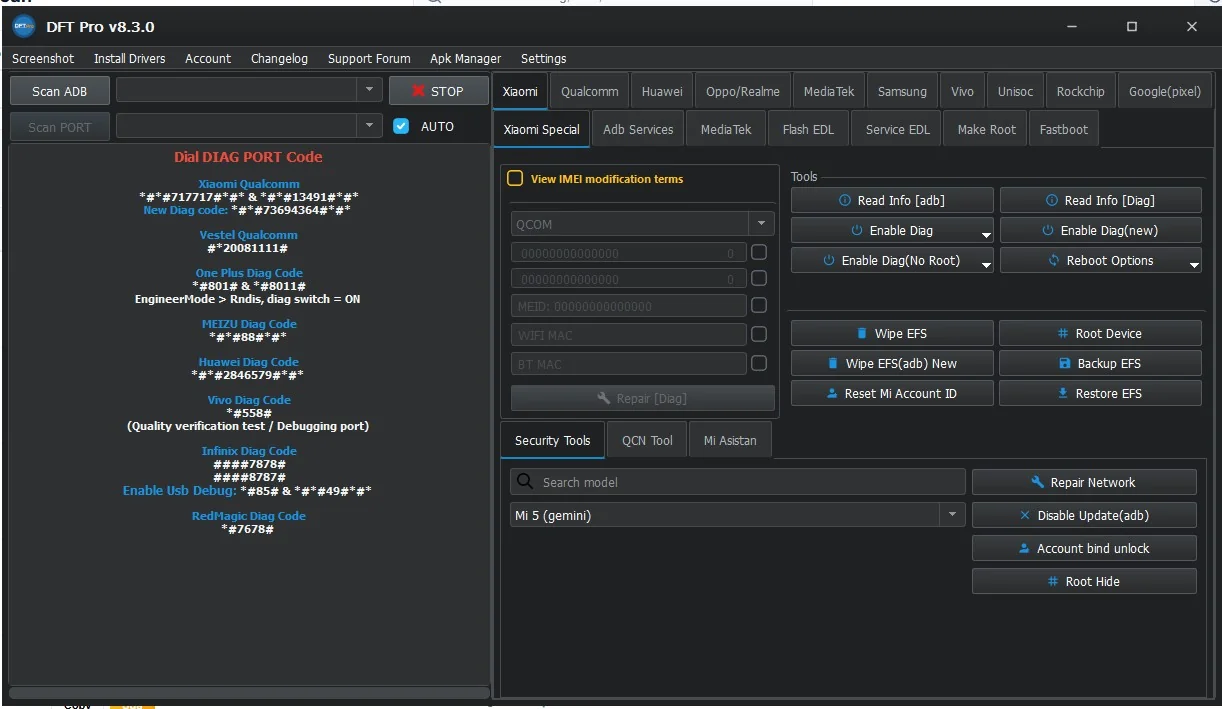
If your repair needs sit right between the two — for example Android 16 Samsung FRP, Knox Guard, or Xiaomi NV/CPID — consider specialized middle-tier alternatives such as Samsung Tool CellTool ($2.15), Octoplus Dongle ($2.60), Z3X Samsung Tool PRO ($4.50), or DFT Pro ($1.19).
Which tool should you rent for specific repair scenarios?
Picking the right software for the exact handset on your desk keeps turnaround fast and profit margins healthy. Use UnlockTool for everyday FRP, Mi Account, and checkm8 iPhones; book Chimera Tool when a Samsung Patch Cert, Huawei unbrick, or LG baseband job justifies a full 2-day remote activation window.
- Choose UnlockTool when: You have 1–5 routine FRP locks (Samsung, Xiaomi, OPPO, Vivo), a HyperOS Mi Account reset, or an iPhone 6s–iPhone X Ramdisk ticket. Check our complete UnlockTool guide and Samsung chipset FRP guide.
- Choose Chimera Tool when: You are repairing Samsung IMEI/certificates, unlocking carrier-locked Galaxy or LG devices, unbricking Huawei/Honor boards, or batching several high-value Samsung tickets inside a 48-hour window. Read our full Chimera Tool remote rental guide.
- Combine Both Without Buying Two Annual Licenses: Rent UnlockTool on demand for pennies per hour on daily walk-ins, and book Chimera Tool only on weeks when a high-margin Samsung/Huawei/LG job actually arrives.
Workshop Batching Strategy: When a technician knows a customer is dropping off a Samsung Patch Cert or Huawei dead-boot ticket, queueing 2–3 additional Samsung unlock/EFS jobs before scheduling Chimera Tool's 2-day remote activation spreads the $25.96 session cost cleanly across multiple paid tickets — beating the fixed cost of an annual Chimera Basic or Professional license for small shops.
Frequently Asked Questions
Which is cheaper to rent on GSM24h: UnlockTool or Chimera Tool?
UnlockTool is far cheaper for quick single-device jobs, starting from $0.30 with instant automated credentials. Chimera Tool starts from $25.96 for a 2-day assisted remote activation session tailored to deeper Samsung, Huawei, and LG repairs.
Can Chimera Tool bypass iPhone iCloud or Passcode like UnlockTool?
No. Chimera Tool focuses on Android brands (Samsung, LG, Huawei, MTK, Qualcomm). For iPhone A7–A11 Ramdisk use UnlockTool; for A12+ Hello or Passcode bypass use GSM24h's HFZ services on /bypass-icloud and /hfz-ramdisk.
Which tool is better for Samsung FRP bypass in 2026?
For standard Samsung FRP resets, UnlockTool (from $0.30) or Samsung Tool CellTool (from $2.15) usually offer the best cost per ticket. Choose Chimera Tool or Octoplus when the job also needs certificate patching, carrier unlock, or deep baseband recovery.
Does Chimera Tool include automatic USB driver installation?
Yes. Chimera Tool's official Windows installer from chimeratool.com/en/download bundles automated vendor driver installation, whereas UnlockTool typically requires installing Samsung, MTK, Qualcomm, and Apple drivers manually.
Are server credits included when renting UnlockTool or Chimera Tool?
UnlockTool's standard FRP, Mi Account, and Apple checkm8 features run credit-free on standard rentals. Chimera Tool covers license-included operations during your remote session, while credit-billed carrier/server tasks require separate Chimera Credits.
Should a small repair shop buy annual licenses or rent on demand?
Small shops with mixed walk-in volume usually save significantly by renting UnlockTool per shift and booking Chimera Tool remotely only when high-margin Samsung, Huawei, or LG jobs require it.
Pick Your Tool and Start Servicing Today
Rent UnlockTool instantly from $0.30 or book Chimera Tool remote activation from $25.96 on GSM24h.com.
Rent UnlockTool →
Written by: Thanh Tài
6 years of GSM & IT background; specializes in mobile and laptop software, firmware flashing, iCloud, Xiaomi, Samsung, and OPPO unlocking. Facebook · Profile & articles · About us
No comments yet. Be the first to share your thoughts!