
Learning how to Backup EFS Samsung partitions before running any firmware flash, boot repair, or authorized unlock is the single most valuable habit in GSM servicing. Inside every Galaxy phone, the encrypted EFS and NV storage blocks hold the factory IMEI, Wi-Fi and Bluetooth MAC addresses, cellular RF calibration, and modem security certificates. Losing them triggers Null IMEI, Unknown Baseband, and Emergency Calls Only — failures that take hours to diagnose if you never saved a clean backup first using Z3X Samsung Tool PRO ($4.50), Chimera Tool ($25.96), Samsung Tool CellTool ($2.15), or UnlockTool ($0.30). All EFS and IMEI restoration procedures apply strictly to restoring original factory data on owner-authorized devices.
Table of Contents
- What is the Samsung EFS partition and why is it critical?
- When must technicians back up EFS and NV data?
- How do you back up Samsung EFS cleanly by chipset and tool?
- How do you restore a Samsung EFS backup safely without bootloops?
- Which GSM tool should you rent for Samsung EFS backup and restore?
- Frequently Asked Questions
What is the Samsung EFS partition and why is it critical?
The Samsung EFS (Encrypting File System) partition — alongside companion radio partitions such as SEC_EFS, modemst1, modemst2, fsg, and nvdata — stores device-unique cellular identity and RF calibration files tied to the phone's hardware CPU ID. Unlike Android system or vendor partitions, EFS cannot simply be downloaded from a public stock ROM.
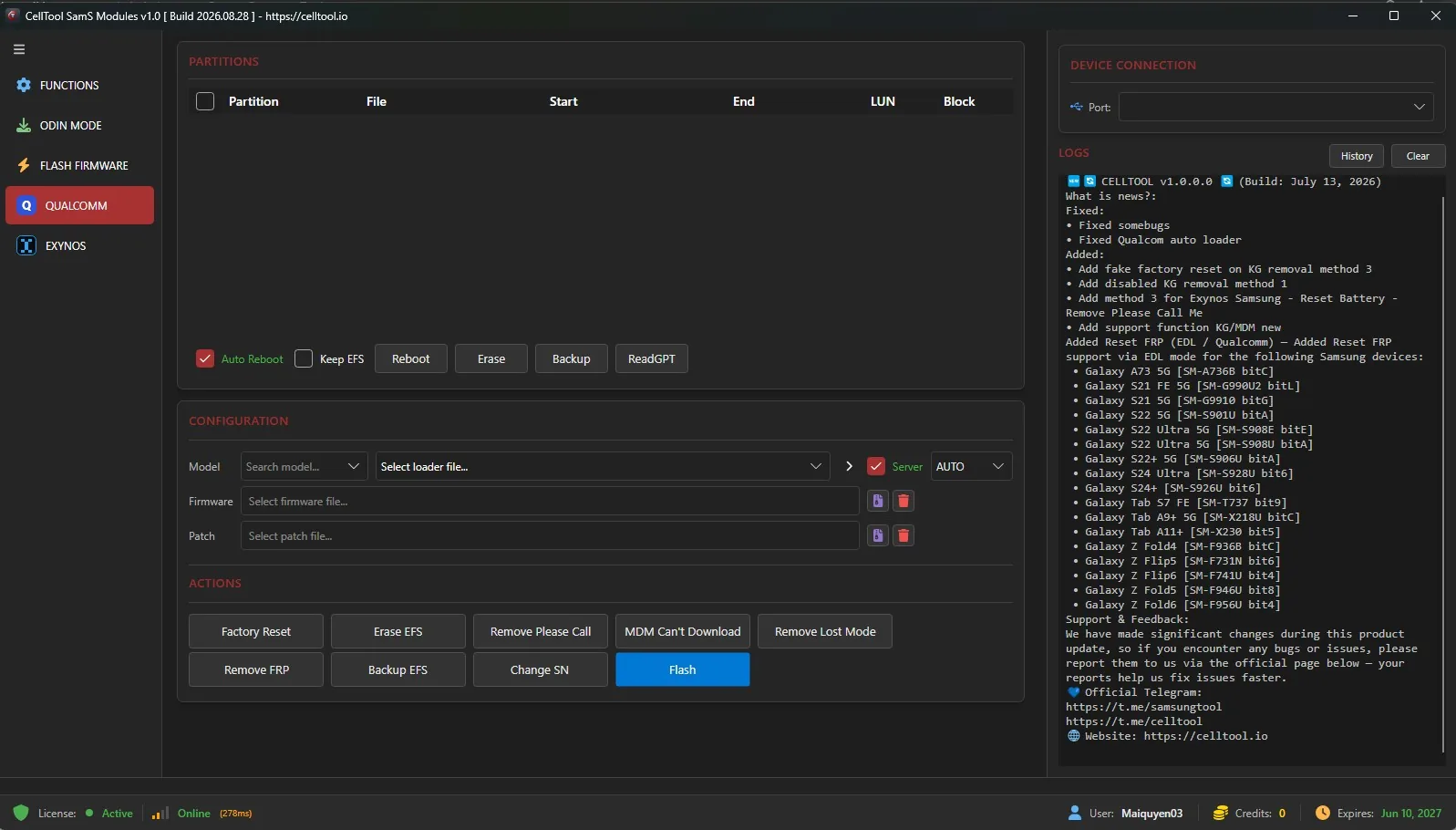
Samsung Tool CellTool Qualcomm EDL module showing dedicated Keep EFS, Backup EFS, and ReadGPT safeguards prior to servicing.
Under the Android partition architecture, stock firmware packages (BL, AP, CP, CSC) intentionally skip overwriting unique factory calibration data during normal upgrades. However, power loss during a baseband flash, mismatched binary downgrade, corrupted NAND/UFS blocks, or an accidental Erase EFS click can wipe these partitions instantly — leaving the phone showing IMEI 000000000000000 or Unknown Baseband.
| Samsung Chipset | Key Radio / Identity Partitions | Common Backup Formats | Risk If Corrupted |
|---|---|---|---|
| Exynos | EFS, SEC_EFS, CPEFS, RADIO | .tar / .img / Chimera & Z3X EFS archive | Null IMEI, Unknown Baseband, NG network status |
| Qualcomm Snapdragon | efs, modemst1, modemst2, fsg, fsc, persist | Raw partition dump + .QCN RF calibration file | No SIM / No Service, blank IMEI, broken Wi-Fi/sensors |
| MediaTek (Helio / Dimensity) | efs, sec_efs, nvram, nvdata, nvcfg, protect1/2 | Raw BROM scatter/partition dump | Invalid IMEI, NVRAM warning, bootloop on modem init |
When must technicians back up EFS and NV data?
Always pull a verified EFS and NV backup before performing any invasive software operation: flashing combination or regional CSC firmware, repairing dead-boot UFS/eMMC storage, performing an authorized carrier or Knox Guard service, or troubleshooting intermittent baseband drops on an aging board.
- Before switching firmware region or binary: Even when flashing official 4-file Samsung firmware in Download Mode, a sudden USB disconnect mid-CP write can corrupt modem handshake structures.
- Before Qualcomm EDL or MediaTek BROM repairs: Hardware bootrom tools have raw block-write access to every partition in the GPT table — one misconfigured checkbox can wipe modemst1/2.
- Before board-level hardware swaps: When transferring a UFS chip or diagnosing a baseband PMIC fault, an untouched EFS archive confirms whether the original software calibration was intact before soldering began.
Critical Rule — Never Share Another Device's EFS Backup: Modern Samsung EFS and SEC_EFS partitions are cryptographically signed to the specific motherboard's SoC hardware key. Writing an EFS dump taken from a different Galaxy phone of the same model will NOT fix IMEI — it triggers certificate mismatch, DRK errors, or a permanent baseband lock. Always label backups by Model + Serial/Last 4 IMEI + Binary Revision + Date.
How do you back up Samsung EFS cleanly by chipset and tool?
The cleanest EFS backup method depends on your Galaxy SoC and whether the phone boots normally or only connects in bootrom mode. Install the official Samsung Android USB Driver first so Windows enumerates Modem, ADB, Download, or EDL ports reliably.
Qualcomm Galaxy: Backing Up EFS, modemst1/2, FSG & QCN
On Qualcomm Snapdragon Galaxy phones, connect in EDL 9008 (via Samsung Test Point or authorized EDL cable) to dump raw efs, modemst1, modemst2, fsg, fsc, and persist partitions directly to your PC. When the phone still boots with Diagnostic Port enabled, also export a .QCN file for complete RF NV calibration safety.
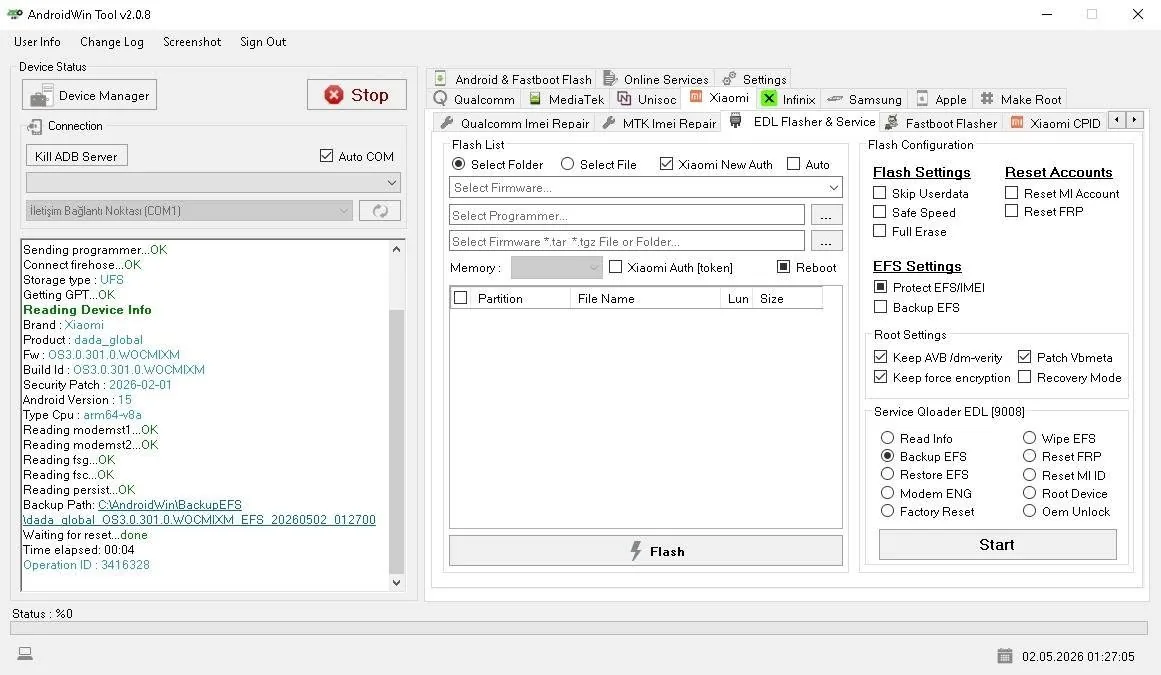
Example Qualcomm EDL 9008 backup log automatically archiving modemst1, modemst2, fsg, fsc, and persist before any write operation.
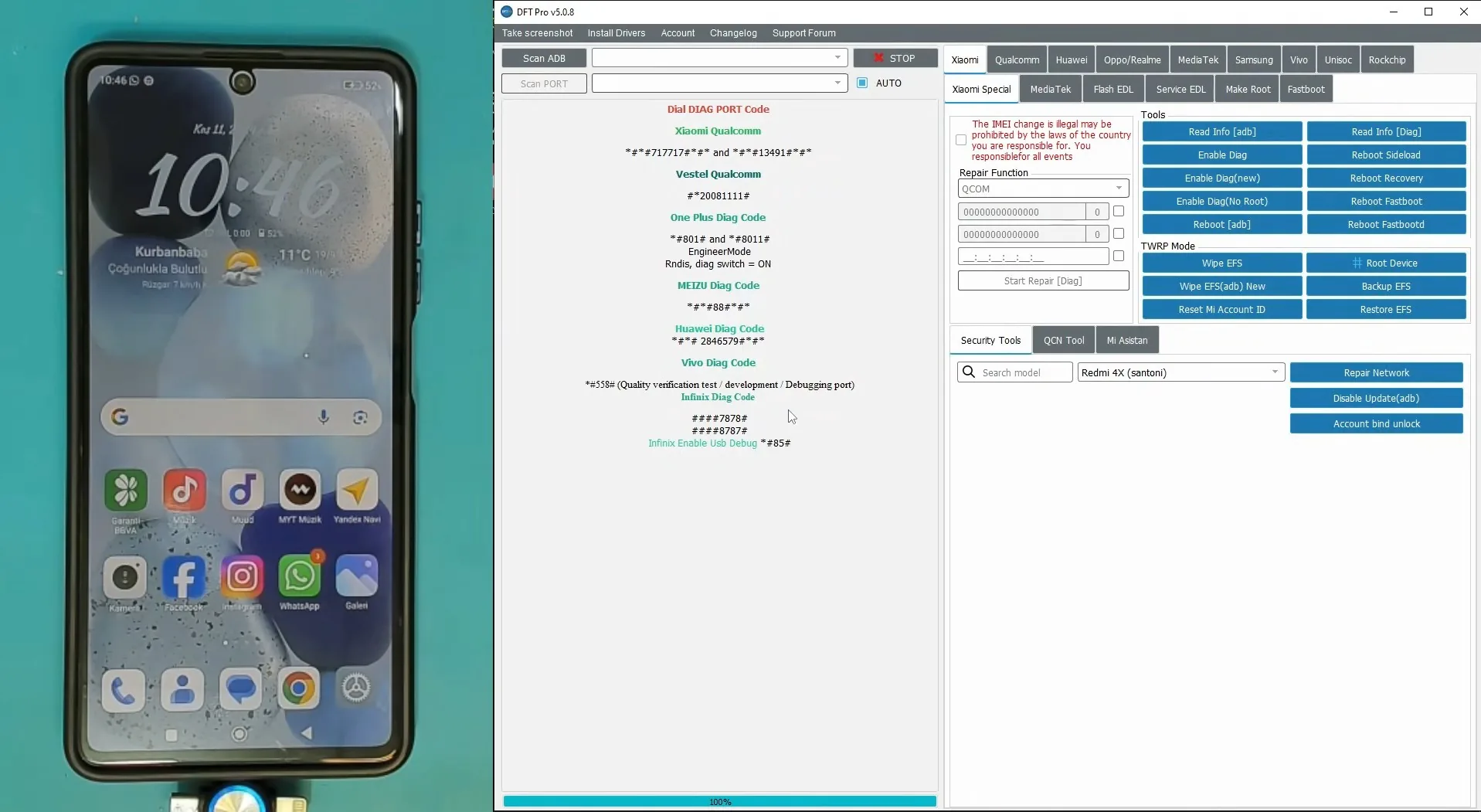
DFT Pro QCN utility — saving a QCN snapshot alongside raw modemst partitions gives full protection on Qualcomm Snapdragon boards.
Exynos & MediaTek Galaxy: Z3X, Chimera & Octoplus Backups
For Exynos Galaxy models, professional Samsung suites like Z3X Samsung Tool PRO and Chimera Tool provide one-click Read EFS and Read Cert/NV functions via ADB, Download Mode, or Exynos EUB. Similarly, Octoplus automatically archives partition/PIT .dump files into its local backup directory prior to critical resets — always verify that backup file size is non-zero before continuing.
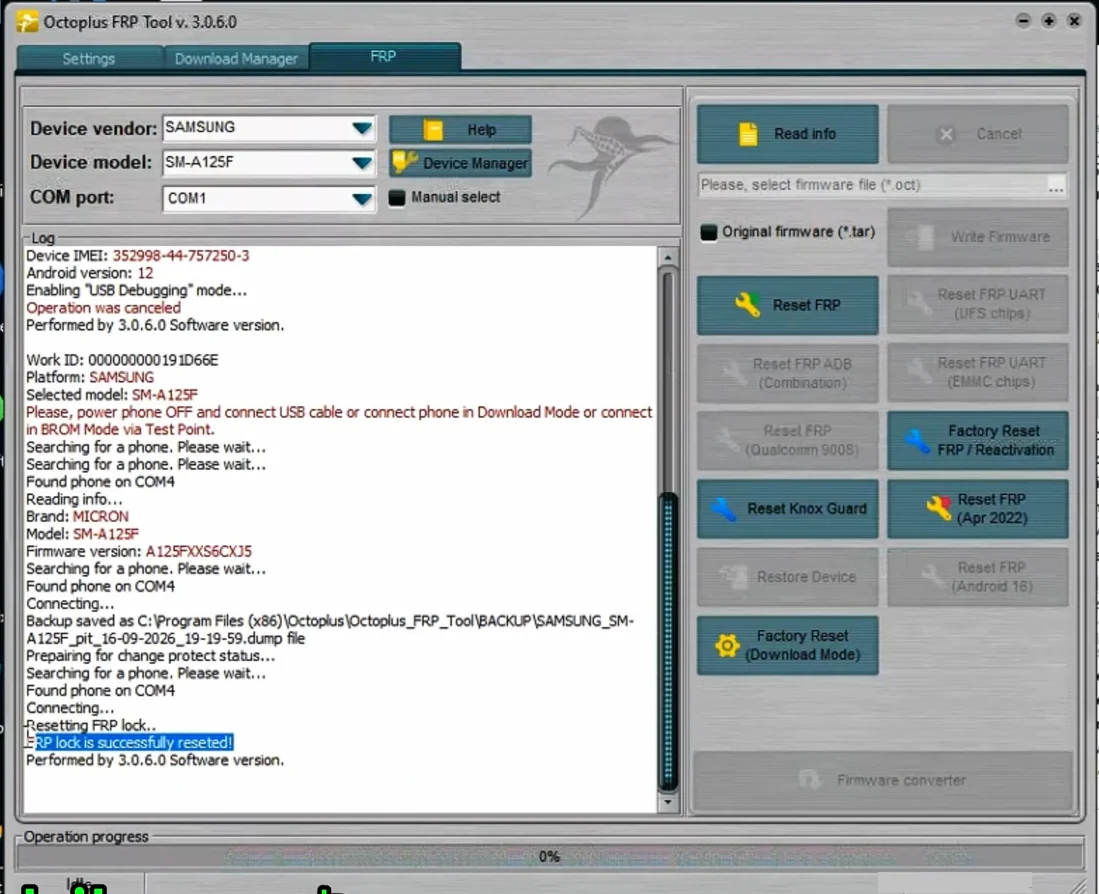
Octoplus automatic backup workflow saving a timestamped partition dump cleanly before modifying the device.
How do you restore a Samsung EFS backup safely without bootloops?
To restore a Samsung EFS backup cleanly, first verify that the phone is running the exact same Android binary (BIT) and matching stock CP modem firmware as when the backup was created, confirm battery charge above 40%, write the original device-matched EFS/NV archive via Z3X, Chimera, CellTool, or UnlockTool, and reboot to check *#06# and Baseband Version.
- Confirm matching stock firmware & BIT version: If Baseband Version shows Unknown because the CP modem image was corrupted, flash the exact matching 4-file stock ROM (same model + same or higher binary BIT) first so the modem partition mounts cleanly.
- Verify hardware vs software fault: Dial *#06# and inspect Settings → About Phone → Software Information. If Baseband remains Unknown even after a clean stock flash, inspect the baseband power rails and RF transceiver hardware before repeatedly writing EFS.
- Write only the original device's backup: Load your labeled EFS / NV / modemst archive inside the same tool family that created it (Z3X for Z3X EFS archives, Chimera for Chimera backups, or EDL raw partition writer for raw .img dumps).
- Verify cellular registration & Wi-Fi MAC: After reboot, confirm original factory IMEI displays cleanly under *#06#, Baseband Version matches the CP build, and a valid SIM card registers on 4G/5G without dropping signal.
Which GSM tool should you rent for Samsung EFS backup and restore?
Match your rented Samsung tool directly to the phone's chipset so you only pay pennies per bench shift instead of maintaining multiple annual smartcard boxes: choose Z3X Samsung Tool PRO or Chimera Tool for Exynos EFS and NV archives, Samsung Tool CellTool for Qualcomm EDL Keep EFS workflows, and UnlockTool for MediaTek NVRAM/NVDATA backups.
| Tool | Best Samsung EFS / NV Use Case | Connection Mode | GSM24h Rental |
|---|---|---|---|
| Z3X Samsung Tool PRO | Classic Exynos & Qualcomm Read/Write EFS, NV, Cert | Download / ADB / Remote UltraViewer | From $4.50 |
| Chimera Tool | Auto-backup EFS, Exynos EUB, deep Samsung modem & boot repair | ADB / Download / EUB (Remote) | From $25.96 |
| Samsung Tool CellTool | Qualcomm EDL 9008 Keep EFS, Backup EFS, ReadGPT | Qualcomm EDL 9008 | From $2.15 |
| UnlockTool | MediaTek NVRAM/NVDATA & Qualcomm EDL partition backup/restore | BROM / EDL 9008 / Download | From $0.30 |
| Package | Current price | Original price | Save |
|---|---|---|---|
| 1 hour | $4.50 | — | — |
Updated November 2026 — listed price before coupon
Backup Hygiene Checklist: Store every client EFS/NV archive in a dated folder on a dedicated drive (or encrypted shop NAS) for at least 30 days after job delivery. If a customer returns after an accidental OTA failure, having their original signed EFS/NV backup turns an impossible repair into a 3-minute restore.
Frequently Asked Questions
What happens if I lose or wipe the Samsung EFS partition without a backup?
Without a valid EFS/NV partition, the Galaxy device typically displays Null IMEI (or 000000000000000), Unknown Baseband, Emergency Calls Only, and sometimes blank Wi-Fi or Bluetooth MAC addresses.
Can I restore an EFS backup taken from another identical Samsung model?
No. Modern Samsung EFS and SEC_EFS partitions are cryptographically bound to each motherboard's unique hardware ID. Flashing another phone's EFS causes certificate mismatch and will not restore valid cellular service.
Does standard 4-file Samsung Odin flashing erase the EFS partition?
Normal Odin flashing (BL, AP, CP, CSC) does not intentionally wipe EFS. However, power loss during flashing, corrupted UFS blocks, or checking advanced repartition/erase flags can damage EFS — which is why backing it up beforehand is best practice.
Which partitions should I back up on Qualcomm vs MediaTek Samsung phones?
On Qualcomm Snapdragon Galaxy boards, back up efs, modemst1, modemst2, fsg, fsc, persist, and a QCN file if booted. On MediaTek Galaxy boards, back up efs, sec_efs, nvram, nvdata, nvcfg, protect1, and protect2.
Can I back up Samsung EFS without rooting the phone?
Yes. Hardware bootrom modes (Qualcomm EDL 9008, MediaTek BROM, Exynos EUB) and authorized service tools such as Samsung Tool CellTool, Chimera Tool, Z3X, and UnlockTool read EFS and NV partitions without requiring root.
Why is Baseband still Unknown even after restoring my original EFS backup?
If Baseband Version stays Unknown after restoring a verified original EFS dump and flashing matching stock CP firmware, the fault is usually hardware-level (damaged baseband PMIC, cold solder joints under the RF transceiver, or failing UFS storage).

Written by: Thanh Tài
6 years of GSM & IT background; specializes in mobile and laptop software, firmware flashing, iCloud, Xiaomi, Samsung, and OPPO unlocking. Facebook · Profile & articles · About us



No comments yet. Be the first to share your thoughts!