
Using a Samsung Test Point is the hardware fallback technicians rely on when a Galaxy smartphone will not enter Download Mode, is soft-bricked with a blank screen, or requires direct bootrom access for authorized FRP and firmware recovery. Unlike generic lists that lump every Galaxy phone under Qualcomm EDL 9008, this complete reference organizes all 45 visually verified Samsung motherboard diagrams by their exact silicon architecture — Qualcomm EDL 9008, MediaTek BROM, Unisoc SPD, Exynos EUB, and direct eMMC/UFS ISP pinouts — paired with live rental tools such as UnlockTool ($0.30) or Samsung Tool CellTool ($2.15). Perform hardware test-point servicing strictly on owner-authorized devices.
Table of Contents
- What is a Samsung Test Point and how does it work by chipset?
- What tools and USB drivers do you need before shorting a test point?
- How do you put a Samsung Galaxy into EDL 9008, BROM, or EUB safely?
- Complete Samsung Test Point Gallery (45 Verified Models)
- Which GSM tools work best after entering Samsung Test Point mode?
- Frequently Asked Questions
What is a Samsung Test Point and how does it work by chipset?
A Samsung Test Point is a pair of exposed copper pads (or a single signal pad bridged to ground) on the mainboard that forces the system-on-chip into its lowest-level factory bootrom before Android or Odin loads. Depending on whether the Galaxy unit uses Qualcomm, MediaTek, Unisoc, or Exynos silicon, Windows enumerates a different diagnostic COM port.
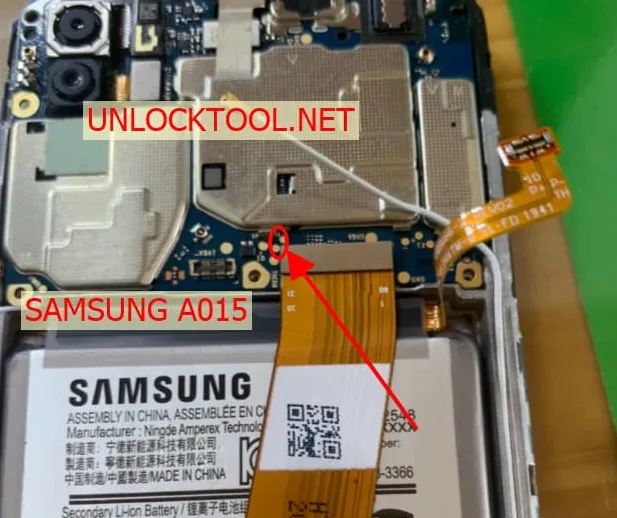
Galaxy A01 (SM-A015, Snapdragon 439) — EDL 9008 test point pads near the RF shield.
Knowing the exact chipset inside a Galaxy model prevents wasted bench time. Many technicians search for an EDL 9008 port on a MediaTek Galaxy A15 or an Exynos Galaxy S21 and assume the cable is faulty when Device Manager actually expects MediaTek USB Port or Exynos USB Device instead. Review the four hardware bootrom families below before opening the back cover:
| Samsung Chipset Family | Hardware Bootrom Mode | Windows Device Manager Port | Recommended Rental Tools |
|---|---|---|---|
| Qualcomm Snapdragon | EDL 9008 (Emergency Download) | Qualcomm HS-USB QDLoader 9008 | UnlockTool, CellTool, DFT Pro |
| MediaTek Helio / Dimensity | BROM / PreLoader Mode | MediaTek USB Port / PreLoader VCOM | UnlockTool, TSM Tool, DFT Pro |
| Unisoc / Spreadtrum | SPD Download / Diag Mode | SPRD U2S Diag (COM) | UnlockTool, Hydra Tool |
| Samsung Exynos | EUB (Exynos USB Boot) | Exynos USB Device / SAMSUNG Mobile USB | Sigma Plus, Chimera Tool, UnlockTool |
What tools and USB drivers do you need before shorting a test point?
Before touching a Samsung motherboard with tweezers, prepare ESD-safe insulated curved tweezers, a plastic pry spudger, a reliable USB-C data cable plugged directly into a rear motherboard USB 2.0/3.0 port, and the matching chipset driver package. Pre-installing drivers ensures Windows detects the bootrom port within seconds of connection.
- Drivers ready first: Install the official Samsung Android USB Driver alongside Qualcomm HS-USB QDLoader 9008, MediaTek VCOM, or Exynos drivers covered in our complete GSM USB drivers guide.
- Platform-Tools for verification: Keep Google Android SDK Platform-Tools handy for post-flash ADB diagnostics once the phone boots back into Android.
- Anti-static hardware tools: Use fine-tip ESD-safe tweezers (never a bulky screwdriver), a heat mat or warm air around 70–80°C to soften back-glass adhesive cleanly, and a Phillips #000 driver for midframe screws.
- Battery disconnect discipline: Always unclip the battery FPC connector with a nylon spudger first so live voltage never shorts an adjacent capacitor (only reconnect on models explicitly noted as battery-required such as Galaxy A34 5G SM-A346E).
Bench Warning on Battery & Neighboring SMD Caps: Most dead-board accidents during test-point work happen when a metal tweezer slips off the copper test pads onto a nearby power rail while the battery is still plugged in. Disconnect the battery ribbon first, verify the target pads under magnification, and apply gentle vertical contact — never scrape the solder mask.
How do you put a Samsung Galaxy into EDL 9008, BROM, or EUB safely?
Entering Samsung Test Point mode takes five controlled steps: power off and open the rear housing, disconnect the battery flex, bridge the target test pads with ESD tweezers, insert the USB cable connected to your Windows PC, and release the tweezers as soon as Device Manager confirms the bootrom COM port.
- Power off and remove the midframe shield: Shut down the phone, warm the back cover to lift it cleanly, unscrew the upper motherboard plastic cover, and expose the mainboard.
- Unplug the battery connector: Lift the battery FPC with a plastic spudger. On most Qualcomm and MediaTek Galaxy models, the phone enumerates cleanly with the battery disconnected; models like Galaxy A34 5G (SM-A346E) or certain Exynos boards may require the battery attached after locating the pads safely.
- Open Windows Device Manager: Expand Ports (COM & LPT) and Universal Serial Bus devices side-by-side so you see the exact port appear in real time.
- Bridge the test points and plug in USB: Hold fine ESD tweezers steadily across the two designated pads (or pad-to-shield GND on single-pad MediaTek points), then insert the USB cable with your free hand.
- Release tweezers and execute the job: Once Windows plays the USB connect chime and shows Qualcomm HS-USB QDLoader 9008, MediaTek USB Port, SPRD U2S Diag, or Exynos USB Device, lift the tweezers immediately and trigger the desired reset or flash action inside your GSM tool.
Complete Samsung Test Point Gallery (45 Verified Models)
Every single Samsung board diagram below has been visually inspected and placed into its real silicon category — including correcting misnamed third-party filenames (such as Galaxy A02s SM-A025F and Galaxy A80 SM-A805F) and separating true eMMC/UFS ISP pinouts from 2-pin USB test points.
Qualcomm Snapdragon Models — EDL 9008 (10 Boards)
Snapdragon Galaxy handsets boot into Qualcomm HS-USB QDLoader 9008 when bridged (Galaxy A01 SM-A015 is pictured above; the remaining nine Snapdragon models appear below):
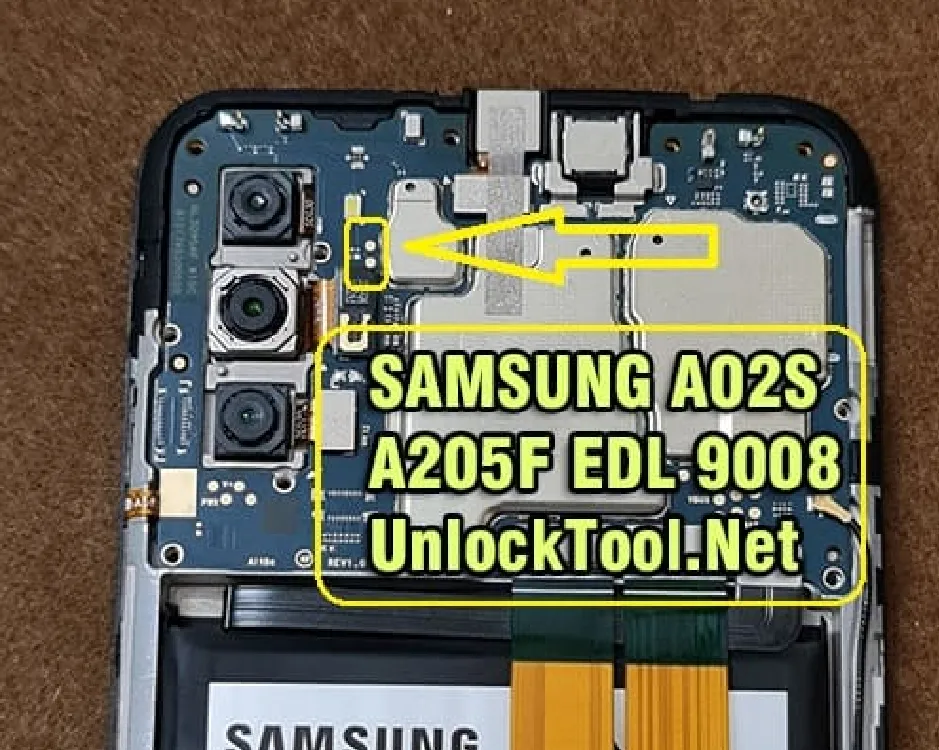
Galaxy A02s (SM-A025F, Snapdragon 450 — file labeled A205F) — dual EDL 9008 test point pads left of the upper EMI shield.
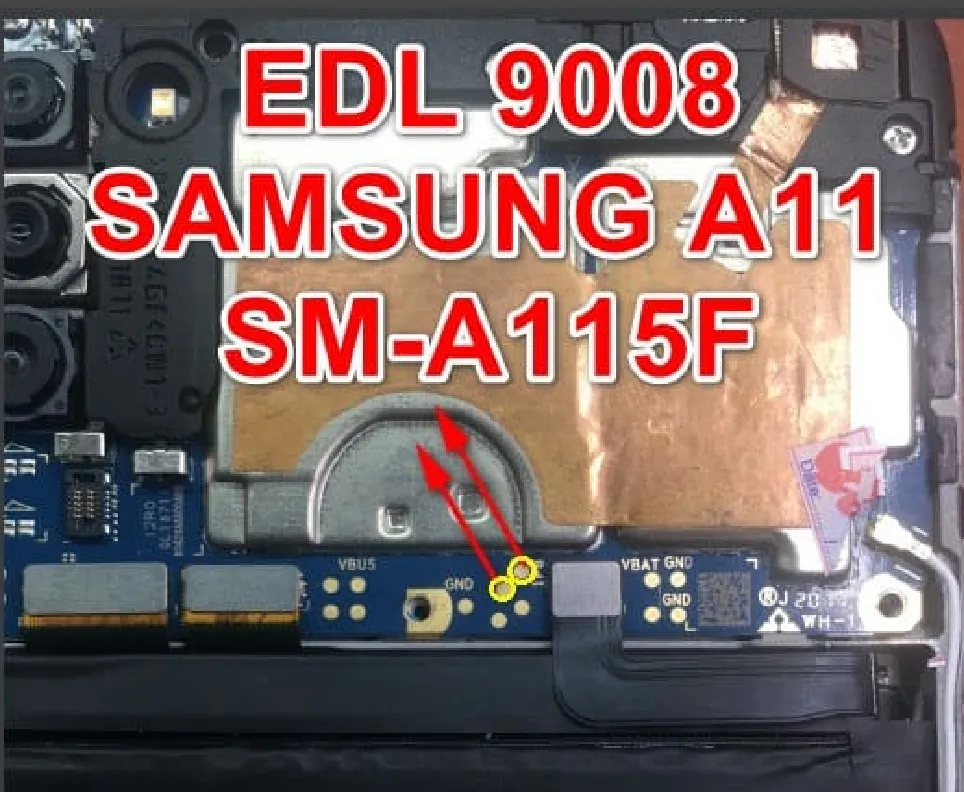
Galaxy A11 (SM-A115F, Snapdragon 450) — bridge the two circled pads along the lower copper shield edge for EDL 9008.
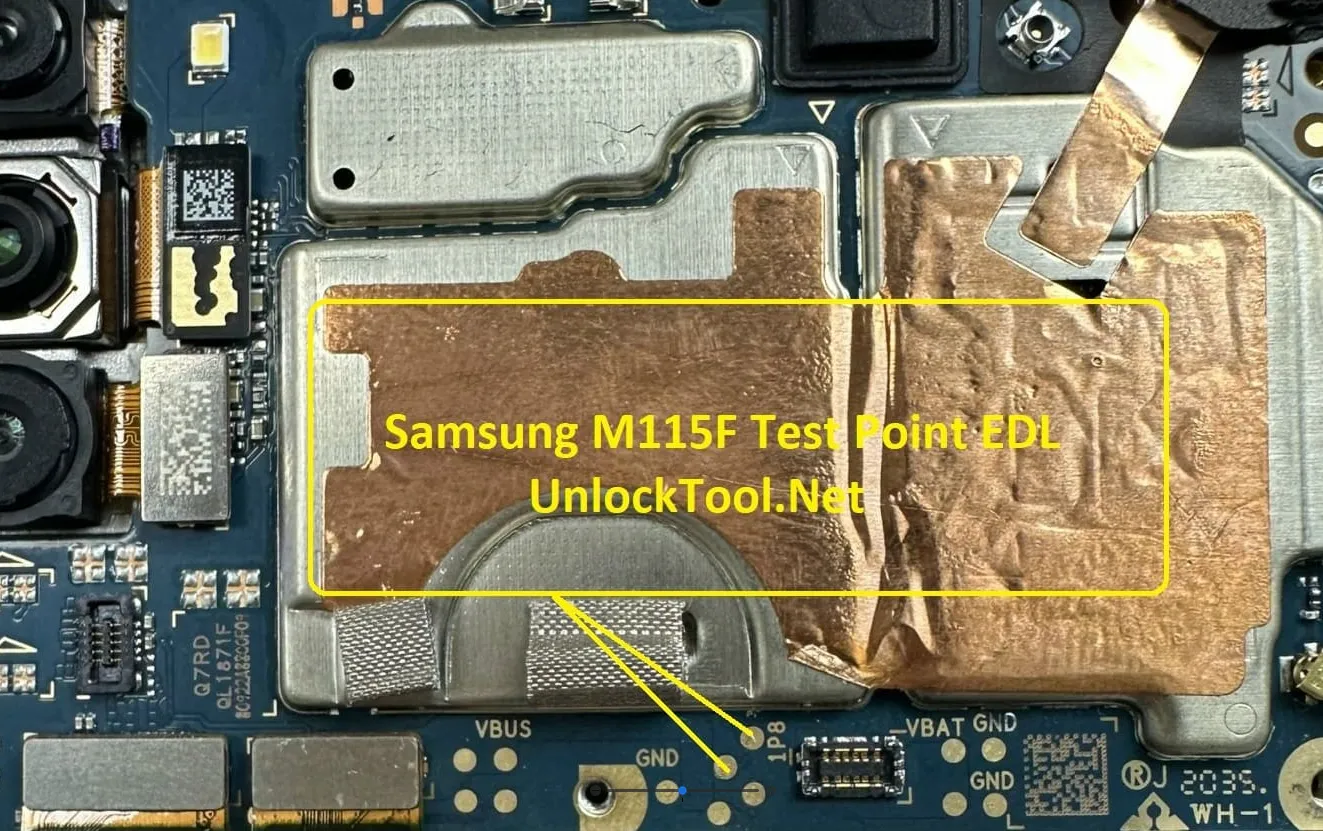
Galaxy M11 (SM-M115F, Snapdragon 450) — dual EDL 9008 test pads between GND and 1P8 below the copper shield.
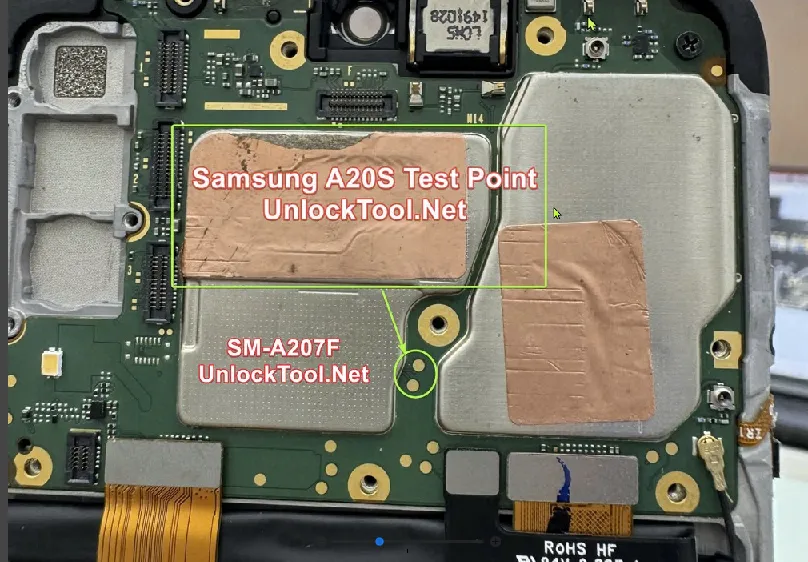
Galaxy A20s (SM-A207F, Snapdragon 450) — two EDL 9008 pads circled between the center EMI shields.
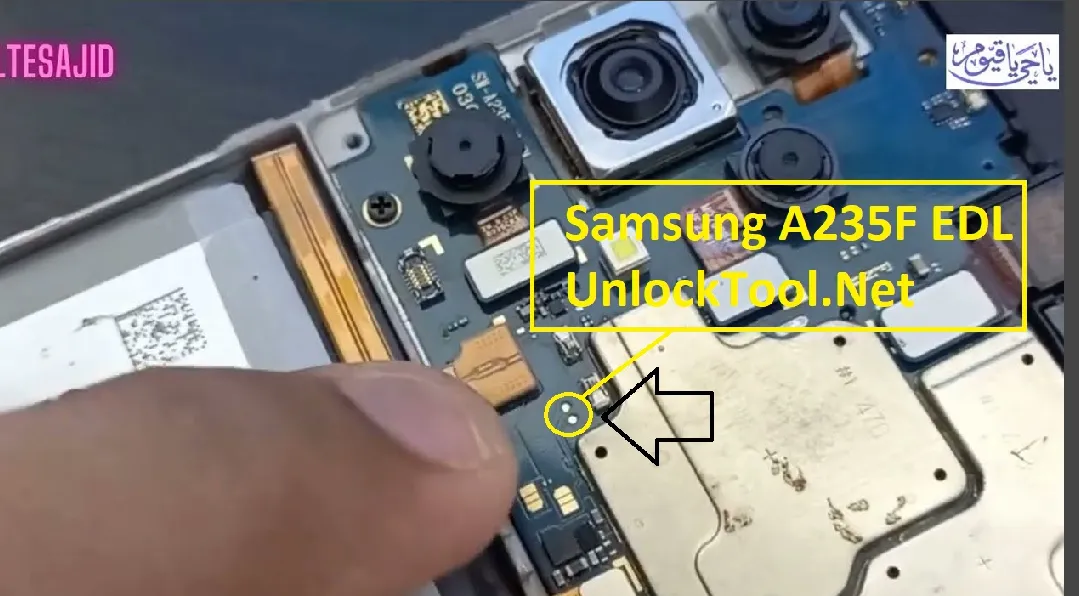
Galaxy A23 4G (SM-A235F, Snapdragon 680) — dual EDL 9008 pads positioned directly left of the metal shield.
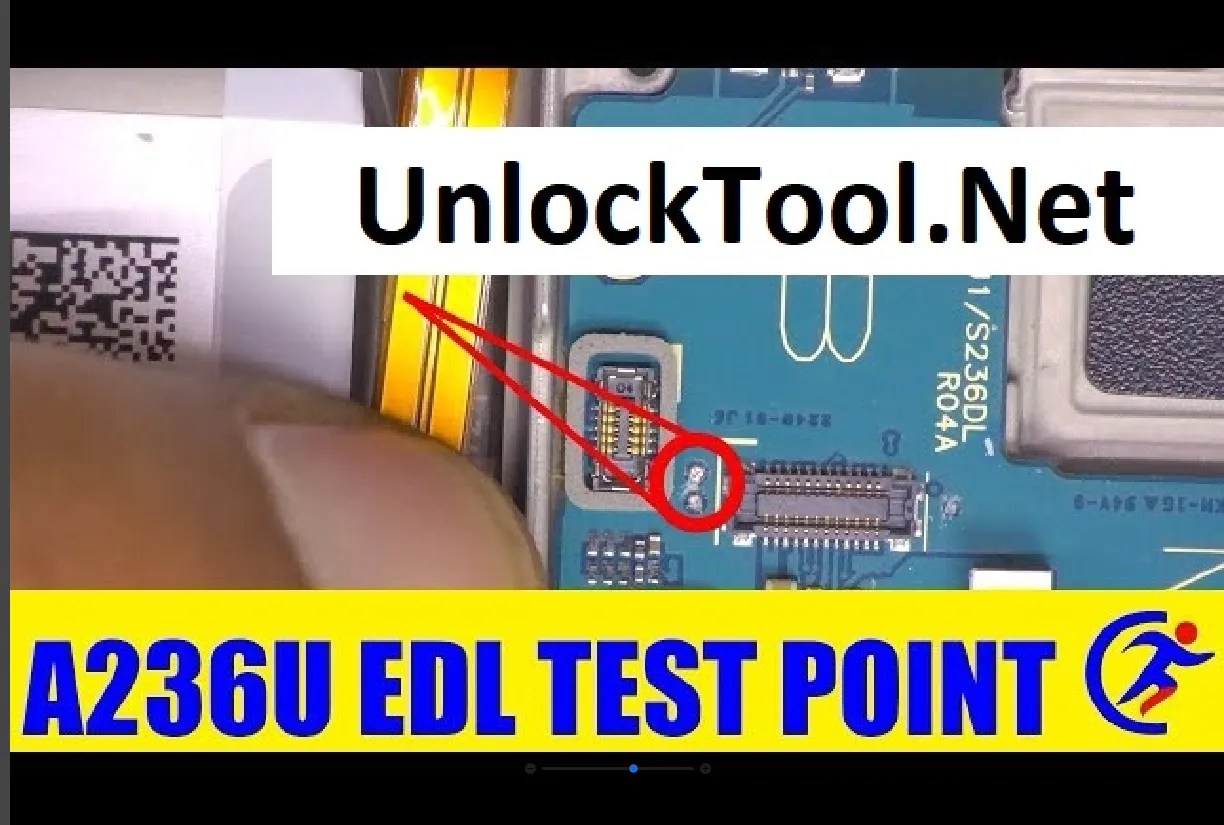
Galaxy A23 5G (SM-A236U / S236DL, Snapdragon 695) — dual EDL 9008 pads located beside the lower FPC connector.
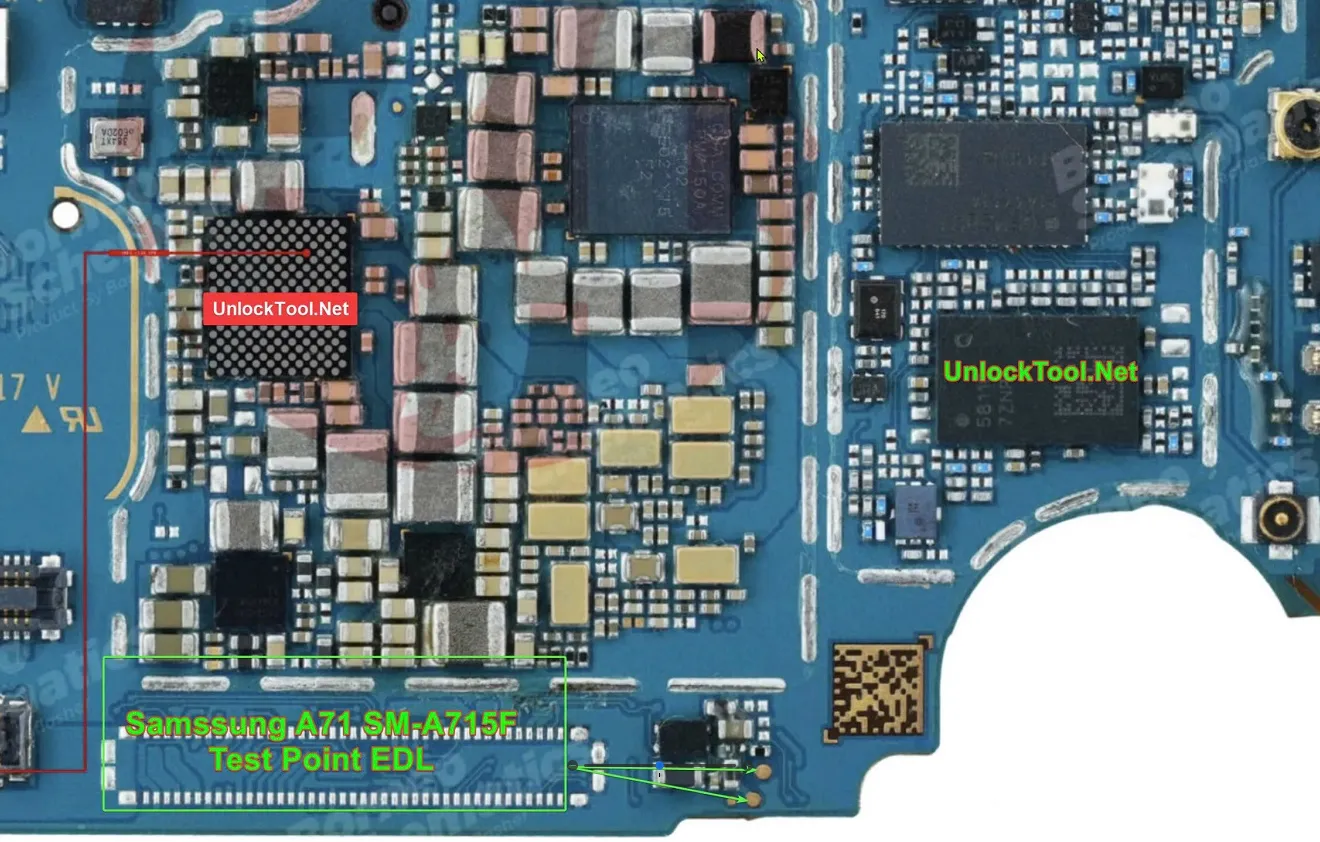
Galaxy A71 (SM-A715F, Snapdragon 730) — dual EDL 9008 test points along the lower PCB edge.
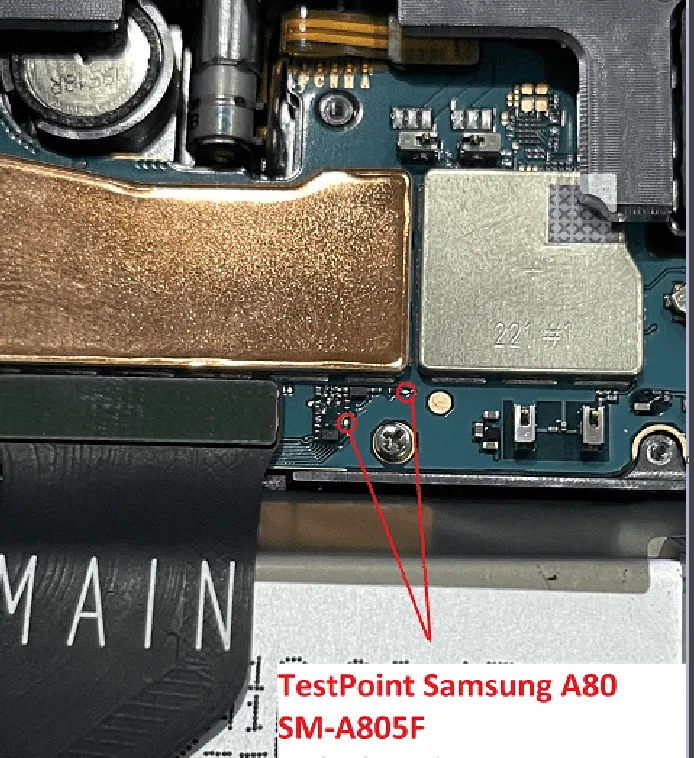
Galaxy A80 (SM-A805F, Snapdragon 730G) — two EDL 9008 pads located near the center screw below the copper shield.
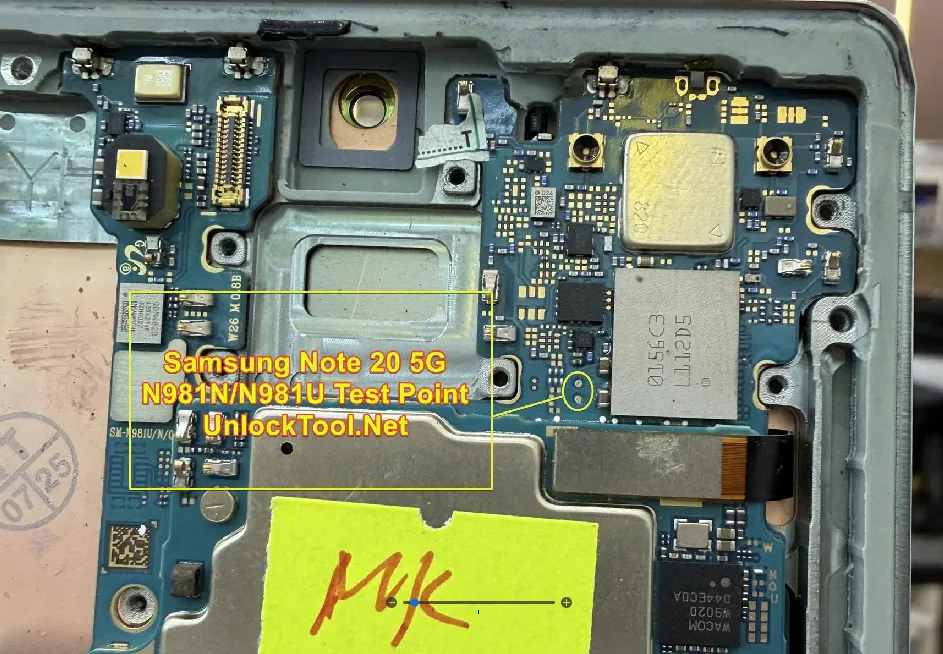
Galaxy Note 20 5G (SM-N981N / SM-N981U, Snapdragon 865+) — vertical pair of EDL 9008 pads left of the silver IC.
MediaTek Helio & Dimensity Models — BROM Mode (20 Boards)
These 20 Galaxy A, M, and F models run MediaTek Helio or Dimensity processors and connect as MediaTek USB Port / PreLoader VCOM when bridged. Where only one pad is marked, bridge that pad directly to a clean metal EMI shield ground (GND):
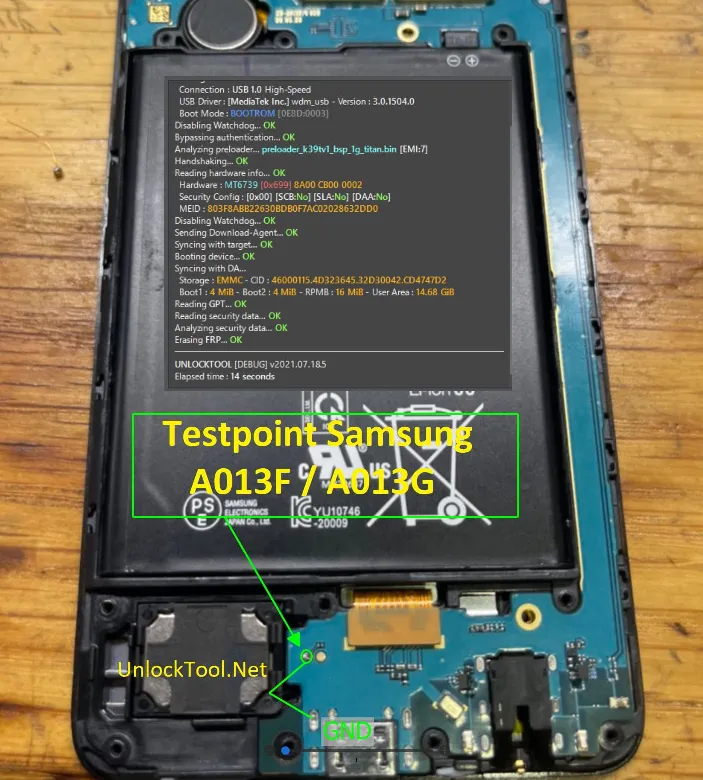
Galaxy A01 Core (SM-A013F / SM-A013G, MediaTek MT6739) — bridge the marked pad on the lower sub-board to GND for BROM.
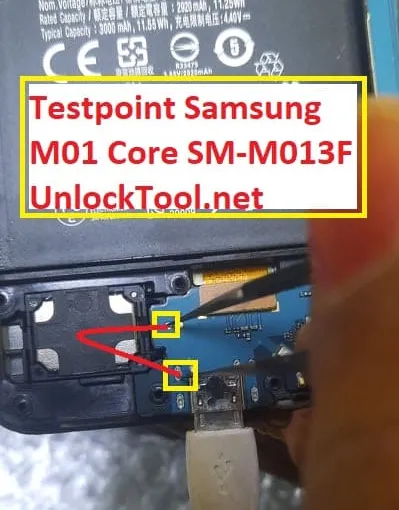
Galaxy M01 Core (SM-M013F, MediaTek MT6739) — short the two lower-board pads beside the micro-USB port to enter BROM.
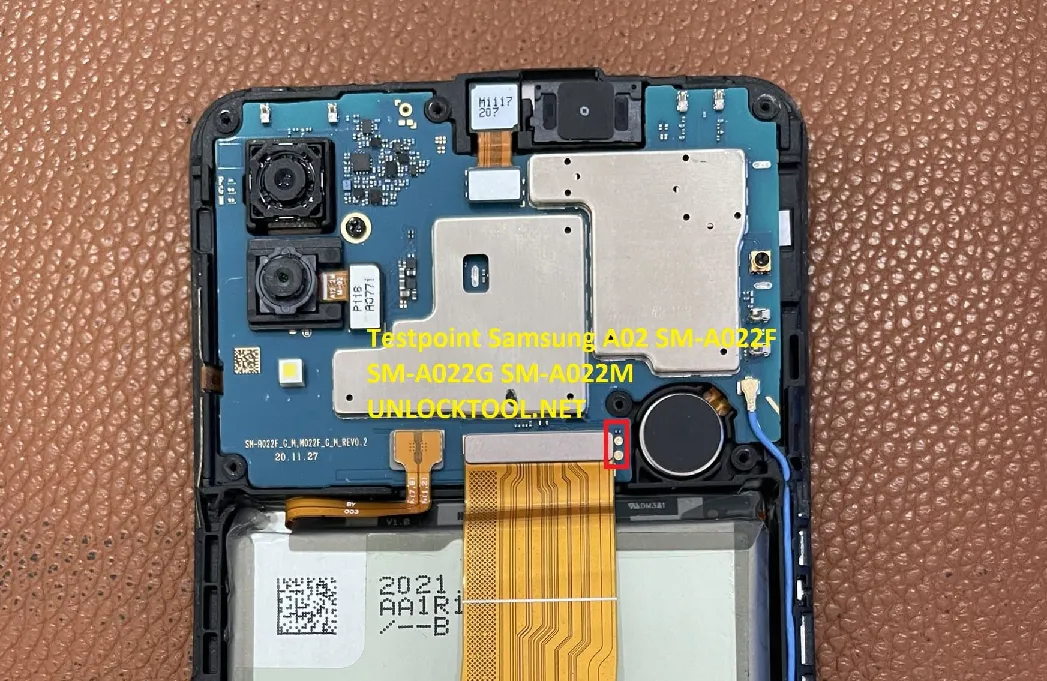
Galaxy A02 (SM-A022F / G / M, MediaTek MT6739W) — dual BROM test pads immediately right of the display flex connector.
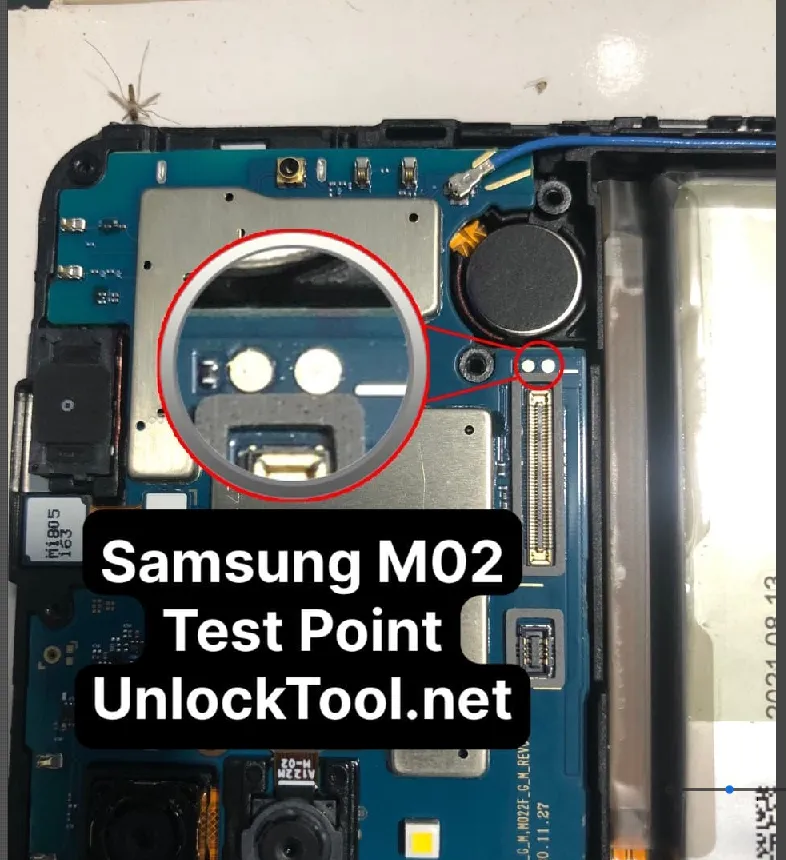
Galaxy M02 (SM-M022F / G / M, MediaTek MT6739W) — zoomed dual BROM test pads directly above the FPC connector.
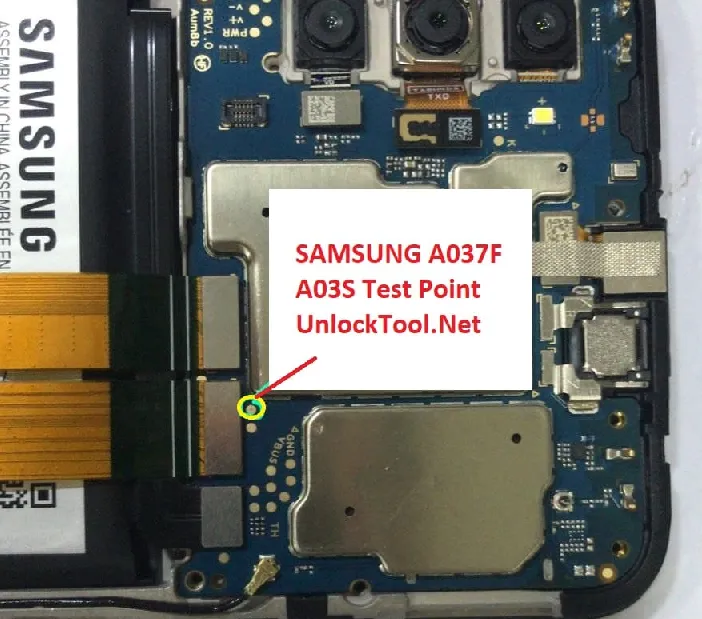
Galaxy A03s (SM-A037F, MediaTek Helio P35) — bridge the circled pad next to the flex connector to GND for BROM.
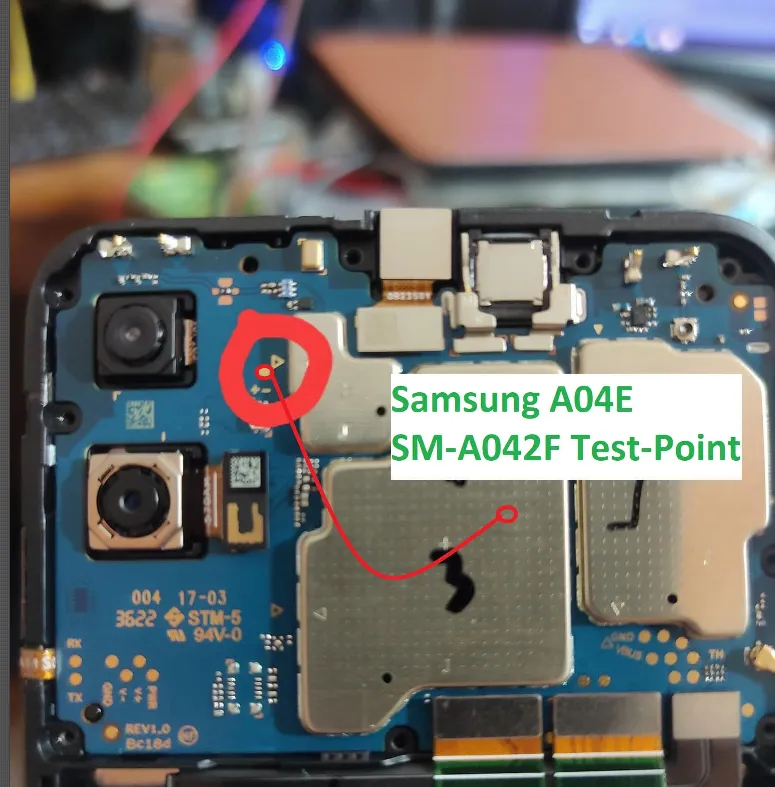
Galaxy A04e (SM-A042F, MediaTek Helio P35) — short the marked CLK/BROM pad to the EMI shield ground.
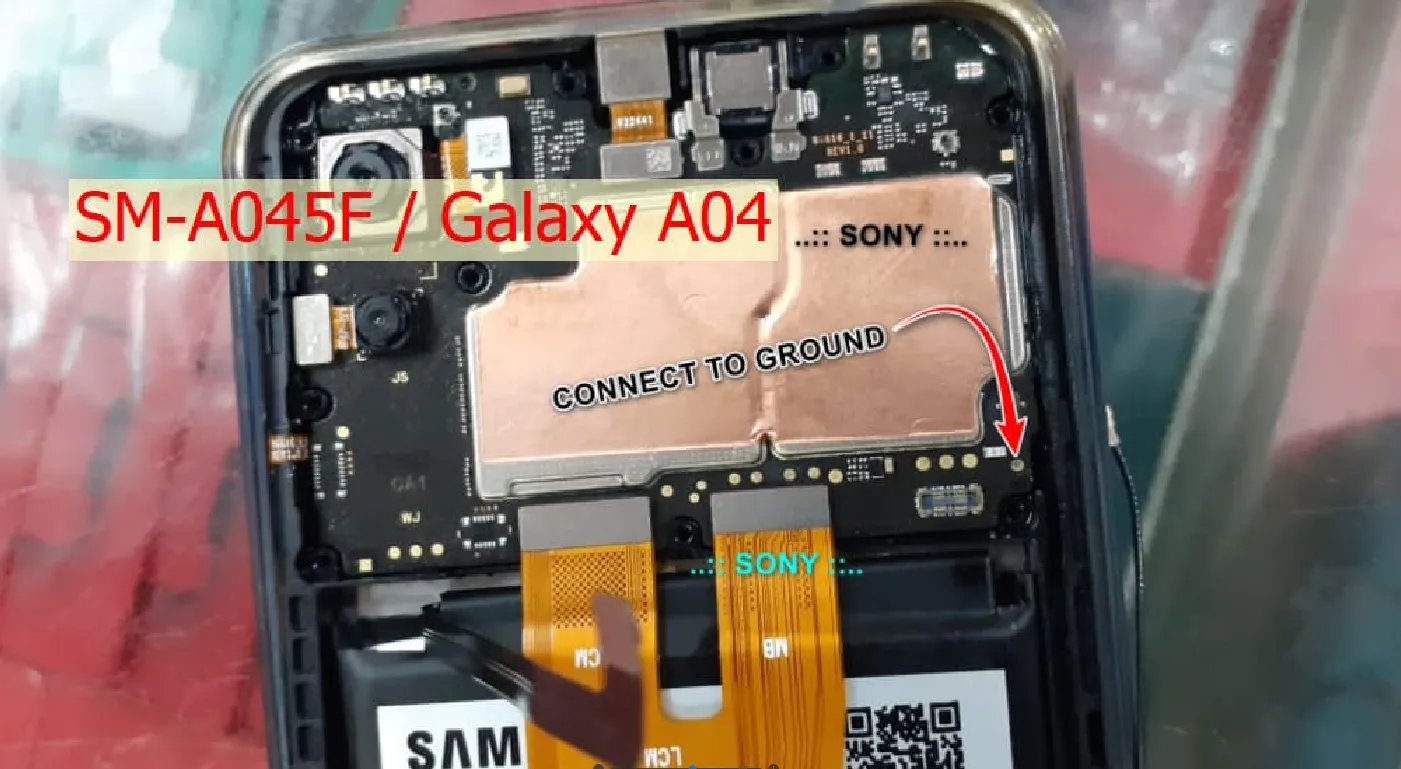
Galaxy A04 (SM-A045F, MediaTek Helio P35) — connect the lower-right pad to EMI shield GND to force BROM.
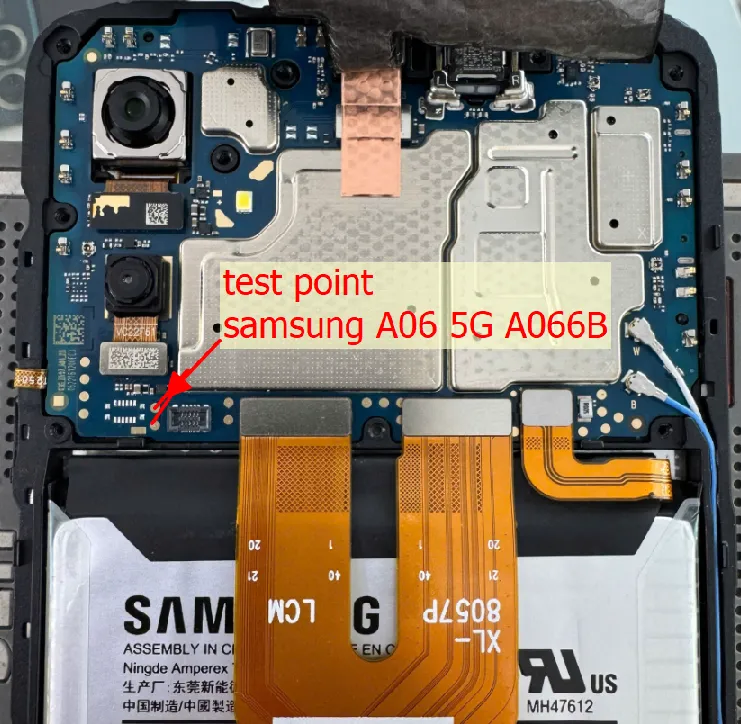
Galaxy A06 5G (SM-A066B, MediaTek Dimensity 6300) — dual BROM pads located at the lower-left corner beside the connector.
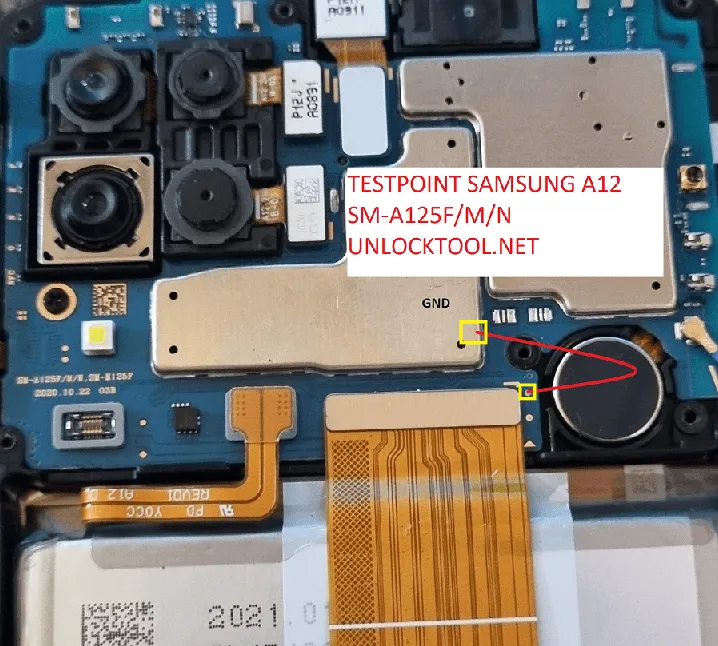
Galaxy A12 (SM-A125F / M / N, MediaTek Helio P35) — bridge the single BROM pad to shield GND while inserting USB.
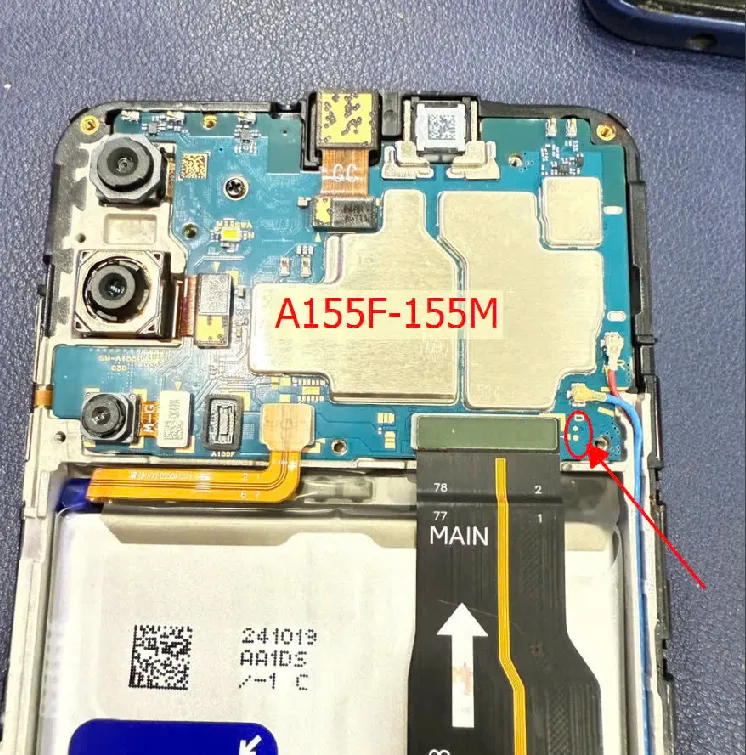
Galaxy A15 4G (SM-A155F / M, MediaTek Helio G99) — BROM test pads positioned right of the MAIN sub-board flex.
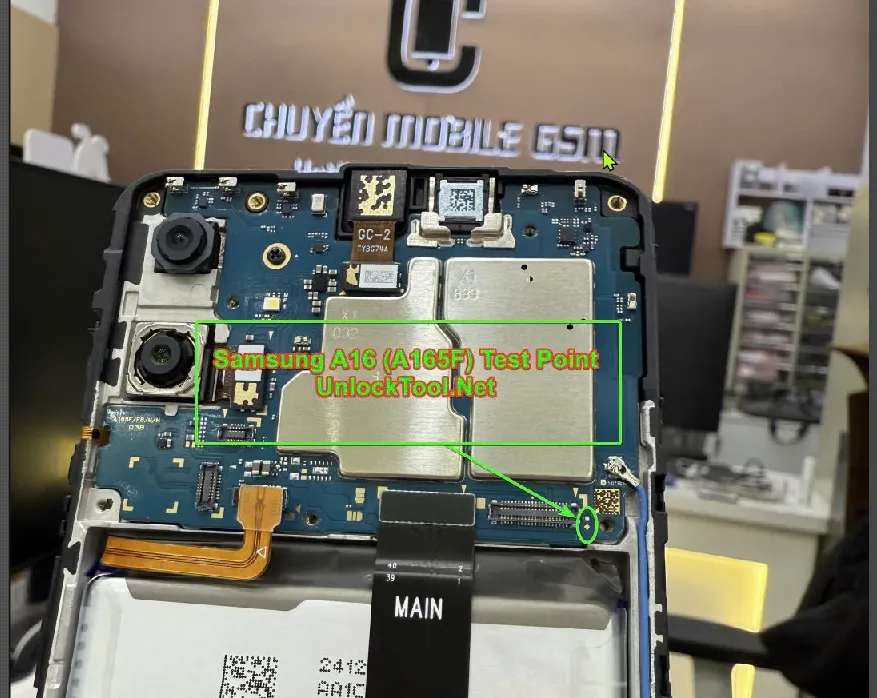
Galaxy A16 4G (SM-A165F, MediaTek Helio G99) — dual BROM pads circled on the lower-right edge next to the connector.
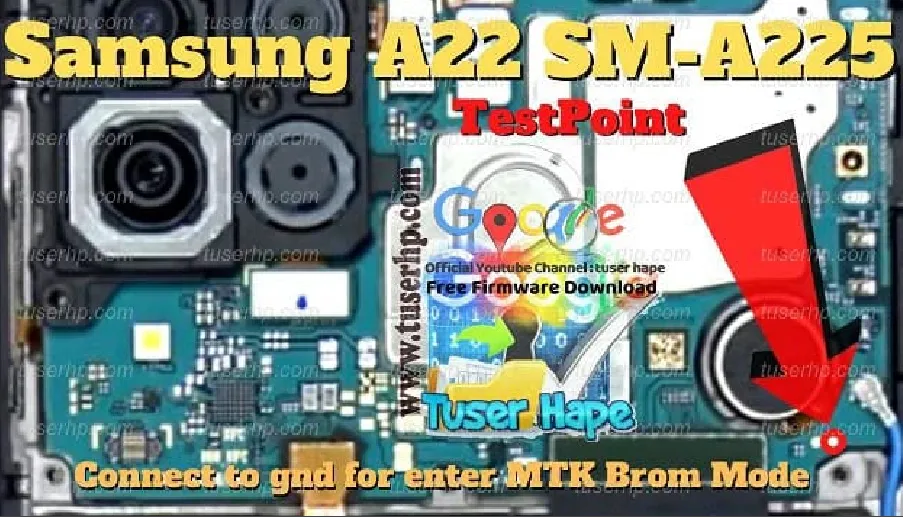
Galaxy A22 4G (SM-A225F, MediaTek Helio G80) — bridge the lower-right pad near the coaxial cable to GND for MTK BROM.
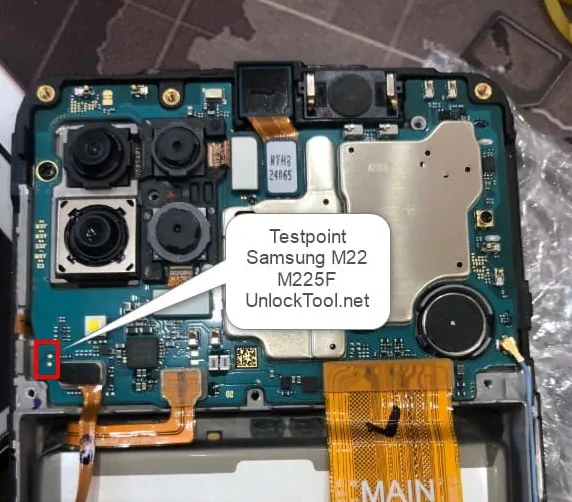
Galaxy M22 (SM-M225F, MediaTek Helio G80) — vertical dual BROM pads on the lower-left PCB edge.
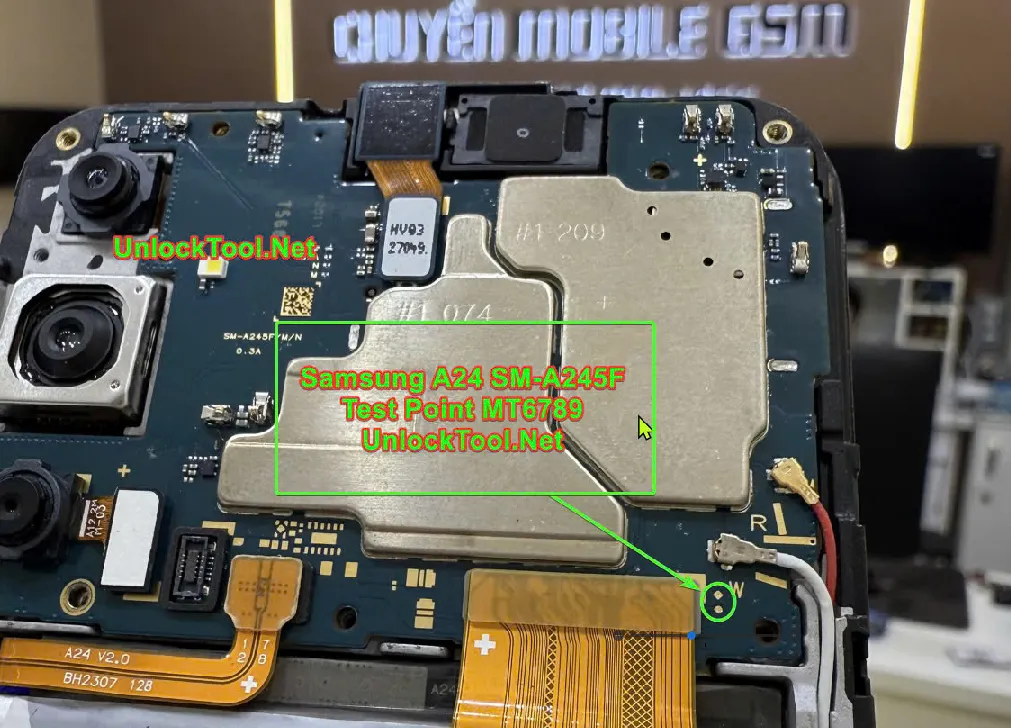
Galaxy A24 (SM-A245F, MediaTek Helio G99 / MT6789) — dual BROM pads positioned right of the orange sub-board flex.
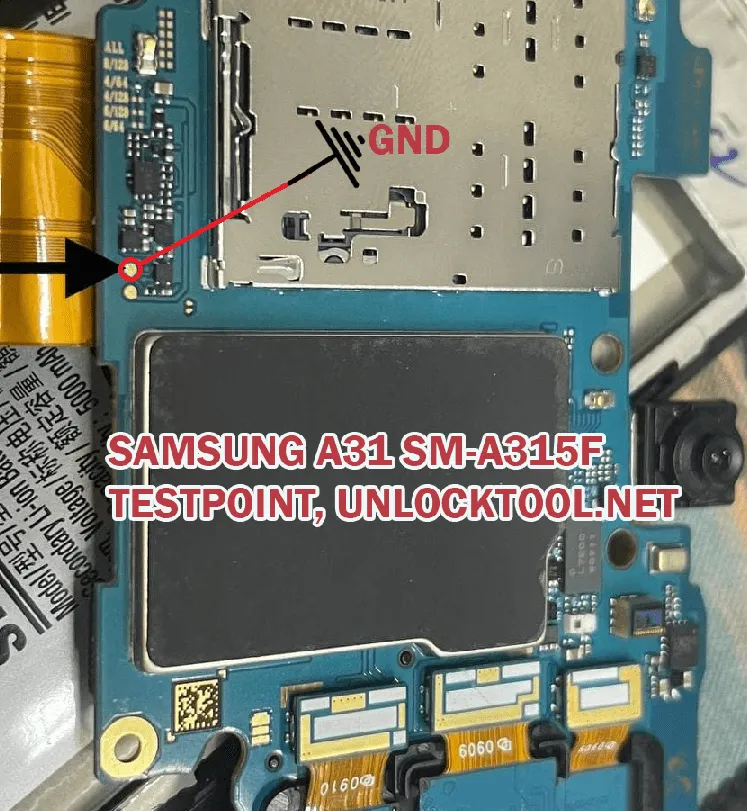
Galaxy A31 (SM-A315F / G, MediaTek Helio P65) — bridge the circled pad left of the SIM tray shield to GND for BROM.
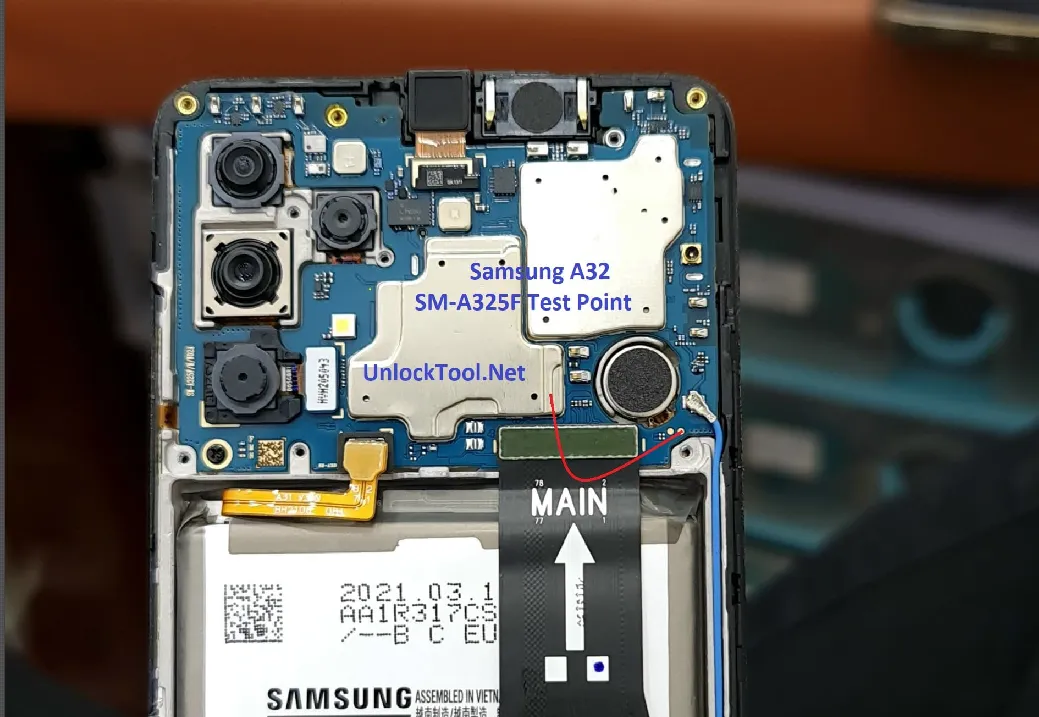
Galaxy A32 4G (SM-A325F, MediaTek Helio G80) — connect the lower-right pad beside the speaker contact to EMI shield GND.
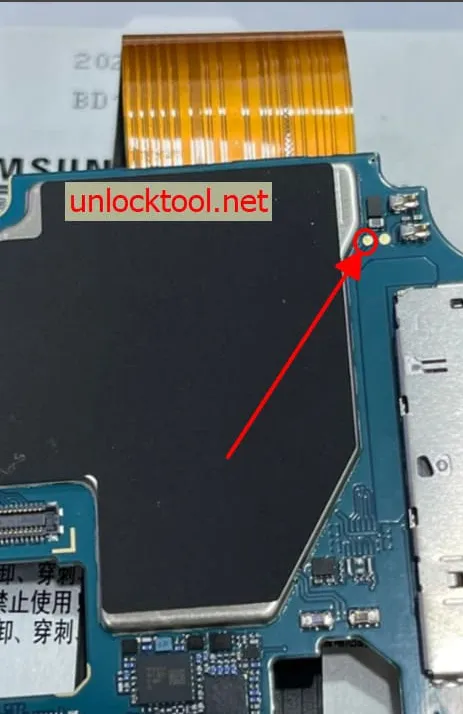
Galaxy A32 5G (SM-A326B, MediaTek Dimensity 720) — BROM test point pad located beside the SIM tray metal frame.
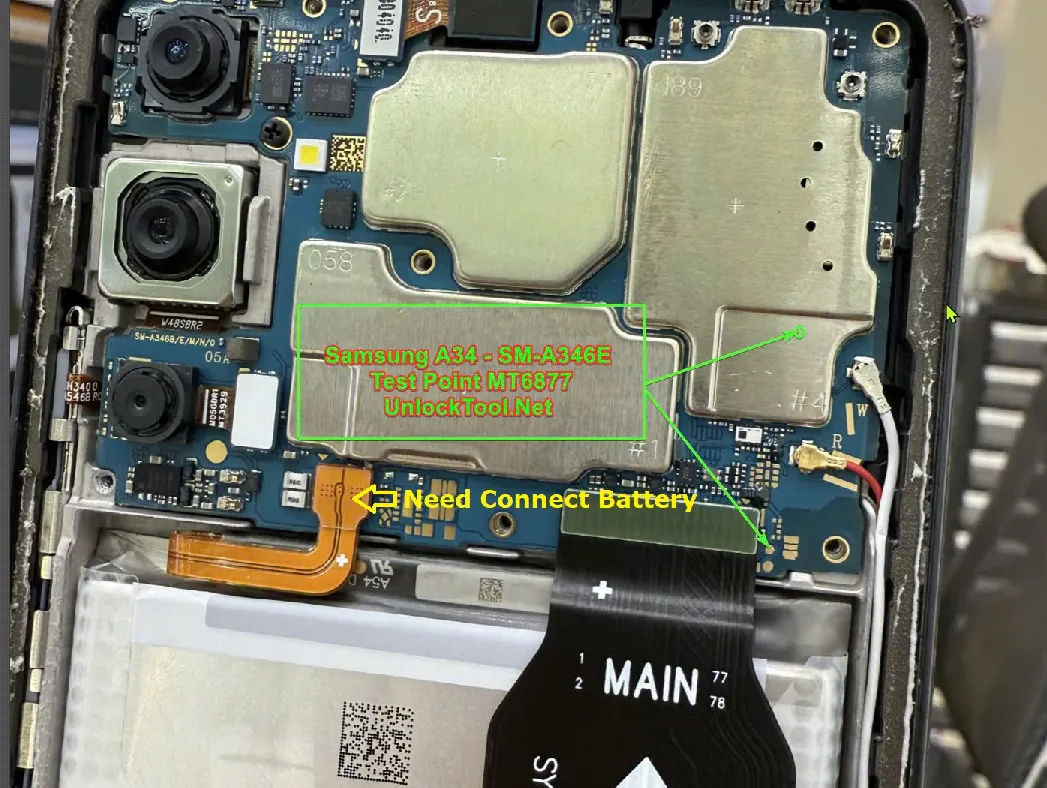
Galaxy A34 5G (SM-A346E, Dimensity 1080 / MT6877) — bridge marked pad to shield GND with battery connected.
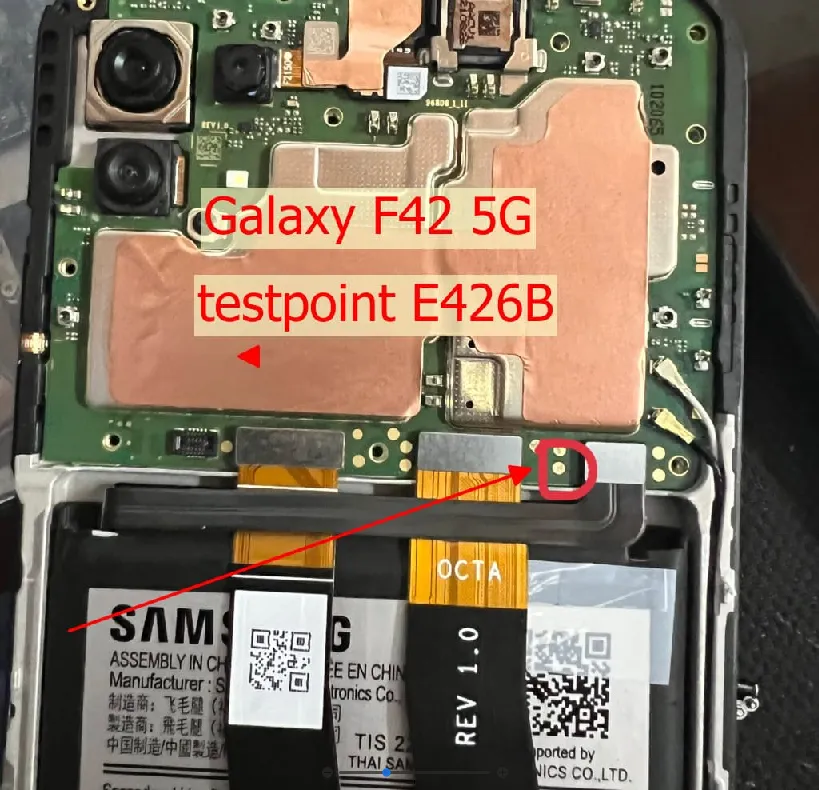
Galaxy F42 5G (SM-E426B, MediaTek Dimensity 700) — vertical pair of BROM pads directly right of the OCTA flex.
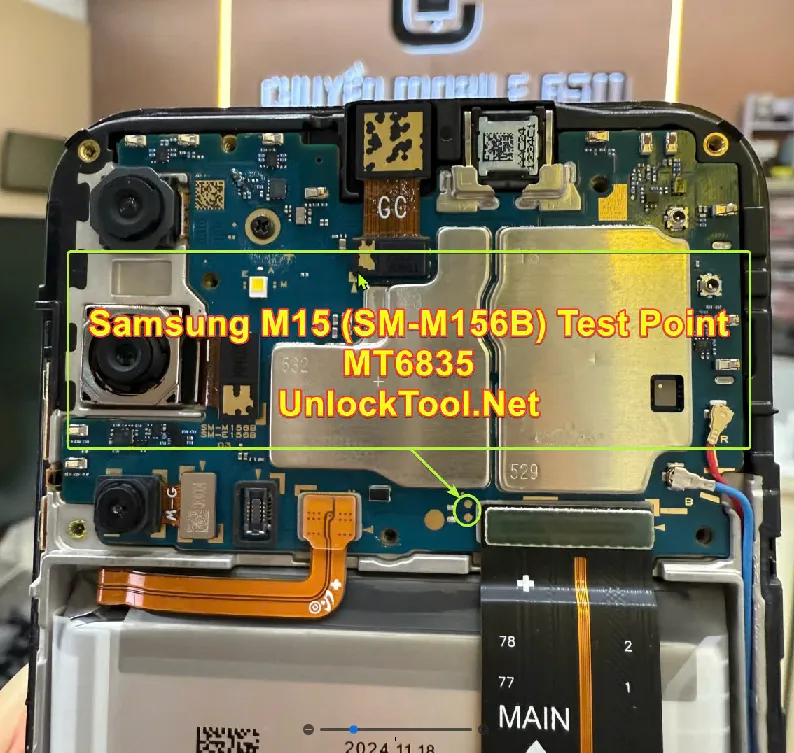
Galaxy M15 5G (SM-M156B, Dimensity 6100+ / MT6835) — dual BROM pads immediately left of the MAIN flex connector.
Unisoc / Spreadtrum Models — SPRD Diag Mode (3 Boards)
Galaxy A03 Core, Galaxy A03, and Galaxy Tab A8 use Unisoc/Spreadtrum SoCs and enumerate as SPRD U2S Diag when their hardware test points are shorted:
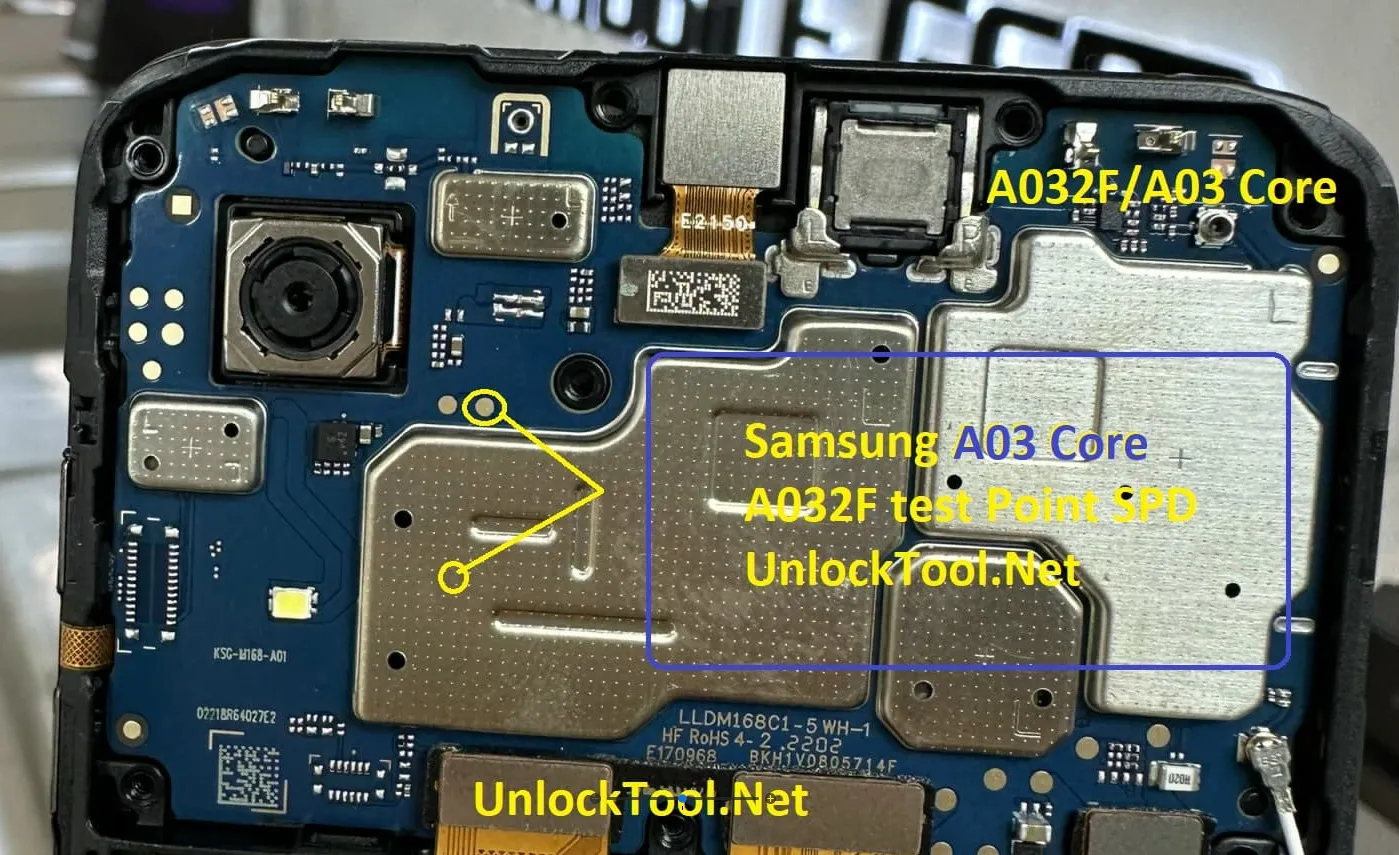
Galaxy A03 Core (SM-A032F, Unisoc SC9863A) — bridge the marked pad above the shield to EMI shield GND for SPRD Diag.
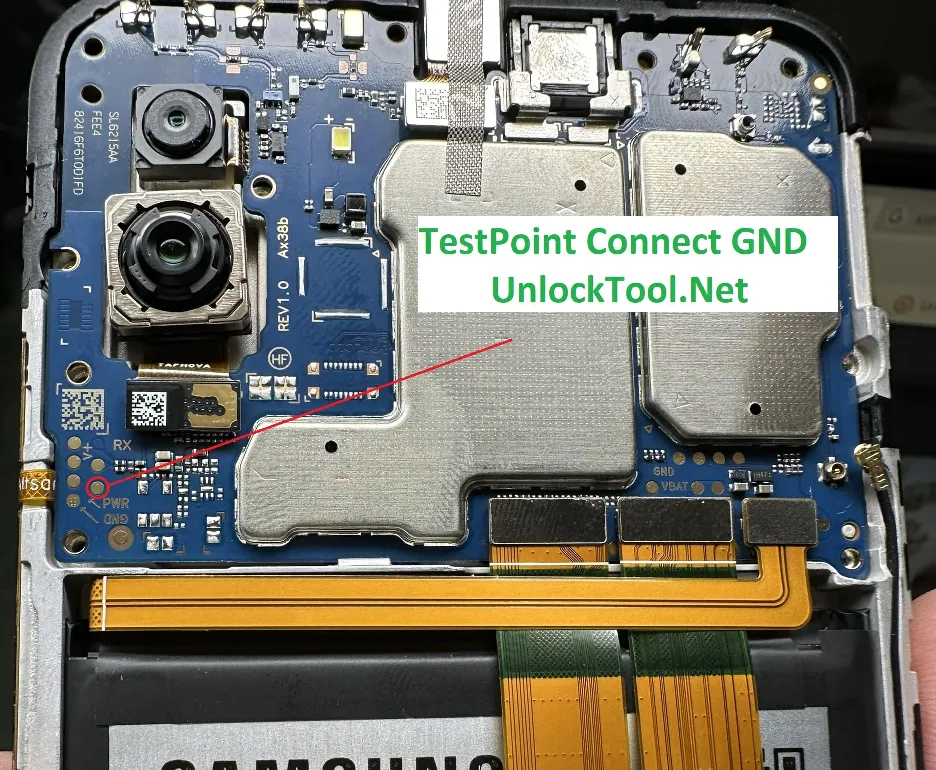
Galaxy A03 (SM-A035F, Unisoc Tiger T606) — bridge the two right-edge pads to trigger SPRD U2S Diag mode.
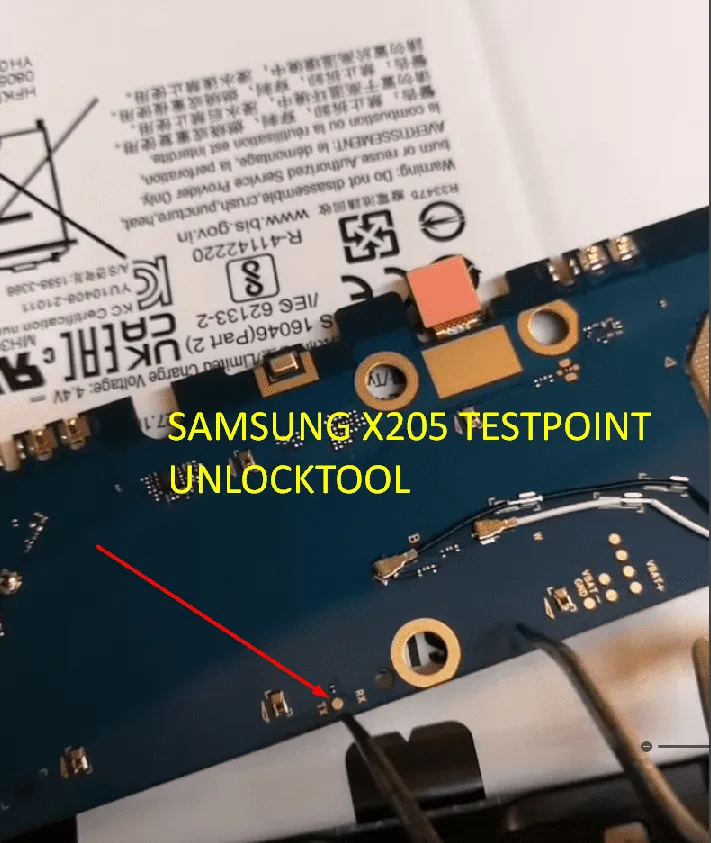
Galaxy Tab A8 (SM-X205, Unisoc Tiger T618) — bridge the TX/RX test pad along the lower edge to GND for SPD mode.
Samsung Exynos Models — 2-Pin EUB Mode (7 Boards)
Exynos Galaxy models enter Exynos USB Boot (EUB) over a standard USB cable when bridging the two marked pads — see our full workflow in the Samsung Exynos EUB guide:
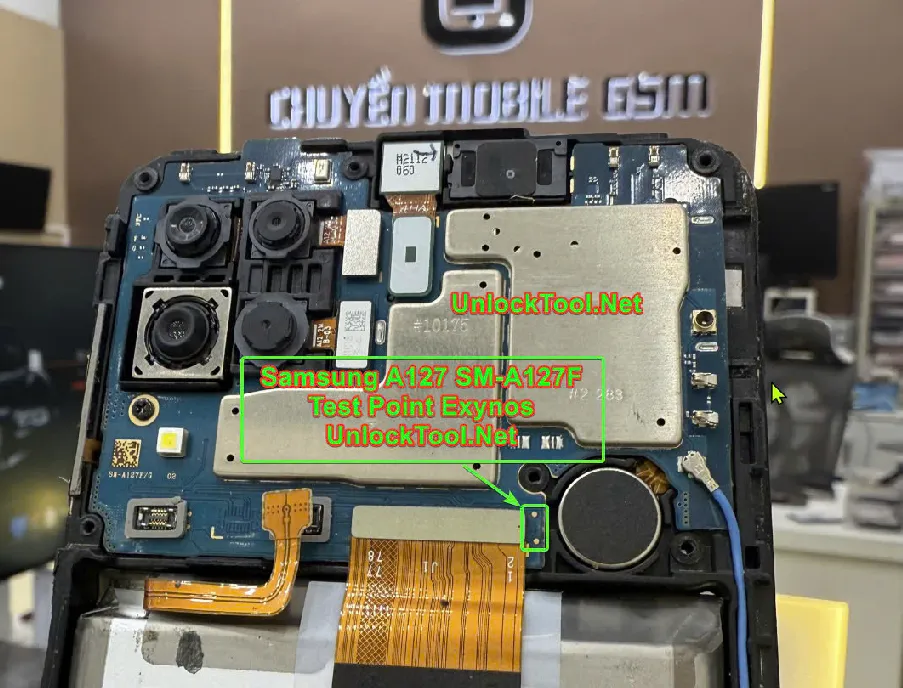
Galaxy A12 Nacho (SM-A127F, Exynos 850) — two-pin EUB test point right of the orange sub-board flex connector.
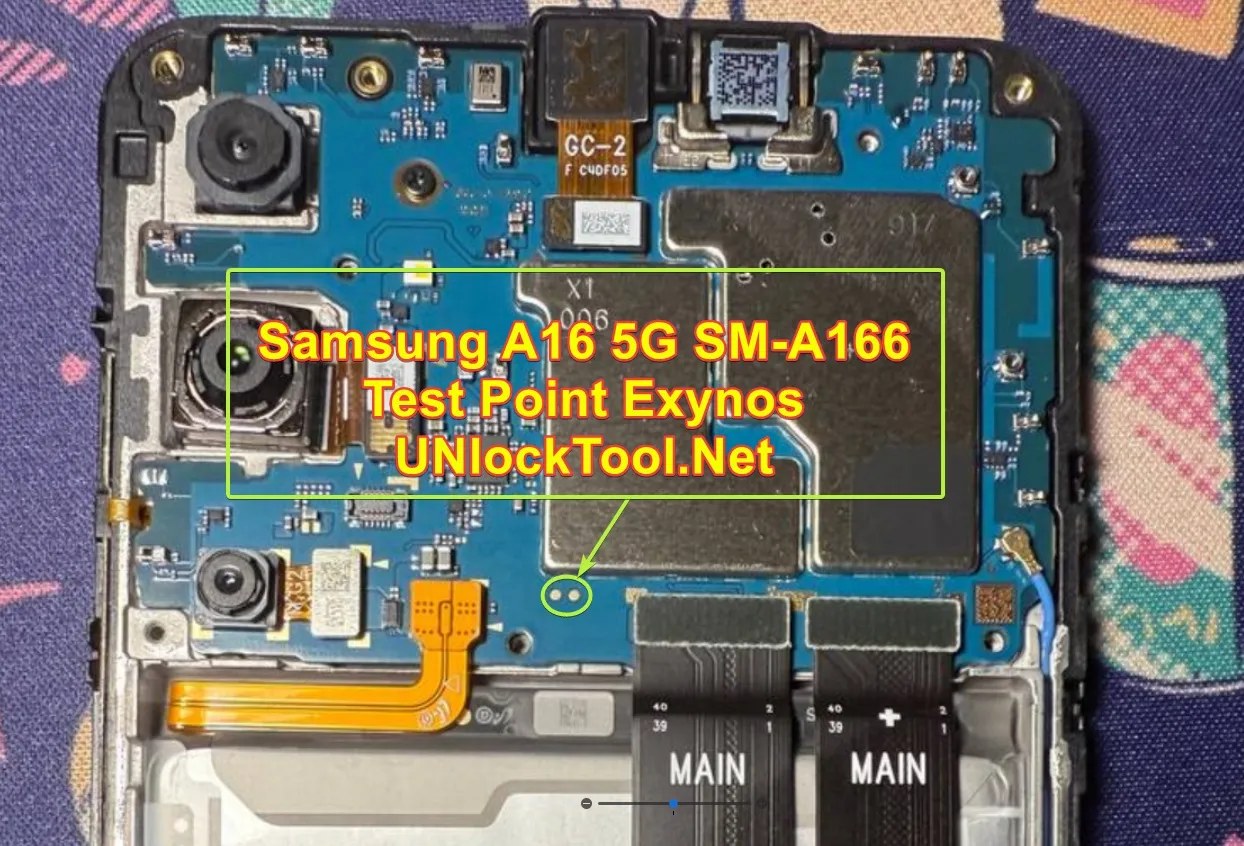
Galaxy A16 5G (SM-A166, Exynos 1330) — dual EUB pads located immediately left of the MAIN flex connectors.
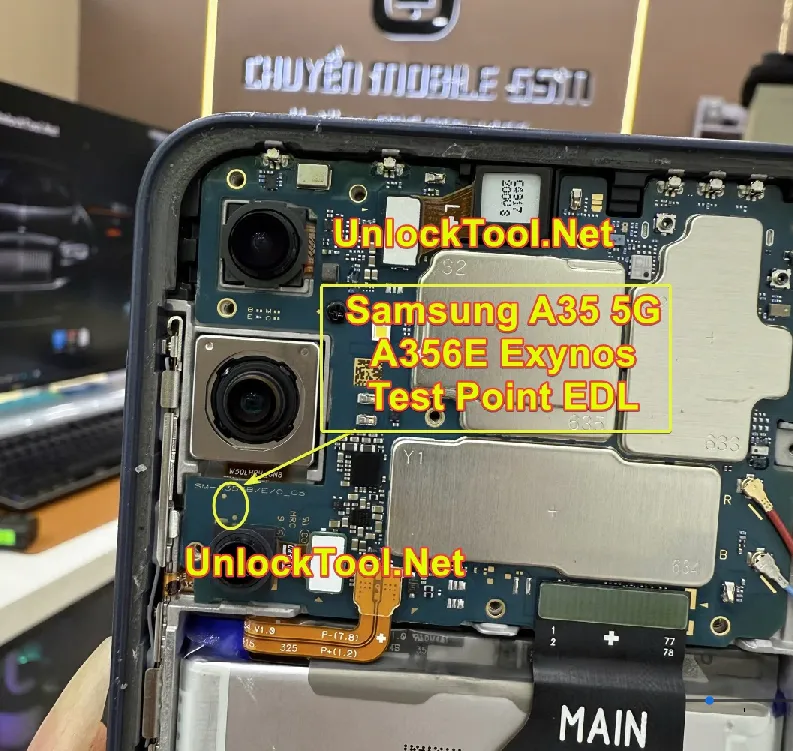
Galaxy A35 5G (SM-A356E, Exynos 1380) — dual EUB pads positioned below the middle rear camera module.
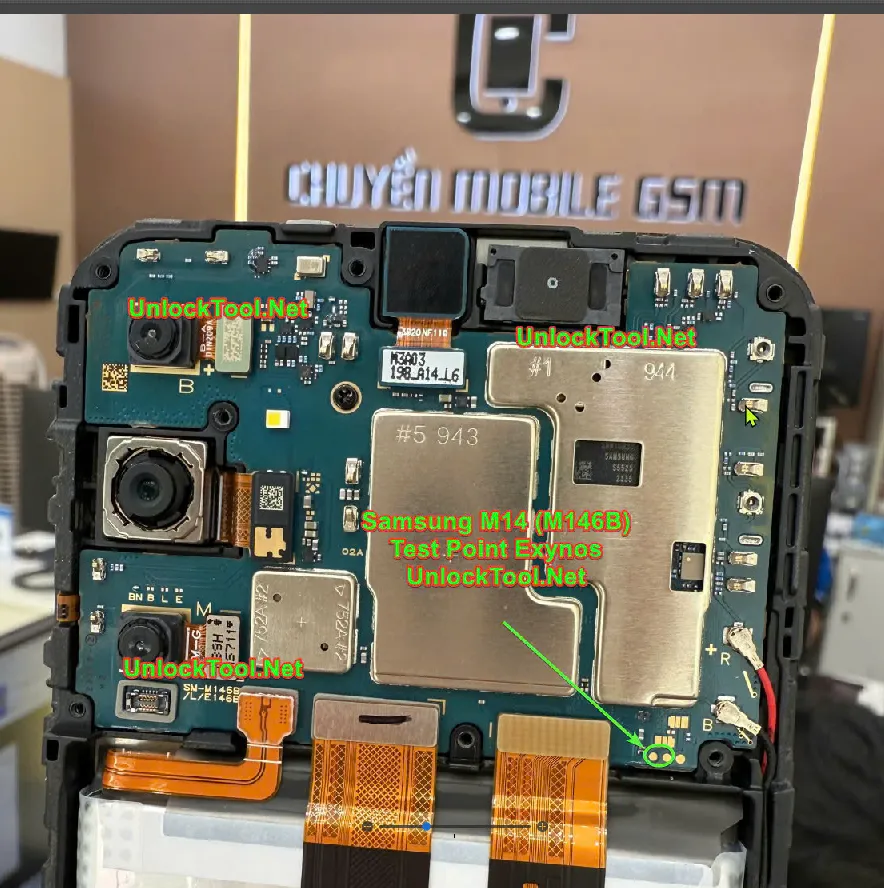
Galaxy M14 5G (SM-M146B, Exynos 1330) — two EUB pads circled on the bottom-right corner of the mainboard.
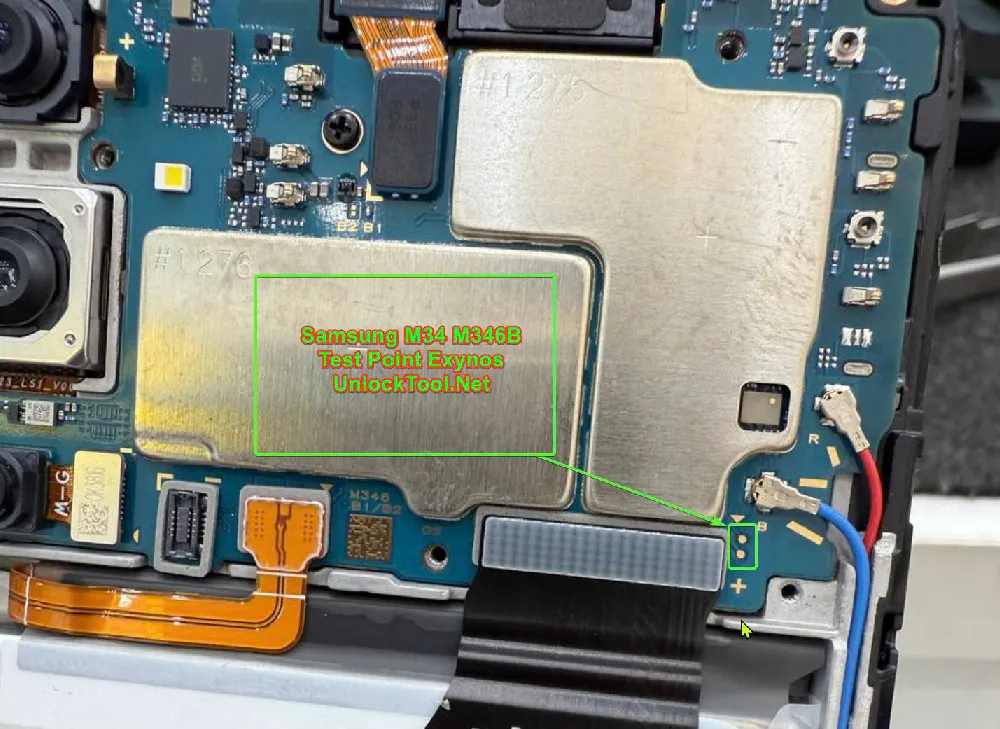
Galaxy M34 5G (SM-M346B, Exynos 1280) — vertical EUB test pads directly right of the MAIN display flex.
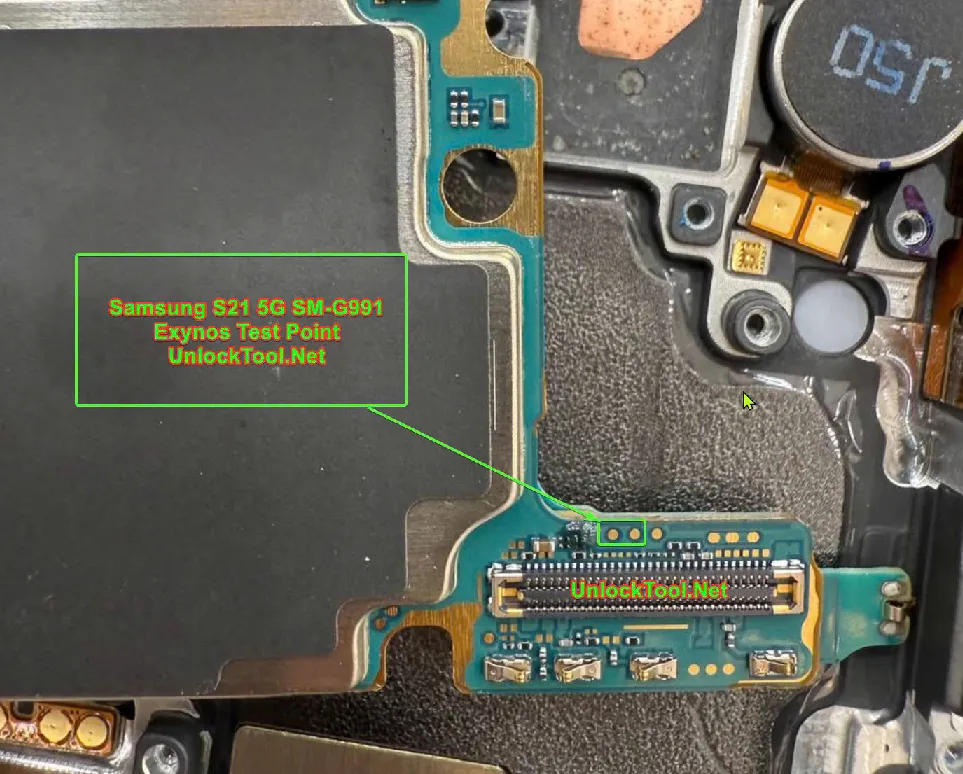
Galaxy S21 5G (SM-G991B, Exynos 2100) — dual EUB pads located directly above the lower board-to-board connector.
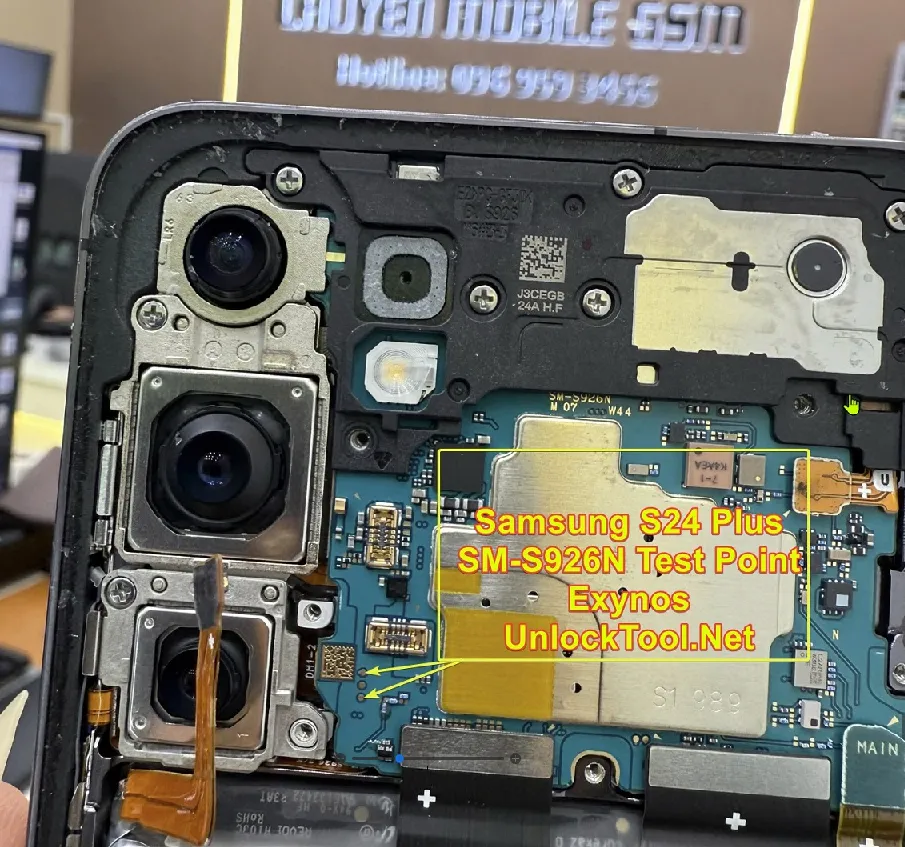
Galaxy S24 Plus (SM-S926N / SM-S926B, Exynos 2400) — two-pin EUB test point located beside the bottom edge flex.
Direct Storage eMMC & UFS ISP Pinouts (5 Boards)
Important distinction: The five diagrams below are direct eMMC / UFS ISP pinouts (requiring micro-soldering jumper wires such as CMD, CLK, DAT0 or UFS TX/RX/RST to a hardware programmer box like EasyJTAG, Medusa Pro, or UFI), NOT 2-pin USB shorting test points:
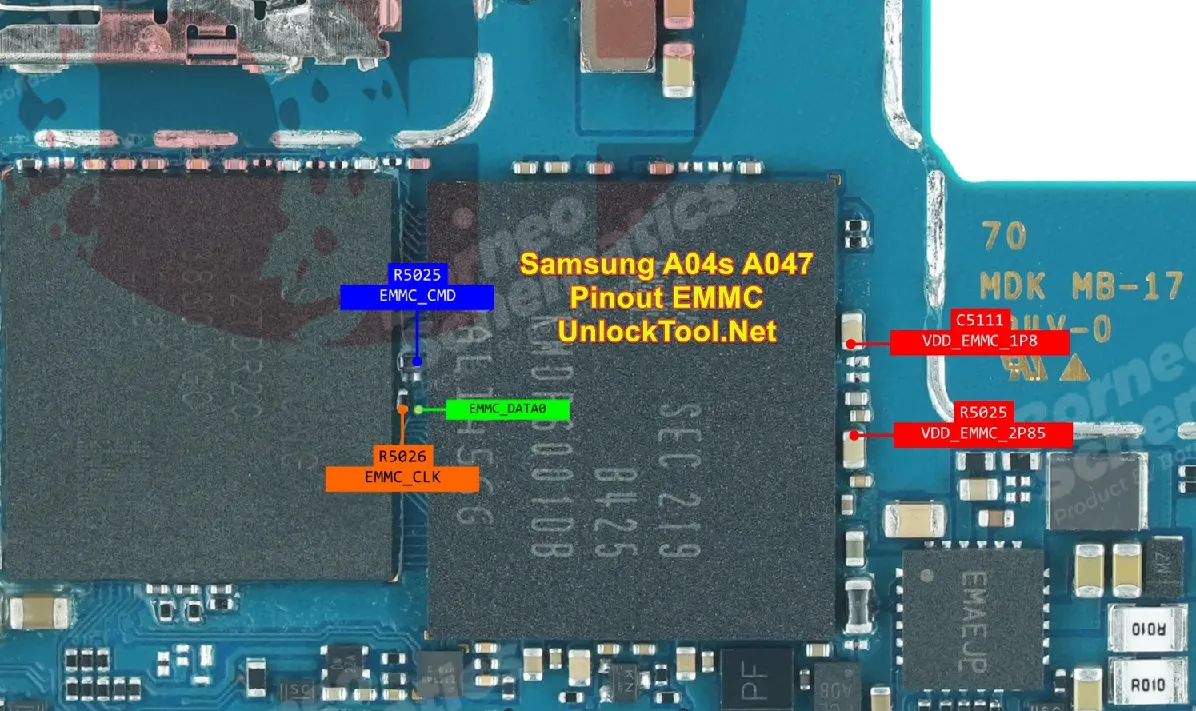
Galaxy A04s (SM-A047F, Exynos 850) — eMMC ISP Pinout (CMD, CLK, DATA0, VDD_1P8, VDD_2P85) for eMMC programmer boxes.
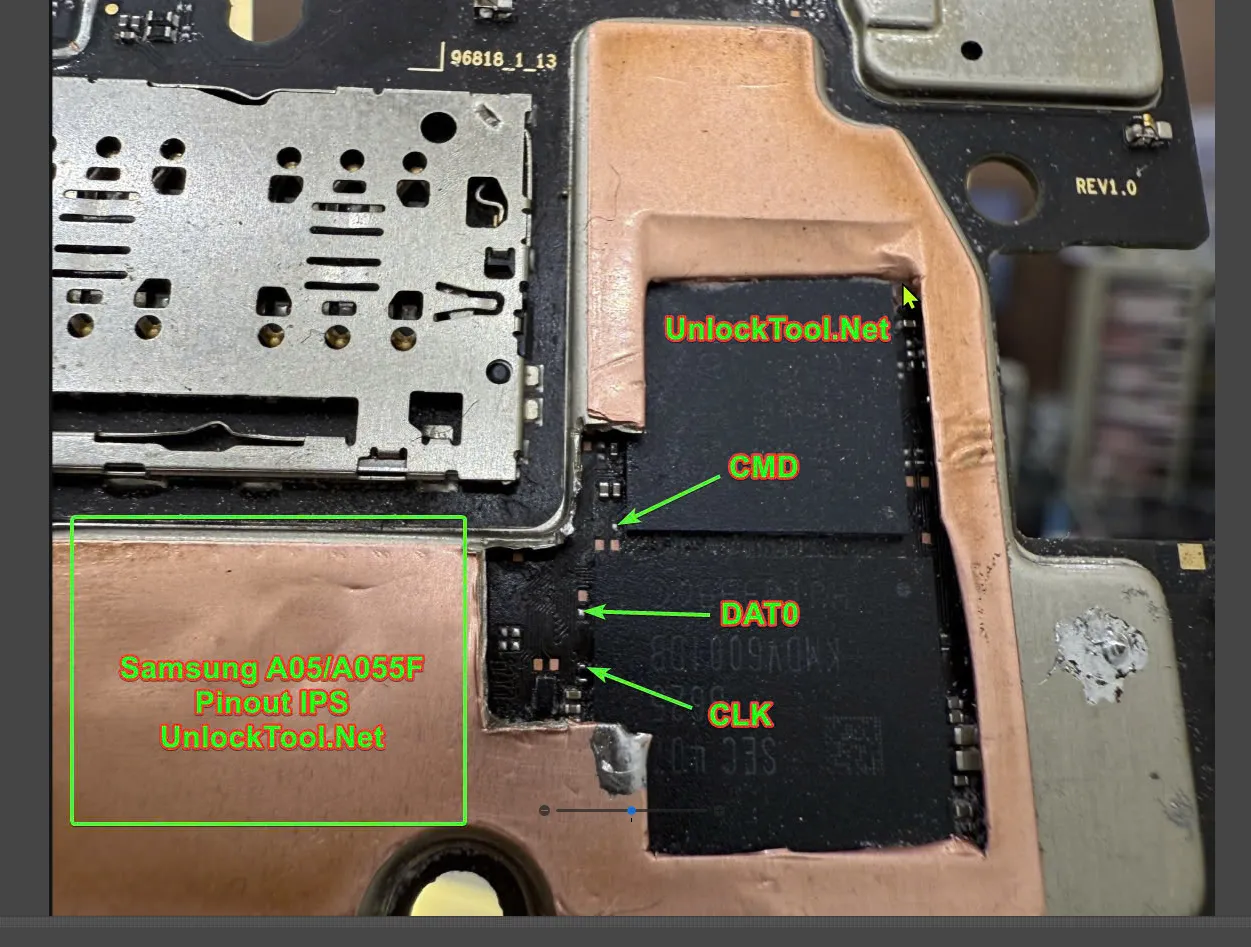
Galaxy A05 (SM-A055F, MediaTek Helio G85) — eMMC ISP Pinout (CMD, DAT0, CLK) under the cut copper shield.
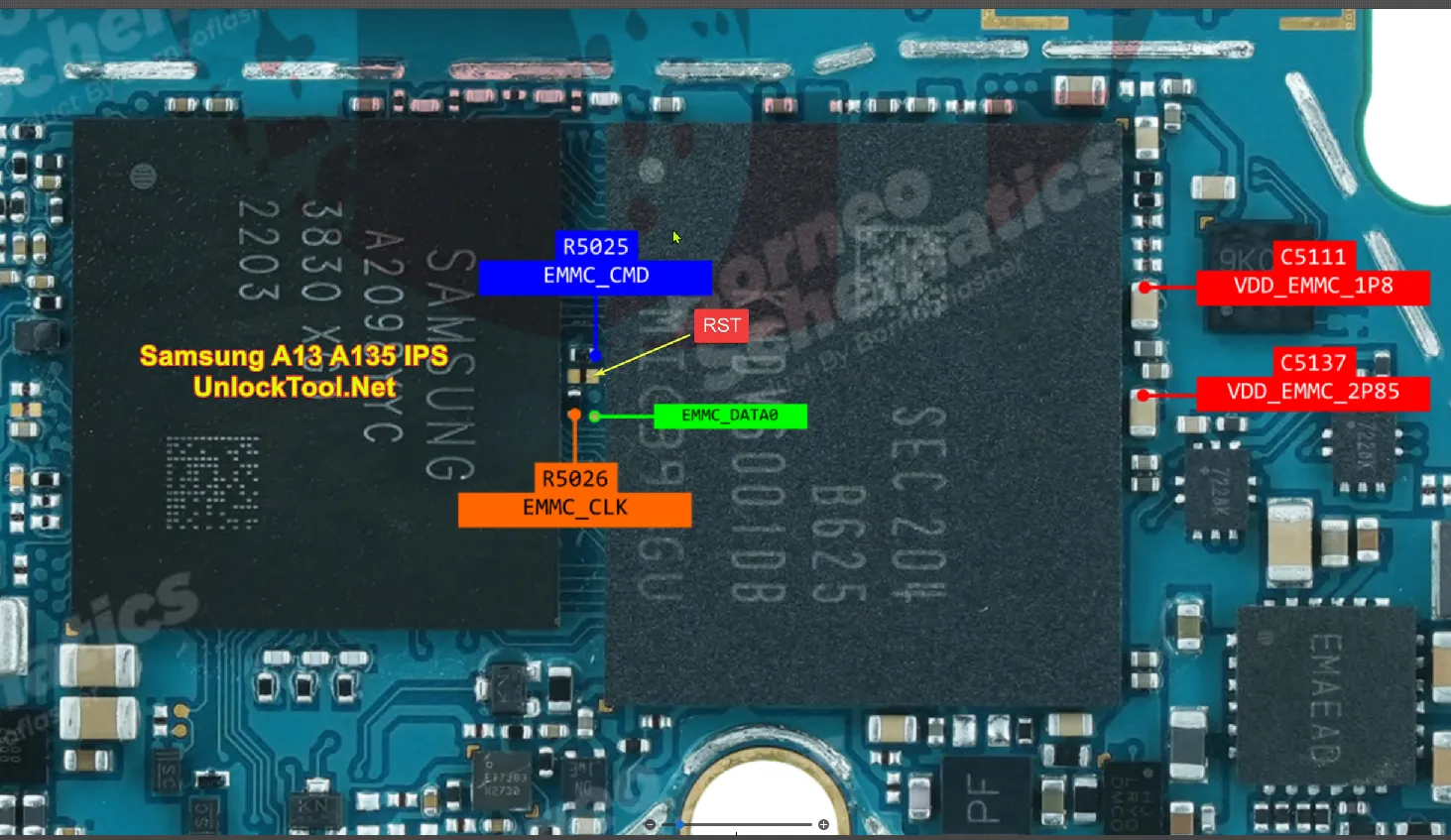
Galaxy A13 (SM-A135, Exynos 850) — eMMC ISP Pinout (CMD, RST, DATA0, CLK, VDD_1P8, VDD_2P85) for direct eMMC boxes.
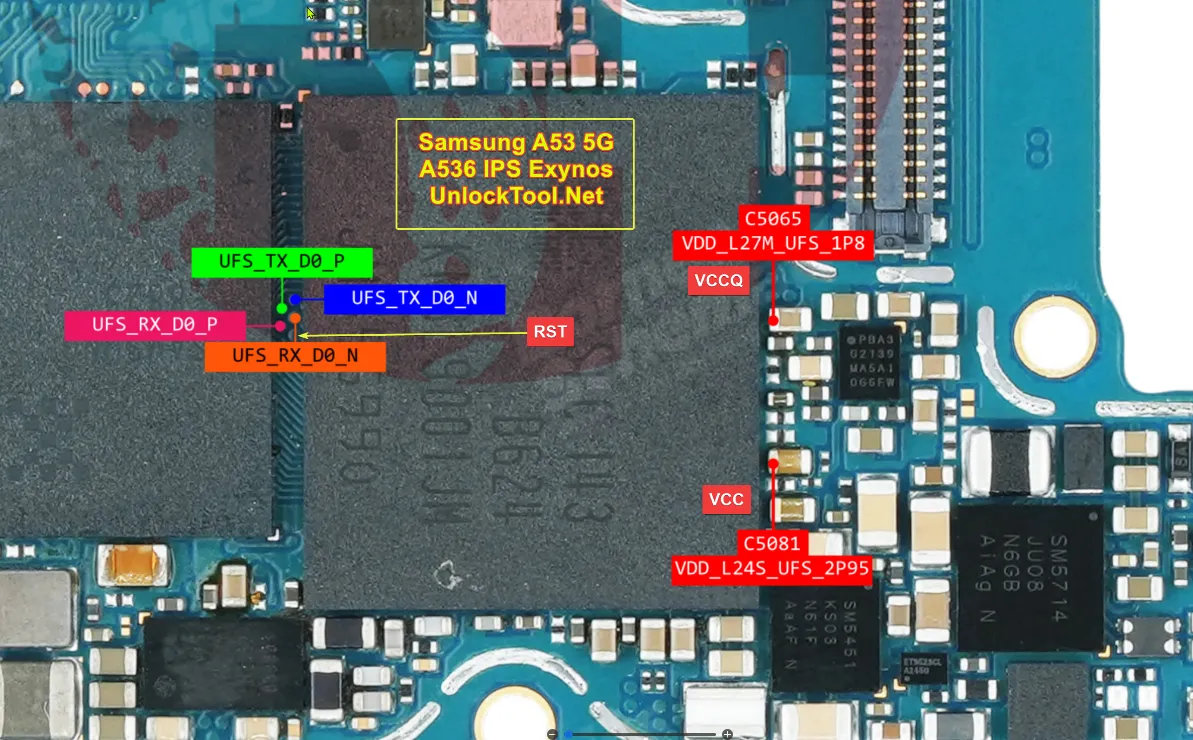
Galaxy A53 5G (SM-A536, Exynos 1280) — UFS ISP Pinout (UFS_TX_D0, UFS_RX_D0, RST, VCC, VCCQ) for UFS programmer boxes.
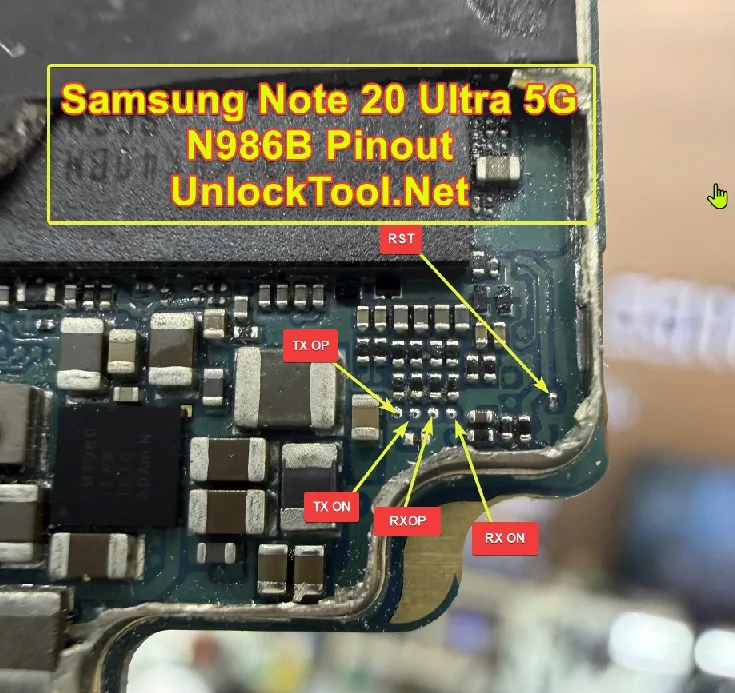
Galaxy Note 20 Ultra 5G (SM-N986B, Exynos 990) — UFS ISP Pinout (TX OP/ON, RX OP/ON, RST) for direct UFS servicing.
Which GSM tools work best after entering Samsung Test Point mode?
Once your Galaxy board detects in EDL 9008, BROM, SPD, or EUB, match the rental tool to the chipset so you do not overpay for unused annual licenses. GSM24h delivers automated rental credentials in ~2 seconds with live USD pricing.
- All-Rounder (Qualcomm + MediaTek + Unisoc + Exynos): Rent UnlockTool starting from $0.30 — ideal for everyday FRP, factory reset, and Odin recovery (Samsung UnlockTool chipset guide).
- Qualcomm EDL & Knox Guard Specialists: Rent Samsung Tool CellTool starting from $2.15 for Qualcomm EDL Auto-Loader, Keep EFS, and authorized KG servicing (CellTool guide).
- Exynos EUB & Deep Repair: Rent Sigma Plus ($1.55) or Rent Chimera Tool ($25.96) for stubborn Exynos EUB FRP, boot repair, and factory diagnostics.
| Package | Current price | Original price | Save |
|---|---|---|---|
| 6 hours | $0.30 | $0.35 | 14% |
| 12 hours | $0.42 | $0.49 | 14% |
| 1 day | $0.95 | $1.00 | 5% |
| 2 days | $1.20 | $1.30 | 8% |
| 3 days | $1.60 | $1.70 | 6% |
| 5 days | $2.00 | $2.10 | 5% |
| 7 days | $3.40 | $3.50 | 3% |
| 14 days | $3.90 | $4.00 | 3% |
| 30 days | $7.40 | — | — |
Updated November 2026 — listed price before coupon
Technician Tip — Check Binary (BIT) Before Flashing in EDL or EUB: Before writing any bootloader or firmware package after a test-point repair, always confirm the device's current Samsung binary revision (for example, U5 or S7) and back up EFS/NV data first — see our Samsung EFS backup & restore guide and EDL Mode vs Download Mode comparison.
Frequently Asked Questions
Do all Samsung Galaxy phones use Qualcomm EDL 9008 test points?
No. Only Qualcomm Snapdragon Galaxy variants enter Qualcomm HS-USB QDLoader 9008. MediaTek Galaxy models enter BROM, Unisoc models enter SPRD U2S Diag, and Exynos models enter Exynos USB Boot (EUB) mode.
Should I disconnect the battery before shorting a Samsung Test Point?
Yes on almost all boards — disconnecting the battery FPC connector with a plastic spudger protects the power management IC and nearby SMD capacitors from accidental shorts if your tweezers slip. Only reconnect the battery on specific MediaTek/Exynos models like Galaxy A34 5G (SM-A346E) that explicitly require battery voltage to hold the BROM port.
Why does Windows show Unknown USB Device instead of QDLoader 9008 or EUB?
Unknown USB Device usually means the matching Qualcomm 9008, MediaTek VCOM, or Exynos USB driver is missing, Windows Driver Signature Enforcement blocked it, or the USB cable/port dropped data lines. Switch to a rear motherboard USB port and reinstall the driver.
What is the difference between a Samsung EUB test point and an eMMC/UFS ISP pinout?
A 2-pin USB test point only requires temporarily shorting two copper pads (or pad-to-GND) with tweezers while plugging in a normal USB cable. An eMMC/UFS ISP pinout (such as Galaxy A04s, A05, A13, A53 5G, or Note 20 Ultra) requires micro-soldering multiple jumper wires (CMD/CLK/DAT0 or TX/RX/RST) to a hardware programmer box.
Can a Samsung Test Point recover a phone that cannot enter Download Mode?
Yes. Because bootrom modes execute inside the SoC hardware before the Android bootloader loads, a test point can often detect soft-bricked phones with black screens and restore bootloader partitions using authorized firmware loaders.
Which tool should I rent on GSM24h for Samsung Test Point jobs?
For mixed Qualcomm, MediaTek, and Unisoc Galaxy models, UnlockTool (/rent-unlocktool) covers most daily jobs starting from $0.30. For specialized Qualcomm EDL loaders choose Samsung Tool CellTool (/rent-samsung-tool), and for Exynos EUB choose Sigma Plus (/rent-sigma-plus) or Chimera Tool (/rent-chimera-tool).

Written by: Thanh Tài
6 years of GSM & IT background; specializes in mobile and laptop software, firmware flashing, iCloud, Xiaomi, Samsung, and OPPO unlocking. Facebook · Profile & articles · About us



No comments yet. Be the first to share your thoughts!