
Mastering Xiaomi Test Point EDL 9008 is essential whenever a Snapdragon Xiaomi, Redmi, or POCO device is hard-bricked, stuck in a bootloop with a locked bootloader, or requires authorized EDL servicing on MIUI and HyperOS. This full motherboard reference compiles all 49 verified Xiaomi, Redmi, POCO, and Redmi Pad diagrams — accurately separating Qualcomm EDL 9008 boards from MediaTek BROM and Unisoc SPD exceptions — so you can connect directly into Qualcomm HS-USB QDLoader 9008 with AndroidWinTool ($1.03), DFT Pro ($1.19), UnlockTool ($0.30), or Android Multi Tool (AMT) ($0.39). Always perform servicing strictly on owner-authorized devices.
Table of Contents
- When do Xiaomi, Redmi, and POCO phones require EDL 9008 test points?
- How does Xiaomi EDL Auth work on MIUI vs HyperOS?
- How do you enter Xiaomi EDL 9008 safely without damaging the board?
- Complete Xiaomi, Redmi & POCO Test Point Gallery (49 Verified Models)
- Which tools work best for Xiaomi EDL 9008 flashing and resets?
- Frequently Asked Questions
When do Xiaomi, Redmi, and POCO phones require EDL 9008 test points?
Xiaomi Snapdragon devices require EDL 9008 hardware test points whenever Fastboot Mode is inaccessible or locked, the phone only vibrates with a black screen after a failed OTA/ROM flash, or authorized service recovery cannot proceed over ADB. Test points bypass the locked bootloader entirely and connect directly to Qualcomm's primary bootrom.
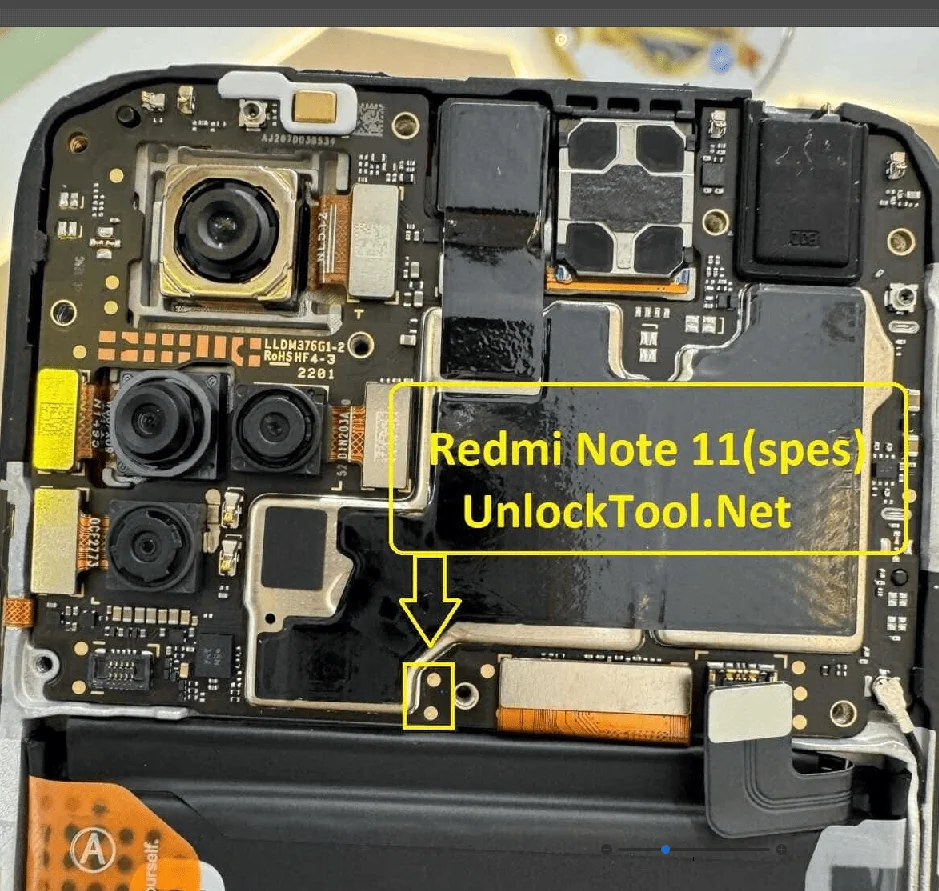
Redmi Note 11 (spes / spesn, Snapdragon 680) — dual EDL 9008 pads cleanly exposed above the battery.
Note that an EDL Deep Flash cable (shorting USB D+ to GND) only worked on legacy Snapdragon models such as Redmi Note 3 and Mi 5 on older bootloaders. Modern Redmi Note 8 through Note 13, POCO, and HyperOS handsets block USB cable shorting at the bootloader level, making the physical motherboard test point the only reliable entry path.
How does Xiaomi EDL Auth work on MIUI vs HyperOS?
On legacy Snapdragon Xiaomi models (Mi 5, Redmi 4A, Redmi Note 5A, POCO F1), standard Firehose programmers flash offline without server verification. On modern MIUI 12–14 and HyperOS Snapdragon handsets, Xiaomi's EDL Auth signature enforces either a server-authorized Firehose loader (via AndroidWinTool, AMT, or DFT Pro) or a patched no-auth loader supported by UnlockTool.
Crucial Chipset Verification (Not Every Redmi Is Qualcomm!): Many online test-point galleries mistakenly label every Redmi motherboard as Qualcomm EDL 9008. In fact, Redmi 6 (cereus) and Redmi 6A (cactus) use MediaTek Helio chips (BROM mode), and Redmi A3x (klein) uses Unisoc Tiger T603 (SPRD Diag mode). We separated those three boards clearly in their own subsection below so you install the right driver on the first try.
How do you enter Xiaomi EDL 9008 safely without damaging the board?
To trigger Qualcomm HS-USB QDLoader 9008 cleanly on a Xiaomi mainboard, install the Qualcomm 9008 USB driver first, remove the rear cover and upper plastic shield, unplug the battery flex, bridge the two EDL pads with ESD tweezers, and plug in your USB-C cable while watching Windows Device Manager.
- Pre-install Qualcomm 9008 drivers & Platform-Tools: Set up the signed Qualcomm HS-USB QDLoader 9008 driver (see our GSM USB drivers setup guide) plus Google Platform-Tools and the official Android WinUSB reference for Fastboot verification.
- Disassemble carefully & watch the fingerprint flex: On Redmi Note and POCO phones with side or rear fingerprint sensors, open the back cover slowly like a book so you do not tear the thin fingerprint ribbon.
- Disconnect the battery FPC: Unclip the battery connector using a plastic spudger before bringing metal tweezers near the mainboard.
- Short the two EDL pads and connect USB: Hold fine ESD tweezers lightly across both test pads, plug the USB cable into a rear PC motherboard port, and wait 2–3 seconds until Device Manager lists Qualcomm HS-USB QDLoader 9008 (COMx) under Ports.
- Lift tweezers and run your GSM tool immediately: Do not leave tweezers touching the pads during flashing. If the tool times out waiting for the Sahara handshake, unplug USB, wait 5 seconds, and re-trigger EDL cleanly — Sahara only accepts a handshake once per bootrom session.
Complete Xiaomi, Redmi & POCO Test Point Gallery (49 Verified Models)
Scroll directly to your Xiaomi, Redmi, POCO, or Redmi Pad series below. Every diagram includes verified codenames and chipset labels (including fixing commonly swapped packs such as Redmi 9T lime vs Mi 9T davinci and Redmi Note 5A ugglite vs Redmi 4A rolex).
Redmi Note Series — Qualcomm EDL 9008 (15 Boards)
Redmi Note 11 (spes) is shown above; the remaining 14 Snapdragon Redmi Note and Redmi 9T boards appear below in reverse chronological order from Note 13 4G down to Note 3:
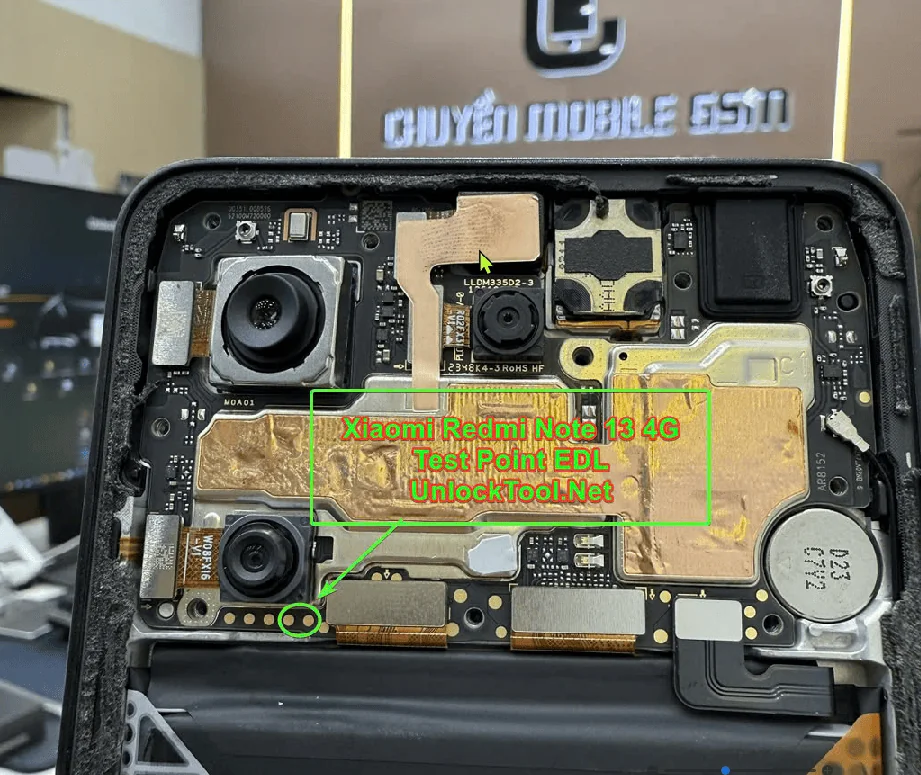
Redmi Note 13 4G (sapphire, Snapdragon 685) — dual EDL 9008 pads along the lower-left PCB edge.
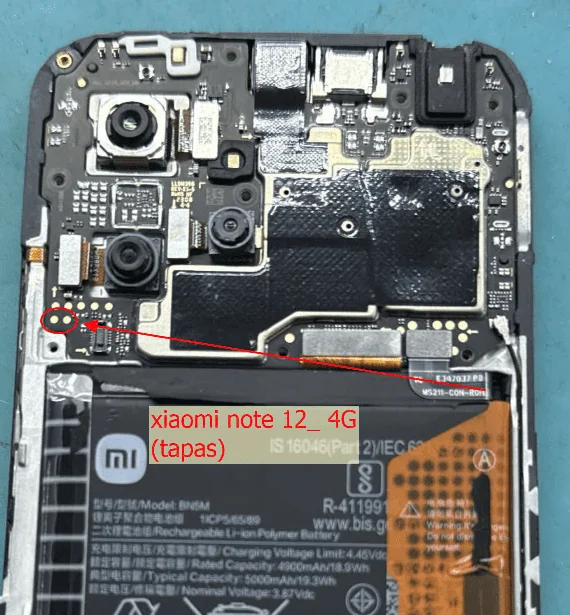
Redmi Note 12 4G (tapas / topaz, Snapdragon 685) — dual EDL 9008 pads on the far left edge below the rear camera.
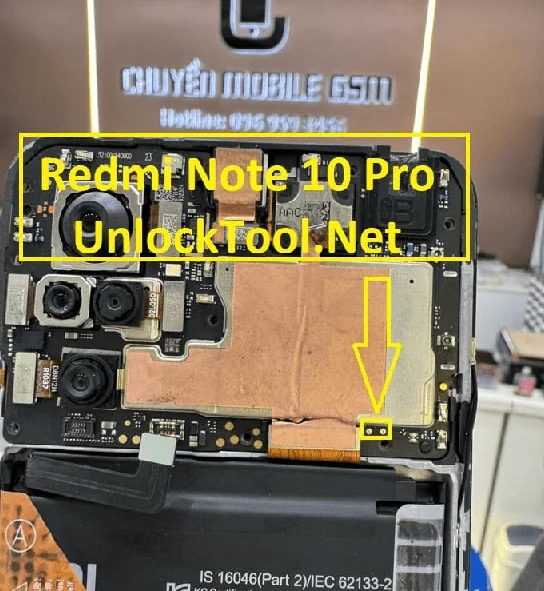
Redmi Note 10 Pro (sweet, Snapdragon 732G) — dual EDL 9008 pads at the lower-right corner of the copper shield.
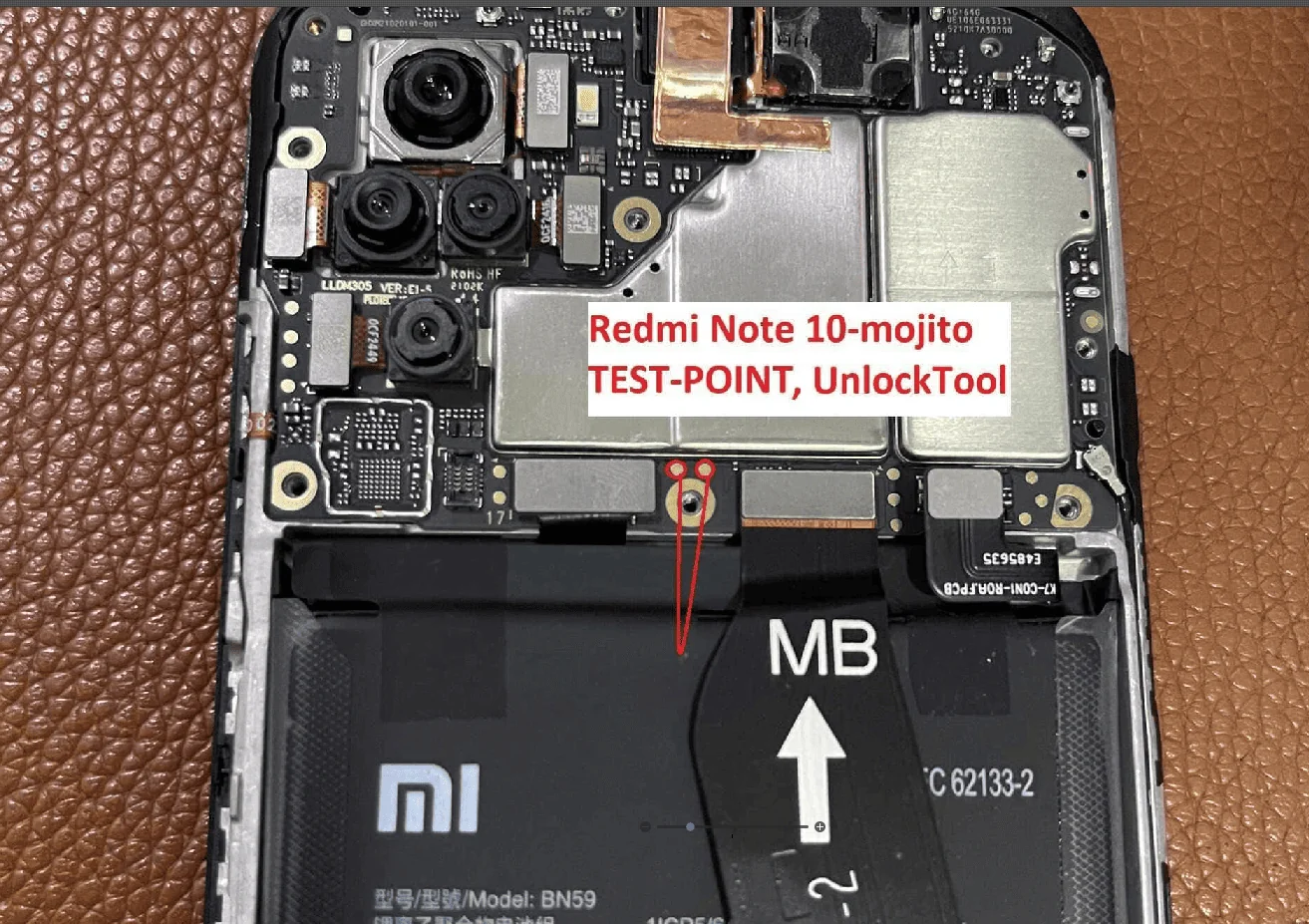
Redmi Note 10 (mojito / sunny, Snapdragon 678) — dual EDL 9008 test point pads on the mainboard.
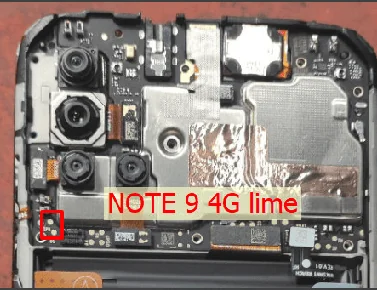
Redmi Note 9 4G (lime, Snapdragon 662) — EDL 9008 pads located near the upper corner beside the camera shield.
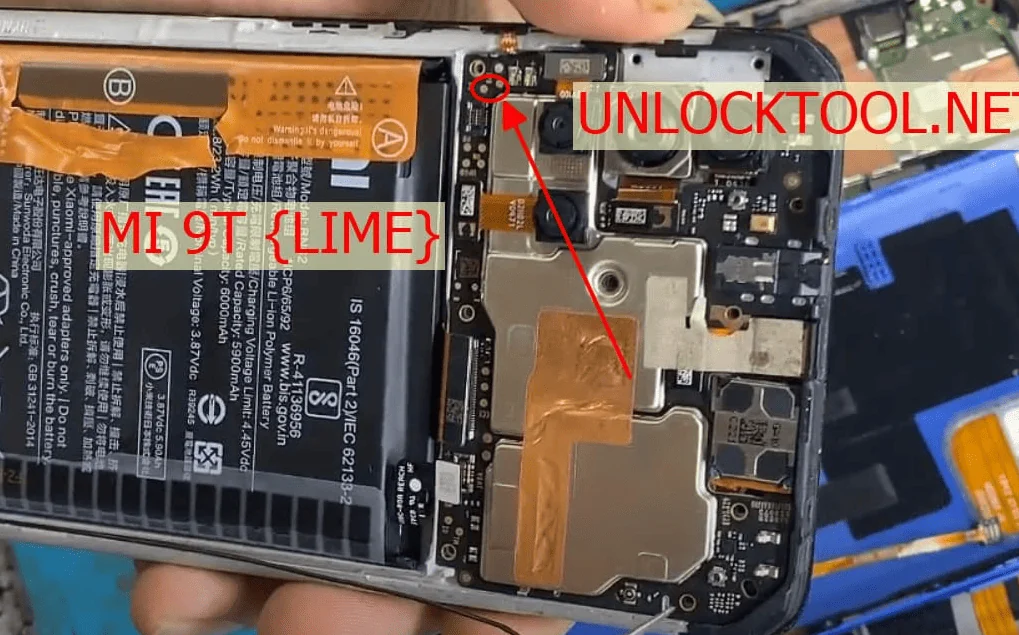
Redmi 9T (lime, Snapdragon 662 — 6000mAh BN62 battery) — dual EDL 9008 pads beside the top corner screw.
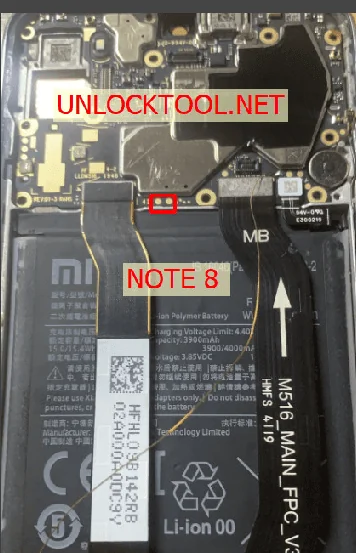
Redmi Note 8 (ginkgo, Snapdragon 665) — two copper pads situated between the display flex and MAIN sub-board flex.
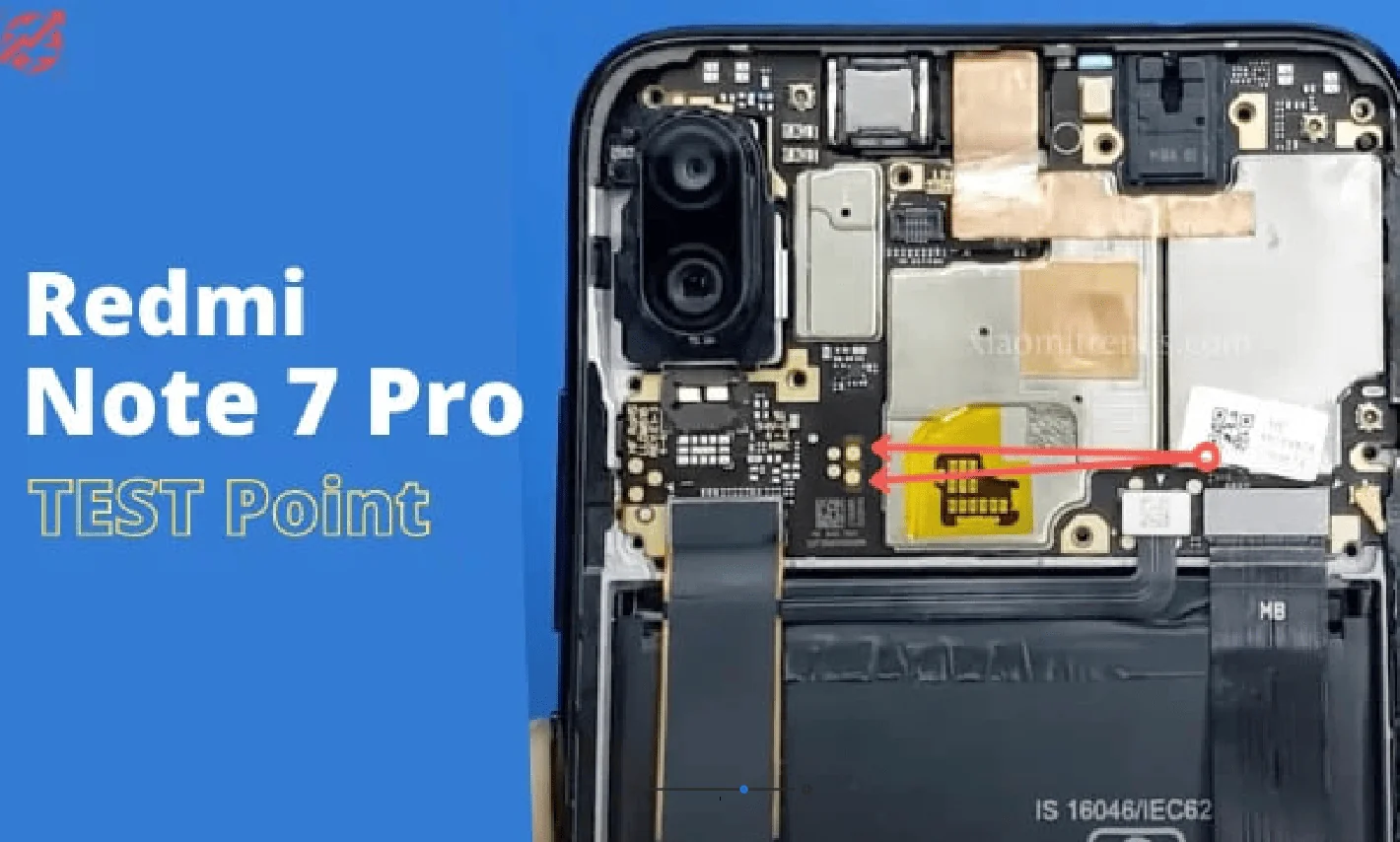
Redmi Note 7 Pro (violet, Snapdragon 675) — dual EDL 9008 test point pads along the center shield edge.
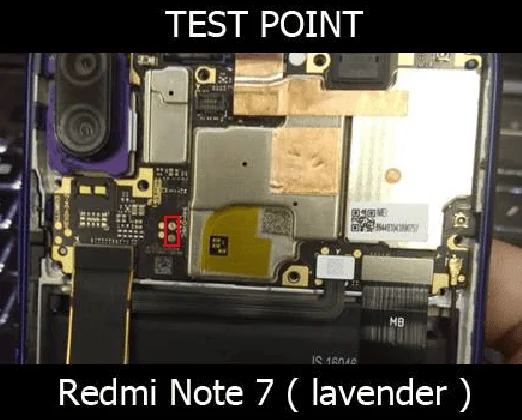
Redmi Note 7 (lavender, Snapdragon 660) — vertical pair of EDL 9008 pads immediately left of the EMI shield.
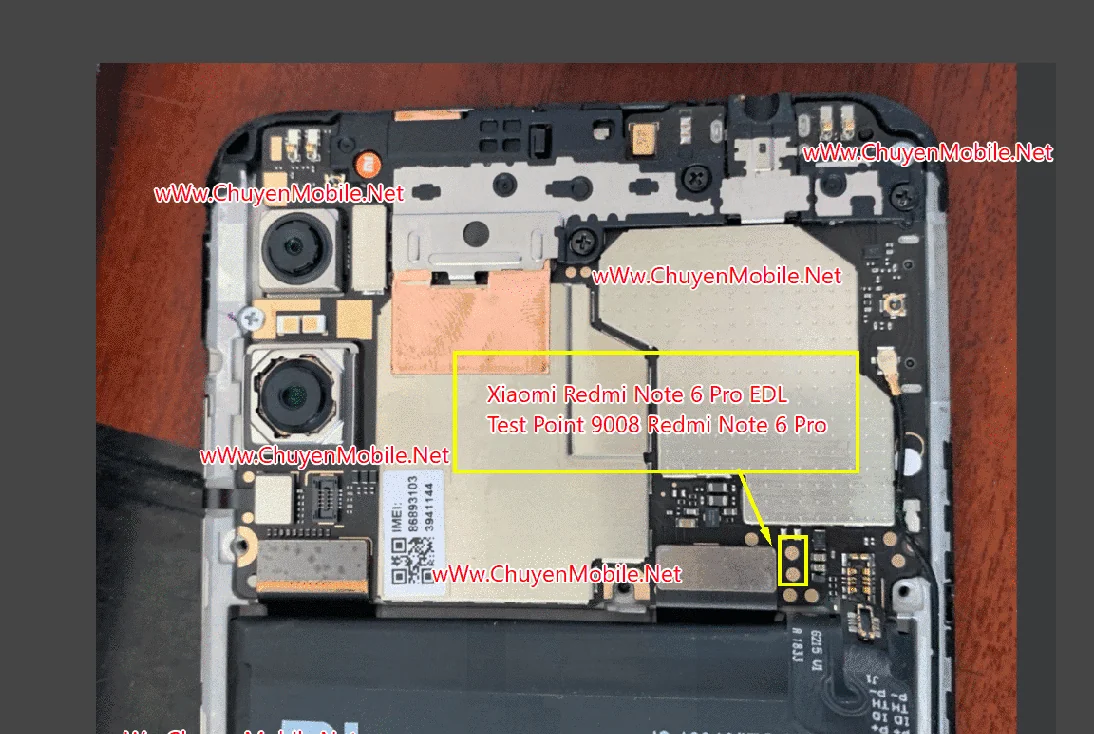
Redmi Note 6 Pro (tulip, Snapdragon 636) — dual EDL 9008 pads beside the battery connector.
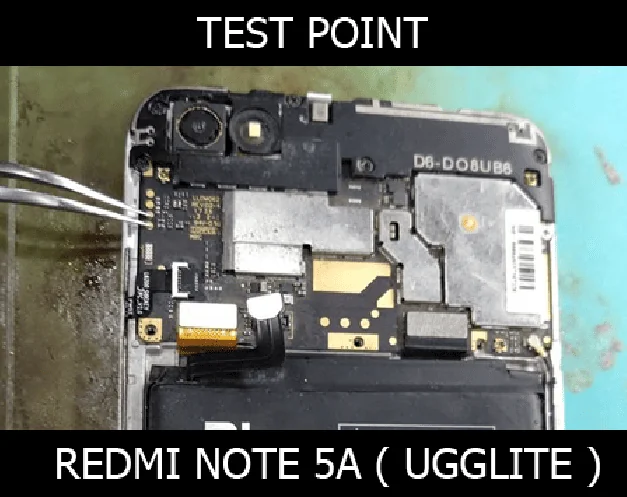
Redmi Note 5A (ugglite, Snapdragon 425) — dual EDL 9008 pads on the upper-left PCB border.
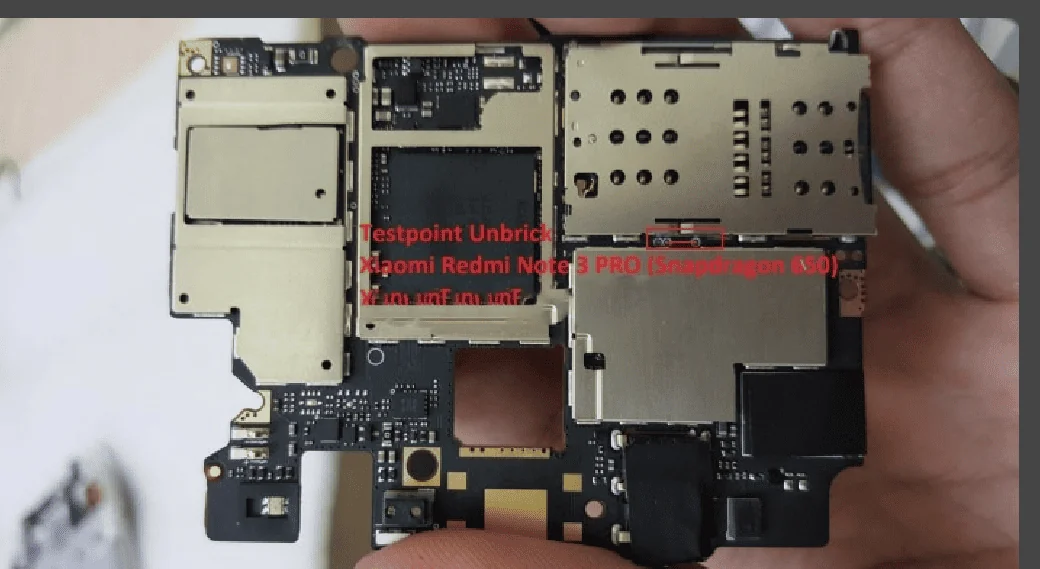
Redmi Note 3 Pro (kenzo, Snapdragon 650) — two EDL 9008 pads along the SIM shield edge.
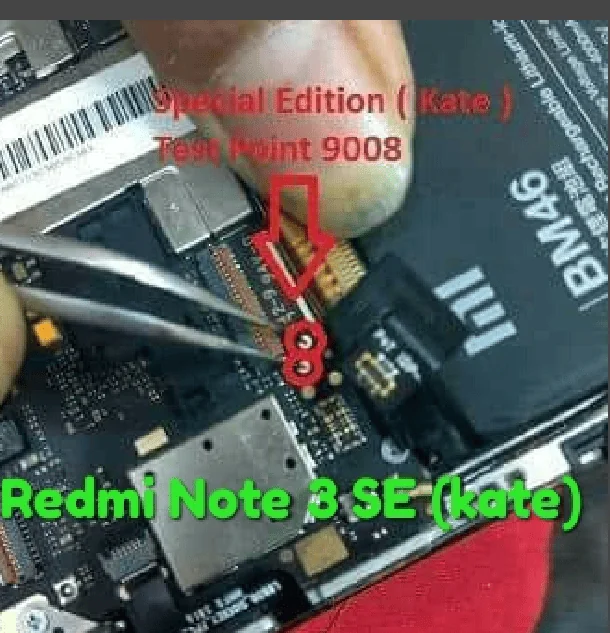
Redmi Note 3 Special Edition (kate, Snapdragon 650) — EDL 9008 test point pair beside the upper connector.
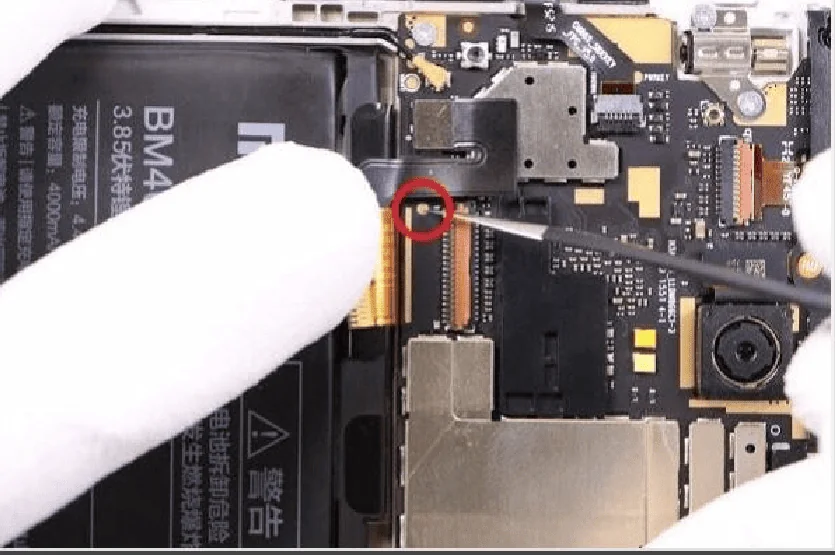
Redmi Note 3 alternate board close-up — EDL test pad accessible under the upper flex.
Xiaomi Mi, MIX & Mi Note Series — Qualcomm EDL 9008 (18 Boards)
Complete Qualcomm EDL 9008 motherboard reference covering Xiaomi Mi 11 Lite, Mi 9, Mi CC9 / Mi A3, Mi 8, Mi MIX 2/2S, Mi Note 2/3, Mi Max, Mi A1/A2 Lite, Mi 6, Mi 5/5s/5X, and Mi 4:
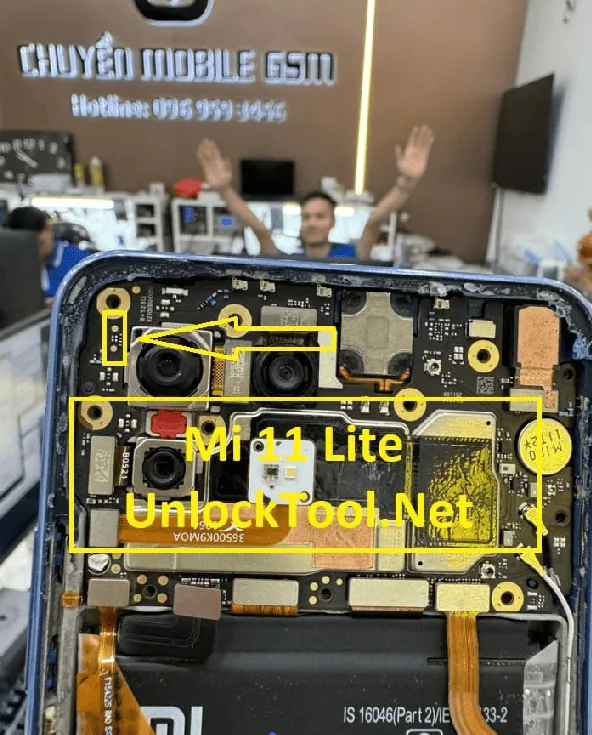
Mi 11 Lite 4G (courbet, Snapdragon 732G) — vertical dual EDL 9008 pads at the upper-left board corner.
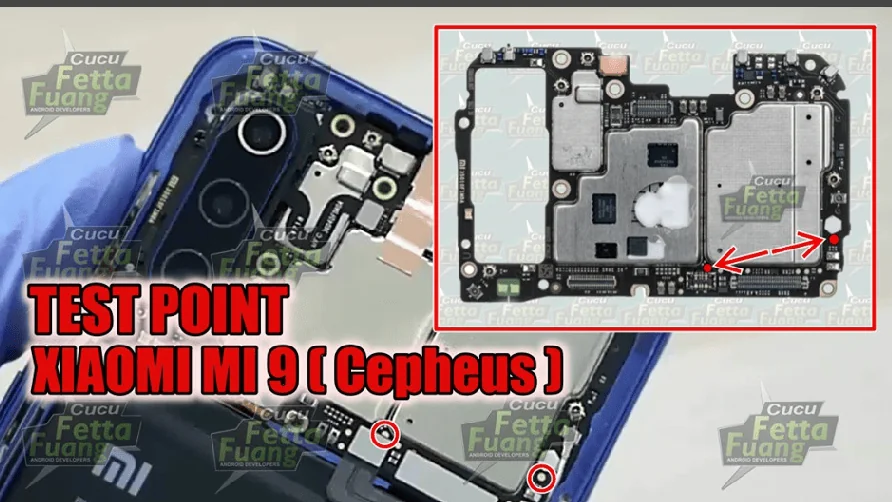
Xiaomi Mi 9 (cepheus, Snapdragon 855) — circled EDL 9008 pads along the lower-right PCB rail.
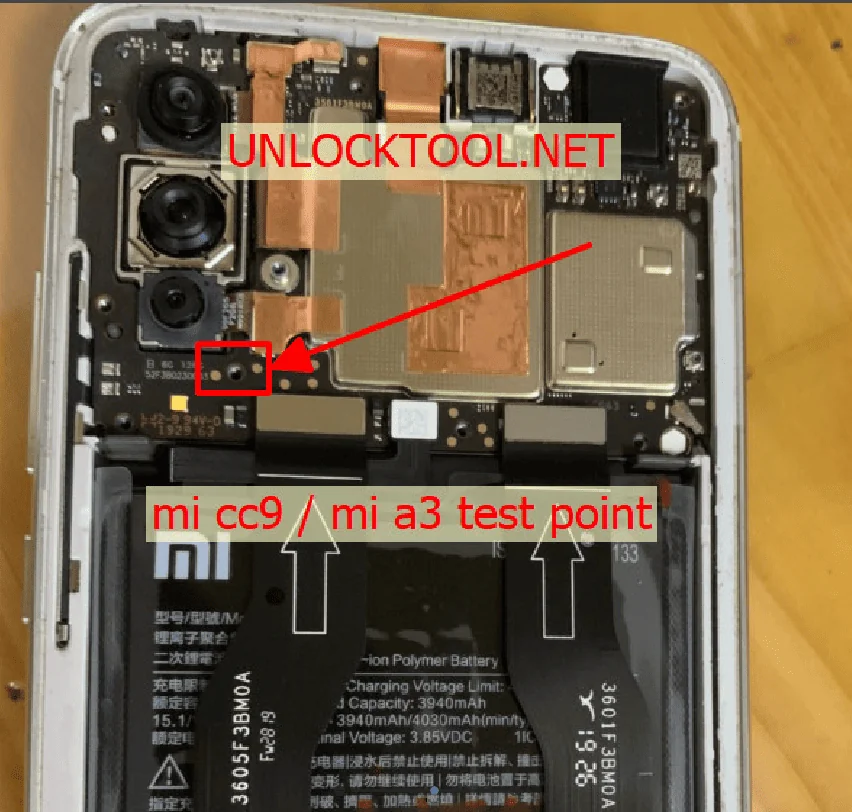
Mi CC9 / Mi 9 Lite (pyxis) & Mi A3 (laurel_sprout) — dual EDL 9008 pads left of the flex connectors.
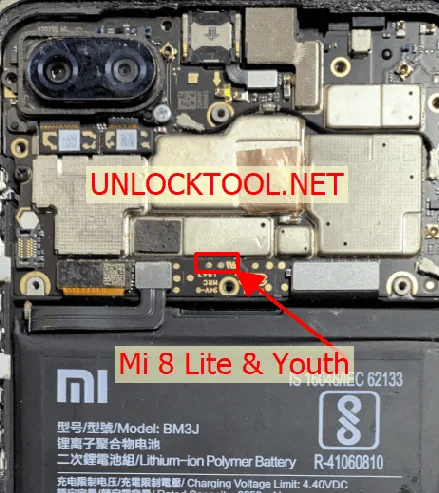
Mi 8 Lite (platina, Snapdragon 660) — dual EDL 9008 test pads.
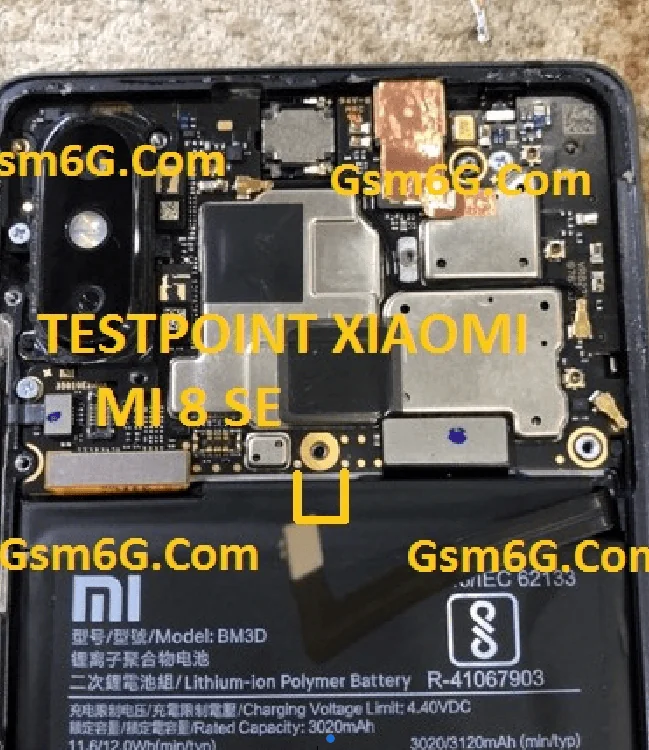
Mi 8 SE (sirius, Snapdragon 710) — dual EDL 9008 test pads on the mainboard.
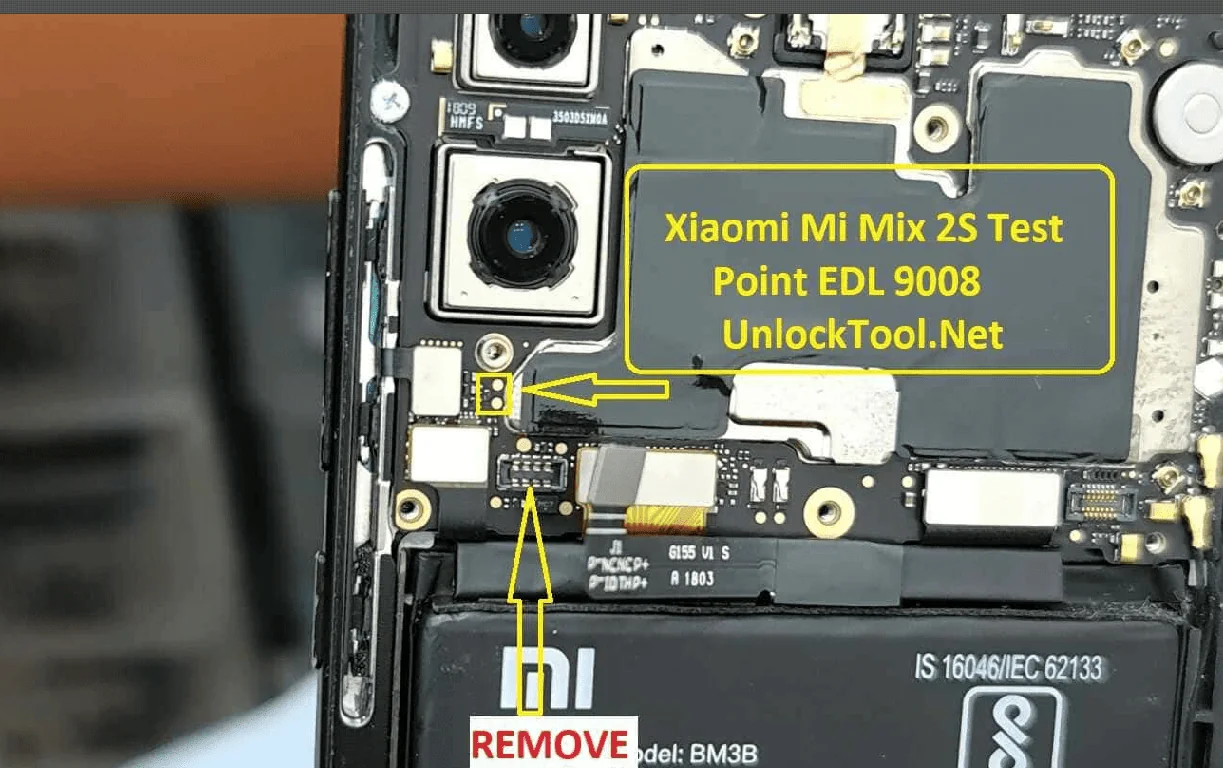
Mi MIX 2S (polaris, Snapdragon 845) — EDL 9008 test point pads.
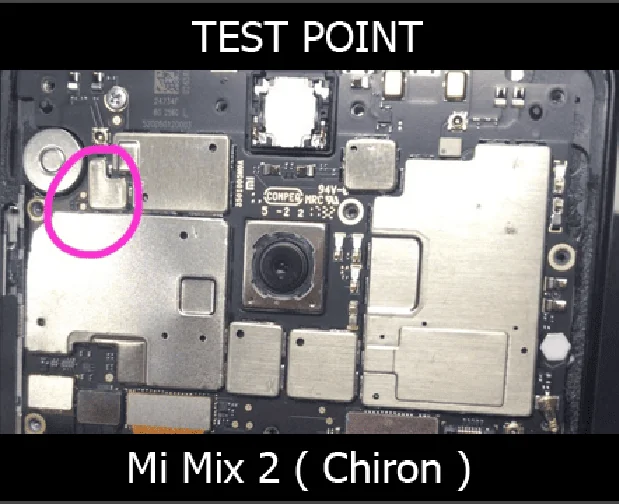
Mi MIX 2 (chiron, Snapdragon 835) — EDL 9008 test point pads.
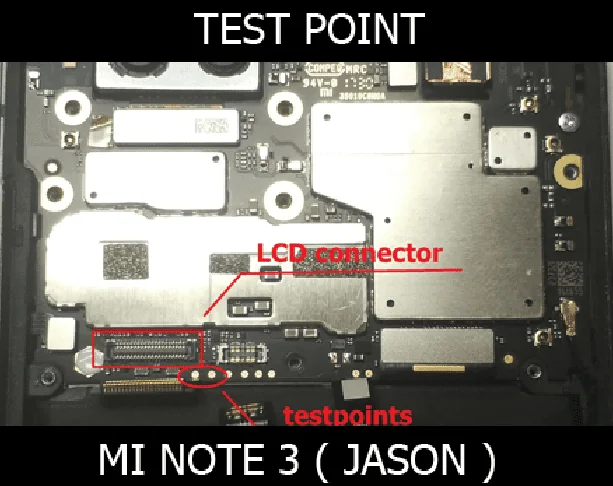
Mi Note 3 (jason, Snapdragon 660) — EDL 9008 test point pads.
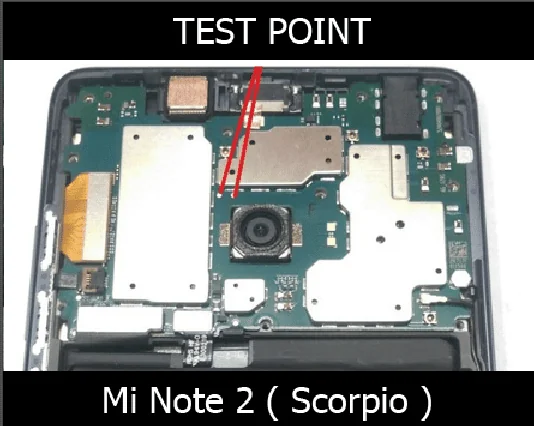
Mi Note 2 (scorpio, Snapdragon 821) — EDL 9008 test point pads.
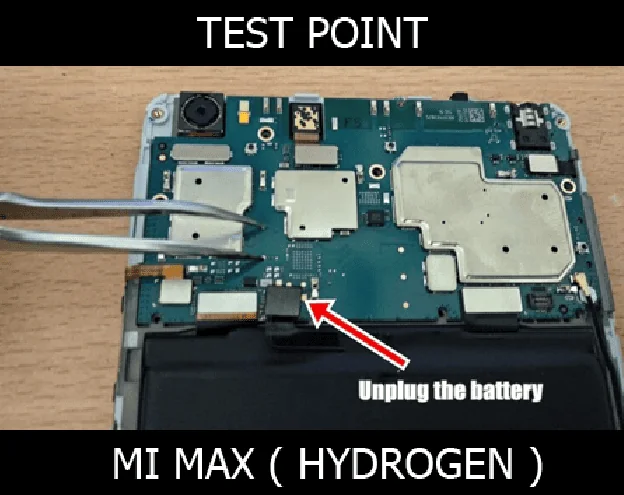
Mi Max (hydrogen / helium, Snapdragon 650/652) — EDL 9008 test point pads.
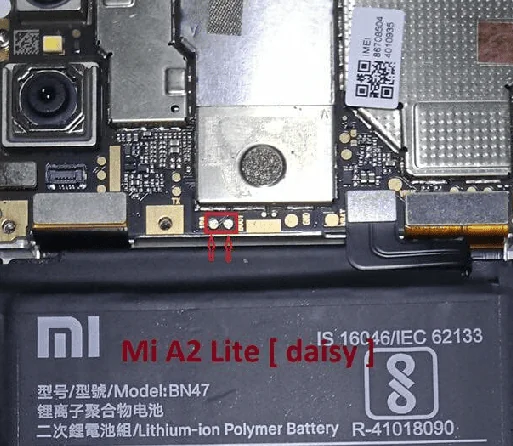
Mi A2 Lite (daisy, Snapdragon 625) — dual EDL 9008 test pads.
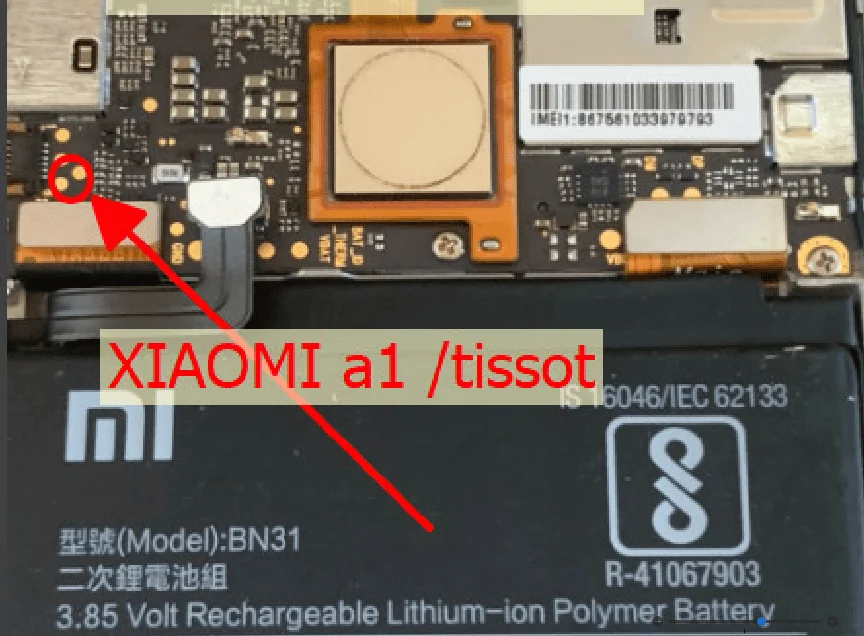
Mi A1 (tissot, Snapdragon 625) — dual EDL 9008 test pads.
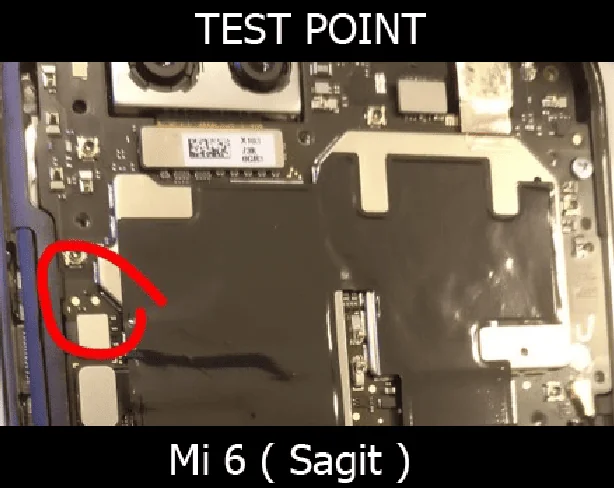
Mi 6 (sagit, Snapdragon 835) — dual EDL 9008 test pads.
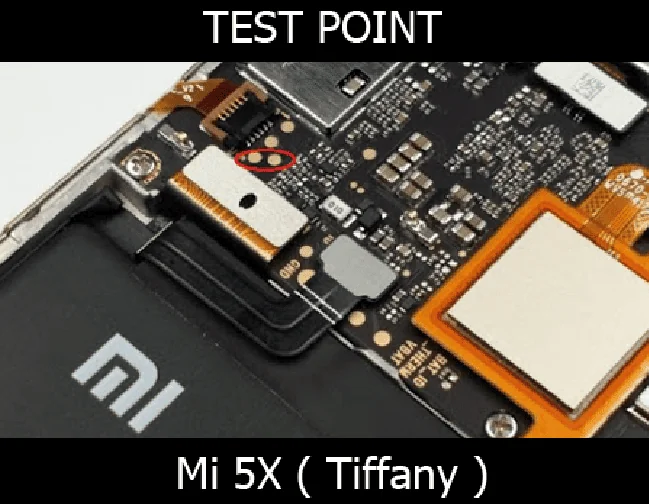
Mi 5X (tiffany, Snapdragon 625) — dual EDL 9008 test pads.
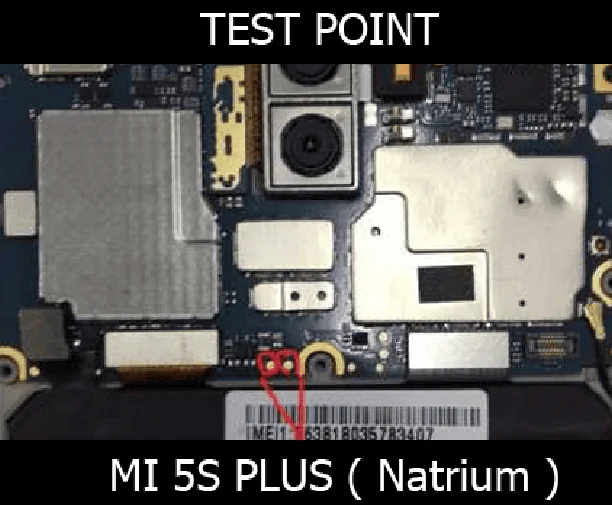
Mi 5s Plus (natrium, Snapdragon 821) — dual EDL 9008 test pads.
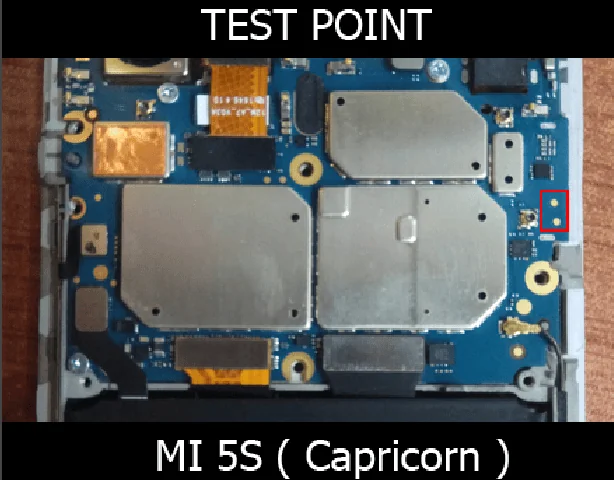
Mi 5s (capricorn, Snapdragon 821) — dual EDL 9008 test pads.
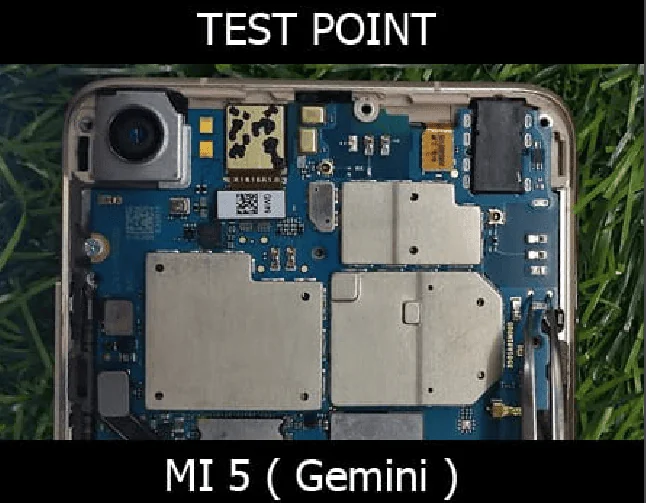
Mi 5 (gemini, Snapdragon 820) — dual EDL 9008 pads along the right PCB border.
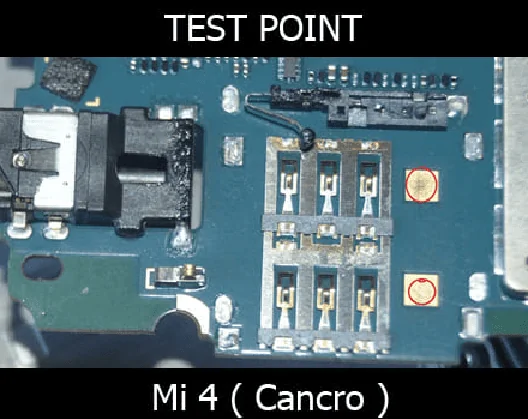
Mi 4 (cancro, Snapdragon 801) — legacy EDL 9008 test point pads.
Redmi K, POCO, Redmi Pad SE & Budget Redmi — EDL 9008 (13 Boards)
Qualcomm Snapdragon Redmi K-series (K40 Pro, K20 Pro, K20 / Mi 9T), POCO F1, Redmi Pad SE tablet, and classic Qualcomm Redmi 3S through Redmi 8 models:
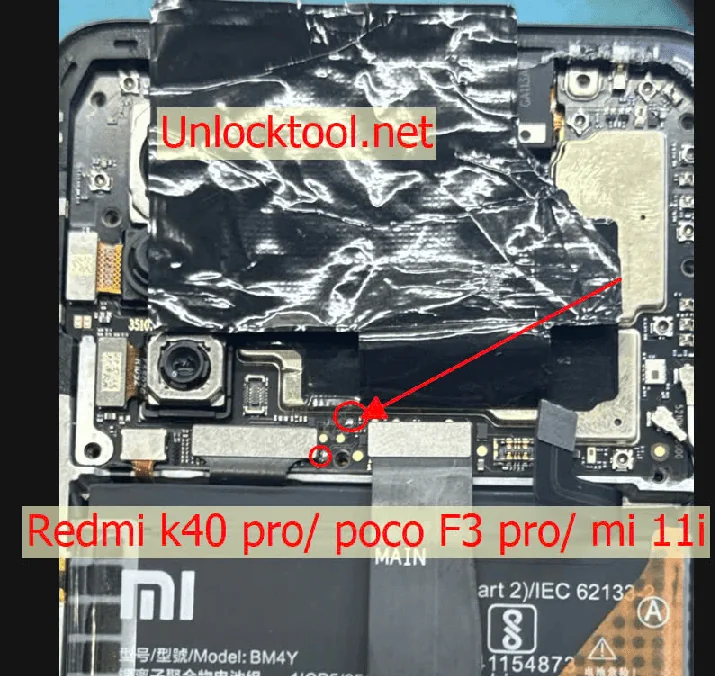
Redmi K40 Pro / Mi 11i (haydn, Snapdragon 888) — two EDL 9008 pads left of the MAIN flex connector.
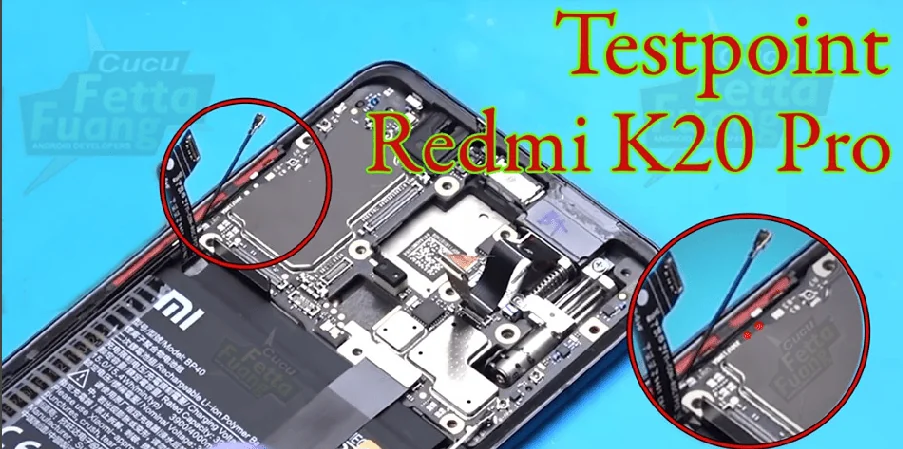
Redmi K20 Pro / Mi 9T Pro (raphael, Snapdragon 855) — dual EDL 9008 pads along the upper-left PCB border.
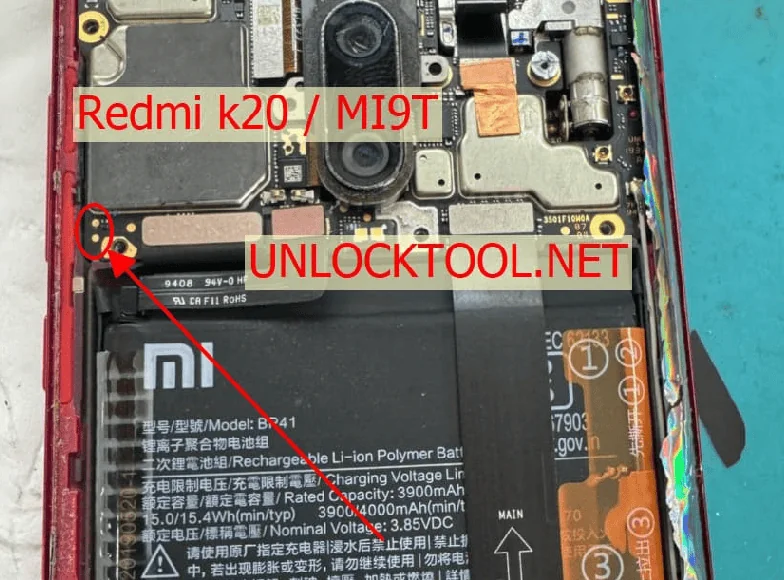
Redmi K20 / Mi 9T (davinci, Snapdragon 730) — dual EDL 9008 pads on the lower-left corner above the BP41 battery.
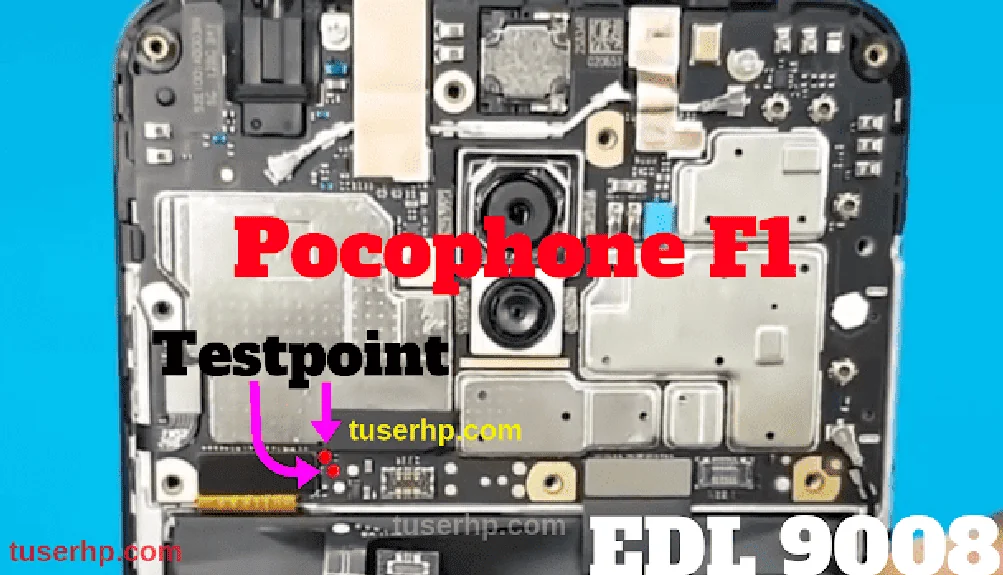
POCO F1 (beryllium, Snapdragon 845) — vertical EDL 9008 pair just above the battery flex on the left side.
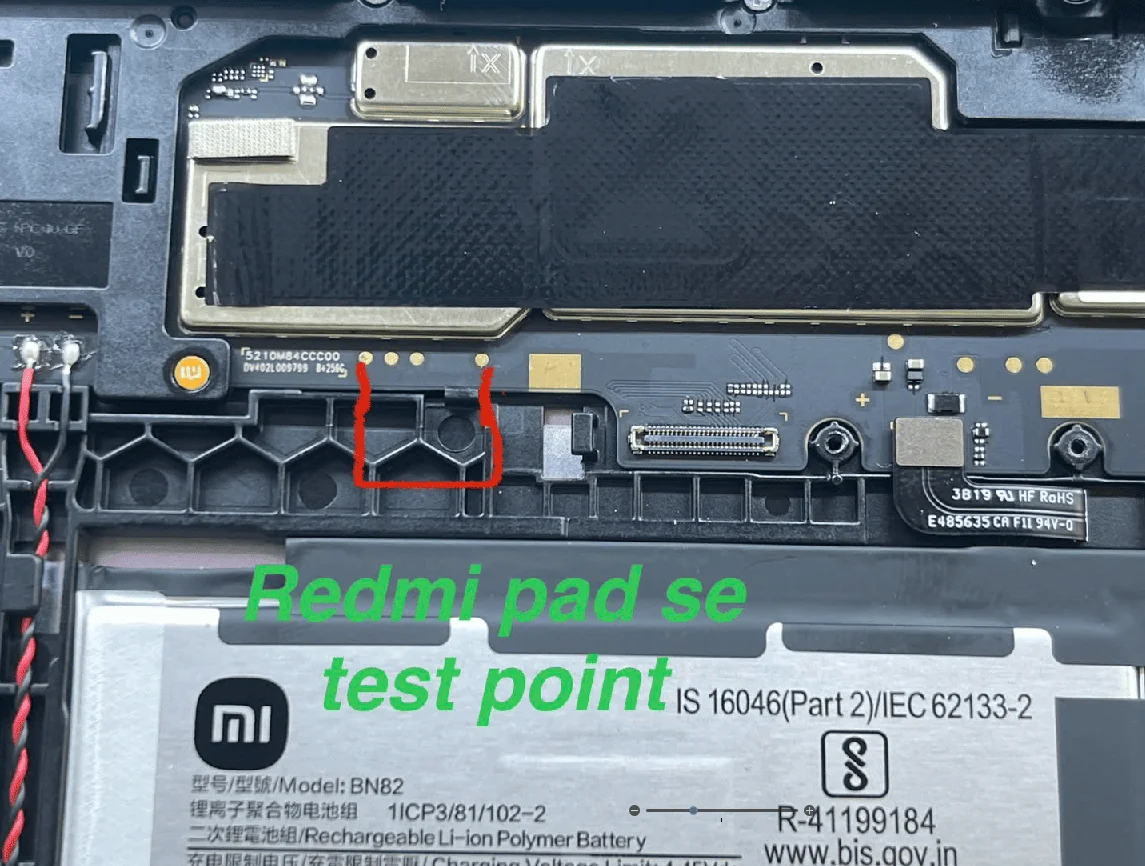
Redmi Pad SE (xun, Snapdragon 680) — bridge the outer two marked pads along the lower shield border above the BN82 battery.
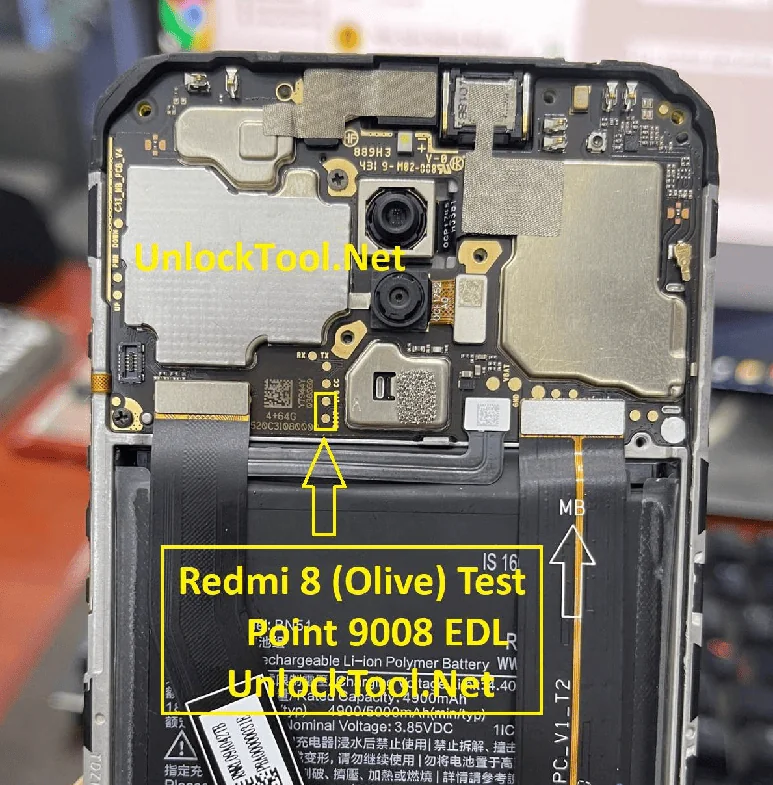
Redmi 8 (olive, Snapdragon 439) — dual EDL 9008 test point pads.
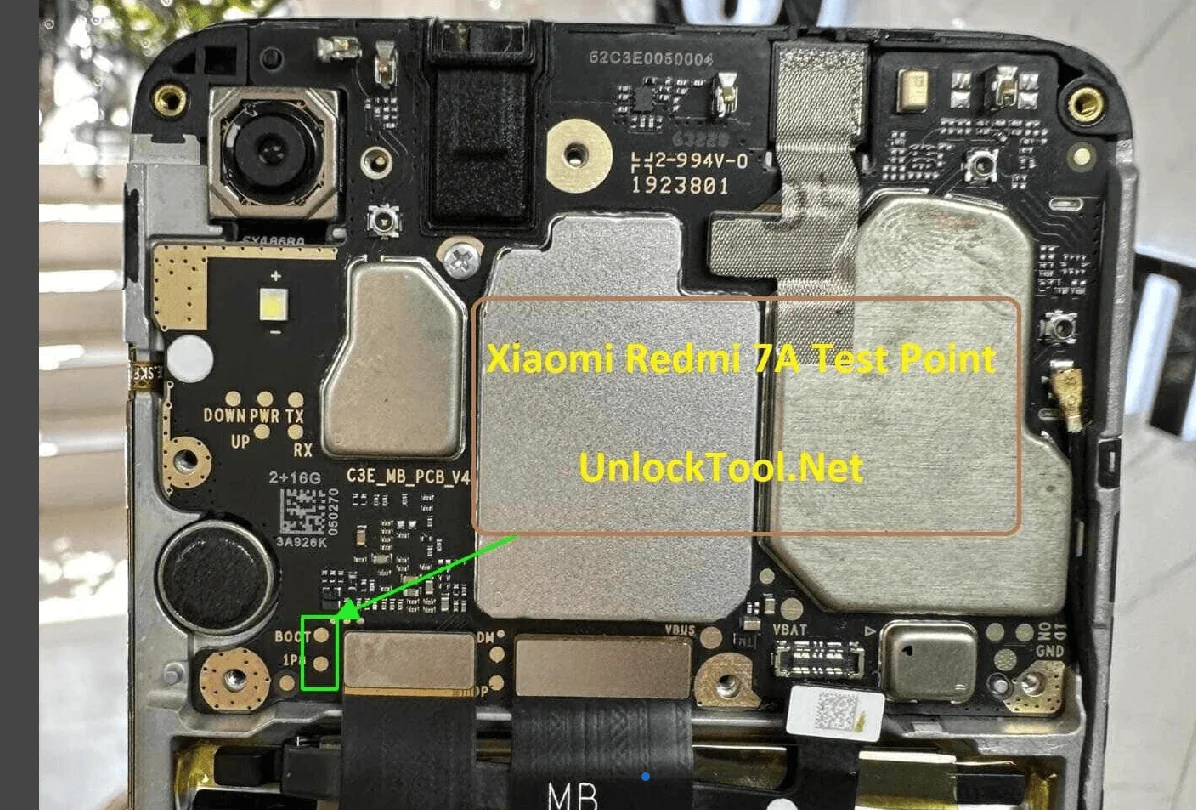
Redmi 7A (pine, Snapdragon 439) — dual EDL 9008 test point pads.
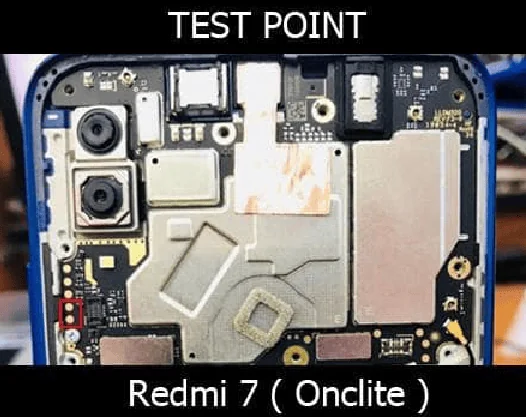
Redmi 7 (onclite, Snapdragon 632) — dual EDL 9008 test point pads.
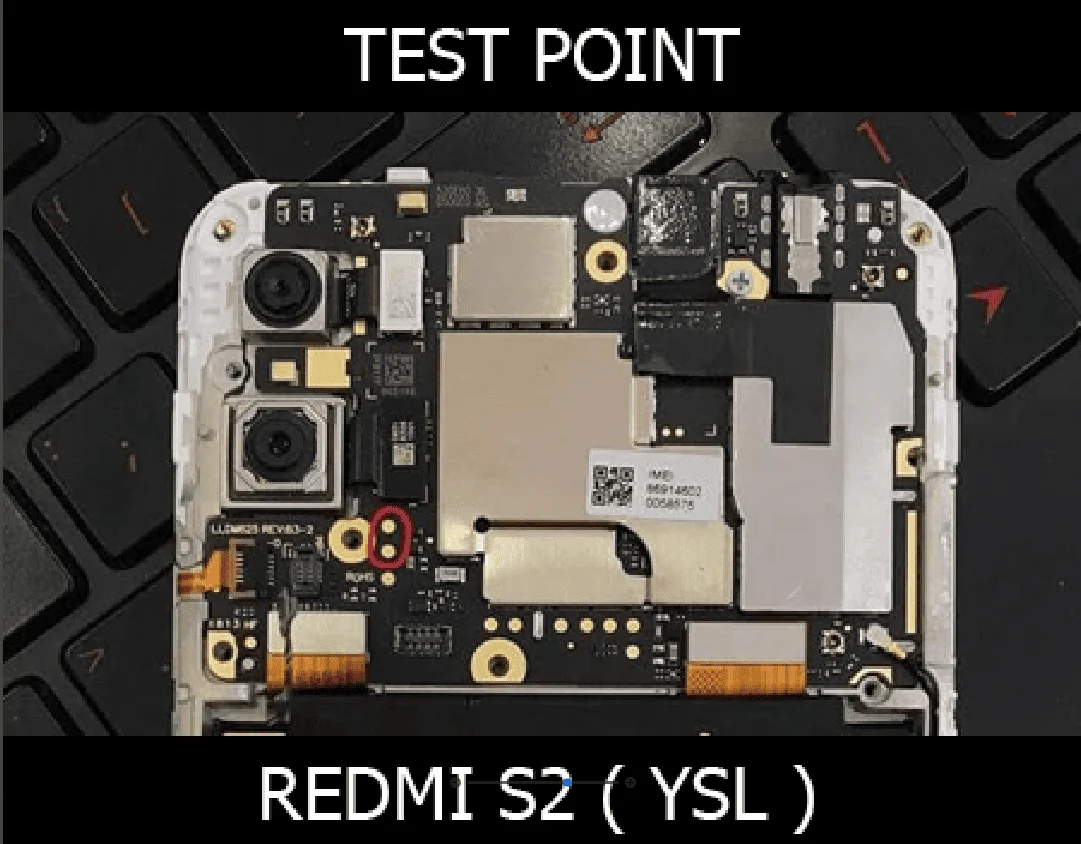
Redmi S2 / Y2 (ysl, Snapdragon 625) — dual EDL 9008 test point pads.
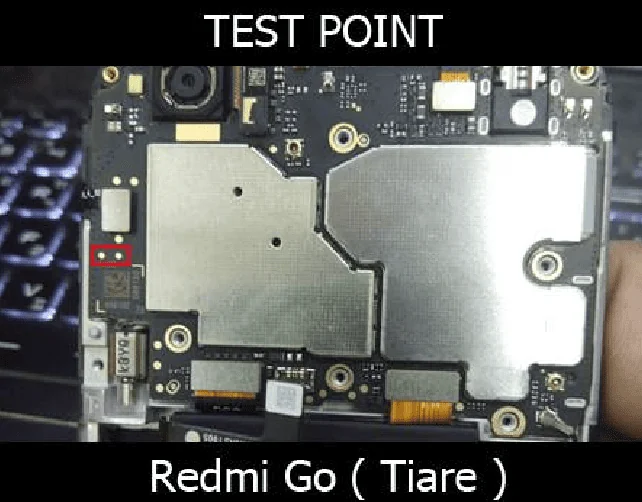
Redmi Go (tiare, Snapdragon 425) — dual EDL 9008 test point pads.
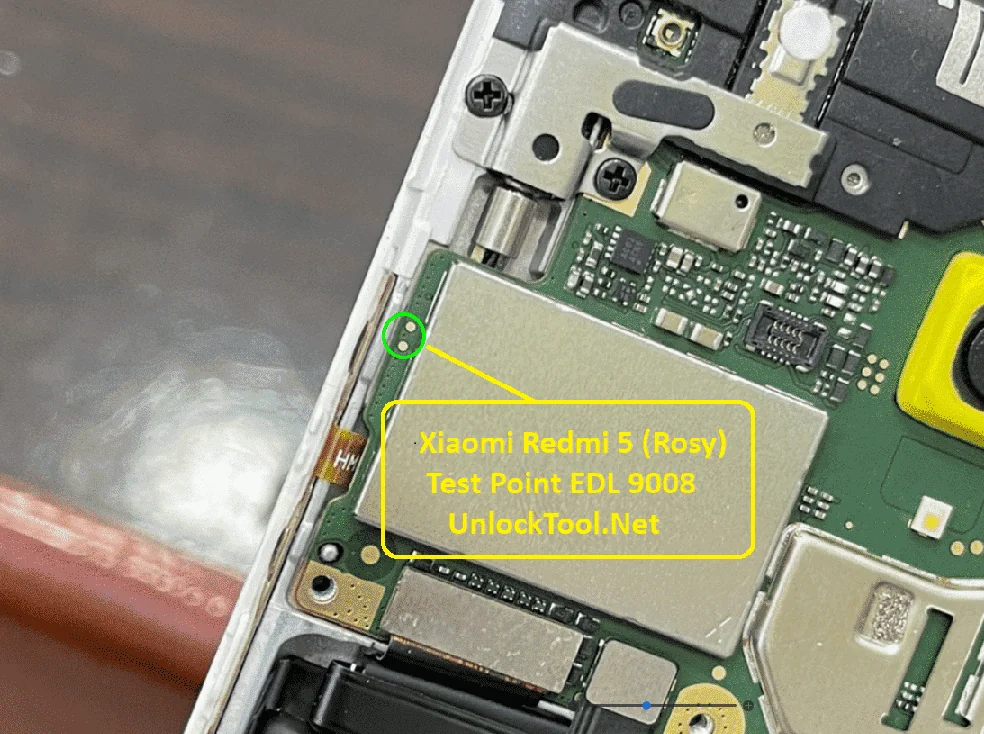
Redmi 5 (rosy, Snapdragon 450) — dual EDL 9008 test point pads.
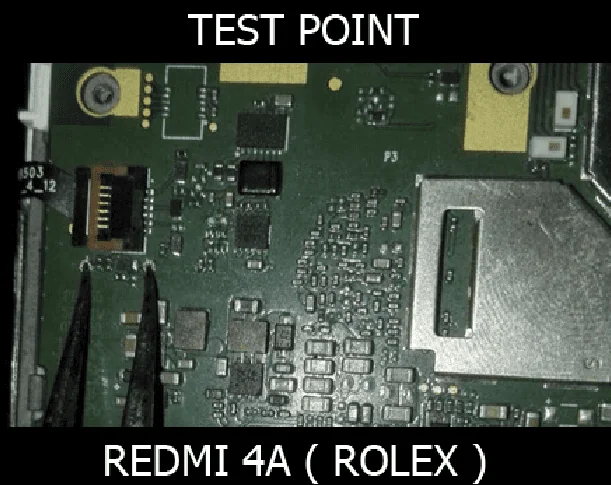
Redmi 4A (rolex, Snapdragon 425) — dual EDL 9008 pads directly beneath the upper flex connector.
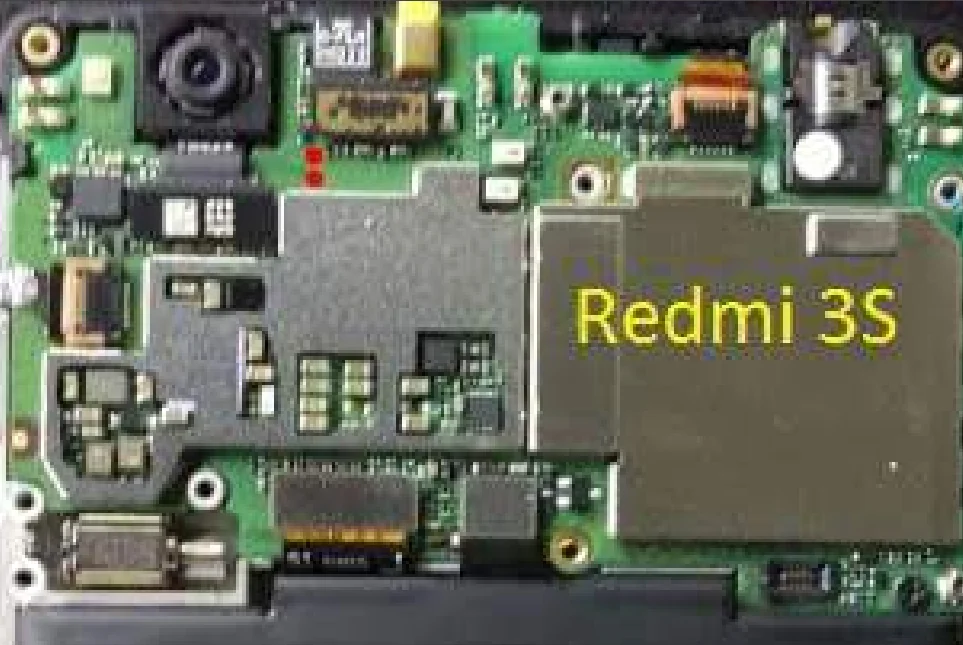
Redmi 3S (land, Snapdragon 430) — dual EDL 9008 test point pads.
Non-Qualcomm Redmi Exceptions — MediaTek BROM & Unisoc SPD (3 Boards)
These three popular budget Redmi handsets do not use Qualcomm Snapdragon chips — use MediaTek VCOM drivers for Redmi 6 / 6A and Spreadtrum SPRD drivers for Redmi A3x:
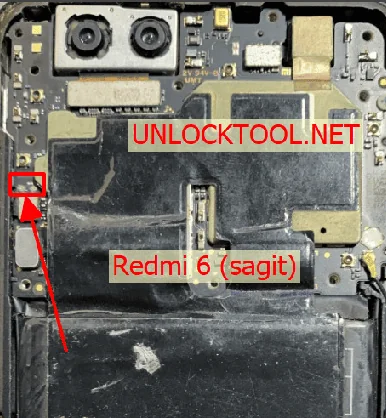
Redmi 6 (cereus, MediaTek Helio P22) — MediaTek BROM test point (NOT Qualcomm EDL 9008).
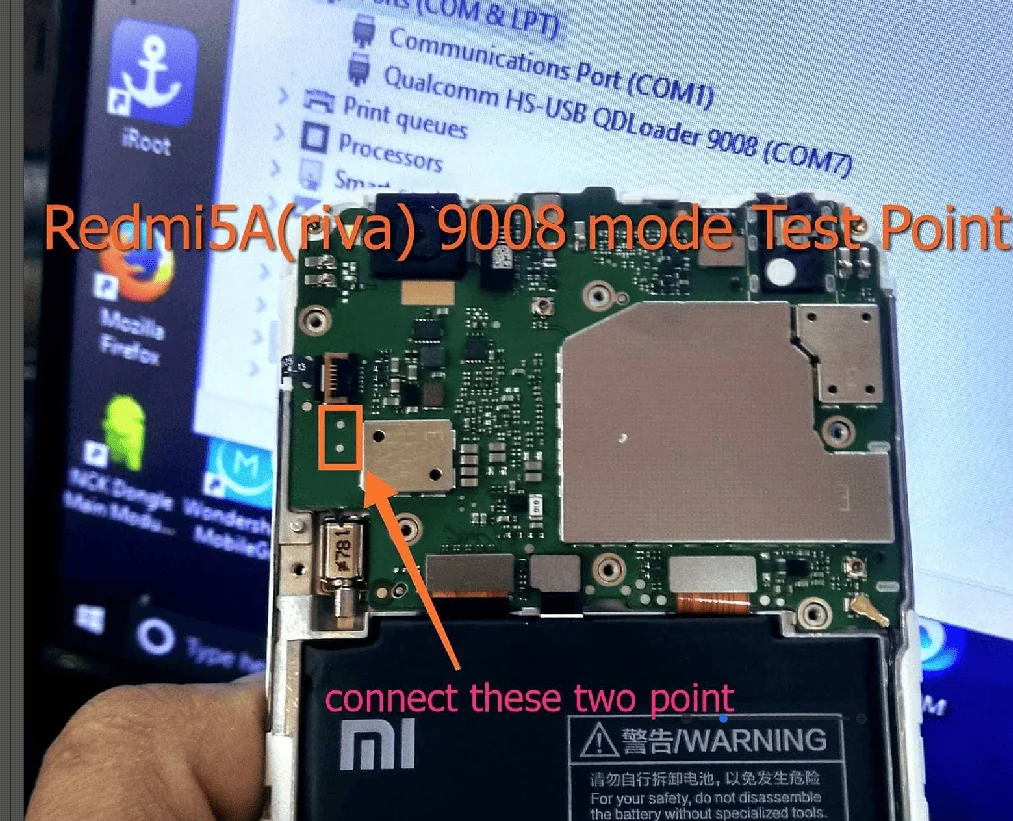
Redmi 6A (cactus, MediaTek Helio A22) — MediaTek BROM test point (NOT Qualcomm EDL 9008).
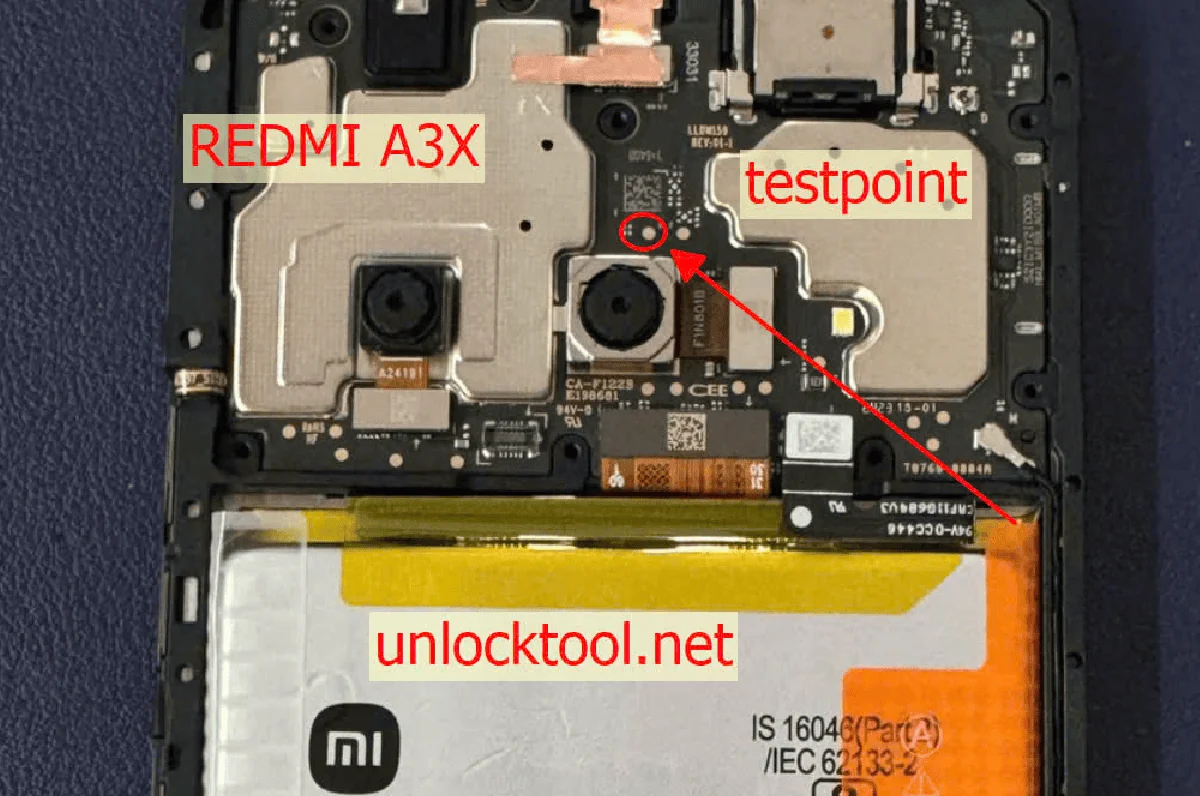
Redmi A3x (klein, Unisoc Tiger T603) — Unisoc SPRD Diag test point located directly above the rear camera.
Which tools work best for Xiaomi EDL 9008 flashing and resets?
Selecting the right tool depends on whether your Xiaomi unit is running an older no-auth Snapdragon loader or newer HyperOS EDL Auth. All four leading Xiaomi GSM tools are available via instant automated rental on GSM24h with no full-year license commitment:
- HyperOS & Xiaomi New Auth EDL: Rent AndroidWinTool ($1.03) — purpose-built for Xiaomi EDL No-Auth/Server loaders and EFS/modemst partition backups (AndroidWinTool Xiaomi EDL guide).
- Daily Xiaomi FRP & Mi Account Workflows: Rent UnlockTool ($0.30) — broad built-in Xiaomi model list for authorized Mi Account, FRP, and Fastboot/EDL firmware work (Xiaomi HyperOS UnlockTool guide).
- Deep Qualcomm QCN, EFS & Dual-SIM Recovery: Rent DFT Pro ($1.19) or Rent Android Multi Tool (AMT) ($0.39) for advanced Qualcomm EDL firmware flashing, QCN backup, and server auth tasks.
| Package | Current price | Original price | Save |
|---|---|---|---|
| 2 days | $1.03 | $2.10 | 51% |
Updated November 2026 — listed price before coupon
Golden Rule Before Any Xiaomi EDL Flash: Before erasing userdata, resetting Mi Account, or flashing a full Fastboot ROM in EDL 9008, always back up modemst1, modemst2, fsg, fsc, and persist first. Corrupted persist or modem partitions can break Wi-Fi, sensors, or baseband — learn how EDL compares to Fastboot and Download Mode in our EDL Mode vs Download Mode guide.
Frequently Asked Questions
Can I use an EDL Deep Flash cable instead of opening a newer Redmi Note or POCO?
No. EDL Deep Flash cables only work on legacy Snapdragon models (such as Redmi Note 3 or Mi 5) with older bootloaders. Modern Redmi Note 8–13, K-series, and HyperOS models block cable shorting and require opening the back cover to bridge the motherboard test points.
Why do I get a Sahara Fail error right after entering Qualcomm 9008 mode?
Sahara protocol only accepts one loader handshake per bootrom boot. If a previous flash attempt failed or timed out, disconnect the USB cable, wait 5 seconds, re-short the test point to re-enter QDLoader 9008 fresh, and use a rear USB 2.0/3.0 port with a shorter data cable.
Do Redmi 6, Redmi 6A, or Redmi A3x support Qualcomm EDL 9008?
No. Redmi 6 and Redmi 6A run MediaTek Helio processors (requiring MediaTek BROM mode), while Redmi A3x runs a Unisoc T603 processor (requiring SPRD U2S Diag mode).
Should the battery stay unplugged during a Xiaomi EDL 9008 flash?
Disconnect the battery while shorting the test points to stay safe. Most Snapdragon Xiaomi boards complete the entire EDL flash cleanly on USB bus power alone; only reconnect the battery after the port enumerates if a specific high-draw tablet or flagship disconnects mid-flash.
Which rented tool handles Xiaomi HyperOS EDL Auth models best?
AndroidWinTool (/rent-androidwintool) and Android Multi Tool (/rent-android-multi-tool) specialize in newer Xiaomi EDL Auth loaders, while UnlockTool (/rent-unlocktool) and DFT Pro (/rent-dft-pro) provide wide no-auth model coverage and QCN/EFS backup utilities.
Does entering EDL 9008 test point mode automatically erase my phone data?
No. Simply entering Qualcomm HS-USB QDLoader 9008 does not erase anything — data is only modified when your flashing tool writes partitions or executes a factory reset command.

Written by: Trần Kế Khang
5 years of in-depth mobile & laptop hardware repair experience; founder of thuetaikhoan.com.vn, unlocktool.us, dienthoailaptop.vn, and gsm24h.com. Facebook · Profile & articles · About us



No comments yet. Be the first to share your thoughts!