
AndroidWinTool (often abbreviated as AWT) has quickly earned a regular spot on multi-brand GSM repair benches for Xiaomi New Auth EDL 9008 servicing, CPID Critical_Info repair, Fastboot temporary bootloader unlocks, and free Android 16 Samsung MTP FRP resets. On GSM24h.com, technicians can rent AndroidWinTool from $1.03 with instant automated credentials instead of paying $20 to $40 for an official license right away. All servicing and IMEI/CPID procedures must be performed strictly to restore original factory identifiers on owner-authorized hardware.
Table of Contents
What is AndroidWinTool (AWT)?
AndroidWinTool is a Windows servicing suite built around Qualcomm, MediaTek, Unisoc, Xiaomi, Infinix/Tecno/Itel (Transsion), and Samsung repair workflows. Unlike traditional dongles, AWT runs entirely via cloud login and combines local credit-free USB exploits (such as Samsung Android 16 MTP FRP) with on-demand server operations for Xiaomi EDL auth, CPID, and Anti-Crack Trigger P7 repairs.
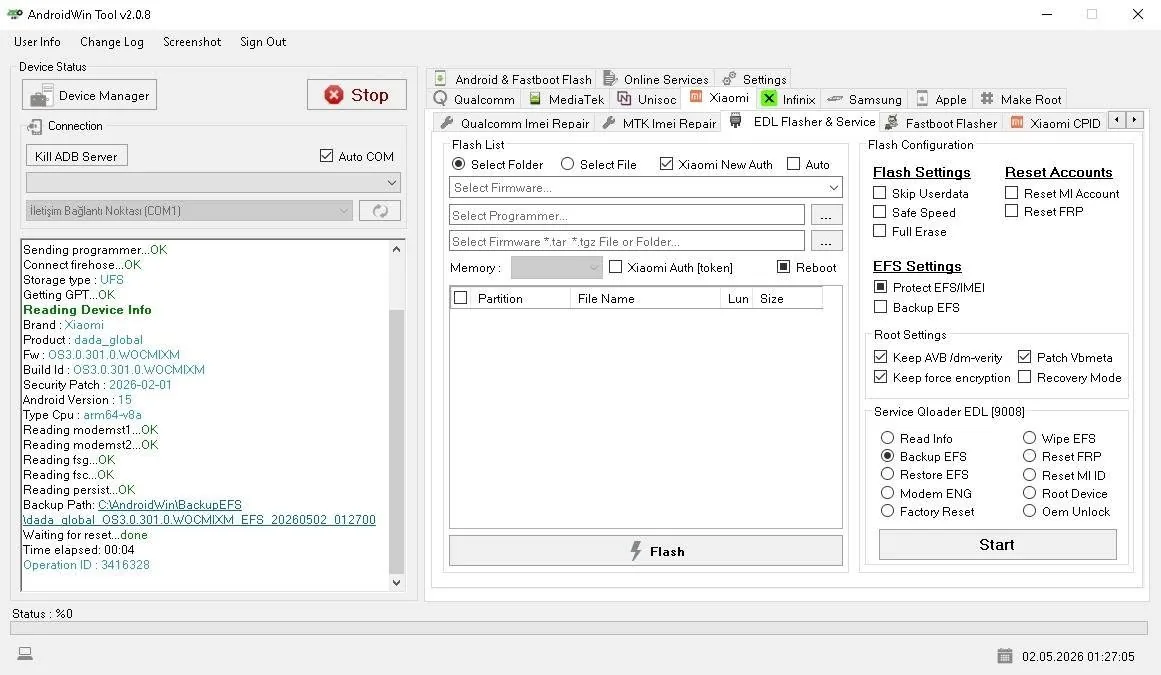
AndroidWinTool v2.0.8 performing Qloader EDL 9008 EFS backup on Xiaomi 15 (dada_global, OS3.0.301.0, Android 15).
Xiaomi EDL Flasher & EFS Backup
In the EDL Flasher & Service tab seen above, AWT integrates Firehose Qloader 9008 routines including Backup EFS, Restore EFS, Reset FRP, Reset Mi ID, Factory Reset, and Flash Firmware with the Xiaomi New Auth toggle enabled. Notice in the log panel on the left: reading GPT and backing up modemst1, modemst2, fsg, fsc, and persist from a Xiaomi 15 (dada_global, Security Patch 2026-02-01) completed in just 4 seconds before flashing.
Bench Safety Workflow (Xiaomi 15 / dada_global): Before running any Mi Account reset or EDL firmware flash on HyperOS / Android 15 Snapdragon flagships, always execute Backup EFS with Protect EFS/IMEI checked first. Saving that timestamped C:\AndroidWin\BackupEFS\ archive protects your baseband NVRAM if a customer's partition table becomes corrupted mid-flash.
CPID IMEI Repair & Live Server Costs
Switch to the Xiaomi CPID tab when restoring original device identifiers after baseband damage or hardware swap. AWT clearly separates free server operations from credit-billed Dual SIM requests directly in the client interface and live AndroidWinTool official server status page:
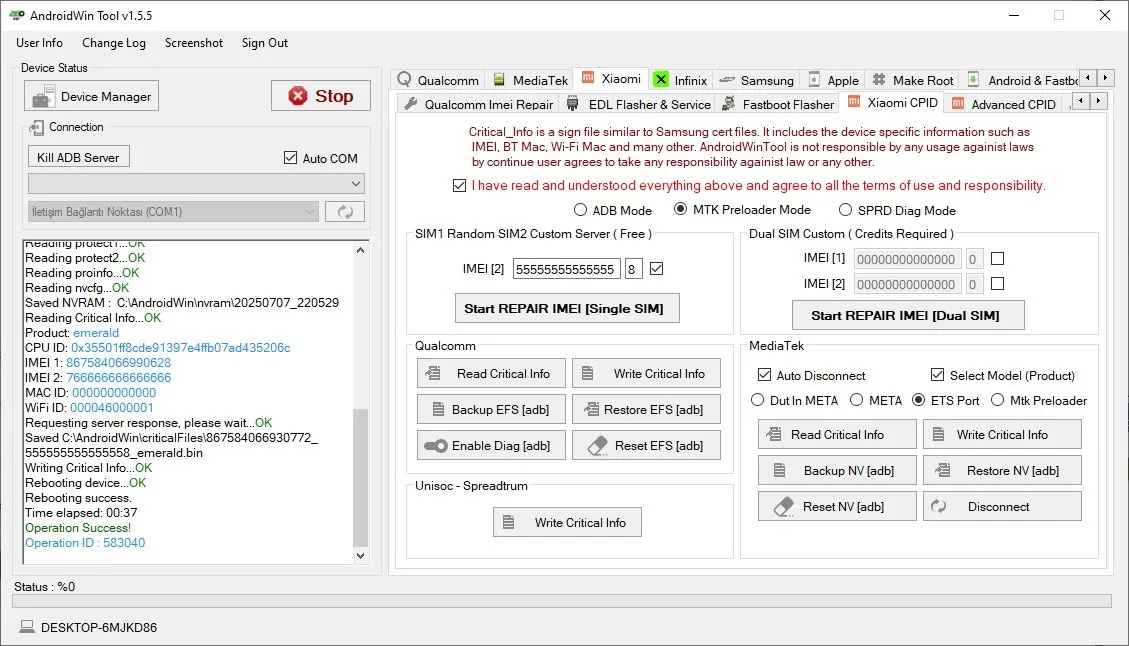
AWT v1.5.5 Xiaomi CPID module writing Critical_Info in MTK Preloader mode with clear separation between Free and Credit-billed jobs.
- Local / Server-Free Jobs: Samsung FRP Remove by MTP Android 16 is marked Free, and inside Xiaomi CPID the SIM1 Random SIM2 Custom Server (Free) option executes without deducting extra server credits.
- Credit-Billed Server Jobs (Official AWT Schedule): Verified live on
androidwintool.com— Xiaomi/Redmi/Poco FRP by Mi Assistant Mode (8 Credits), Dual SIM Custom CPID for MediaTek (10 Credits), Dual SIM Custom CPID for Qualcomm (22 Credits), Xiaomi 17 / Redmi K90 Series Dual SIM CPID (30 Credits), and iTel/Tecno/Infinix Anti-Crack Trigger P7 (20 Credits).
Fastboot Flasher & Recent v2.1.8–2.1.9 Updates
The changelog window inside AWT v2.1.9 documents rapid HyperOS and flagship additions, including MTK bootloader unlock via fastboot flasher, Xiaomi Fastboot Reboot EDL QC (Free), Xiaomi 17 Series Temp Root (QC - MTK), and fixes for Xiaomi Pad 7 (uke) Permanent Bootloader Unlock.
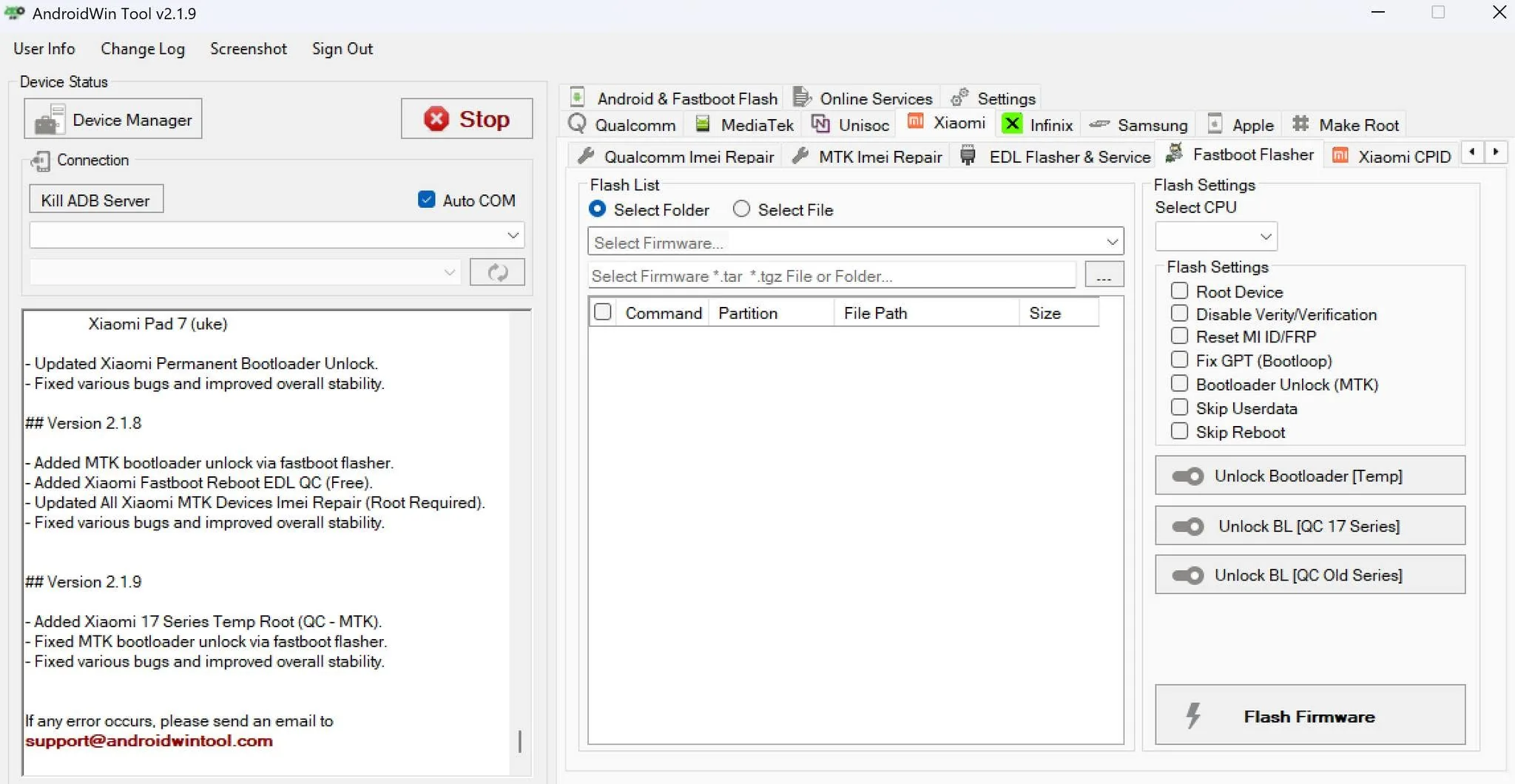
AWT v2.1.9 Fastboot Flasher and built-in Changelog showing Xiaomi Pad 7 (uke) and Xiaomi 17 Series updates.
Always download the untouched client package from the official AndroidWinTool download page and keep Google Platform-Tools (ADB/Fastboot) updated on Windows so Fastboot and Preloader drivers hand off reliably.
How much does AndroidWinTool cost compared to buying a license?
Renting AndroidWinTool starts at $1.03 on GSM24h.com, letting you pay only for an active repair window instead of committing to an official $20.00 (1-month), $30.00 (3-month), or $40.00 (1-year) license. Order confirmation finishes in ~2 seconds with instant credential output and no wallet pre-deposit required.
| Package | Current price | Original price | Save |
|---|---|---|---|
| 2 days | $1.03 | $2.10 | 51% |
Updated November 2026 — listed price before coupon
To help decide between renting AWT or pairing another flagship utility for a mixed repair queue, compare each tool's strongest specialty below:
| Tool | Best Bench Use Case | Hourly Rental Starting At | Standalone Package Option |
|---|---|---|---|
| AndroidWinTool (AWT) | Xiaomi New Auth EDL, CPID, Pad 7 unlock, Transsion Anti-Crack | $1.03 | Standard & 22-Credit options on GSM24h |
| DFT Pro Tool | Xiaomi MTK/QC NV/IMEI, Bootloader, Flash | $1.19 | Full hourly access without buying key |
| UnlockTool | Broad multi-brand FRP, Mi Account, Apple Ramdisk | $0.30 | Covers Samsung, Xiaomi, OPPO, iOS (guide) |
AndroidWinTool covers Qualcomm, MediaTek, Unisoc, Xiaomi, Infinix/Tecno, and Samsung modules in one cloud login.
How do you rent and run AndroidWinTool in 4 steps?
Renting and running AndroidWinTool takes only minutes when drivers and server checks are handled before checkout. Prepare your Qualcomm 9008 or MediaTek VCOM USB drivers, book either a Standard or 22-Credit slot on GSM24h, receive instant credentials after ~2-second confirmation, and verify live upstream server status before flashing.
- Prepare Software & Drivers First: Download and extract the latest AWT setup from
androidwintool.com/download, temporarily whitelist its folder in Windows Defender, and verify Qualcomm HS-USB 9008 / MTK VCOM drivers in Device Manager. - Select Your Rental Tier on GSM24h: Visit the AndroidWinTool rental page and pick either a Standard account (for free server / EDL / Fastboot jobs) or the 22 Credits option if you plan to run credit-billed Dual SIM CPID or Mi Assistant jobs.
- Complete USD or Crypto Checkout: Once payment confirms (~2 seconds), copy your username and password directly from the screen.
- Log In & Check Live Server Status: Check whether your needed server endpoint shows Online on
androidwintool.combefore placing the phone in EDL 9008 or Preloader mode, and back up EFS/NV partitions before writing.
Server Status Check Lesson: Notice on androidwintool.com that individual CPID and Anti-Crack endpoints dynamically switch between Online and Offline depending on upstream server capacity. Checking server status for your specific model before opening a timed session prevents wasting minutes waiting on a maintenance window. For Xiaomi HyperOS bypass comparisons, check our Xiaomi Mi Account bypass guide and DFT Pro repair guide.
Common AndroidWinTool errors and fixes
If an operation stalls mid-job inside AWT, verify these four frequent causes:
- Server Showing "Offline" for CPID / Trigger P7: This is controlled upstream by AndroidWinTool's backend, not your local PC. Avoid repeated clicks and verify live server availability on their homepage before retrying.
- "Waiting for Device" in Qloader EDL 9008 or MTK Preloader: Check Device Manager under Ports (COM & LPT) and confirm Auto COM is enabled. If Fastboot won't transition via Reboot EDL QC, verify bootloader/model support or use authorized test-point EDL entry where hardware permits.
- Antivirus Deleting AWT Executable: Windows Defender often flags packed loaders cleanly. Restore from Protection History and exclude
C:\AndroidWin\before extracting. - "Insufficient Credits" Prompt: Standard time rentals have 0 server credits. Confirm beforehand whether your task (like Dual SIM Custom CPID or Mi Assistant FRP) requires credits and choose the matching credit option on GSM24h.
Frequently Asked Questions
Does standard AndroidWinTool rental include free credits for Dual SIM CPID?
No. As verified on androidwintool.com and inside AWT v1.5.5, Dual SIM Custom CPID requires additional server credits (10 credits MTK, 22 credits Qualcomm, 30 credits Xiaomi 17/Redmi K90 series). Standard hourly accounts include free server features like Samsung Android 16 MTP FRP and SIM1 Random / SIM2 Free CPID where listed.
What is the difference between renting AndroidWinTool and buying an official license?
Official AWT licenses cost $20.00 (1 month), $30.00 (3 months), or $40.00 (1 year). Renting from $1.03 on GSM24h gives full software access for your short repair window with zero pre-registration and ~2-second automated delivery.
Can AndroidWinTool reboot Xiaomi Qualcomm phones to EDL without disassembling?
Yes, AWT v2.1.8 added Xiaomi Fastboot Reboot EDL QC (Free) for supported Qualcomm models, though newer HyperOS patches and locked bootloaders on certain flagships may still require test-point EDL 9008 or authorized loaders.
Why should I run Backup EFS before Xiaomi New Auth EDL servicing?
Backing up modemst1, modemst2, fsg, fsc, and persist takes seconds in Qloader EDL mode and gives you a complete rollback archive if an NVRAM partition becomes erased or corrupted during firmware flashing.
Is CPID / IMEI Critical_Info repair legal on AndroidWinTool?
IMEI/Critical_Info restoration is only permitted on devices you own or service with verifiable customer authorization to restore the phone's original factory identifiers printed on the device chassis or retail box.
What if a rented AndroidWinTool account stops working mid-session?
Under GSM24h policy, if an assigned account encounters an unresolvable technical fault on our side, our 24/7 support provides a replacement account or a full refund promptly.
Need AndroidWinTool Right Now?
Rent AndroidWinTool from $1.03 with automated 24/7 delivery and USD / crypto payment.
Rent AndroidWinTool Now →
Written by: Trần Kế Khang
5 years of in-depth mobile & laptop hardware repair experience; founder of thuetaikhoan.com.vn, unlocktool.us, dienthoailaptop.vn, and gsm24h.com. Facebook · Profile & articles · About us



No comments yet. Be the first to share your thoughts!