
Cheetah-Tool Pro is a Windows mobile repair software suite specializing in Qualcomm EDL 9008 servicing, Samsung and OPPO/OnePlus/Vivo FRP removal, IMEI and NV/QCN repair, and multi-brand firmware flashing. Technicians handling occasional flagship Qualcomm or carrier jobs can rent Cheetah-Tool Pro starting from $7.47 via automated 24/7 delivery on GSM24h.com without purchasing an official $27.00 to $49.00 multi-month license. All FRP, IMEI, and lock-removal procedures must strictly be applied to owner-authorized devices.
Table of Contents
What is Cheetah-Tool Pro?
Developed by the Cheetah Team at cheetah-tool.com, Cheetah-Tool Pro is a dongle-free Windows utility supporting Windows 7, 8, 10, and 11 for FRP bypass, stock firmware flashing, IMEI/NV/QCN restoration, read-code calculation, and Qualcomm EDL/ADB/Download Mode operations across Samsung, OPPO, OnePlus, Vivo, and Motorola devices.
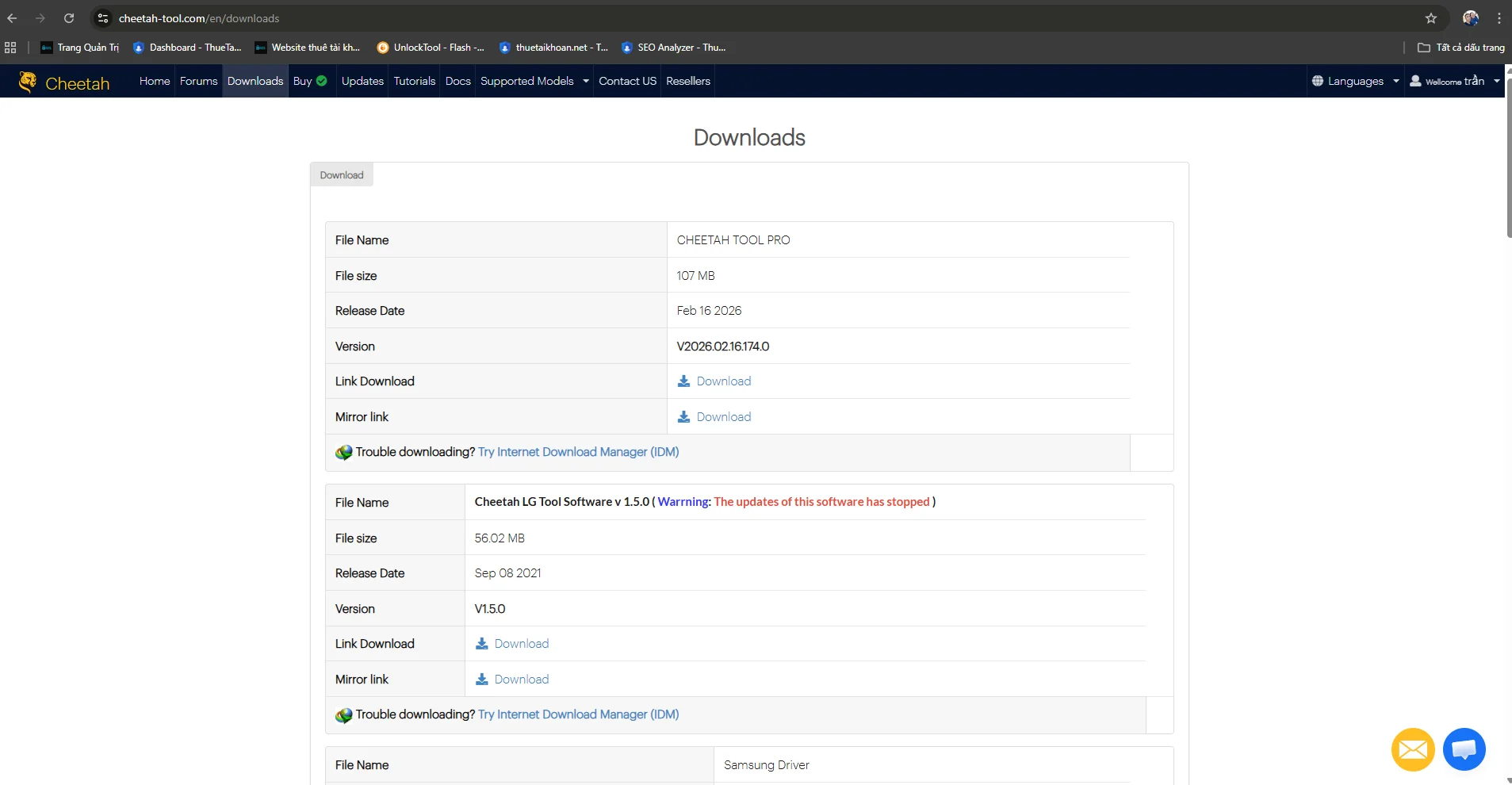
Official cheetah-tool.com/en/downloads page hosting the V2026.02.16.174.0 (107 MB) Windows package and Samsung Driver links.
Core Qualcomm EDL, FRP & IMEI Modules
Rather than scattering features across outdated sub-utilities (note on the official downloads page that legacy Cheetah LG Tool updates have officially stopped), active development centers on the unified Cheetah-Tool Pro package:
- Qualcomm EDL 9008 & Flash: Auto-loader and custom programmer detection for unbricking, partition backup/restore, and FRP wiping on Qualcomm Snapdragon handsets.
- FRP & Screen Lock Removal: ADB, Download Mode, and test-point workflows for Samsung, OPPO, OnePlus, Vivo, and other supported Android models.
- IMEI, QCN & Read Code Services: Baseband repair, NV/QCN restore to bring back cellular signal, and network unlock code calculation (note that certain server-calculated or high-security operations listed under Credit usage on cheetah-tool.com require separate credits).
Official Download Version & Windows Setup
Always pull the main installer from cheetah-tool.com/en/downloads — as shown above, the February 16, 2026 build (V2026.02.16.174.0, 107 MB) ships right alongside the official Samsung Driver bundle. Pair it with Samsung's official Android USB Driver so Windows switches cleanly between MTP, Download Mode, and Qualcomm HS-USB QDLoader 9008.
Bench Prep Checklist Before Ordering: Make sure you have downloaded the 107 MB CHEETAH TOOL PRO installer, disabled Real-Time Protection interference inside Windows Defender for the extraction folder, and confirmed your Qualcomm 9008 or Samsung USB port enumerates in Device Manager before paying for your rental window. Prepping the environment first keeps every rental minute focused on actual phone servicing.
How much does Cheetah-Tool Pro cost: rental vs official license?
Renting Cheetah-Tool Pro on GSM24h.com starts from $7.47 with automated ~2-second order confirmation, no mandatory account registration, and USD / crypto checkout. By contrast, purchasing an official license directly from cheetah-tool.com/buy_license spans $27.00 to $49.00 depending on the license duration tier.
| Package | Current price | Original price | Save |
|---|---|---|---|
| 7 days | $7.47 | — | — |
Updated November 2026 — listed price before coupon
Because Cheetah-Tool Pro pricing sits higher per session than entry-level MTK/Samsung tools, renting makes the strongest financial sense when a customer specifically brings in a Qualcomm Snapdragon, OPPO/OnePlus, or carrier IMEI repair that cheaper tools cannot authenticate cleanly.

Cheetah-Tool Pro runs on Windows 7 through Windows 11 with cloud credential login and no physical smartcard dongle.
How does Cheetah-Tool Pro compare with UnlockTool, DFT Pro, and AMT?
Each GSM rental tool shines on different chipsets and budgets, so matching your ticket to the right utility keeps repair margins high. Cheetah-Tool Pro focuses heavily on Qualcomm EDL 9008, QCN/IMEI repair, and carrier unlock calculation, while UnlockTool, DFT Pro, and AMT handle broader daily FRP, Xiaomi NV, and MediaTek workloads at lower hourly entry rates.
| Tool | Strongest Platforms | Rental Starting Price | When to Pick It |
|---|---|---|---|
| Cheetah-Tool Pro | Qualcomm EDL, Samsung, OPPO/OnePlus, carrier IMEI/QCN | $7.47 | When Qualcomm EDL / QCN / Read Code matches your exact model on cheetah-tool.com |
| UnlockTool | Samsung, Xiaomi, OPPO, Vivo, Apple Ramdisk | $0.30 | Daily driver for budget-friendly multi-brand FRP (full guide) |
| DFT Pro Tool | Xiaomi MTK/QC, MediaTek NV/IMEI, Bootloader | $1.19 | Dedicated Xiaomi / MediaTek flash & NV jobs (DFT guide) |
| Android Multi Tool (AMT) | Vivo, Tecno, Infinix, Oppo auth/FRP | $0.39 | Fast BBK & Transsion MTK servicing |
This comparison highlights a key rule for repair shops: verify your exact handset model and security patch on our Samsung chipset FRP guide or cheetah-tool.com's Supported Models lookup before deciding which tool rental to book.
How to download, rent, and connect devices cleanly
Follow these verified bench steps to avoid driver lockups and wasted session time:
- Check Model & Credit Support: Open
cheetah-tool.com→ Supported Models and Credit usage to confirm whether your task runs credit-free with a standard login or requires server credits. - Install Software & Drivers: Grab
V2026.02.16.174.0(or the newest build) fromcheetah-tool.com/en/downloadsand install Samsung/Qualcomm 9008 USB drivers. - Rent on GSM24h.com: Open the Cheetah-Tool Pro rental page, complete USD or crypto checkout, and receive your login automatically upon ~2-second web confirmation.
- Connect with Backed-Up EFS/QCN: Before wiping security or writing IMEI, back up existing EFS/QCN partitions so you can revert cleanly if carrier calibration is affected.
Qualcomm EDL Cable & Port Discipline: On Qualcomm EDL 9008 handsets, plugged-in USB hubs or front-panel PC ports routinely drop Firehose programmers midway through flashing. Always plug your OEM data cable directly into a rear motherboard USB port and confirm Windows Device Manager detects Qualcomm HS-USB QDLoader 9008 without switching off within 5 seconds before pressing Start in Cheetah-Tool Pro.
Common Cheetah-Tool Pro connection issues and fixes
Resolve the most frequent setup errors before restarting your PC:
- Missing or Unsigned Qualcomm 9008 Driver: If the device shows under Other Devices as
QHSUSB_BULK, install Qualcomm's signed USB QDLoader driver from the official Cheetah downloads tab and reconnect via test-point or EDL cable. - HWID / Multi-PC Login Lock: Cheetah-Tool Pro tracks active machine sessions closely. Never share or launch rented credentials simultaneously on two PCs during an active window.
- Read Code / Server Task Asking for Credits: Standard hourly rental accounts do not automatically carry extra paid server credits. Check the Credit usage list on cheetah-tool.com beforehand if your model relies on paid server calculation.
- Antivirus Blocking Launch: Exclude the installed Cheetah-Tool folder in Windows Security before double-clicking the executable. If an assigned account ever arrives locked due to a technical issue on our side, GSM24h replaces or refunds it promptly.
Frequently Asked Questions
How much does it cost to rent Cheetah-Tool Pro vs buying an official license?
Renting Cheetah-Tool Pro on GSM24h starts at $7.47 for automated short-term access, whereas buying a license directly from cheetah-tool.com costs between $27.00 and $49.00 depending on the official duration plan.
Does Cheetah-Tool Pro require a physical hardware dongle?
No. Cheetah-Tool Pro runs completely cloud-authenticated on Windows 7, 8, 10, and 11 — you only need your rented username/password and the official desktop installer.
Are server credits included when I rent Cheetah-Tool Pro?
Standard hourly rentals cover all standard FRP, flash, and local servicing modules without extra credits. Operations marked under Credit usage on cheetah-tool.com (such as specific server read-code calculations) require separate credits.
Is Cheetah-Tool LG Tool still updated inside Cheetah-Tool Pro?
No. As clearly labeled on cheetah-tool.com/en/downloads, updates for the legacy Cheetah LG Tool v1.5.0 software have stopped; active development focuses on Cheetah-Tool Pro.
What should I verify before starting IMEI or QCN repair with Cheetah-Tool Pro?
Confirm legal owner authorization (IMEI repair is strictly for restoring factory IMEIs), save an original QCN/EFS backup first, and verify exact model support in cheetah-tool.com's Supported Models directory.
What happens if a rented Cheetah-Tool account fails to log in?
If an assigned credential has a technical fault before or during your session, GSM24h provides a working replacement account or refunds the order under our support guarantee.
Book Your Cheetah-Tool Pro Rental Session
Rent Cheetah-Tool Pro from $7.47 with automated 24/7 credential delivery and zero subscription lock-in.
Rent Cheetah-Tool Pro →
Written by: Thanh Tài
6 years of GSM & IT background; specializes in mobile and laptop software, firmware flashing, iCloud, Xiaomi, Samsung, and OPPO unlocking. Facebook · Profile & articles · About us



No comments yet. Be the first to share your thoughts!