
HFZ Activator is a family of Serial Number (SN) activation tools widely used by repair shops to handle Activation Lock and passcode servicing on A12+ Apple devices when owner credentials cannot be recovered on the spot. Unlike hourly account rentals, HFZ activates per device SN — with live packages on GSM24h starting from $2.68 on the HFZ & iCloud Bypass catalog and $3.94 for HFZ Ramdisk passcode services. Every iCloud or passcode workflow applies strictly to devices serviced by their rightful owner or under documented authorization.
Table of Contents
What is HFZ Activator and which packages exist?
HFZ Activator is not a single executable; it is a suite of device-registered bypass utilities separated by chipset generation, operating system, and lock state (Hello Activation Lock vs Passcode screen). Picking the wrong HFZ service ID for your device's exact model or OS causes registration mismatches, so check whether you need A12+ Windows No-Signal, iHello AiO Mac/Windows, or Ramdisk Passcode first.

HFZ Activator uses per-device Serial Number activation rather than hourly shared logins.
HFZ Activator A12+ Windows vs iHello HFZ AiO (Mac/Windows)
Confusion often arises online over whether HFZ requires Windows or macOS. In the official HFZ release repository and on GSM24h's live Authorized iPhone Activation Support catalog, two distinct A12+ Hello-screen packages exist side by side:
- HFZ Activator A12+ Premium Windows Tool (No Signal): Runs natively on Windows (such as
HFZ-ACTIVATOR-A12-Premium v1.1 (win).zip, ~50.7 MB) for supported A12+ iPhones and iPads without cellular carrier signal. - iHello HFZ AiO Premium Bypass A12: Supports both Mac & Windows builds as well as
CH(China mainland) hardware variants, with fast server processing listed at 1–10 minutes on GSM24h.

Standard HFZ Activator workflow: driver check, eligibility scan, Serial registration, multi-stage activation, and final reboot.
HFZ Ramdisk for Passcode Bypass
If an iPhone XR through iPhone 11 Pro Max, iPhone SE (2nd Gen), or supported iPad is stuck on a forgotten Passcode / Unavailable screen rather than the wiped Hello setup screen, standard No-Signal Hello tools are not the right choice. Instead, GSM24h lists device-specific HFZ Ramdisk (Passcode Bypass + Owner Info) services on the HFZ Ramdisk catalog (alongside checkm8-based alternatives in our UnlockTool Ramdisk bypass guide).
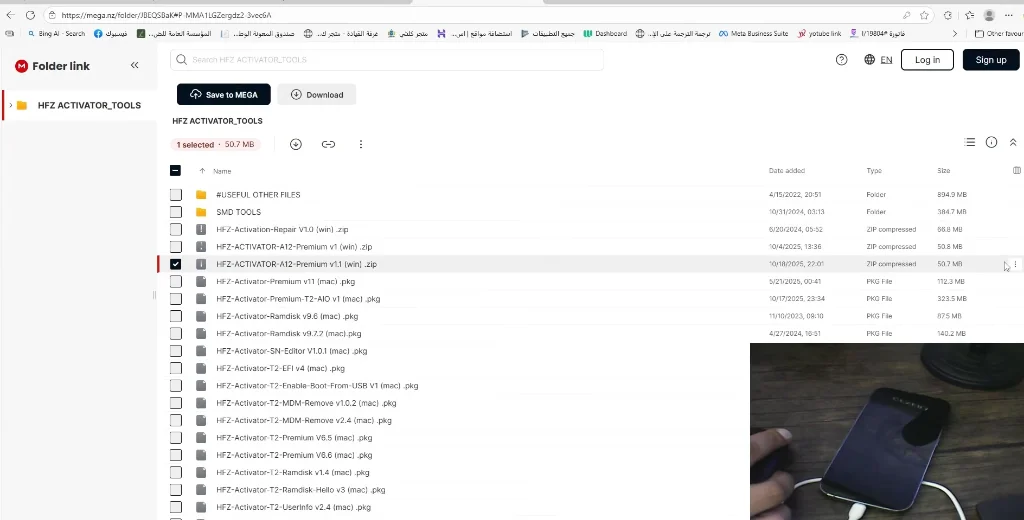
Official HFZ repository folder displaying both Windows A12 Premium (.zip) and macOS Ramdisk / T2 (.pkg) installers.
How much does HFZ Activator SN registration cost on GSM24h?
Because HFZ bills per unique Apple Serial Number rather than by timed account hours, live USD rates are loaded directly from GSM24h's ADY service catalog on the HFZ Bypass page and the HFZ Ramdisk page:
| GSM24h HFZ Service Package | Platform / Scope | Live GSM24h USD Price | Order Page |
|---|---|---|---|
| iHello HFZ AiO Premium Bypass A12 | Mac & Windows (A12 all models, CH supported, 1–10 min) | $2.68 | Bypass iCloud Catalog |
| HFZ Activator A12+ Premium Windows Tool | Windows only (No Signal, A12+ all models) | $3.62 | Bypass iCloud Catalog |
| HFZ Ramdisk Passcode (XR / XS / XS Max) | Passcode Bypass + Owner Info per device model | $3.94 | HFZ Ramdisk Page |
| HFZ Ramdisk Passcode (11 / 11 Pro / 11 PM / SE 2 / iPad) | Passcode Bypass + Owner Info per device model | $4.20 | HFZ Ramdisk Page |
If your Apple device instead needs an official status check or permanent Apple server service rather than software bypass, browse our full Apple & iCloud unlock catalog or check Apple's official recovery guidance at Apple Support Activation Lock help.
How to prepare Windows, Defender, and Apple drivers
Almost every failed HFZ run traces back to blocked binaries in Windows Security or missing Apple Mobile Device USB drivers. Set up both before plugging in the iPhone:
- Temporarily Pause Windows Defender Real-Time Protection: Packaged activation loaders can be quarantined upon extraction. Turn off Real-time protection temporarily during servicing or exclude your HFZ extraction folder.
- Extract Cleanly to a Dedicated Folder: Unpack
HFZ-ACTIVATOR-A12-Premium v1.1 (win).zipwith WinRAR or 7-Zip onto your desktop or root drive without special characters in the folder path. - Verify Apple Mobile Device USB Drivers: Install Apple's official iTunes / Apple Devices drivers or run Repair Drivers inside 3uTools until Apple Mobile Device USB Device, Bonjour Service, and Port Status all turn green.
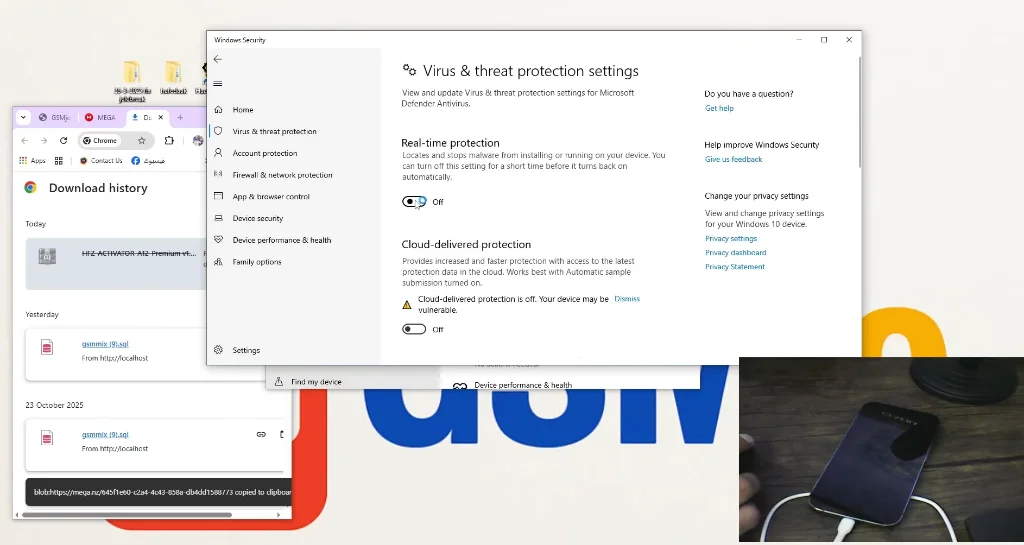
Pause Real-time protection temporarily or whitelist the tool folder before extracting HFZ-ACTIVATOR-A12-Premium v1.1.
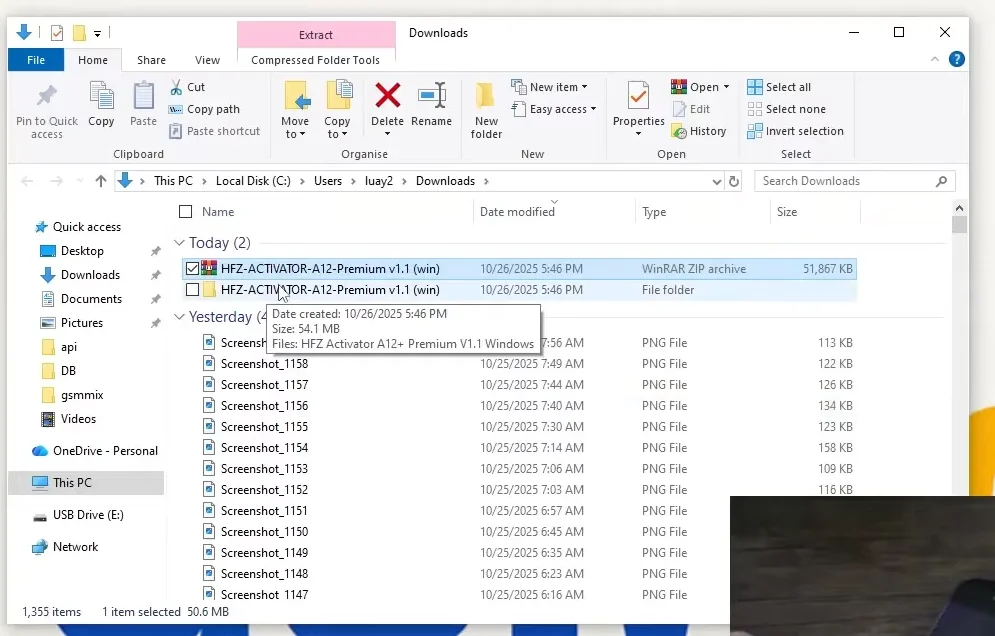
Extract the 50.7 MB Windows archive cleanly before running the executable as Administrator.
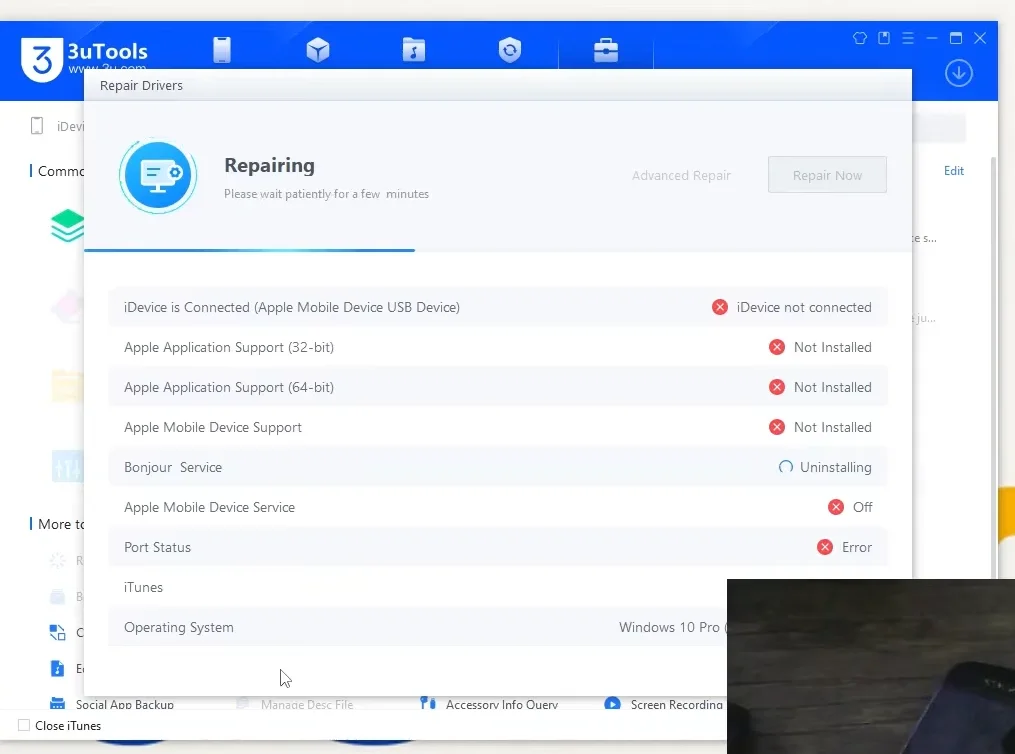
Using 3uTools Repair Drivers on Windows 10/11 when Apple Application Support or Bonjour Service reports missing drivers.
Bench Driver & Cable Note: Never connect an A12+ iPhone through an unpowered USB-C hub during multi-stage activation. Look closely at Apple's official USB troubleshooting recommendations on Apple Support iPhone PC recognition — using an original MFi USB-A to Lightning/USB-C cable plugged into a rear motherboard port prevents the timeout 180s disconnects seen on unstable front ports.
Step-by-step HFZ Activator A12+ workflow
Once your PC drivers pass verification and the iPhone sits on the Wi-Fi connected Hello screen, always run the tool's eligibility check before paying to register the Serial Number.
Stages 1–2: Check Eligibility & Register Serial Number
Plug the iPhone into Windows, launch HFZ Activator A12+ Premium, and wait for Model, Product Type (for example iPhone15,2 on iPhone 14 Pro running iOS 26.0.1), Serial Number, IMEI, and UDID to populate.
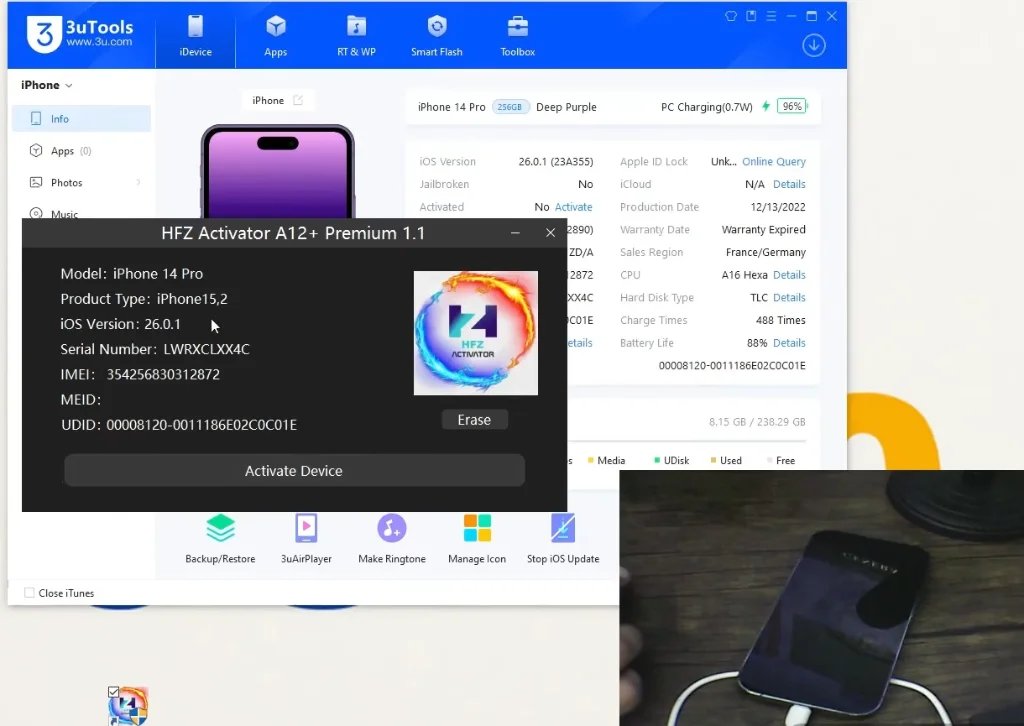
HFZ Activator A12+ Premium 1.1 connected to an iPhone 14 Pro (iPhone15,2) running iOS 26.0.1 alongside 3uTools.
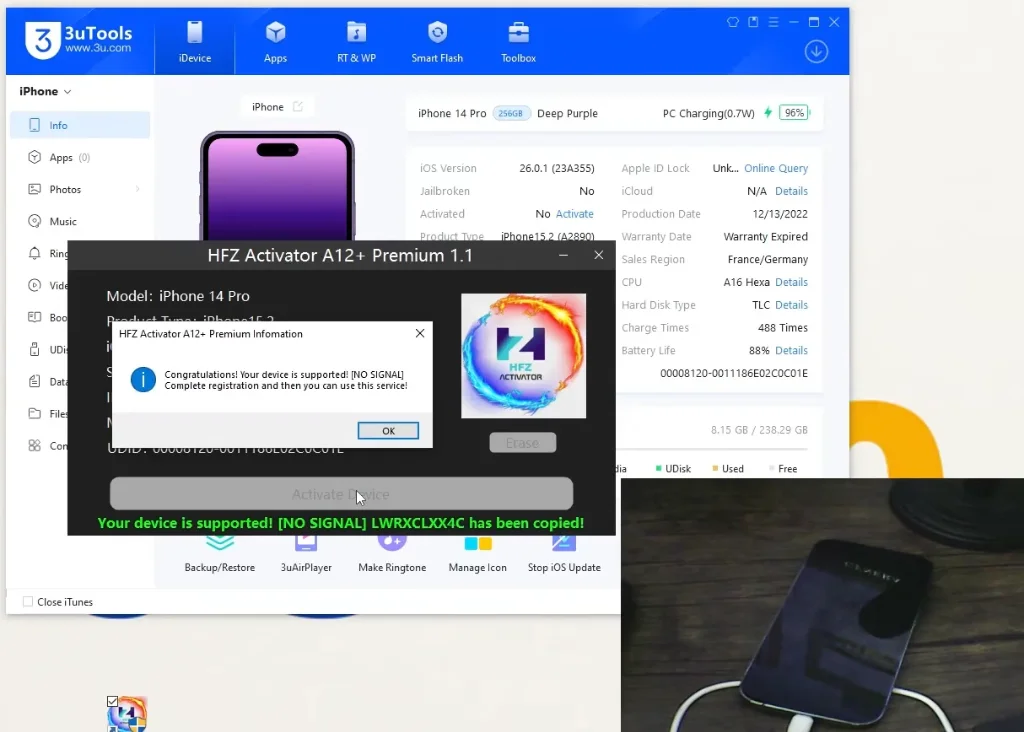
Eligibility confirmation popup: only register the Serial Number after seeing "Congratulations! Your device is supported! [NO SIGNAL]".
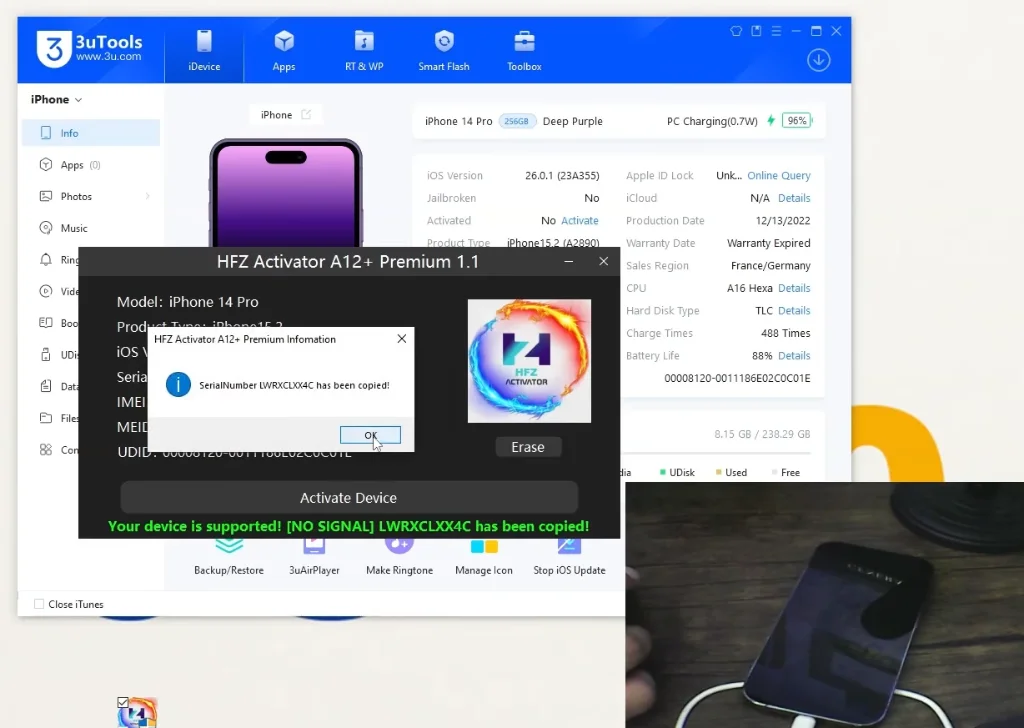
The client copies your exact Serial Number automatically so you can paste it error-free into the GSM24h SN order form.
- Wait for the green banner
Your device is supported! [NO SIGNAL] ... has been copied! - Open GSM24h HFZ Bypass (or HFZ Ramdisk for passcode models), click the matching service card, enter your email and exact copied Serial Number, and submit checkout.
- Wait for confirmation email/order status showing your Serial Number is registered on the HFZ server before starting activation.
Stages 3–5: Multi-Stage USB Activation & Completion
After your Serial Number shows active on the server, click Activate Device inside HFZ Activator and leave the iPhone untouched while it reboots automatically through Stage 1, Stage 5, and Final Stage (timeout 180s per stage).
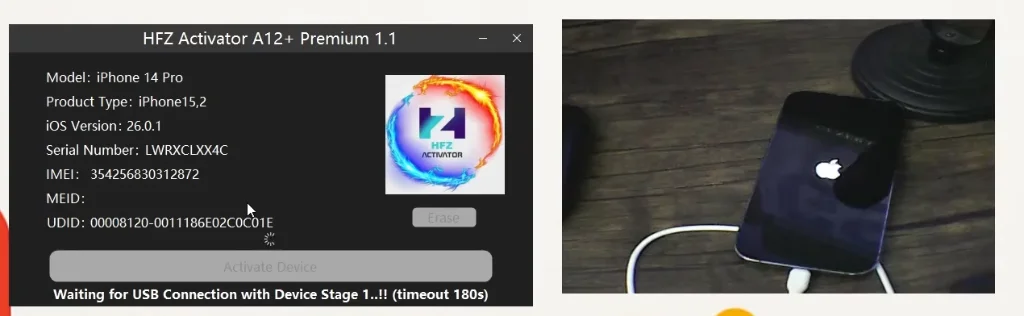
Stage 1: Do not unplug the cable while the iPhone cycles across the Apple boot logo during the 180-second USB window.
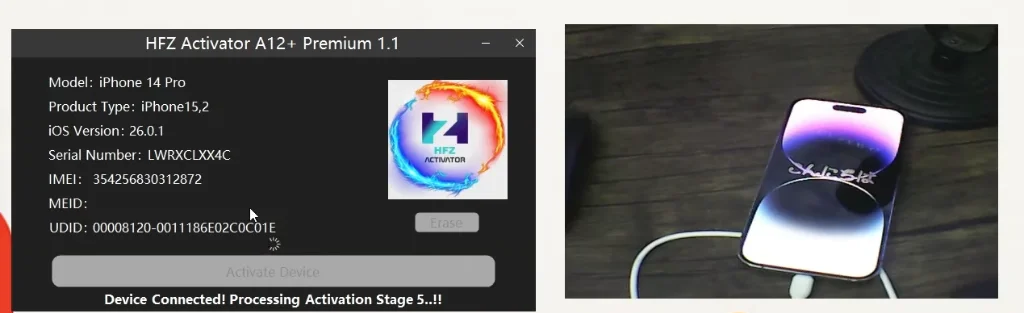
Stage 5 processing in progress while the target iPhone boots back into the Hello setup interface.
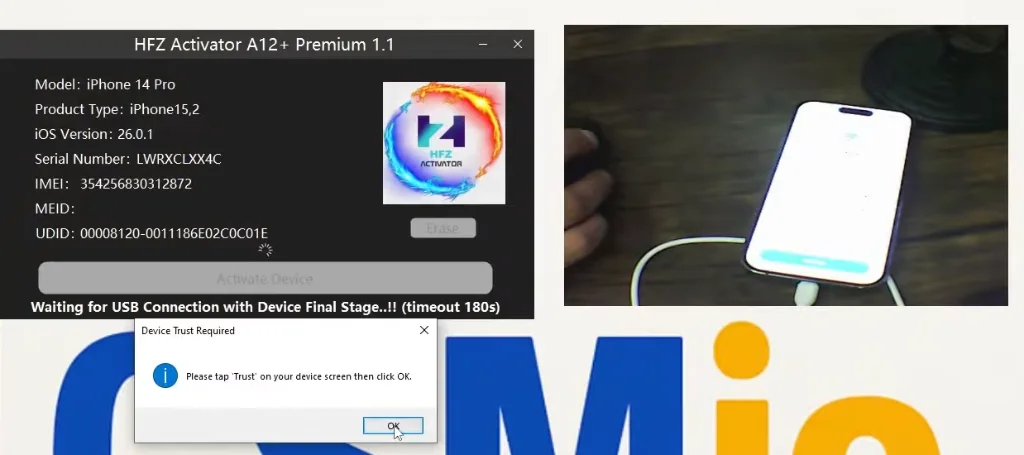
Final Stage prompt: tap "Trust" on the iPhone screen if requested, then click OK inside the Windows client.
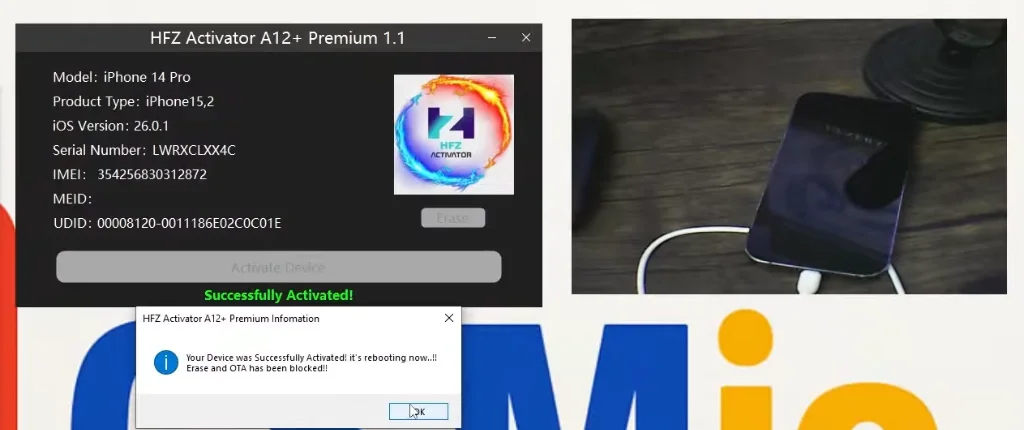
Completion message: "Your Device was Successfully Activated! it's rebooting now..!! Erase and OTA has been blocked!!"
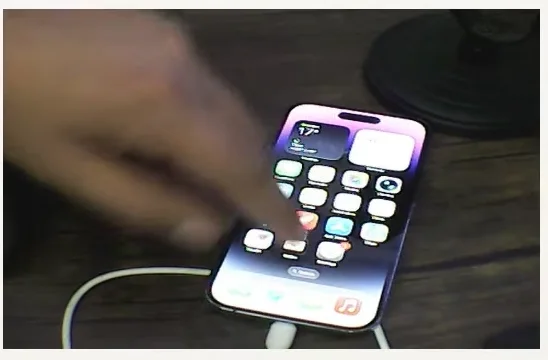
iPhone 14 Pro reaching the iOS home screen cleanly after the final HFZ Activator reboot.
Important limitations: Erase, OTA, and No-Signal rules
Before handing a bypassed device back to an owner or purchasing an SN slot, make sure both you and the device owner clearly understand the technical boundaries shown directly in the tool's output:
- No Cellular Carrier Signal (Wi-Fi Only): Packages labeled BYPASS NO SIGNAL unlock Wi-Fi, App Store, FaceTime over Wi-Fi, and normal apps, but do not activate cellular voice calls or LTE/5G data.
- Erase and OTA Are Intentionally Blocked: As shown in the completion popup above (
Erase and OTA has been blocked!!), software resets from Settings → Erase All Content and Settings and iOS OTA updates are suppressed to prevent losing the activation ticket. Flashing via Finder/iTunes will return the device to Activation Lock. - Checkm8 vs A12+ Coverage: If you are servicing older A7–A11 devices (iPhone 5s through iPhone X), dedicated Ramdisk tools such as UnlockTool or EFT Pro Dongle may offer lower cost per session than per-SN A12+ activation. Compare with our EFT Pro iPhone guide as well.
SN Verification Safeguard: Never enter an IMEI or manually type an Apple Serial Number containing ambiguous characters (0 vs O, 1 vs I) into the checkout form. Rely exclusively on HFZ Activator's automatic clipboard copy button so all characters match Apple's registered hardware string before submitting an irreversible SN API order.
Frequently Asked Questions
Does HFZ Activator A12+ Premium run on Windows or macOS?
Both exist depending on the service package: HFZ Activator A12+ Premium Windows Tool ($3.62) is Windows-only, while iHello HFZ AiO Premium Bypass A12 ($2.68) supports both Mac and Windows. Always download the official build matching the exact GSM24h package you purchased.
Can I make phone calls or use a SIM card after HFZ No-Signal bypass?
No. Any package marked NO SIGNAL disables cellular baseband registration, meaning the iPhone works on Wi-Fi only (apps, Safari, notifications, App Store) without SIM calls or mobile data.
Why shouldn't I reset or update iOS via OTA after HFZ Activator finishes?
HFZ Activator blocks Erase and OTA intentionally because wiping the phone or reflashing firmware via DFU/Recovery clears the local activation record and restores the iCloud Activation Lock screen.
What is the difference between /bypass-icloud and /hfz-ramdisk on GSM24h?
/bypass-icloud covers A12+ Hello-screen HFZ packages (iHello HFZ AiO and HFZ Activator Windows), whereas /hfz-ramdisk covers device-specific HFZ Ramdisk Passcode Bypass + Owner Info packages for XR, XS, 11 series, SE 2, and supported iPads.
What if HFZ Activator stops at "Waiting for USB Connection (timeout 180s)"?
First repair Apple Mobile Device and Bonjour drivers via 3uTools, swap to an original cable on a rear motherboard USB port, and ensure Windows Defender did not quarantine a helper executable during extraction.
How do I check eligibility before paying for HFZ SN registration?
Plug the iPhone into HFZ Activator A12+ Premium first and wait for the green dialog stating "Congratulations! Your device is supported!" Only copy the Serial Number and submit payment after that check succeeds.
Register Supported HFZ Services on GSM24h
Order verified iHello HFZ AiO ($2.68), HFZ A12+ Windows ($3.62), or device-specific HFZ Ramdisk Passcode SN activations with USD & crypto checkout.
View HFZ Services →
Written by: Trần Kế Khang
5 years of in-depth mobile & laptop hardware repair experience; founder of thuetaikhoan.com.vn, unlocktool.us, dienthoailaptop.vn, and gsm24h.com. Facebook · Profile & articles · About us



No comments yet. Be the first to share your thoughts!