
Completing a fast, safe Vivo FRP Bypass on Vivo Y, V, T, and iQOO smartphones running FuntouchOS 13–15 comes down to understanding Vivo's two strict bootrom protections: MediaTek Vivo Special DA / PreLoader Auth and Qualcomm Firehose EDL 9008. Legacy TalkBack or "EasyFRP" APK tricks have been patched out of modern FuntouchOS builds, whereas professional Windows tools clear the frp partition cleanly in under a minute without risking IMEI or Demo corruption. This verified technician guide explains chipset identification, driver prep, and step-by-step workflows using UnlockTool ($0.30), CF-Tools Pro ($1.00), Hydra Tool ($1.21), Android Multi Tool (AMT) ($0.39), and TFM Pro ($0.95).
Notice: Perform Vivo and iQOO FRP removal strictly on owner-authorized devices with valid proof of ownership. Connection mode and loader support depend on exact V-model code and FuntouchOS security patch.
Table of Contents
- Why do modern Vivo and iQOO phones require Special DA or EDL loaders?
- Which Vivo Y, V, T, and iQOO models use MediaTek vs Qualcomm chips?
- What USB drivers and model checks do you need before starting?
- How do you remove Vivo FRP on MediaTek vs Qualcomm models?
- Which rented GSM tool handles Vivo and iQOO FRP best?
- How do you fix common Vivo FRP errors (DA Reject, PreLoader Timeout, Sahara Fail)?
- Frequently Asked Questions
Why do modern Vivo and iQOO phones require Special DA or EDL loaders?
Vivo locks down FuntouchOS 13–15 aggressively across both chip vendors: MediaTek Vivo boards reject generic BROM exploits and demand signed Vivo Special DA (Download Agent) authentication over PreLoader, while Qualcomm Snapdragon Vivo boards restrict Fastboot writes and require signed Firehose programmers in Qualcomm HS-USB QDLoader 9008.
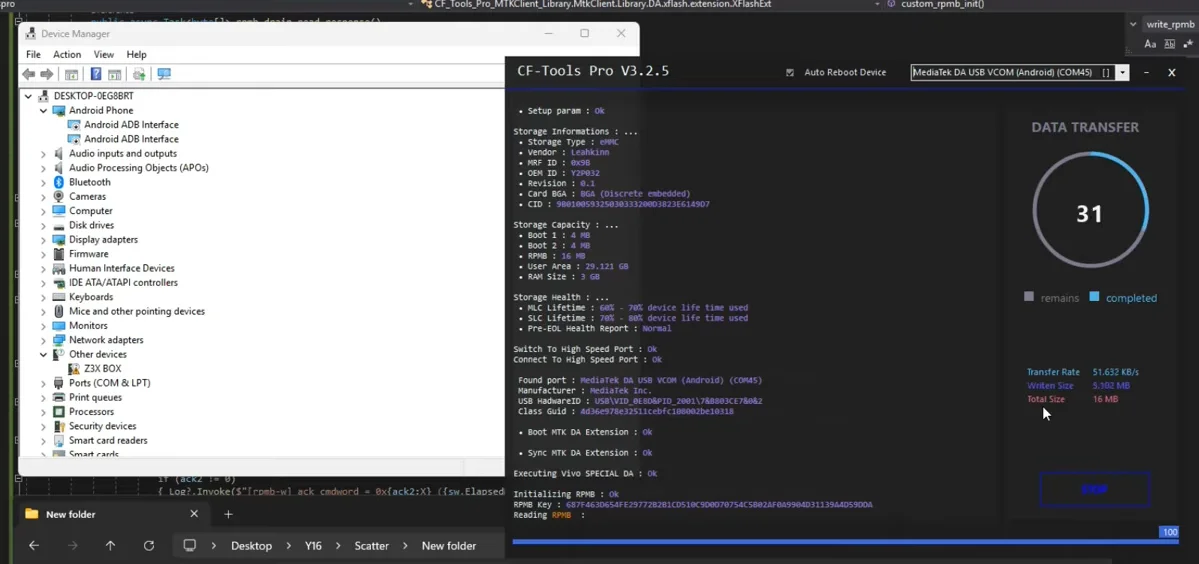
CF-Tools Pro v3.2.5 executing Vivo SPECIAL DA cleanly on Vivo Y16 over MediaTek DA USB VCOM (COM45) with full eMMC health readout.
That is why outdated free methods — such as EasyFRP browser links, TalkBack voice shortcuts, or unsigned SP Flash Tool scatter wipes — fail consistently on 2023–2026 Vivo security patches. Renting a cloud-updated GSM tool for a short bench window finishes the job cleanly without modifying system partitions.
Which Vivo Y, V, T, and iQOO models use MediaTek vs Qualcomm chips?
Always identify the exact Vivo model code (e.g., V2204 for Vivo Y16, V2310 for Vivo Y17s, or V2250 for Vivo V27) inside Recovery Mode → Check System / Fastboot before choosing your driver and tool module:
| Vivo Chipset Family | Representative Models (Verify Exact V-Code) | Required Windows Port | Recommended Rental Tools |
|---|---|---|---|
| MediaTek Helio / Dimensity | Vivo Y02/Y02s, Y15s, Y16, Y17s, Y21/Y21s, Y22/Y22s MTK, Y27, Y28, Y36 MTK, V25, V27, V29e MTK | MediaTek PreLoader / DA USB VCOM | UnlockTool, CF-Tools Pro, TFM Pro, AMT |
| Qualcomm Snapdragon | Vivo Y20/Y20s, Y33T, Y35, Y36 4G (SD 680), V23e/V29/V30/V40, T1/T2/T3 Snapdragon, iQOO Z7/Z9/Neo | Qualcomm HS-USB QDLoader 9008 | UnlockTool, Hydra Tool, AMT, DFT Pro |
What USB drivers and model checks do you need before starting?
Pre-install signed MediaTek USB VCOM / LibUSB drivers and Qualcomm HS-USB QDLoader 9008 drivers (see our complete GSM USB drivers guide), alongside Google Platform-Tools and the official Android WinUSB reference. Close background Android phone suites so COM ports stay exclusively available to your GSM tool.
How do you remove Vivo FRP on MediaTek vs Qualcomm models?
Both Vivo chipset paths take less than a minute once drivers are ready: MediaTek Vivo models connect over USB via PreLoader Auth / Special DA without opening the phone, while locked Qualcomm Snapdragon Vivo models connect in EDL 9008 using a verified Firehose loader.
MediaTek Vivo Workflow (PreLoader Auth & Vivo Special DA)
- Launch your rented tool: Open UnlockTool (Vivo tab or MediaTek tab with PreLoader Auth), CF-Tools Pro (MediaTek Vivo Special DA), or TFM Pro.
- Select the exact Vivo model: Choosing the exact model (e.g., Vivo Y16, Y17s, Y27) automatically loads the matching signed Vivo DA and EMI profile.
- Click Erase FRP FIRST, then connect powered-off device: Turn the phone completely off, wait 5 seconds, hold Volume Up + Volume Down (on newer PreLoader-only patches simply plugging USB while powered off also triggers PreLoader), and insert the cable into a rear PC USB port.
- Verify clean completion: Wait for Boot MTK DA Extension: OK and Erasing FRP... OK before unplugging and rebooting.
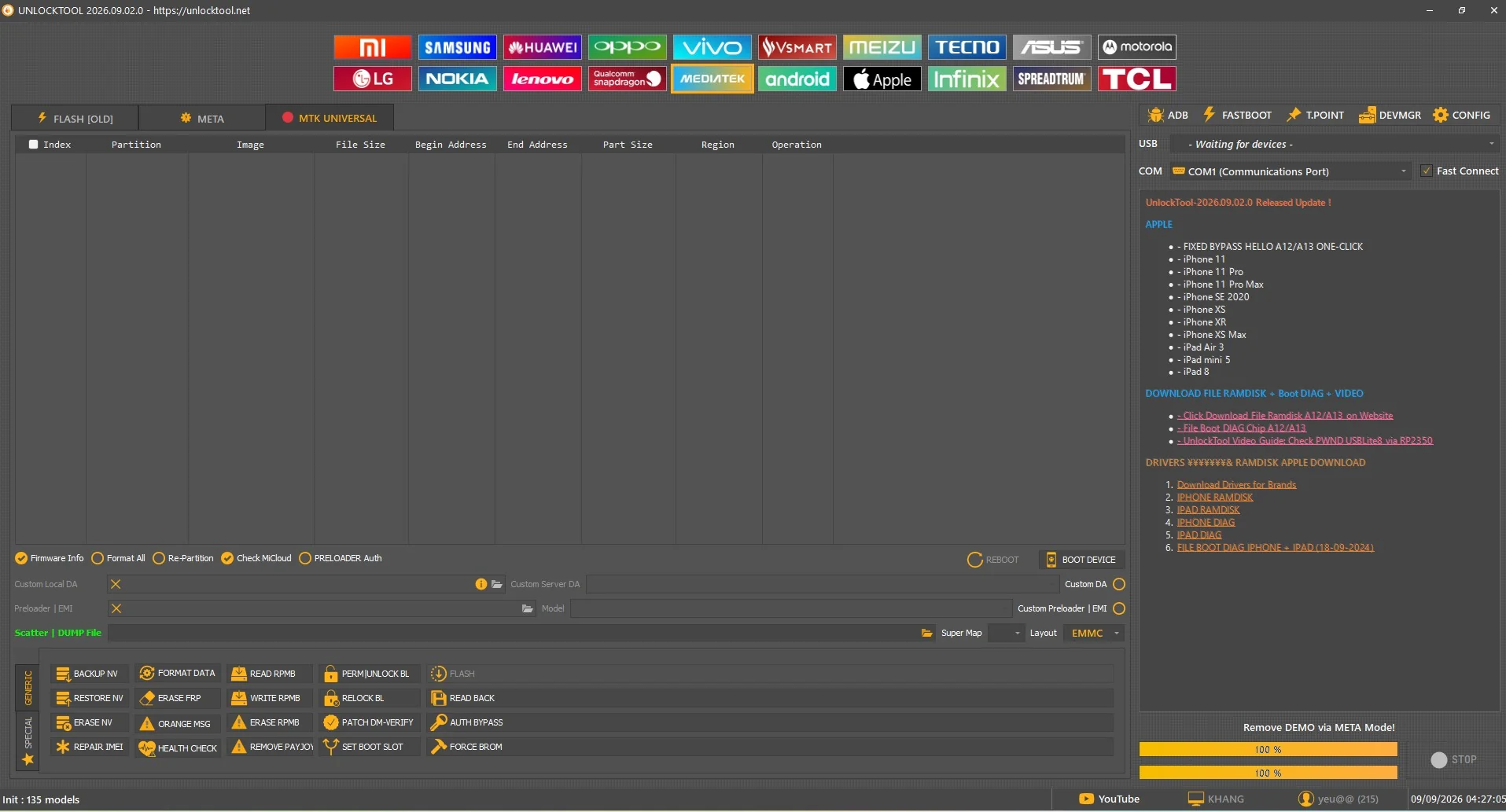
UnlockTool MediaTek workspace showing dedicated Vivo support, PreLoader Auth toggle, Backup NV, and one-click Erase FRP.
Qualcomm Vivo & iQOO Workflow (EDL 9008 Firehose)
- Enter Qualcomm HS-USB QDLoader 9008: On Snapdragon Vivo and iQOO models where Fastboot is locked, disconnect the battery flex safely, bridge the model's dual EDL test points with ESD tweezers, and plug in USB until Device Manager confirms QDLoader 9008.
- Select Server/Auto Firehose & Erase FRP: Inside UnlockTool (Vivo / Qualcomm tab), Hydra Tool (Qualcomm → Vivo tab), or AMT, pick the exact model so the matching Firehose programmer clears only the frp partition cleanly.
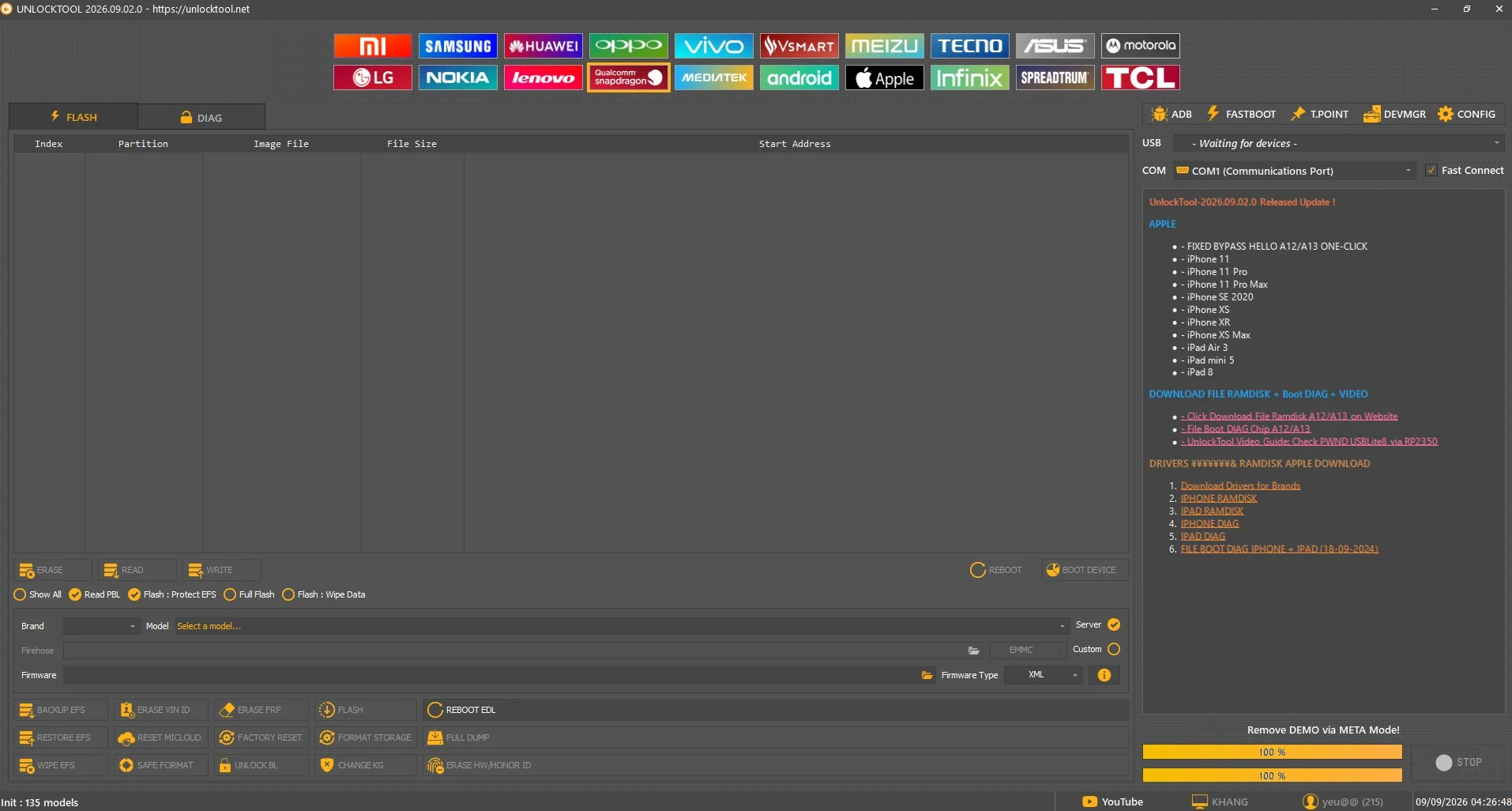
UnlockTool Qualcomm EDL workspace with Server Firehose auto-selection and Protect EFS enabled for Snapdragon Vivo/iQOO boards.
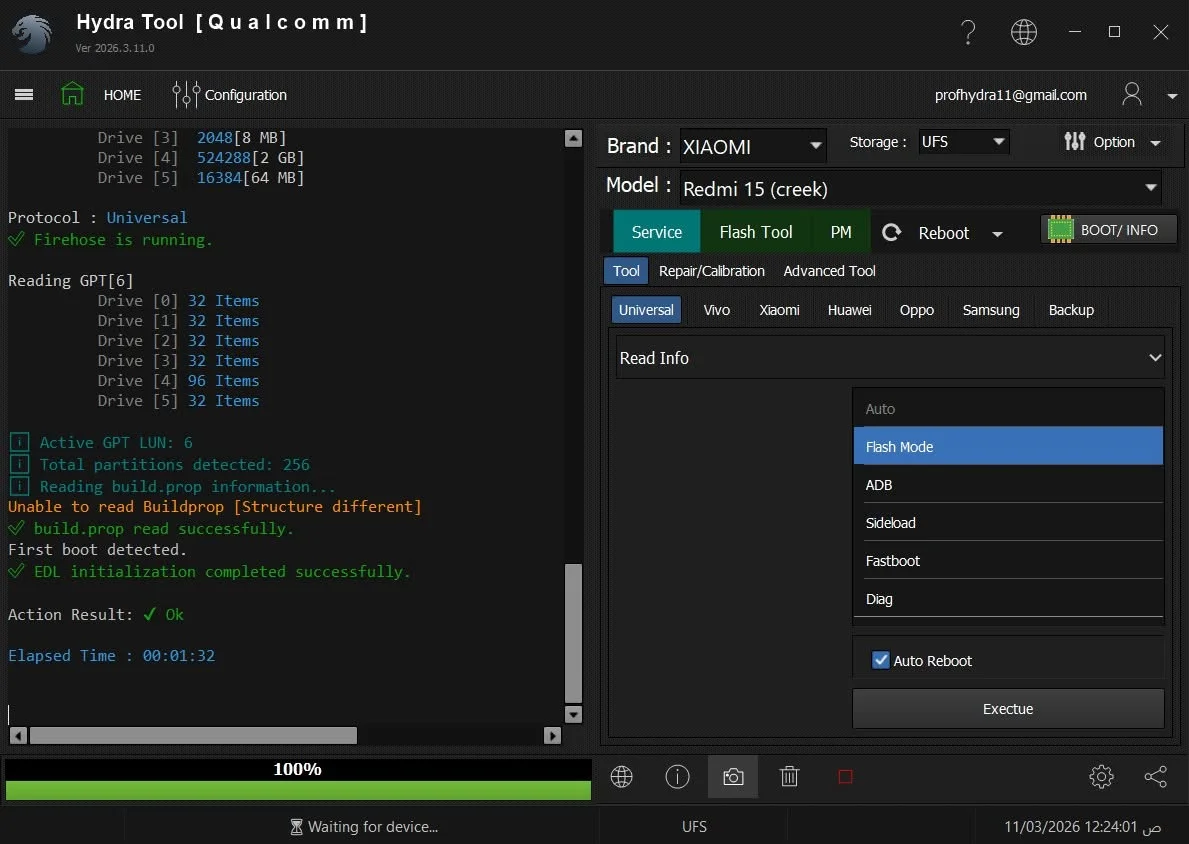
Hydra Tool Qualcomm module featuring a dedicated Vivo tab for Firehose EDL initialization, UFS LUN inspection, and safe partition backups.
Bench Warning on Vivo New Security PreLoader (Android 14–15): On recent MediaTek Vivo patches (such as Y17s, Y27, and Y28 updates), Vivo blocked raw BROM access so holding Volume buttons immediately falls back to PreLoader. If UnlockTool or CF-Tools fails on "BROM", switch explicitly to PreLoader Auth / Vivo Special DA rather than opening the phone unnecessarily.
Which rented GSM tool handles Vivo and iQOO FRP best?
Choose UnlockTool on GSM24h for the widest daily MediaTek PreLoader and Qualcomm Firehose Vivo coverage, rent CF-Tools Pro or TFM Pro when you need ultra-affordable signed Vivo Special DA MediaTek servicing, and pick Android Multi Tool (AMT) or Hydra Tool for Snapdragon Vivo V-series and iQOO EDL 9008 tickets.
- Best All-Rounder (MTK + Qualcomm Vivo): UnlockTool ($0.30) — largest everyday Vivo model coverage for both PreLoader Auth and EDL Firehose.
- Dedicated Vivo Special DA & Fast MTK: CF-Tools Pro ($1.00) and TFM Pro ($0.95) — strong signed MediaTek PreLoader/DA support at ultra-low rental cost.
- Snapdragon Vivo / iQOO & Server Auth: Android Multi Tool (AMT) ($0.39) and Hydra Tool ($1.21) — reliable Qualcomm EDL Firehose and server-backed Vivo operations.
| Package | Current price | Original price | Save |
|---|---|---|---|
| 12 hours | $1.00 | — | — |
Updated November 2026 — listed price before coupon
How do you fix common Vivo FRP errors (DA Reject, PreLoader Timeout, Sahara Fail)?
Fix almost every failed Vivo FRP session in under two minutes by matching the exact V-model's Special DA / PreLoader Auth profile instead of generic MTK, clicking Erase FRP before plugging in the powered-off phone, and resetting Qualcomm EDL cleanly for five seconds after any Sahara timeout (Top 10 FRP Errors guide).
- DA Verification Failed / Status BROM CMD Fail: You selected a generic MTK profile instead of the exact Vivo model's Special DA / PreLoader Auth profile. Pick the exact Vivo model name or update to the latest tool build.
- PreLoader port disappears in 2 seconds: Always click Erase FRP inside the tool BEFORE connecting the powered-off phone so the software catches the brief PreLoader handshake window immediately.
- Qualcomm Sahara Fail on Snapdragon Vivo: Unplug USB, wait 5 seconds, re-short the EDL test point fresh, and use a rear PC USB port — Sahara only accepts a single handshake per bootrom boot.
Protect Vivo Security & NVRAM Partitions: Before performing any full firmware flash or repair on MediaTek Vivo models, always run Backup NV first (and never check Format All). Restoring original Vivo nvram/nvdata takes seconds if backed up, but repairing wiped calibration without a backup is far harder.
Frequently Asked Questions
Do free TalkBack or EasyFRP APK bypass methods still work on Vivo FuntouchOS 14 and 15?
Almost never on updated FuntouchOS 13–15 security patches. Vivo patched Setup Wizard browser launches and blocked third-party APK installs during initial setup, making rented PC tools like UnlockTool or CF-Tools Pro far faster and cleaner.
Do I need to disassemble a MediaTek Vivo Y16, Y17s, or Y27 to remove FRP?
Usually no. MediaTek Vivo models connect over a normal USB cable via PreLoader Auth / Vivo Special DA without opening the back cover. Only locked Qualcomm Snapdragon Vivo models typically require EDL 9008 test points.
How do I check whether my Vivo phone uses MediaTek or Qualcomm?
Check the exact V-model code (such as V2204 or V2250) on the back label or inside Recovery/Fastboot, or connect the powered-off device briefly while watching Windows Device Manager for MediaTek PreLoader USB VCOM vs Qualcomm QDLoader 9008.
Does Vivo FRP removal erase original IMEI or cause Demo Mode?
No, as long as you run targeted Erase FRP rather than Format All. Targeted FRP removal only clears the small frp partition and leaves NVRAM/EFS and factory retail status untouched.
Why does my Vivo MediaTek phone fail with "BROM Auth Failed"?
Newer Vivo FuntouchOS security patches lock raw BROM mode. Switch from generic BROM to your tool's exact Vivo model profile using PreLoader Auth / Vivo Special DA.
Which tool is cheapest to rent on GSM24h for a single Vivo FRP job?
CF-Tools Pro (/rent-cf-tool) starting from $1.00, UnlockTool (/rent-unlocktool) from $0.30, and TFM Pro (/rent-tfm-pro) from $0.95 are the most economical automated rentals on GSM24h.
Servicing an owner-authorized Vivo or iQOO smartphone? Rent CF-Tools Pro or UnlockTool with instant delivery on GSM24h.com.
View CF-Tools Pro Rental Plans →
Written by: Thanh Tài
6 years of GSM & IT background; specializes in mobile and laptop software, firmware flashing, iCloud, Xiaomi, Samsung, and OPPO unlocking. Facebook · Profile & articles · About us



No comments yet. Be the first to share your thoughts!