
Removing Samsung A14 A24 A34 A54 FRP locks cleanly requires one crucial diagnostic step before plugging in a cable: identifying the exact processor inside each variant. Although Galaxy A14, A24, A34, and A54 sit side by side in Samsung's most popular mid-range lineup, they span two completely different chipset families — MediaTek (Helio G80, Helio G99, Dimensity 700, Dimensity 1080) and Samsung Exynos (Exynos 850, Exynos 1330, Exynos 1380) — with Galaxy A14 alone shipping in four regional SoC sub-variants. This verified bench guide maps every exact model code to the fastest working Android 14–16 FRP method using UnlockTool ($0.30), TSM Tool Pro ($0.69), Sigma Plus ($1.55), Octoplus FRP Tool ($2.60), and TFM Pro ($0.95) strictly on owner-authorized devices.
Table of Contents
- Which exact chipsets power Galaxy A14, A24, A34, and A54?
- What USB drivers and checks do you need before starting?
- How do you remove FRP on MediaTek Galaxy A14, A24, and A34?
- How do you remove FRP on Exynos Galaxy A14 (850/1330) and Galaxy A54?
- Which GSM tool should you rent on GSM24h for Galaxy A14–A54 FRP?
- Frequently Asked Questions
Which exact chipsets power Galaxy A14, A24, A34, and A54?
Never assume all Galaxy A-series phones use the same bypass method: Galaxy A24 (Helio G99) and Galaxy A34 5G (Dimensity 1080) are MediaTek boards, Galaxy A54 5G is pure Exynos 1380, and Galaxy A14 splits across MediaTek Helio G80, Dimensity 700, Exynos 850, and Exynos 1330 depending on exact SM-model code.
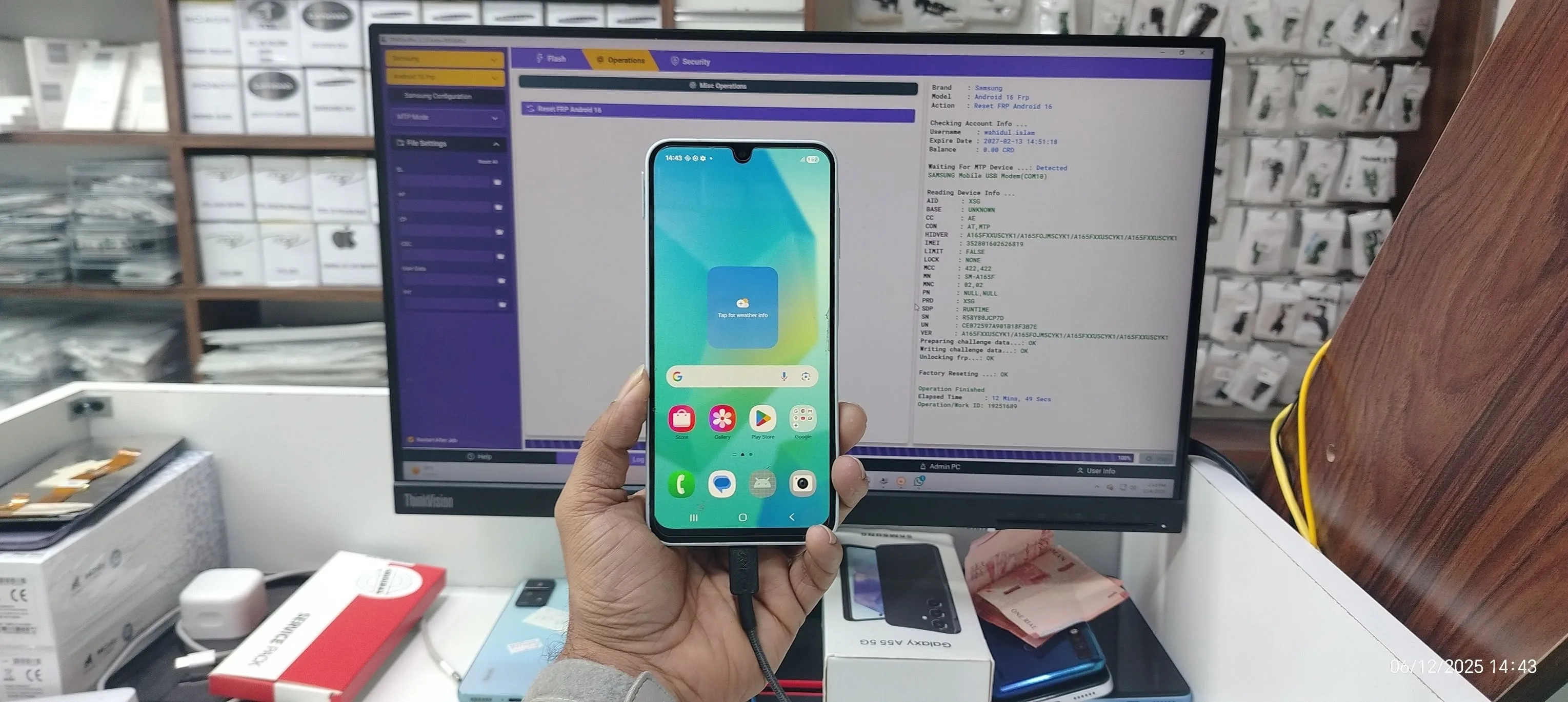
Live bench completion of Samsung Galaxy A-series Android 16 MTP Reset FRP inside TFM Tool Pro with zero hardware disassembly.
| Galaxy Model | Exact Model Codes | Verified SoC | Best FRP Servicing Modes |
|---|---|---|---|
| Galaxy A14 4G (MTK) | SM-A145F / SM-A145M (Helio variant) | MediaTek Helio G80 | MTP Android 14–16 or MTK PreLoader / BROM |
| Galaxy A14 4G (Exynos) | SM-A145F / SM-A145P / SM-A145FB (Exynos variant) | Exynos 850 | MTP Android 14–16 or Exynos EUB (Sigma Plus / Octoplus) |
| Galaxy A14 5G (Exynos) | SM-A146B / SM-A146M | Exynos 1330 | MTP Android 14–16 or Exynos EUB |
| Galaxy A14 5G (MTK) | SM-A146P / SM-A146U / SM-A146W | MediaTek Dimensity 700 | MTP Android 14–16 or MTK PreLoader / BROM |
| Galaxy A24 4G | SM-A245F / SM-A245M / SM-A245N | MediaTek Helio G99 (MT6789) | MTP Android 14–16 or MTK BROM Test Point |
| Galaxy A34 5G | SM-A346E / SM-A346B / SM-A346M | MediaTek Dimensity 1080 (MT6877) | MTP Android 14–16 or MTK BROM Test Point (battery connected) |
| Galaxy A54 5G | SM-A546B / SM-A546E / SM-A546U / SM-A546W | Samsung Exynos 1380 | MTP Android 14–16, Exynos Download, or Exynos EUB |
What USB drivers and checks do you need before starting?
Before renting a tool shift for Galaxy A14, A24, A34, or A54, install the official Samsung Android USB Driver, Google Platform-Tools, and MediaTek VCOM plus Exynos EUB drivers from our complete GSM USB drivers guide, then read exact MTP device info to verify SoC and binary.
- Read exact model & binary via MTP Info first: Plug the powered-on phone on the Welcome screen into your PC and click Read Info [MTP] in UnlockTool, CellTool, or TSM Tool to confirm exact model code, Android version (14/15/16), and binary BIT without guessing.
- Check Knox Guard (KG) Status: Boot once into Download Mode if the phone comes from a carrier fleet — if KG State shows Locked, refer to our MDM & Knox Guard removal guide first.
How do you remove FRP on MediaTek Galaxy A14, A24, and A34?
For MediaTek Galaxy A14 (Helio G80 / Dimensity 700), Galaxy A24 (Helio G99), and Galaxy A34 5G (Dimensity 1080), try zero-disassembly MTP Android 14–16 Reset FRP first; if the security patch blocks MTP, pivot cleanly to MediaTek PreLoader / BROM mode using UnlockTool or TSM Tool Pro.
- Method A — No-Disassembly MTP Reset (Fastest): Keep the phone on the Welcome screen, open UnlockTool (Samsung → Functions → COM Remove FRP Android 14–16), TFM Pro, or Octoplus, and run MTP FRP Reset over a normal USB-C cable.
- Method B — MediaTek PreLoader / BROM Test Point (When MTP Is Blocked): Open the Samsung / MediaTek tab in UnlockTool or TSM Tool Pro, select the exact model (SM-A245F, SM-A346E, SM-A146P), click Erase FRP, and connect in BROM mode using the verified motherboard diagrams in our 45-board Samsung Test Point guide.
Crucial Galaxy A34 5G (SM-A346E) Bench Tip: Unlike older MediaTek boards that connect with the battery unplugged, Galaxy A34 5G (MT6877 / Dimensity 1080) requires the battery flex connected when shorting its BROM test point — otherwise the COM port drops immediately before the Download Agent handshakes.
How do you remove FRP on Exynos Galaxy A14 (850/1330) and Galaxy A54?
Exynos Galaxy A14 (SM-A145F/P Exynos 850, SM-A146B Exynos 1330) and Galaxy A54 5G (SM-A546B/E/U Exynos 1380) do NOT support MediaTek BROM or Qualcomm EDL 9008 — service them over Android 14–16 MTP / Download Mode exploits or 2-pin Exynos USB Boot (EUB) mode using Sigma Plus, Octoplus FRP Tool, Samsung Tool CellTool, or Chimera Tool.
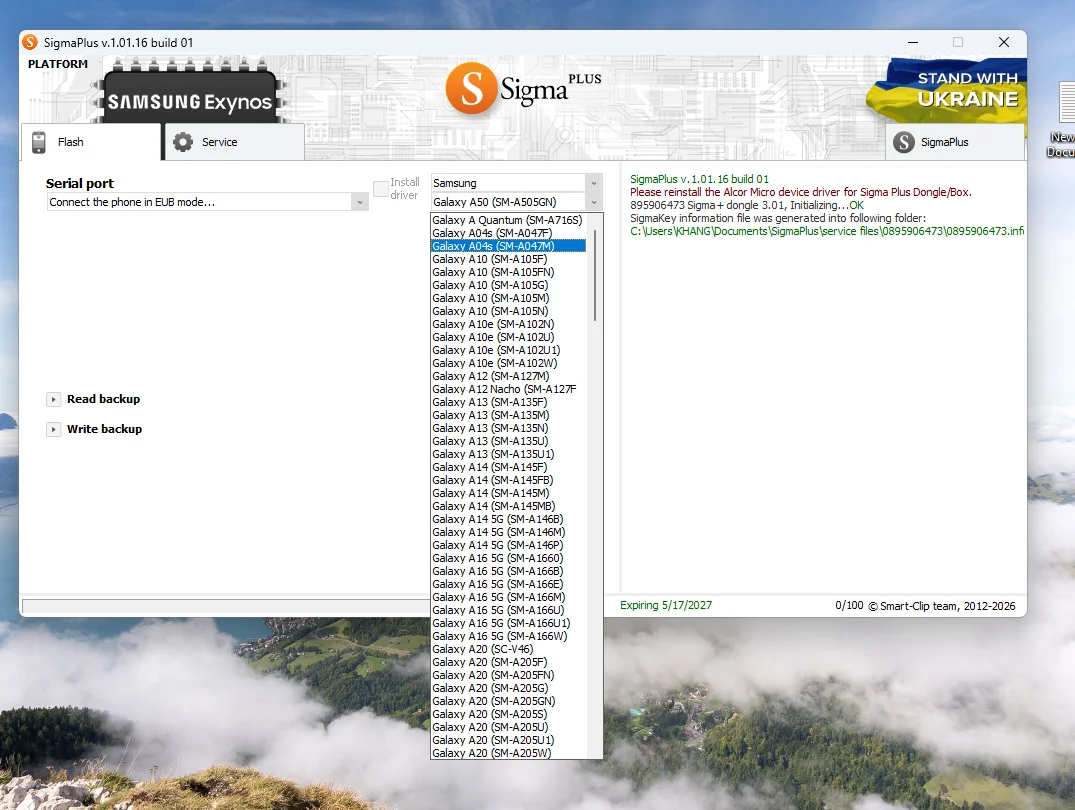
SigmaPlus Samsung Exynos EUB model list explicitly covering Galaxy A14 (SM-A145F/FB/M) and Galaxy A14 5G (SM-A146B/M/P).
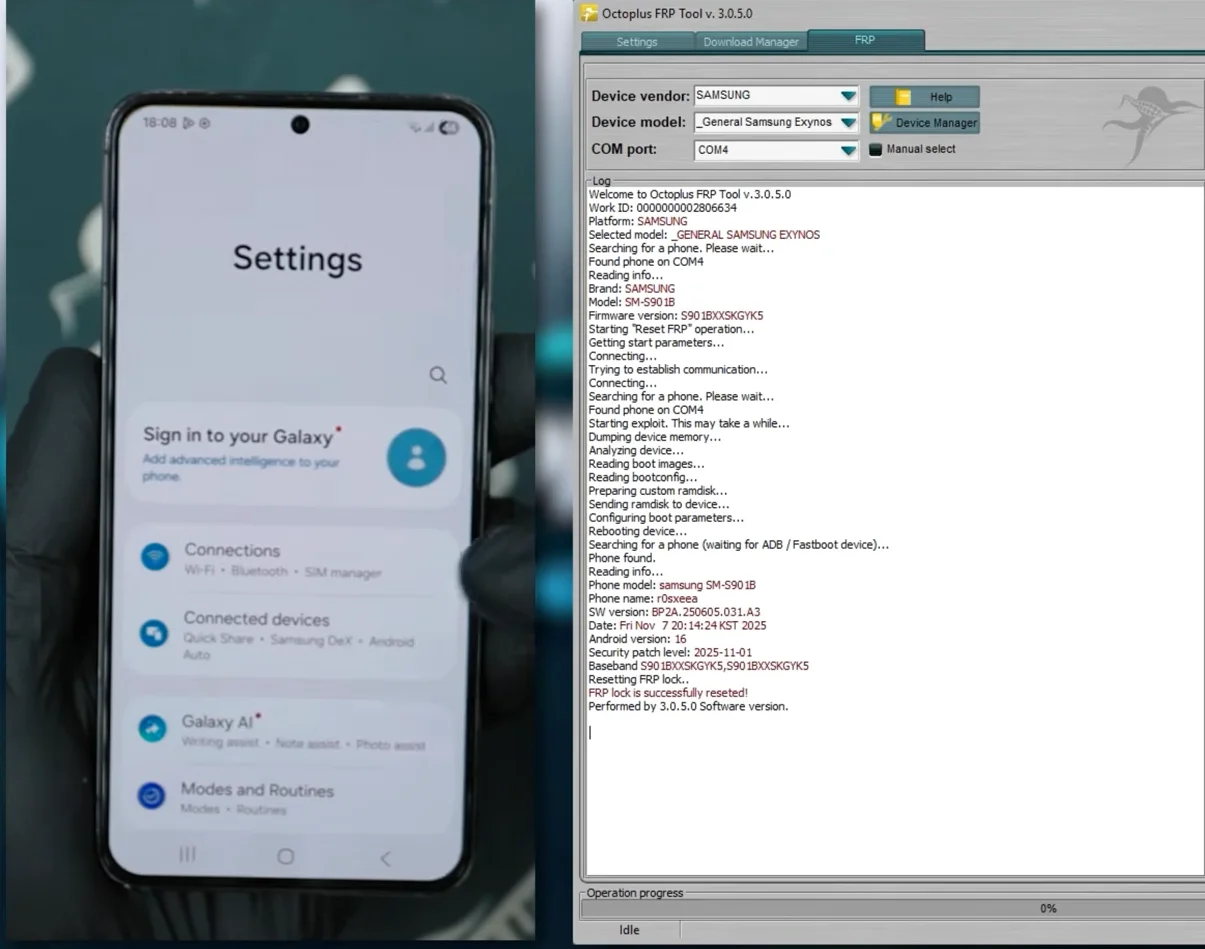
Octoplus FRP Tool v3.0.5.0 completing an Exynos Android 16 FRP reset via custom ramdisk without opening the rear glass.
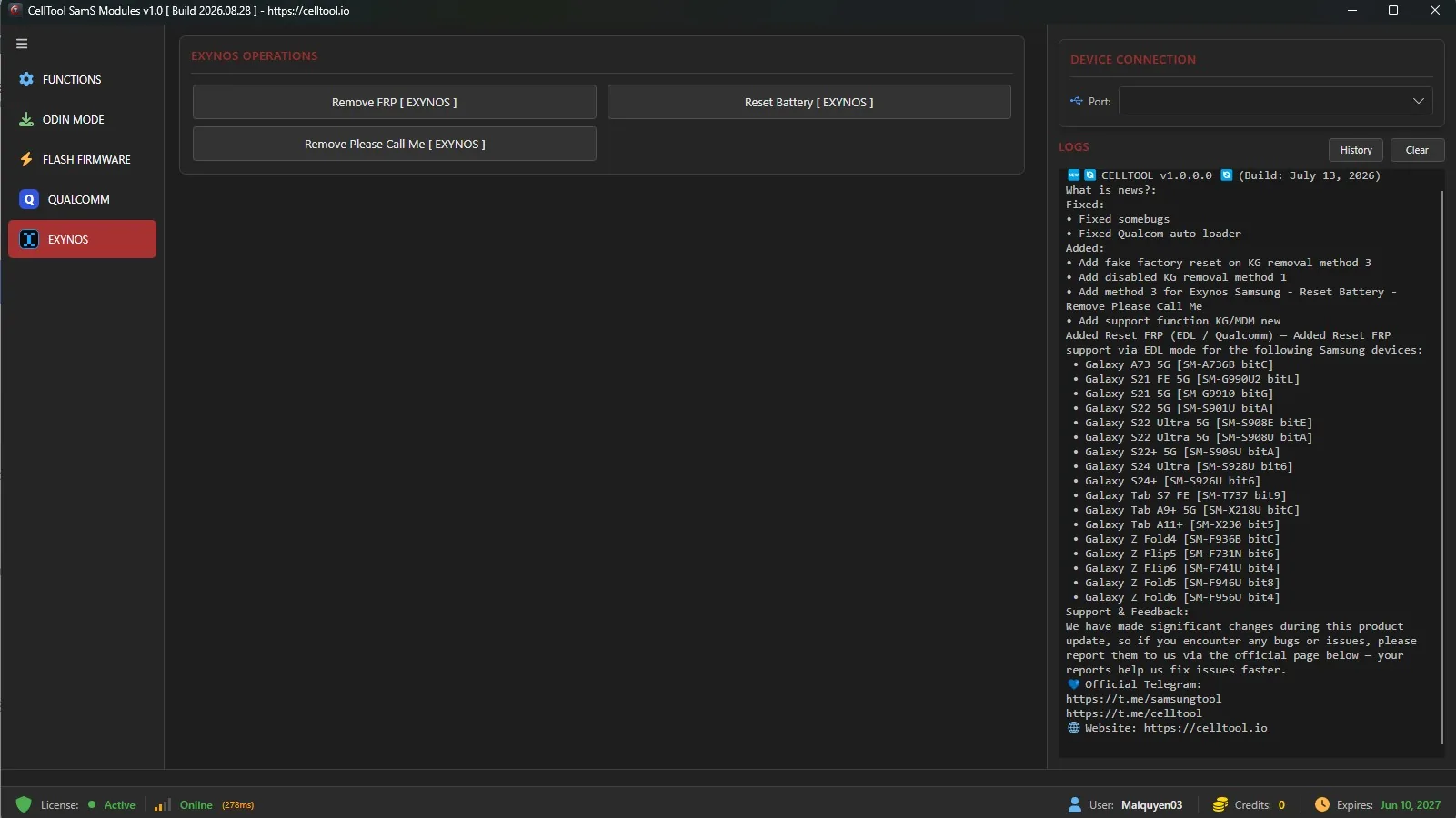
CellTool SamS Modules EXYNOS Operations workspace with one-click Remove FRP [EXYNOS] support.
For full Exynos EUB walkthroughs, read our dedicated Samsung Exynos EUB Sigma Plus guide and Samsung FRP by Chipset guide.
Which GSM tool should you rent on GSM24h for Galaxy A14–A54 FRP?
Match your GSM24h automated hourly rental directly to the chipset inside your Galaxy A14, A24, A34, or A54: choose UnlockTool or TSM Tool Pro for MediaTek BROM and daily MTP resets, Octoplus FRP Tool or Sigma Plus for Exynos 850/1330/1380 EUB and Android 16 exploits, and TFM Pro for rapid zero-disassembly MTP tickets.
- Best All-Rounder (MTK A14/A24/A34 + Android 14–16 MTP): Rent UnlockTool ($0.30) or Rent TSM Tool Pro ($0.69).
- Best for Exynos A14 & A54 Android 15–16 / EUB: Rent Octoplus FRP Tool ($2.60), Rent Sigma Plus ($1.55), or Rent Samsung Tool CellTool ($2.15).
- Fast Samsung Android 16 MTP Alternative: Rent TFM Pro ($0.95) for rapid zero-disassembly MTP resets.
| Package | Current price | Original price | Save |
|---|---|---|---|
| 6 hours | $0.30 | $0.35 | 14% |
| 12 hours | $0.42 | $0.49 | 14% |
| 1 day | $0.95 | $1.00 | 5% |
| 2 days | $1.20 | $1.30 | 8% |
| 3 days | $1.60 | $1.70 | 6% |
| 5 days | $2.00 | $2.10 | 5% |
| 7 days | $3.40 | $3.50 | 3% |
| 14 days | $3.90 | $4.00 | 3% |
| 30 days | $7.40 | — | — |
Updated November 2026 — listed price before coupon
Post-FRP Cleanliness Check: After clearing FRP on Galaxy A14, A24, A34, or A54, finish the Setup Wizard without signing into any test Google account, confirm OEM Unlock / Factory Reset works normally, and inspect *#06# to verify original IMEI and Baseband are completely untouched.
Frequently Asked Questions
Why are there both MediaTek and Exynos versions of Samsung Galaxy A14?
Samsung manufactured regional Galaxy A14 variants across four chips: Helio G80 and Exynos 850 on Galaxy A14 4G (SM-A145F/P), plus Dimensity 700 and Exynos 1330 on Galaxy A14 5G (SM-A146B/P/U). Always read MTP device info first to pick the right chipset tab.
Does Galaxy A54 5G support MediaTek BROM or Qualcomm EDL 9008?
No. Every Galaxy A54 5G variant (SM-A546B/E/U/W) uses Samsung's Exynos 1380 processor, so FRP removal uses Android 14–16 MTP/Download Mode tools (Octoplus, TFM Pro, UnlockTool) or Exynos EUB (Sigma Plus, Chimera, CellTool).
Do I need to open the back cover to remove FRP on Galaxy A14, A24, A34, or A54?
Try zero-disassembly Android 14–16 MTP Reset FRP in UnlockTool, TFM Pro, or Octoplus first. Opening the rear cover for BROM/EUB test points is only required when the installed security patch blocks all MTP and Download Mode exploits.
Why does Galaxy A34 5G disconnect immediately during BROM test point?
Galaxy A34 5G (SM-A346E, Dimensity 1080) requires the battery connector to remain plugged in during the BROM test point handshake so the port stays powered while the Download Agent loads.
Does removing FRP on Galaxy A14–A54 trip Knox Warranty Void (0x1)?
No. Official MTP, MediaTek BROM, and Exynos EUB FRP reset workflows clear only the FRP partition without unlocking the bootloader or flashing unofficial kernels, leaving Knox Warranty Void at 0x0.
How much does it cost to rent a tool for Samsung A14–A54 FRP on GSM24h?
Automated hourly rentals start from $0.30 for UnlockTool, $0.69 for TSM Tool Pro, $0.95 for TFM Pro, and $2.60 for Octoplus FRP Tool, delivered in ~2 seconds.

Written by: Thanh Tài
6 years of GSM & IT background; specializes in mobile and laptop software, firmware flashing, iCloud, Xiaomi, Samsung, and OPPO unlocking. Facebook · Profile & articles · About us



No comments yet. Be the first to share your thoughts!