
Android Multi Tool (widely known on GSM repair benches as AMT) is a fast, lightweight Windows utility built for FRP removal, factory reset, Mi Account servicing, and firmware flashing across Xiaomi, Samsung, OPPO, Realme, Vivo, OnePlus, Tecno, Infinix, and Itel smartphones. Technicians can rent Android Multi Tool starting from $0.39 on GSM24h.com with automated 24/7 credential delivery instead of tying up capital in long-term accounts. All bypass and unlock operations must be performed strictly on owner-authorized hardware.
Table of Contents
- What is Android Multi Tool (AMT) and which brands does it cover?
- How much does renting Android Multi Tool cost on GSM24h?
- How do you download AMT, check server status, and run a job?
- How does Android Multi Tool compare with UnlockTool and AndroidWinTool?
- Common Android Multi Tool errors and fixes
- Frequently Asked Questions
What is Android Multi Tool (AMT) and which brands does it cover?
Android Multi Tool is a dongle-free Windows servicing application hosted at androidmultitool.com (latest installer v1.3.6.6 with bundled MTK and Qualcomm drivers). It focuses on clean, high-speed MediaTek, Qualcomm, Spreadtrum/Unisoc, and Exynos servicing across 20 Android brands without heavy interface bloat.
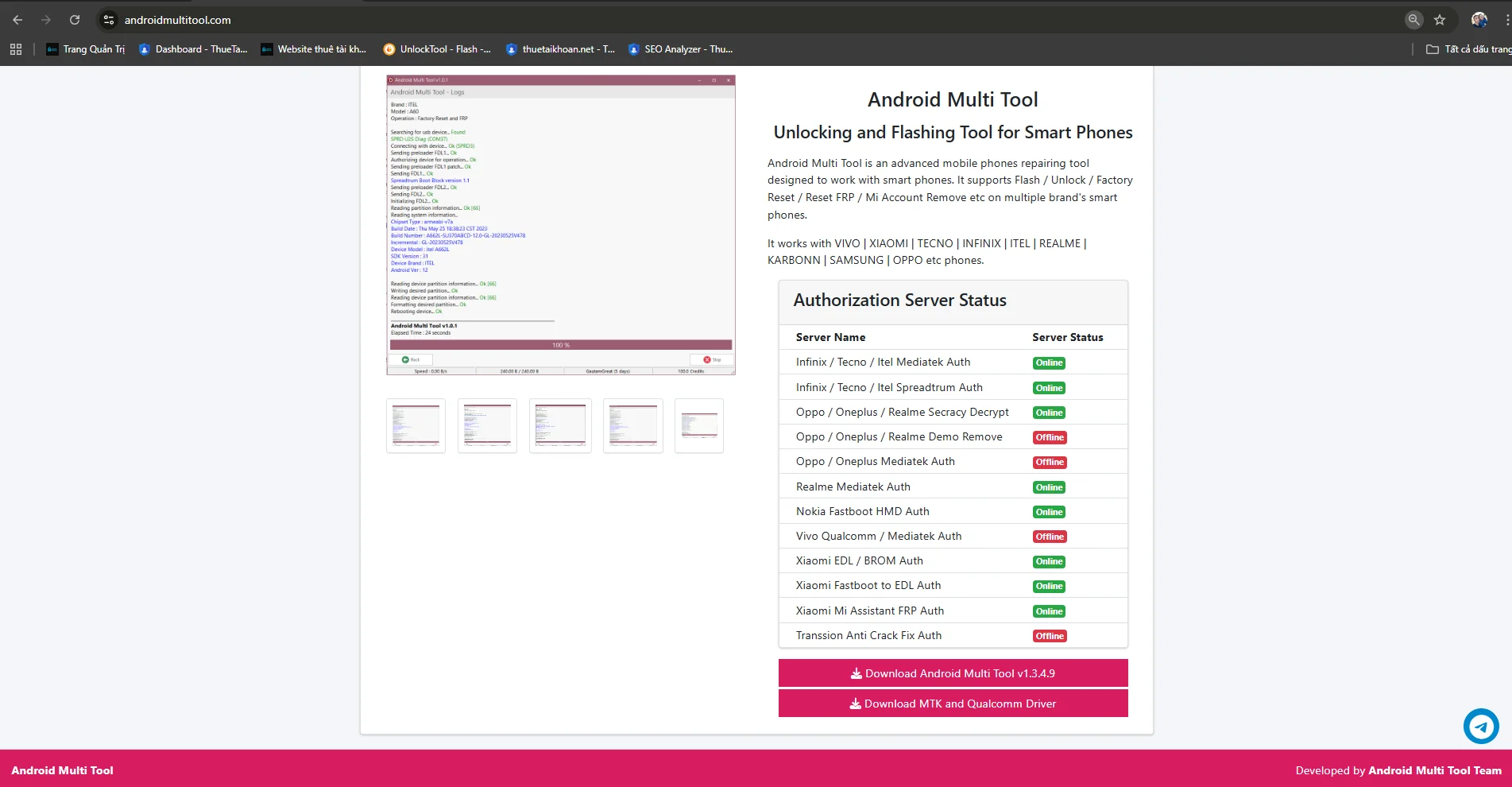
Official androidmultitool.com dashboard showing live Authorization Server Status and official Windows client/driver downloads.
Inside the desktop software's Device List dropdown shown below, AMT supports Huawei, Infinix, Itel, Jio, Karbonn, Lava, Lenovo, LG, Micromax, Motorola, Nokia, Nothing, OnePlus, OPPO, Realme, Samsung, Tecno, Vivo, Xiaomi, and ZTE.
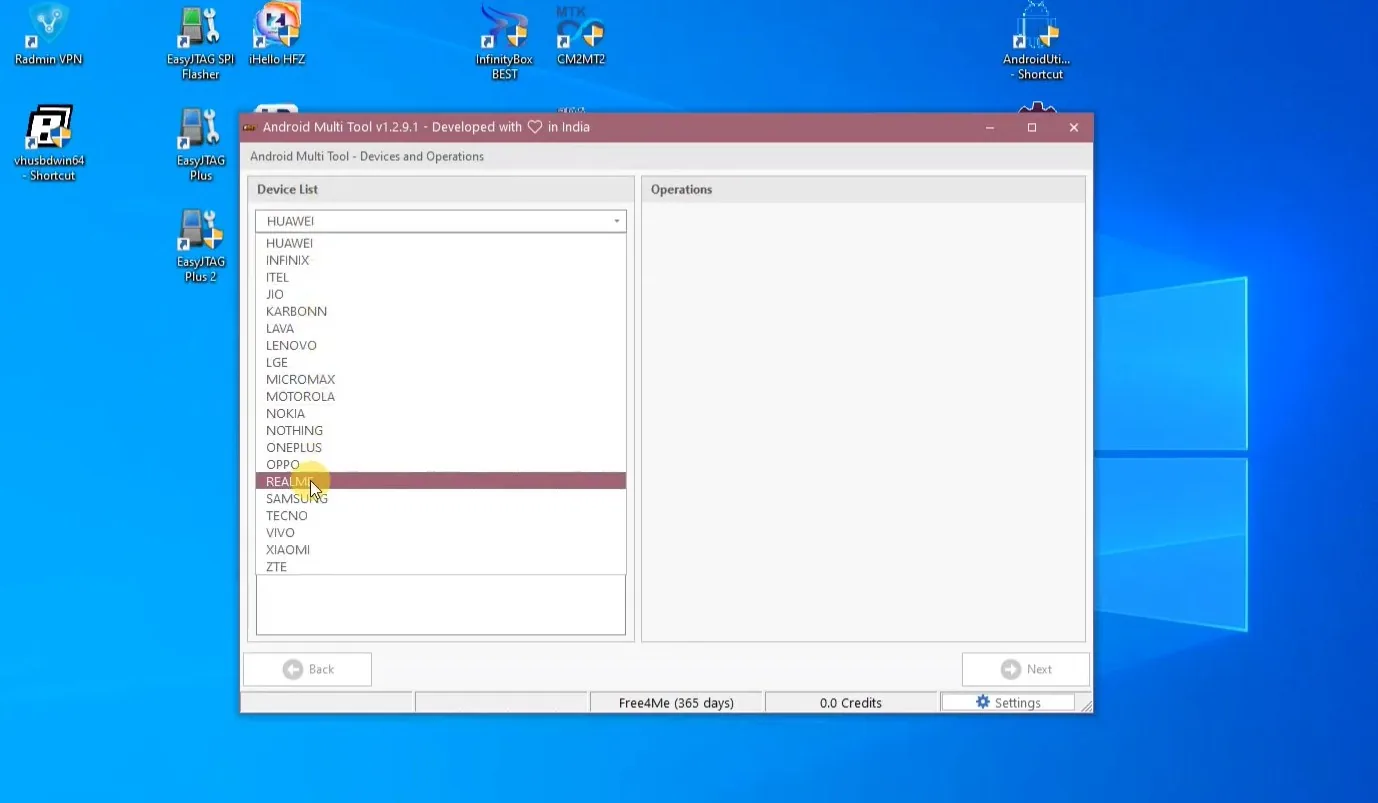
Android Multi Tool desktop client showing supported Android brands and the clean two-pane Devices & Operations layout.
Live Authorization Server Status & Credits Reality
One of AMT's biggest strengths — and the #1 thing every technician must check before paying for a rental — is its transparent live Authorization Server Status table on androidmultitool.com. Individual brand endpoints dynamically toggle between Online and Offline depending on upstream server maintenance, including:
- Xiaomi Endpoints: Xiaomi EDL / BROM Auth, Xiaomi Fastboot to EDL Auth, Xiaomi Preloader Auth, and Xiaomi Mi Assistant FRP Auth.
- OPPO / OnePlus / Realme Endpoints: Secracy Decrypt, Demo Remove, Oppo/OnePlus Mediatek Auth, and Realme Mediatek Auth.
- Transsion, Vivo & Nokia: Infinix/Tecno/Itel Mediatek & Spreadtrum Auth, Transsion Anti Crack Fix Auth, Vivo Qualcomm/Mediatek Auth, and Nokia Fastboot HMD Auth.
Also watch the bottom status bar in AMT screenshots: certain server-authorized jobs deduct AMT Credits (while local credit-free operations run on a standard 0-credit login). Always verify whether your exact job needs extra credits before starting.
Verified Bench Logs: Xiaomi Android 16, Samsung Exynos & Itel Unisoc
Real technician logs from Android Multi Tool v1.3.5.8 illustrate how AMT handles three distinct platforms cleanly:
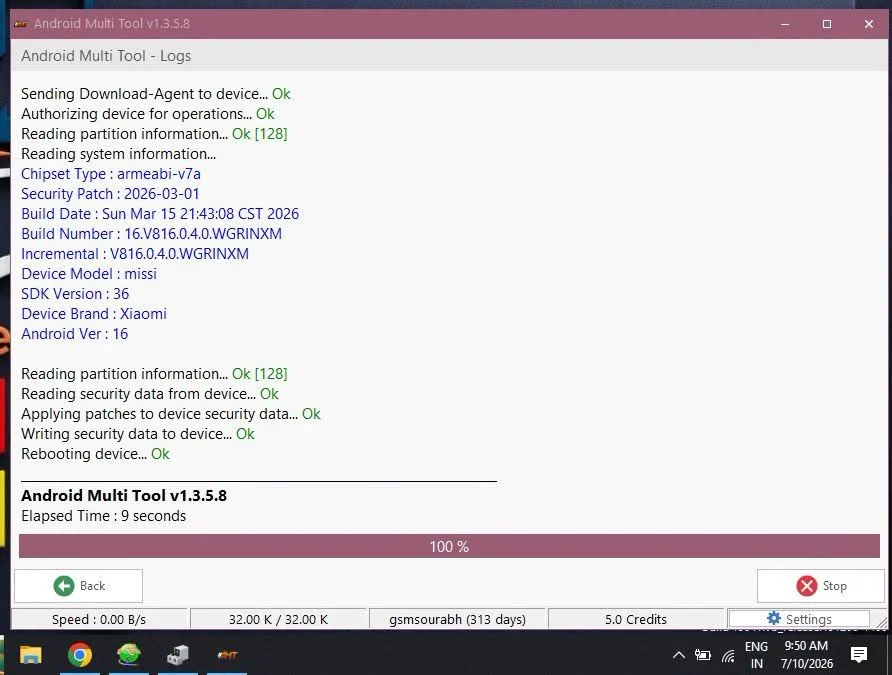
AMT v1.3.5.8 log on Xiaomi (missi, Android 16, SDK 36, Security Patch 2026-03-01) completing security patch & reboot in 9 seconds.
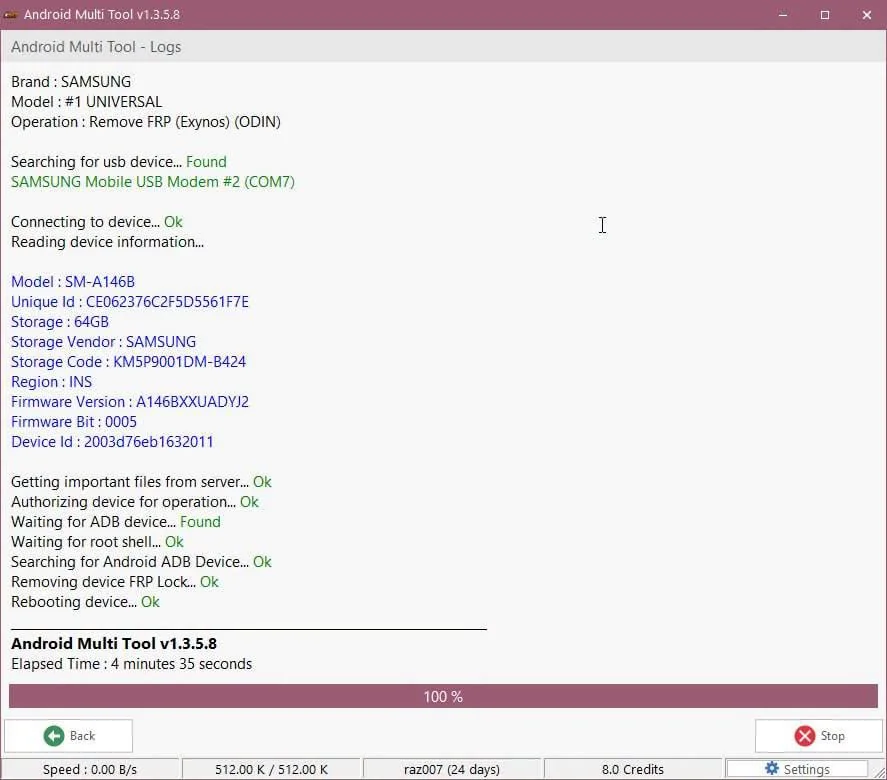
AMT v1.3.5.8 running Remove FRP (Exynos) (ODIN) on Galaxy A14 5G (SM-A146B, Firmware Bit 0005) in 4 minutes 35 seconds.
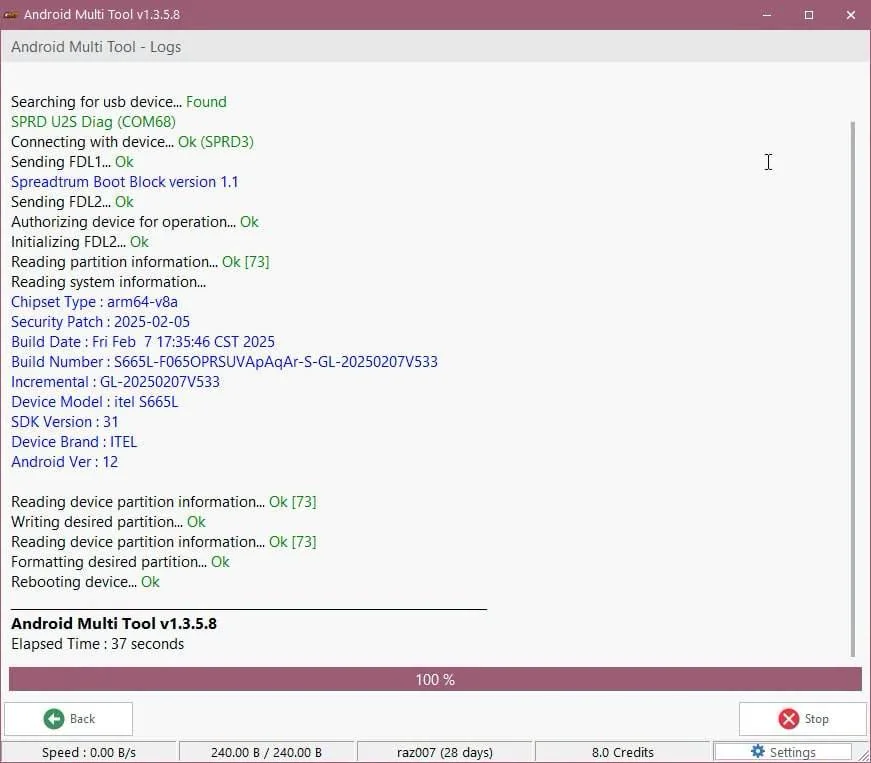
AMT v1.3.5.8 connecting to an Itel S665L (Android 12) over SPRD U2S Diag COM68 and completing Unisoc FRP reset in 37 seconds.
Real-World Log Breakdown (3 Platforms): Notice the contrast across these three genuine AMT v1.3.5.8 sessions: on Xiaomi missi (Android 16, Patch 2026-03-01) the Download-Agent patch took just 9 seconds; on Itel S665L Unisoc via SPRD U2S Diag it finished in 37 seconds; while Samsung SM-A146B Exynos ODIN required 4 minutes 35 seconds because AMT fetches server helper files, waits for ADB/root shell handoff, and reboots automatically. Never unplug a Samsung Exynos device early during that 4–5 minute ODIN transition.
How much does renting Android Multi Tool cost on GSM24h?
Renting Android Multi Tool on GSM24h.com starts from $0.39 with transparent USD plans updated before any coupon code. Order confirmation completes in ~2 seconds with automated 24/7 login delivery, no mandatory account registration, and USD or crypto checkout.
| Package | Current price | Original price | Save |
|---|---|---|---|
| 3 hours | $0.39 | $0.54 | 28% |
| 5 hours | $0.56 | $0.59 | 5% |
| 12 hours | $0.64 | $0.69 | 7% |
Updated November 2026 — listed price before coupon
Because entry pricing sits among the lowest of any major multi-brand Android tool, renting AMT per session is ideal for budget Unisoc/Itel/Tecno, Realme, and Xiaomi tickets.
How do you download AMT, check server status, and run a job?
Running Android Multi Tool smoothly starts with checking live Authorization Server Status on androidmultitool.com so you never pay for a session during upstream maintenance. Download AMT v1.3.6.6 and its MTK/Qualcomm drivers, book your rental on GSM24h, select the exact model, and wait until the log finishes rebooting.
- Check Live Server Status First: Open androidmultitool.com and confirm your target brand's Auth Server shows green Online (if it says Offline, hold off until AMT brings that server back up).
- Install AMT & Drivers: Download the latest
Android Multi Toolbuild (v1.3.6.6or newer) plus the official MTK and Qualcomm Driver bundle, alongside Samsung Android USB Driver and Google Android Platform-Tools. - Rent on GSM24h.com: Visit the Android Multi Tool rental page, pick your duration (standard vs credit-equipped package if your model requires auth credits), and copy your credentials right after checkout.
- Select Brand, Model & Execute: Choose your brand and model in the left pane, click the exact operation (such as Reset FRP or Factory Reset), connect the handset in the prompted USB mode (BROM, EDL 9008, SPRD Diag, or ODIN), and wait until the progress bar reaches
100%and logsRebooting device... Ok.
Driver Handoff Discipline (SPRD & ODIN): When running Samsung Exynos ODIN FRP or Spreadtrum/Unisoc Diag operations in AMT, keep Windows Device Manager open beside the tool. Confirm SAMSUNG Mobile USB Modem or SPRD U2S Diag (COMxx) appears cleanly before clicking Start — switching from a front-panel port to a rear motherboard USB port immediately cures most mid-transfer FDL1/FDL2 timeouts.
How does Android Multi Tool compare with UnlockTool and AndroidWinTool?
AMT is strongest on fast MediaTek/Unisoc/Transsion and Realme/Xiaomi FRP jobs, while other rental utilities specialize in Apple Ramdisk or Xiaomi CPID/New Auth. Compare entry rates across GSM24h:
| Tool | Best Bench Strength | GSM24h Rental Starting At | Related Guide |
|---|---|---|---|
| Android Multi Tool (AMT) | Xiaomi Android 16, Realme/OPPO/Vivo, Itel/Tecno/Infinix, Samsung Exynos | $0.39 | This guide |
| UnlockTool | All-around FRP, Mi Account & iPhone checkm8 Ramdisk | $0.30 | UnlockTool Guide |
| AndroidWinTool (AWT) | Xiaomi New Auth EDL, CPID IMEI, Pad 7 unlock | $1.03 | AndroidWinTool Guide |
| DFT Pro Tool | Xiaomi MTK/QC NV/IMEI & bootloader repairs | $1.19 | DFT Pro Guide |
If your queue also includes Snapdragon EDL carrier unlocks or Galaxy Knox Guard jobs, see our Cheetah-Tool Pro guide and Samsung Tool CellTool guide.
Common Android Multi Tool errors and fixes
Check these four common causes whenever an AMT operation fails to authorize or detect a phone:
- Auth Server Listed as "Offline": Controlled upstream by the Android Multi Tool team. Refresh
androidmultitool.comto verify server availability before attempting repeated auth calls. - "Not Enough Credits" During Auth Operation: Standard rental logins hold
0.0 Creditsfor credit-free local jobs; server-auth operations require an account with credits. Double-check credit requirements before ordering. - SPRD / MTK Device Disconnects Immediately: Reinstall the official MTK/Qualcomm/Unisoc drivers, hold the exact boot key combo firmly until the COM port stabilizes, and disable Windows USB selective suspend if needed.
- Account Login Error on Launch: Never run the same AMT login on two PCs simultaneously. If an assigned account arrives with a technical lock on our side, GSM24h replaces or refunds it promptly under our support policy.
Frequently Asked Questions
How much does it cost to rent Android Multi Tool (AMT) on GSM24h.com?
Android Multi Tool rentals start from $0.39 on GSM24h.com with automated 24/7 credential delivery right after ~2-second payment confirmation.
Does Android Multi Tool support Xiaomi Android 16 and Samsung Exynos FRP?
Yes. Verified AMT v1.3.5.8 bench logs confirm successful security patching on Xiaomi Android 16 (SDK 36, March 2026 patch) as well as Samsung Exynos ODIN FRP removal (such as Galaxy A14 5G SM-A146B), subject to model and server status.
Why should I check Authorization Server Status on androidmultitool.com before renting?
AMT's brand-specific auth servers (such as Xiaomi EDL/BROM, Realme MTK, Vivo, or Transsion Anti-Crack) switch between Online and Offline depending on upstream maintenance. Checking beforehand ensures your target server is Online when your rental starts.
Do standard AMT hourly rentals include server credits?
Standard time-based rentals carry 0 credits and cover local credit-free servicing. If your specific phone requires credit-billed auth (for example 5–8 credits), select a credit-enabled package or check availability with support first.
Does Android Multi Tool require a physical dongle?
No. Android Multi Tool runs purely via cloud account login on Windows using the official installer from androidmultitool.com.
What happens if a rented AMT account cannot log in?
If an assigned credential fails due to a verified technical fault on our side, GSM24h provides a replacement account or refunds the order promptly.
Rent Android Multi Tool (AMT) Automatically
Get instant 24/7 access from $0.39 for Xiaomi, Samsung, Realme, OPPO, and Unisoc servicing.
Rent AMT Now →
Written by: Trần Kế Khang
5 years of in-depth mobile & laptop hardware repair experience; founder of thuetaikhoan.com.vn, unlocktool.us, dienthoailaptop.vn, and gsm24h.com. Facebook · Profile & articles · About us



No comments yet. Be the first to share your thoughts!